

Not compatible with Dokan multi-vendor plugin
The support doesn work on Saturdays and Sundays, so some Friday requests can be answered on Monday. If you have problems with registration ask help on contact us page pleaseIf you not got email within 24~36 business hours, firstly check your spam box, and if no any email from the support there - back to the forum and read answer here. DO NOT ANSWER ON EMAILS [noreply@pluginus.net] FROM THE FORUM!! Emails are just for your info, all answers should be published only here.
The support doesn work on Saturdays and Sundays, so some Friday requests can be answered on Monday.

Quote from Shohan on November 25, 2025, 13:01Hi,
Hope you are doing well. We are using Dokan multi-vendor plugin and this currency switcher on our website with Is Multiple Allowed setting on. But no matter what currency is currently selected, Dokan dashboard shows the same price value with the currency currency symbol instead of the converted value for that currency. It doesn’t work on Products, Orders or even Withdrawal tab which is a major issue. Can you please tell me if you have a compatibility fix for this issue on this free plugin or the pro version? If the pro version has the fix, we are willing to purchase the pro version.Let me know what you think.
Thank you.
Hi,
Hope you are doing well. We are using Dokan multi-vendor plugin and this currency switcher on our website with Is Multiple Allowed setting on. But no matter what currency is currently selected, Dokan dashboard shows the same price value with the currency currency symbol instead of the converted value for that currency. It doesn’t work on Products, Orders or even Withdrawal tab which is a major issue. Can you please tell me if you have a compatibility fix for this issue on this free plugin or the pro version? If the pro version has the fix, we are willing to purchase the pro version.
Let me know what you think.
Thank you.

Quote from Alex Dovlatov on November 26, 2025, 12:39Hello
Should work, but maybe they are did updates, I can suggest you create stage site by https://wordpress.org/plugins/duplicator/ and share wp-admin+ftp access in the private area of this ticket to that stage site, I will look into and will make tests
Welcome!
Hello
Should work, but maybe they are did updates, I can suggest you create stage site by https://wordpress.org/plugins/duplicator/ and share wp-admin+ftp access in the private area of this ticket to that stage site, I will look into and will make tests
Welcome!
Quote from Shohan on December 6, 2025, 06:12Hi,
I have created the Staging site and FTP. How do I share the access securely without the info being publicly shared in this forum?Looking forward to your reply.
Thank you.
Hi,
I have created the Staging site and FTP. How do I share the access securely without the info being publicly shared in this forum?
Looking forward to your reply.
Thank you.
Quote from Shohan on December 6, 2025, 09:30I have added the staging wp admin and ftp information in the Private Data area. Please check and let me know what you think.
Thank you.
I have added the staging wp admin and ftp information in the Private Data area. Please check and let me know what you think.
Thank you.
Quote from Alex Dovlatov on December 8, 2025, 13:30Hello
Check please ftp, maybe its need ssh key:
Status: Server refused our key
Status: Access denied
Error: Authentication failed.
Error: Critical error: Could not connect to serverThe server is configured to authenticate using an SSH key rather than a password, sure better use not production server in such case. What I can suggest, make by duplicator zip of your site (wp-admin access works fine) and place on one of my test account to make investigation there ...
Hello
Check please ftp, maybe its need ssh key:
Status: Server refused our key
Status: Access denied
Error: Authentication failed.
Error: Critical error: Could not connect to server
The server is configured to authenticate using an SSH key rather than a password, sure better use not production server in such case. What I can suggest, make by duplicator zip of your site (wp-admin access works fine) and place on one of my test account to make investigation there ...
Quote from Shohan on December 9, 2025, 05:50It needs a password. I created the FTP from cPanel. Please try to use Filezilla.
It needs a password. I created the FTP from cPanel. Please try to use Filezilla.
Quote from Alex Dovlatov on December 9, 2025, 13:42Hello
Sure, we used filezilla, ok, no problem I will install duplicator
So, I did tests, disabled all plugins exep nessesary, and dockan not see currency symbol, but amount is right https://clip2net.com/s/4nsy4aD , I did order by GBP. I will look into it within the framework of the program https://currency-switcher.com/woocs-labs and when it will be resolved I will write you here
Hello
Sure, we used filezilla, ok, no problem I will install duplicator
So, I did tests, disabled all plugins exep nessesary, and dockan not see currency symbol, but amount is right https://clip2net.com/s/4nsy4aD , I did order by GBP. I will look into it within the framework of the program https://currency-switcher.com/woocs-labs and when it will be resolved I will write you here
Quote from Shohan on December 10, 2025, 13:38Hi,
The amount is the exact amount ordered using the currency. But the currency symbol for the order is wrong. It always displays the current selected currency with the same order value no matter which currency is selected. So, the Withdrawal tab calculation is also wrong.Let's say, someone purchased a product of 40 euro and another product of 30 GBP.
Then if the vendor goes to their Orders tab and have euro selected, they see orders of 40 euro and 30 euro which is wrong becuase GBP and euro has different exchange rate. Also, their withdrawal tab available earnings shows 70 euros if Euro is selected. But if GBP is selected, it still shows 70 GBP. So, the currency conversion is not working in both the Orders, Withdrawal and any other pages in Dokan Dashboard.
Let me know when you have an update.
Thank you.
Hi,
The amount is the exact amount ordered using the currency. But the currency symbol for the order is wrong. It always displays the current selected currency with the same order value no matter which currency is selected. So, the Withdrawal tab calculation is also wrong.
Let's say, someone purchased a product of 40 euro and another product of 30 GBP.
Then if the vendor goes to their Orders tab and have euro selected, they see orders of 40 euro and 30 euro which is wrong becuase GBP and euro has different exchange rate. Also, their withdrawal tab available earnings shows 70 euros if Euro is selected. But if GBP is selected, it still shows 70 GBP. So, the currency conversion is not working in both the Orders, Withdrawal and any other pages in Dokan Dashboard.
Let me know when you have an update.
Thank you.
Quote from Shohan on December 14, 2025, 16:40Hi, any update on this case?
Hi, any update on this case?
Quote from Alex Dovlatov on December 15, 2025, 12:36Hello
Task is ijn the order, I hink this week will be results
Read please: https://currency-switcher.com/woocs-labs
Hello
Task is ijn the order, I hink this week will be results
Read please: https://currency-switcher.com/woocs-labs
Quote from Shohan on December 19, 2025, 07:51Okay, I will be waiting for the result.
Thank you.
Okay, I will be waiting for the result.
Thank you.
Quote from Alex Dovlatov on December 19, 2025, 18:08Hello
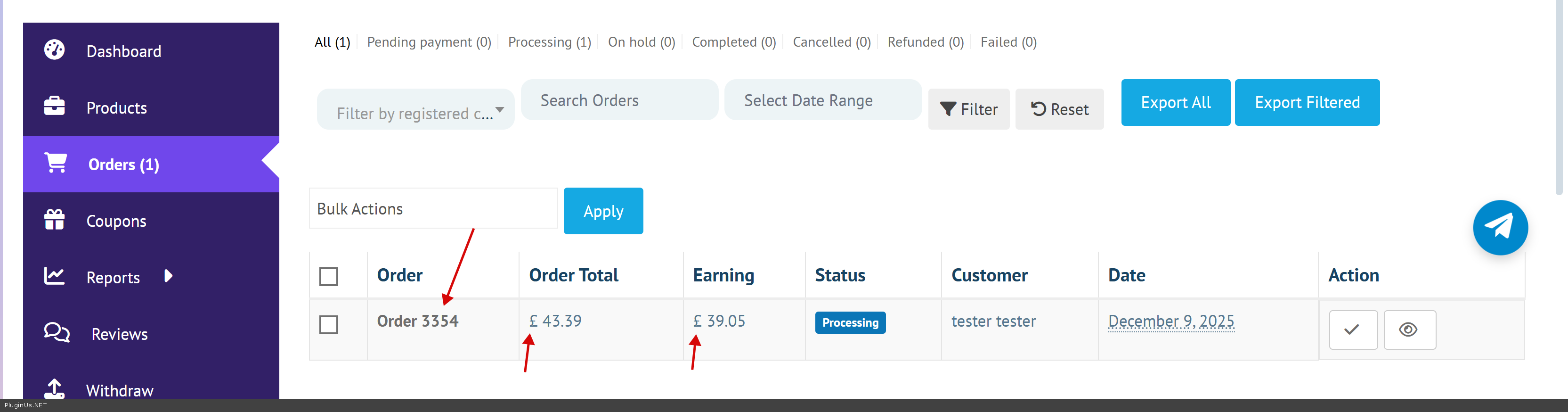
So, today is Friday - WOOCS LABS day, and we investigated the issue, and found the way to avoid impact of FOX hooks on DOCAN while vendor is in his dashboard, we are looked into the code, and found the most simple way is to disable FOX functionality on DOCAN dashboard, here is the code added into file functions.php of the current wp theme:
add_action('template_redirect', function() {
    // Detect Dokan vendor dashboard
    if (function_exists('dokan_is_seller_dashboard') && dokan_is_seller_dashboard()) {
        global $WOOCS;
        // Disable WOOCS currency switching on vendor dashboard
        if (isset($WOOCS)) {
            remove_all_actions('woocommerce_before_calculate_totals');
            remove_all_filters('woocommerce_currency_symbol');
            remove_all_filters('raw_woocommerce_price');
            remove_all_filters('woocommerce_price_format');
        }
    }
}, 1);
Its implemented already on stage site, so you can do tests:
Hello
So, today is Friday - WOOCS LABS day, and we investigated the issue, and found the way to avoid impact of FOX hooks on DOCAN while vendor is in his dashboard, we are looked into the code, and found the most simple way is to disable FOX functionality on DOCAN dashboard, here is the code added into file functions.php of the current wp theme:
add_action('template_redirect', function() {
    // Detect Dokan vendor dashboard
    if (function_exists('dokan_is_seller_dashboard') && dokan_is_seller_dashboard()) {
        global $WOOCS;
        // Disable WOOCS currency switching on vendor dashboard
        if (isset($WOOCS)) {
            remove_all_actions('woocommerce_before_calculate_totals');
            remove_all_filters('woocommerce_currency_symbol');
            remove_all_filters('raw_woocommerce_price');
            remove_all_filters('woocommerce_price_format');
        }
    }
}, 1);
Its implemented already on stage site, so you can do tests:
Quote from Shohan on December 20, 2025, 02:08Hi,
I have tested this code. It works perfectly on the Orders page. But the problem happens on the Withdraw page. After the order completion, the withdraw page logs the exact order value irrespective of the currency into the base currency. Can you help me with making sure the order value is currency converted into base currency if a order uses a different currency than the base currency on the Dokan Withdrawal page?Looking forward to your reply.
Thank you.
Hi,
I have tested this code. It works perfectly on the Orders page. But the problem happens on the Withdraw page. After the order completion, the withdraw page logs the exact order value irrespective of the currency into the base currency. Can you help me with making sure the order value is currency converted into base currency if a order uses a different currency than the base currency on the Dokan Withdrawal page?
Looking forward to your reply.
Thank you.
Quote from Shohan on December 20, 2025, 02:30Also, it looks like the filters don't work on the Withdraw page at all. So, the withdrawable amount is shown in the selected currency in the page.
Also, it looks like the filters don't work on the Withdraw page at all. So, the withdrawable amount is shown in the selected currency in the page.
Quote from Alex Dovlatov on December 22, 2025, 15:33Hello
Thank you for your patience!
After investigating both WOOCS and Dokan code, I need to clarify something important:
This is not a FOX compatibility issue. FOX has already completed its job - it stored the order in the selected currency with proper metadata (
_order_currencyand_woocs_order_rate). The Orders page now displays correctly because we disabled WOOCS filters there.What you're asking for is Dokan's business logic - specifically, how Dokan should handle multi-currency withdrawals. This is additional customization of Dokan's withdrawal processing, not a FOX compatibility fix.
That said, I'm happy to help! Dokan provides a filter hook that allows us to convert order amounts to base currency during withdrawal processing. Here's the solution:
// Add to functions.php
add_filter('dokan_order_net_amount', function($net_amount, $order) {
    // Get order currency and rate stored by WOOCS
    $order_currency = $order->get_meta('_order_currency');
    $order_rate = $order->get_meta('_woocs_order_rate');

    // Get base currency
    $base_currency = get_option('woocommerce_currency');

    // If order was placed in different currency, convert to base
    if ($order_currency && $order_currency !== $base_currency && $order_rate) {
        // Convert back to base currency
        $net_amount = $net_amount / floatval($order_rate);
    }

    return $net_amount;
}, 10, 2);
This code will: 1. Check if order was placed in a different currency 2. Convert the vendor earning back to base currency using the exchange rate from when the order was placed 3. Store the correct converted amount in Dokan's withdrawal system
Add this code along with the previous code for the Orders page. Please test on your staging site first.
Let me know if this works for you!
Hello
Thank you for your patience!
After investigating both WOOCS and Dokan code, I need to clarify something important:
This is not a FOX compatibility issue. FOX has already completed its job - it stored the order in the selected currency with proper metadata (_order_currency and _woocs_order_rate). The Orders page now displays correctly because we disabled WOOCS filters there.
What you're asking for is Dokan's business logic - specifically, how Dokan should handle multi-currency withdrawals. This is additional customization of Dokan's withdrawal processing, not a FOX compatibility fix.
That said, I'm happy to help! Dokan provides a filter hook that allows us to convert order amounts to base currency during withdrawal processing. Here's the solution:
// Add to functions.php
add_filter('dokan_order_net_amount', function($net_amount, $order) {
    // Get order currency and rate stored by WOOCS
    $order_currency = $order->get_meta('_order_currency');
    $order_rate = $order->get_meta('_woocs_order_rate');

    // Get base currency
    $base_currency = get_option('woocommerce_currency');

    // If order was placed in different currency, convert to base
    if ($order_currency && $order_currency !== $base_currency && $order_rate) {
        // Convert back to base currency
        $net_amount = $net_amount / floatval($order_rate);
    }

    return $net_amount;
}, 10, 2);
This code will: 1. Check if order was placed in a different currency 2. Convert the vendor earning back to base currency using the exchange rate from when the order was placed 3. Store the correct converted amount in Dokan's withdrawal system
Add this code along with the previous code for the Orders page. Please test on your staging site first.
Let me know if this works for you!