
Multiple Feature Filtering?
The support doesn work on Saturdays and Sundays, so some Friday requests can be answered on Monday. If you have problems with registration ask help on contact us page pleaseIf you not got email within 24~36 business hours, firstly check your spam box, and if no any email from the support there - back to the forum and read answer here. DO NOT ANSWER ON EMAILS [noreply@pluginus.net] FROM THE FORUM!! Emails are just for your info, all answers should be published only here.
The support doesn work on Saturdays and Sundays, so some Friday requests can be answered on Monday.

Quote from SamLochner on October 29, 2020, 15:57I haven't been able to find a way to do this with the free version, is there a way to do the following with the paid version?
Say I'm selling shoes. Each of my shoe products is are either low, medium, or high heel height. And each of my shoe products is either square, round, or pointed toe style. I want to set up one filter that allows the customer to choose the heel height of products they want to view and then a separate filter that allows them to choose the toe style of products they want to view. What is the best way to do this with your plugin?
Thanks,
Sam
I haven't been able to find a way to do this with the free version, is there a way to do the following with the paid version?
Say I'm selling shoes. Each of my shoe products is are either low, medium, or high heel height. And each of my shoe products is either square, round, or pointed toe style. I want to set up one filter that allows the customer to choose the heel height of products they want to view and then a separate filter that allows them to choose the toe style of products they want to view. What is the best way to do this with your plugin?
Thanks,
Sam

Quote from Pablo Borysenco on October 30, 2020, 13:13Hello Sam
to choose the heel height of products they want to view and then a separate filter that allows them to choose the toe style - Do you mean the second filter should appear?
Hello Sam
to choose the heel height of products they want to view and then a separate filter that allows them to choose the toe style - Do you mean the second filter should appear?
Quote from SamLochner on October 30, 2020, 14:38
Hi Pablo, thanks for your response.
The filter for toe style and the filter for heel height should both always be visible.
Should I be using tags, categories, or some other way to input toe style and heel height of any given shoe product? My thought is to use categories as then I can have sub categories (tags don't have sub tags), but your plugin only allows one category filter.
Just to be perfectly clear, I'm picturing a drop down that allows for filtering by toe style and another drop down for filtering by heel height. So the customer might pick pointed toe from the first drop down then high heel from the second drop down and so the only products that should be showing are high heel pointed toe shoes.
Thanks,
Sam
Hi Pablo, thanks for your response.
The filter for toe style and the filter for heel height should both always be visible.
Should I be using tags, categories, or some other way to input toe style and heel height of any given shoe product? My thought is to use categories as then I can have sub categories (tags don't have sub tags), but your plugin only allows one category filter.
Just to be perfectly clear, I'm picturing a drop down that allows for filtering by toe style and another drop down for filtering by heel height. So the customer might pick pointed toe from the first drop down then high heel from the second drop down and so the only products that should be showing are high heel pointed toe shoes.
Thanks,
Sam
Quote from Pablo Borysenco on November 2, 2020, 11:35Hello Sam
In this case, you need to use different taxonomies.
Example: categories - toe style AND attribute - heel height OR attribute - toe style AND attribute - heel height
Hello Sam
In this case, you need to use different taxonomies.
Example: categories - toe style AND attribute - heel height OR attribute - toe style AND attribute - heel height
Quote from SamLochner on November 2, 2020, 16:37Do you recommend a particular plugin for adding an attribute taxonomy?
Do you recommend a particular plugin for adding an attribute taxonomy?
Quote from Pablo Borysenco on November 3, 2020, 11:33Hello
This is standard woocommerce functionality
https://www.youtube.com/watch?v=9tTdUXMjlIg
Hello
This is standard woocommerce functionality
Quote from SamLochner on November 3, 2020, 17:42Awesome, that is really great.
Last question then I am set: Is it possible to put all the filters on one line? For instance, there is a drop down for toe style and immediately beside it there is another drop down for heel height.
I do see there is an option to put check boxes and radio buttons in a row (thought it doesn't seem to work). But what I'm after is to have the actual filters themselves all in a row.
Thanks,
Sam
Awesome, that is really great.
Last question then I am set: Is it possible to put all the filters on one line? For instance, there is a drop down for toe style and immediately beside it there is another drop down for heel height.
I do see there is an option to put check boxes and radio buttons in a row (thought it doesn't seem to work). But what I'm after is to have the actual filters themselves all in a row.
Thanks,
Sam
Quote from Pablo Borysenco on November 4, 2020, 11:30Hello Sam
please drop me exact link to the issue
You can take a screenshot of what you want
Try this option - https://c2n.me/49GRa3b.png
Hello Sam
please drop me exact link to the issue
You can take a screenshot of what you want
Try this option - https://c2n.me/49GRa3b.png
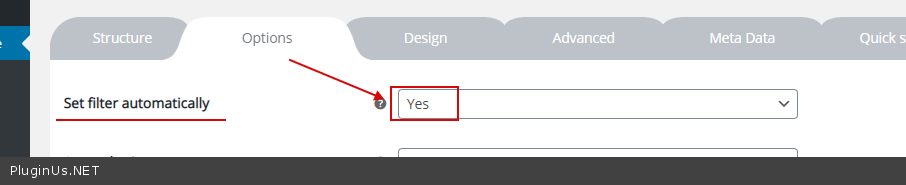
Quote from SamLochner on November 4, 2020, 15:35I tried set filter automatically option, didn't help.
In this image (see link), you'll see how the drop downs for the filters are each on a new line. It looks really awkward this way. I would like them to be beside each other.
Thanks,
Sam
I tried set filter automatically option, didn't help.
In this image (see link), you'll see how the drop downs for the filters are each on a new line. It looks really awkward this way. I would like them to be beside each other.
Thanks,
Sam
Quote from Pablo Borysenco on November 5, 2020, 12:30Hello
Your link is closed.
also please drop me link to the issue(a page with filter )
Hello
Your link is closed.
also please drop me link to the issue(a page with filter )
Quote from SamLochner on November 5, 2020, 16:18Here's the link again properly shared this time
Here's the page I'm working on
Thanks,
Sam
Here's the link again properly shared this time
Here's the page I'm working on
Thanks,
Sam
Quote from Pablo Borysenco on November 9, 2020, 12:04Hello Sam
Please add this CSS
.woof_container {display: inline-block;
width: 32%;
}
Hello Sam
Please add this CSS
display: inline-block;
width: 32%;
Quote from SamLochner on November 9, 2020, 16:43Great, thanks!
Great, thanks!
Quote from Pablo Borysenco on November 10, 2020, 13:42Hello
Welcome;)
Hello
Welcome;)
Quote from SamLochner on November 12, 2020, 15:19One more quick question: Is there a way to only have the filters show up for certain shop pages? I'm actually using the shortcode to generate products on certain pages, and I don't always want the filters to show up.
Thanks,
Sam
One more quick question: Is there a way to only have the filters show up for certain shop pages? I'm actually using the shortcode to generate products on certain pages, and I don't always want the filters to show up.
Thanks,
Sam
Quote from Pablo Borysenco on November 13, 2020, 13:26Hello
For show or hide widgets on different pages - http://www.woocommerce-filter.com/how-to-show-or-hide-widget-only-on-selected-site-pages/
OR
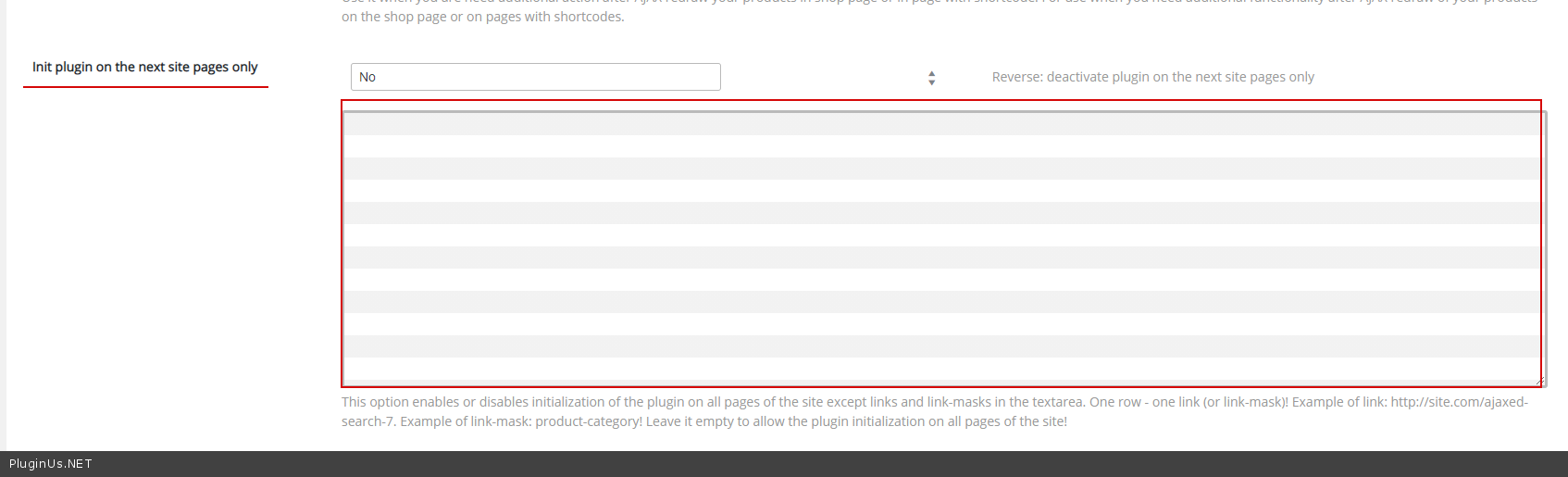
this option - https://c2n.me/49Ojx5o.png
Hello
For show or hide widgets on different pages - http://www.woocommerce-filter.com/how-to-show-or-hide-widget-only-on-selected-site-pages/
OR
this option - https://c2n.me/49Ojx5o.png
Quote from SamLochner on November 13, 2020, 21:21Got it, thanks!
Got it, thanks!
Quote from Pablo Borysenco on November 16, 2020, 14:17Hello
Welcome;)
Hello
Welcome;)
Quote from SamLochner on November 25, 2020, 00:45I'm not sure what happened, but now filtering is not working, instead goes to a page that says 'no products found matching your selection'
Here's a page with the filter on it. Can you please have a quick look?
https://podohub.com/shoe-lasts-for-sale/
Thank you kindly,
Sam
I'm not sure what happened, but now filtering is not working, instead goes to a page that says 'no products found matching your selection'
Here's a page with the filter on it. Can you please have a quick look?
https://podohub.com/shoe-lasts-for-sale/
Thank you kindly,
Sam
Quote from Pablo Borysenco on November 25, 2020, 14:40Hello Sam
To show products please use standard woocommerce function OR shortcode [woof_products]
Hello Sam
To show products please use standard woocommerce function OR shortcode [woof_products]