

mobile menu woof product filters
The support doesn work on Saturdays and Sundays, so some Friday requests can be answered on Monday. If you have problems with registration ask help on contact us page pleaseIf you not got email within 24~36 business hours, firstly check your spam box, and if no any email from the support there - back to the forum and read answer here. DO NOT ANSWER ON EMAILS [noreply@pluginus.net] FROM THE FORUM!! Emails are just for your info, all answers should be published only here.
The support doesn work on Saturdays and Sundays, so some Friday requests can be answered on Monday.

Quote from L. on April 12, 2022, 13:29Hi,
I would like the product filter on mobile to toggle like a hamburger-menu. I've added the shortcode [woof_mobile] on the productpage (using elementor Pro) below the regular shortcode [woof] but unfortunately, there is no filter showing on mobile, except the regular filter [woof].
Hi,
I would like the product filter on mobile to toggle like a hamburger-menu. I've added the shortcode [woof_mobile] on the productpage (using elementor Pro) below the regular shortcode [woof] but unfortunately, there is no filter showing on mobile, except the regular filter [woof].

Quote from Pablo Borysenco on April 13, 2022, 11:23Hello
Please drop me exact link to the issue
Read this - https://products-filter.com/shortcode/woof_mobile
Hello
Please drop me exact link to the issue
Read this - https://products-filter.com/shortcode/woof_mobile
Quote from L. on April 13, 2022, 11:56Hi,
The exact link is:
https://lab.ontwikkelomgevingwebsite.nl/droogstoven/
Hi,
The exact link is:
Quote from Pablo Borysenco on April 13, 2022, 12:08Please paste your license key here - https://share.pluginus.net/image/i20210618130558.png -> https://share.pluginus.net/image/i20210618130614.png
Please use shortcode (to show the filter) [woof mobile_mode=1]
Please paste your license key here - https://share.pluginus.net/image/i20210618130558.png -> https://share.pluginus.net/image/i20210618130614.png


Please use shortcode (to show the filter) [woof mobile_mode=1]
Quote from L. on April 13, 2022, 12:37Hi Pablo,
I did both (shortcode and license key).
Shortcode is not working right yet.
Hi Pablo,
I did both (shortcode and license key).
Shortcode is not working right yet.
Quote from L. on April 14, 2022, 08:40Hi Pablo,
Maybe you didn't had the time yet to help me further with the issue but I was wondering what can be the next step to make the shortcode for mobile work.
Hope to hear from you soon.
Hi Pablo,
Maybe you didn't had the time yet to help me further with the issue but I was wondering what can be the next step to make the shortcode for mobile work.
Hope to hear from you soon.
Quote from Pablo Borysenco on April 14, 2022, 12:55Hello
Yes, very strange! It looks like the standard wp_is_mobile() function does not work on your site.
Please add wp-admin+FTP access - https://share.pluginus.net/image/i20210618130558.png ->https://share.pluginus.net/image/i20210618130637.png
Can I disable plugins/theme to test?
Hello
Yes, very strange! It looks like the standard wp_is_mobile() function does not work on your site.
Please add wp-admin+FTP access - https://share.pluginus.net/image/i20210618130558.png ->https://share.pluginus.net/image/i20210618130637.png

Can I disable plugins/theme to test?
Quote from L. on April 14, 2022, 15:10Yes, you can disable plugins/theme to test.
The credentials are added (Wordpress and FTP)
Yes, you can disable plugins/theme to test.
The credentials are added (Wordpress and FTP)
Quote from L. on April 15, 2022, 13:22Hi Pablo,
Do you have an update already?
Hi Pablo,
Do you have an update already?
Quote from Pablo Borysenco on April 15, 2022, 13:22Hello
Please add shortcode [woof_mobile] on this page
AND use shortcode [woof mobile_mode=1 sid='my_filter']
My test page - https://lab.ontwikkelomgevingwebsite.nl/test-woof/
Hello
Please add shortcode [woof_mobile] on this page
AND use shortcode [woof mobile_mode=1 sid='my_filter']
My test page - https://lab.ontwikkelomgevingwebsite.nl/test-woof/
Quote from L. on April 15, 2022, 15:29Hi,
I added these shortcodes
[woof]
[woof_mobile]
[woof mobile_mode=1 sid='my_filter']
on the page:
https://lab.ontwikkelomgevingwebsite.nl/droogstoven/Now they are both visible on all devices. Do I have to set the mobile-filter on devices larger than 768px to display none and the desktop-filter to display none on devices smaller than 769px? Is that te solution or do I have to change something else to the shortcodes?
Hi,
I added these shortcodes
[woof]
[woof_mobile]
[woof mobile_mode=1 sid='my_filter']
on the page:
https://lab.ontwikkelomgevingwebsite.nl/droogstoven/
Now they are both visible on all devices. Do I have to set the mobile-filter on devices larger than 768px to display none and the desktop-filter to display none on devices smaller than 769px? Is that te solution or do I have to change something else to the shortcodes?
Quote from Pablo Borysenco on April 18, 2022, 10:57Hello
Please use this shortcodes - https://c2n.me/4fsc193.png
Check it on this page - https://lab.ontwikkelomgevingwebsite.nl/test-woof/
Hello
Please use this shortcodes - https://c2n.me/4fsc193.png
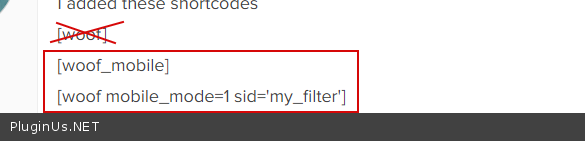
Check it on this page - https://lab.ontwikkelomgevingwebsite.nl/test-woof/
Quote from Pablo Borysenco on April 18, 2022, 11:02[woof_mobile] - this just lays out the container for the "show filter" button
[woof] - this will display the filter. These aattributes - mobile_mode=1 sid='my_filter' (in the shortcode) - indicate that the filter should disappear for mobile devices and work with [woof_mobile]
[woof_mobile] - this just lays out the container for the"show filter" button
[woof] - this will display the filter. These aattributes - mobile_mode=1 sid='my_filter' (in the shortcode) - indicate that the filter should disappear for mobile devices and work with [woof_mobile]
Quote from L. on April 19, 2022, 09:12Great, it works. Thank you very much!
Can I ask one more question:
Is it possible to change the filter icon to open the filters on mobile devices? Of course, I can change the imagein the file: wp-content/plugins/woocommerce-products-filter/img/open_filter.png
But then it will be overwritten when the plugin must be updated.
Is there another way?
Great, it works. Thank you very much!
Can I ask one more question:
Is it possible to change the filter icon to open the filters on mobile devices? Of course, I can change the image in the file: wp-content/plugins/woocommerce-products-filter/img/open_filter.png
But then it will be overwritten when the plugin must be updated.
Is there another way?
Quote from Pablo Borysenco on April 19, 2022, 11:41Hello
Sure! In Design tab - https://share.pluginus.net/image/i20220419094117.png
Hello
Sure! In Design tab - https://share.pluginus.net/image/i20220419094117.png

Quote from L. on April 21, 2022, 16:28Ha Pablo,
I'm having problems with the filter and it's empty terms. There are not hidden on the categories where they suppose to be hidden. I've set dynamic count to yes and hide empty terms to yes.
On this page all the categories are visible and in every category page there should be different filters active: https://lab.ontwikkelomgevingwebsite.nl/productoverzicht/
How to solve this?
Ha Pablo,
I'm having problems with the filter and it's empty terms. There are not hidden on the categories where they suppose to be hidden. I've set dynamic count to yes and hide empty terms to yes.
On this page all the categories are visible and in every category page there should be different filters active: https://lab.ontwikkelomgevingwebsite.nl/productoverzicht/
How to solve this?
Quote from Pablo Borysenco on April 22, 2022, 12:26Hello
I'm not sure I understand your question.
https://lab.ontwikkelomgevingwebsite.nl/productoverzicht/ - there is no filter on this page
Filter works correctly on category pages
Hello
I'm not sure I understand your question.
https://lab.ontwikkelomgevingwebsite.nl/productoverzicht/ - there is no filter on this page
Filter works correctly on category pages
Quote from L. on April 22, 2022, 13:49My apologie. For example this page: https://lab.ontwikkelomgevingwebsite.nl/droogstoven/
On this page the filter 'breedtemaat' and 'temperatuur' shouldn't be there because they are not active in this category.
And on this page: https://lab.ontwikkelomgevingwebsite.nl/koelkasten/
the filter 'Max. temperatuur' should not be visible. Also the values of the 'volume' filter do not match with the exact volumes of this category, because it should stop at 240 degrees instead of 1000 degreesAnd on this page: https://lab.ontwikkelomgevingwebsite.nl/laboratorium-stoelen/
the filters 'volume', 'max.temperatuur', 'breedtemaat' and 'temperatuur' are not active in this category.And so on.
My apologie. For example this page: https://lab.ontwikkelomgevingwebsite.nl/droogstoven/
On this page the filter 'breedtemaat' and 'temperatuur' shouldn't be there because they are not active in this category.
And on this page: https://lab.ontwikkelomgevingwebsite.nl/koelkasten/
the filter 'Max. temperatuur' should not be visible. Also the values of the 'volume' filter do not match with the exact volumes of this category, because it should stop at 240 degrees instead of 1000 degrees
And on this page: https://lab.ontwikkelomgevingwebsite.nl/laboratorium-stoelen/
the filters 'volume', 'max.temperatuur', 'breedtemaat' and 'temperatuur' are not active in this category.
And so on.