
Make child categories selected when selecting parent category
The support doesn work on Saturdays and Sundays, so some Friday requests can be answered on Monday. If you have problems with registration ask help on contact us page pleaseIf you not got email within 24~36 business hours, firstly check your spam box, and if no any email from the support there - back to the forum and read answer here. DO NOT ANSWER ON EMAILS [noreply@pluginus.net] FROM THE FORUM!! Emails are just for your info, all answers should be published only here.
The support doesn work on Saturdays and Sundays, so some Friday requests can be answered on Monday.

Quote from michael74 on April 14, 2021, 17:04Hi,
I have an issue which I need to solve very quickly.
When a parent category is selected I want that all child categories become also selected. Instead at the moment the child categories are shown as unselected but it's wrong because the products of the filtered parent category obviously include all products of child categories.
Hope I was clear enough.
Another issue: the woocommerce search result page shows correct pagination at first, but when i click a page number the search seems to get lost and all products are shown. For example: I make a search which returns 21 products, I correctly see only 2 pages in the bottom pagination. When I click on the second page the pagination shows 21 pages (all products, even not related to the search I made).
Please give me feedback, thank you.
Michael
Hi,
I have an issue which I need to solve very quickly.
When a parent category is selected I want that all child categories become also selected. Instead at the moment the child categories are shown as unselected but it's wrong because the products of the filtered parent category obviously include all products of child categories.
Hope I was clear enough.
Another issue: the woocommerce search result page shows correct pagination at first, but when i click a page number the search seems to get lost and all products are shown. For example: I make a search which returns 21 products, I correctly see only 2 pages in the bottom pagination. When I click on the second page the pagination shows 21 pages (all products, even not related to the search I made).
Please give me feedback, thank you.
Michael
Quote from michael74 on April 14, 2021, 22:00Another issue, I installed a plugin (Responsive Sidebar: https://wordpress.org/plugins/responsive-sidebar/) that displays the shop filter widget on mobile (up to 767px) in a toggle sidebar. It works at first run but when a filter is selected the sidebar is displayed on the page again, can you help me with it?
Thank you,
Michael
Another issue, I installed a plugin (Responsive Sidebar: https://wordpress.org/plugins/responsive-sidebar/) that displays the shop filter widget on mobile (up to 767px) in a toggle sidebar. It works at first run but when a filter is selected the sidebar is displayed on the page again, can you help me with it?
Thank you,
Michael

Quote from Pablo Borysenco on April 15, 2021, 11:52Hello Michael
1) unfortunately the plugin does not have this feature. You need code customization
2) I did a test - https://c2n.me/4bHE70g
3) Please disable Ajax mode
Hello Michael
1) unfortunately the plugin does not have this feature. You need code customization
2) I did a test - https://c2n.me/4bHE70g
3) Please disable Ajax mode
Quote from michael74 on April 15, 2021, 21:38Hi and thank you for your response:
1) unfortunately the plugin does not have this feature. You need code customization
Could you please lead me to a solution or workaround?2) I did a test - https://c2n.me/4bHE70g
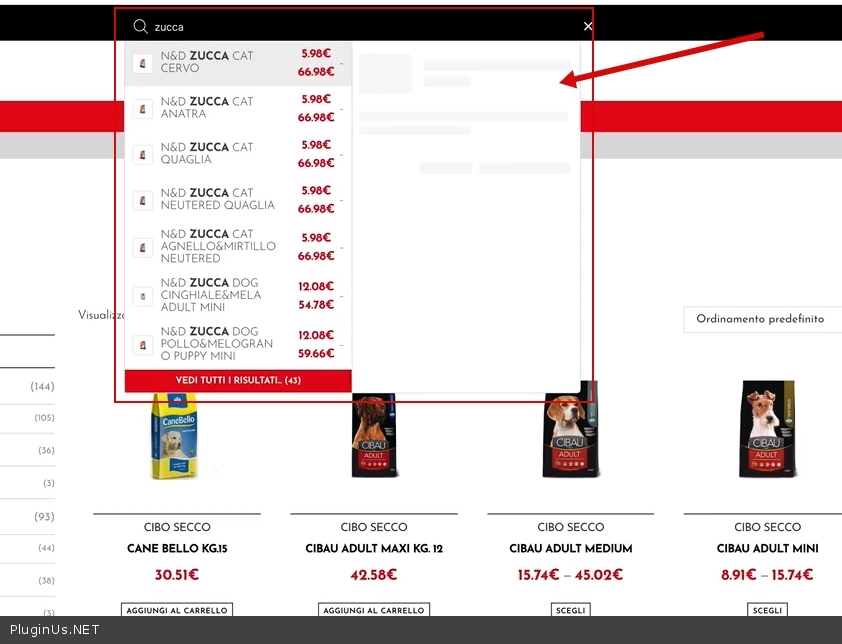
Thank you but what I mean is if you do a search. Try searching in the top bar for "zucca". Here is a test: http://www.heystudio.it/clients/Search_Problem.mp43) Please disable Ajax mode
Reading the forum I found a workaround by using your slideout (I didn't know about it) and hiding the sidebar on mobile.
Hi and thank you for your response:
1) unfortunately the plugin does not have this feature. You need code customization
Could you please lead me to a solution or workaround?
2) I did a test - https://c2n.me/4bHE70g
Thank you but what I mean is if you do a search. Try searching in the top bar for"zucca". Here is a test: http://www.heystudio.it/clients/Search_Problem.mp4
3) Please disable Ajax mode
Reading the forum I found a workaround by using your slideout (I didn't know about it) and hiding the sidebar on mobile.
Quote from Pablo Borysenco on April 16, 2021, 12:58Hello
1 Unfortunately we do not have a ready-made solution for you. If you have experience in programming, I will tell you how to do it. If you have no experience in programming, you should hire a developer.
2 OK! Try writing to support this third-party filter. I have nothing to do with this filter
Hello
1 Unfortunately we do not have a ready-made solution for you. If you have experience in programming, I will tell you how to do it. If you have no experience in programming, you should hire a developer.
2 OK! Try writing to support this third-party filter. I have nothing to do with this filter
Quote from michael74 on April 16, 2021, 13:02
- I do have enough programming experience, please let me know how to do it, thank you
- The Search result page is not related to any third party plugin.
- I do have enough programming experience, please let me know how to do it, thank you
- The Search result page is not related to any third party plugin.
Quote from Pablo Borysenco on April 19, 2021, 11:17Hello
- You need JS customization. Track clicks on checkboxes. And if the current checkbox in the container has a <ul> tag. trigger all checkboxes of this <ul> tag
- Ok! It doesn't depend on my plugin anyway( Note this is not a standard filter - https://c2n.me/4bK6fsc.jpg )
Hello
- You need JS customization. Track clicks on checkboxes. And if the current checkbox in the container has a <ul> tag. trigger all checkboxes of this <ul> tag
- Ok! It doesn't depend on my plugin anyway( Note this is not a standard filter - https://c2n.me/4bK6fsc.jpg )
Quote from michael74 on April 19, 2021, 16:16
- You need JS customization. Track clicks on checkboxes. And if the current checkbox in the container has a <ul> tag. trigger all checkboxes of this <ul> tag
ok thanks, that's what I was trying. I'll let you know.- Ok! It doesn't depend on my plugin anyway( Note this is not a standard filter - https://c2n.me/4bK6fsc.jpg )
The problem is actually with WOOF plugin, if I make it inactive everything works fine. In addition if you do a test you'll notice that the url changes (with the ?swoof= parameter inside) when second page is clicked. Please check yourself, login with the account in the above hidden data: Try searching in the top bar for "vet" and click "vedi tutti i risultati", then click on page 2.Thank you
- You need JS customization. Track clicks on checkboxes. And if the current checkbox in the container has a <ul> tag. trigger all checkboxes of this <ul> tag
ok thanks, that's what I was trying. I'll let you know. - Ok! It doesn't depend on my plugin anyway( Note this is not a standard filter - https://c2n.me/4bK6fsc.jpg )
The problem is actually with WOOF plugin, if I make it inactive everything works fine. In addition if you do a test you'll notice that the url changes (with the ?swoof= parameter inside) when second page is clicked. Please check yourself, login with the account in the above hidden data: Try searching in the top bar for"vet" and click"vedi tutti i risultati", then click on page 2.
Thank you
Quote from Pablo Borysenco on April 20, 2021, 12:32Hello
2) Ok! Please do a test with native text filter/ Activate this extension - https://c2n.me/4bKLKJq.png - The problem is that these two filters have different queries to the database.
Hello
2) Ok! Please do a test with native text filter/ Activate this extension - https://c2n.me/4bKLKJq.png - The problem is that these two filters have different queries to the database.
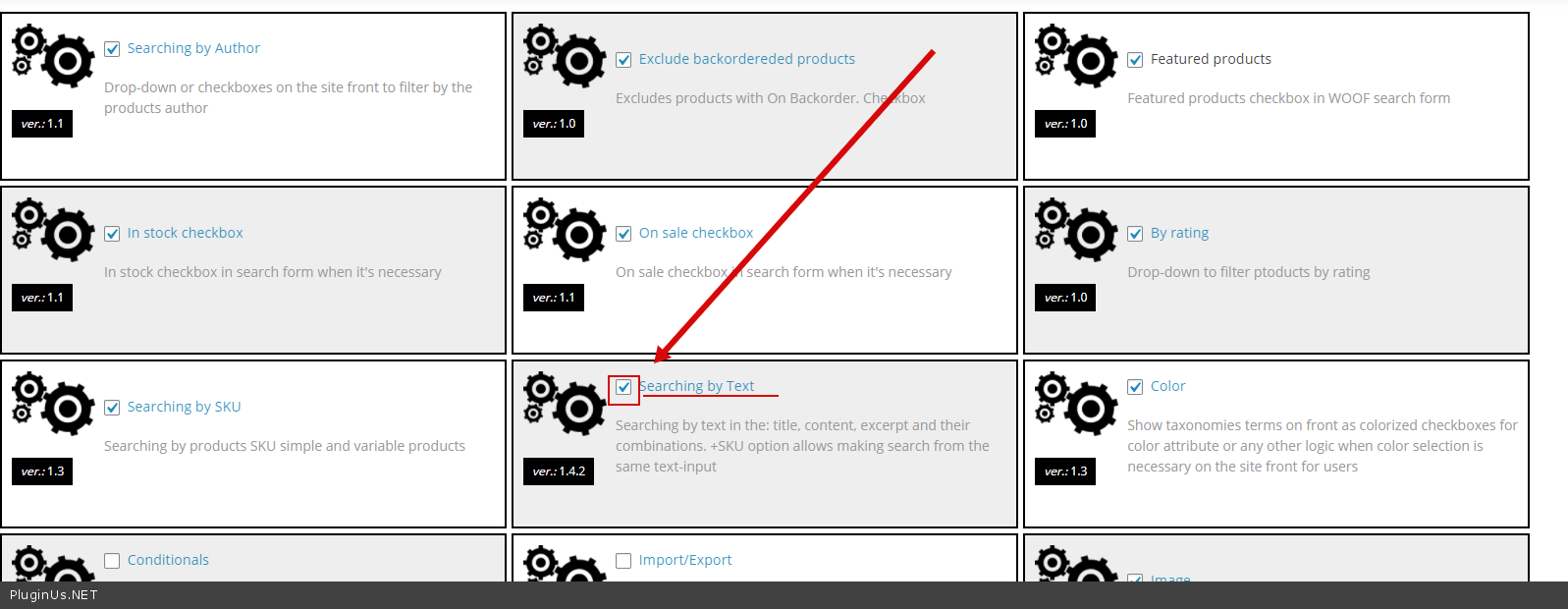
Quote from michael74 on April 20, 2021, 16:54That seems to fix the problem, thanks!
That seems to fix the problem, thanks!
Quote from Pablo Borysenco on April 21, 2021, 11:33Hello
Welcome;)
Hello
Welcome;)