

Issues with WPML on secondary language
The support doesn work on Saturdays and Sundays, so some Friday requests can be answered on Monday. If you have problems with registration ask help on contact us page pleaseIf you not got email within 24~36 business hours, firstly check your spam box, and if no any email from the support there - back to the forum and read answer here. DO NOT ANSWER ON EMAILS [noreply@pluginus.net] FROM THE FORUM!! Emails are just for your info, all answers should be published only here.
The support doesn work on Saturdays and Sundays, so some Friday requests can be answered on Monday.

Quote from federicoslanzi on November 5, 2021, 18:49Dear Sirs, I'm writing you because I'm using WPML as a plugin for multilanguage. In my first language, everything works fine. In my secondary language the filter is visibile but when we filter by taxonomy it doesn't work: the categories in the filter are empty and show no product inside of them. Can you please help me solve the problem?Unfortunately I had to hide the filter and I can't show it until it works because my e-shop is already online.

Quote from Pablo Borysenco on November 8, 2021, 15:32Hello
Please drop me wp-admin access - https://share.pluginus.net/image/i20210618130558.png -> https://share.pluginus.net/image/i20210618130637.png
You can create a test page with the filter
Hello
Please drop me wp-admin access - https://share.pluginus.net/image/i20210618130558.png -> https://share.pluginus.net/image/i20210618130637.png


You can create a test page with the filter
Quote from federicoslanzi on November 9, 2021, 11:34You can find all the datas in the private area! Thanks
You can find all the datas in the private area! Thanks
Quote from Pablo Borysenco on November 9, 2021, 13:28Hello
Please check your access - https://c2n.me/4dVJw9M.png
Please udate plugin to latest version - https://products-filter.com/how-to-make-auto-update-for-wordpress-plugins-and-themes-bought-on-envato
and recreate file in "Turbo mode" tab
Hello
Please check your access - https://c2n.me/4dVJw9M.png
Please udate plugin to latest version - https://products-filter.com/how-to-make-auto-update-for-wordpress-plugins-and-themes-bought-on-envato
and recreate file in "Turbo mode" tab
Quote from federicoslanzi on November 9, 2021, 16:25Hello,
now you can access to wp-admin.
Unfortunately, we cannot overwrite your plugin because we made edits on template files; so, i kindly ask you to check this version. Turbo mode just recreated.
Thanks.
Hello,
now you can access to wp-admin.
Unfortunately, we cannot overwrite your plugin because we made edits on template files; so, i kindly ask you to check this version. Turbo mode just recreated.
Thanks.
Quote from Pablo Borysenco on November 10, 2021, 13:02Hello
Unfortunately, we do not support older versions ( the version with third-party code too). You should update the plugin, the new version contains fixes, including for compatibility with WPML
Hello
Unfortunately, we do not support older versions ( the version with third-party code too). You should update the plugin, the new version contains fixes, including for compatibility with WPML
Quote from federicoslanzi on November 15, 2021, 16:35Hi,
i've just update your plugin but it seems still not working and all the issues i've been reported you before keeps happen; even the compatibility with WPML.Can you help me? Thanks
Hi,
i've just update your plugin but it seems still not working and all the issues i've been reported you before keeps happen; even the compatibility with WPML.
Can you help me? Thanks
Quote from Pablo Borysenco on November 16, 2021, 13:09Hello
My test - https://c2n.me/4e0IfEx - what is not working correctly in the filter?
also try disabling turbo mode
I noticed that you haven't translated the attributes. This can cause problems too.
Hello
My test - https://c2n.me/4e0IfEx - what is not working correctly in the filter?
also try disabling turbo mode
I noticed that you haven't translated the attributes. This can cause problems too.
Quote from federicoslanzi on November 22, 2021, 11:25Hello,
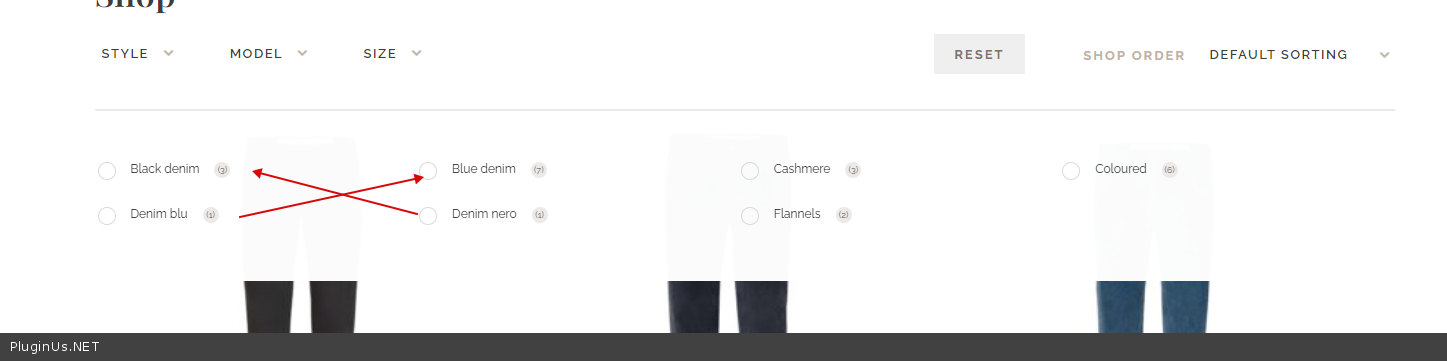
the issue is in the secondary language as previously said. If you switch the language, you will notice that the dropdown infos are wrong (count of elements, etc...). The reset button too, if clicked, it shows only two results instead all list.
Thanks.
Hello,
the issue is in the secondary language as previously said. If you switch the language, you will notice that the dropdown infos are wrong (count of elements, etc...). The reset button too, if clicked, it shows only two results instead all list.
Thanks.
Quote from Pablo Borysenco on November 22, 2021, 14:20Hello
My test: https://share.pluginus.net/video/v20211122151933.mp4 - I recreated the file and it looks like it works
Hello
My test: https://share.pluginus.net/video/v20211122151933.mp4 - I recreated the file and it looks like it works
Quote from federicoslanzi on November 23, 2021, 15:50Hi,
it seems not working in the main language, now. All the products have the same setting, attributes and categories.
See the attached links.Thanks.
Hi,
it seems not working in the main language, now. All the products have the same setting, attributes and categories.
See the attached links.
Thanks.
Quote from Pablo Borysenco on November 24, 2021, 12:16Hello
Ok! Drop me FTP access - https://share.pluginus.net/image/i20210618130558.png ->https://share.pluginus.net/image/i20210618130637.png - I will investigate this in more detail
Hello
Ok! Drop me FTP access - https://share.pluginus.net/image/i20210618130558.png ->https://share.pluginus.net/image/i20210618130637.png - I will investigate this in more detail
Quote from federicoslanzi on November 24, 2021, 12:36Hi, you can find all the datas in the private area. Thanks
Hi, you can find all the datas in the private area. Thanks
Quote from Pablo Borysenco on November 25, 2021, 17:24Hello
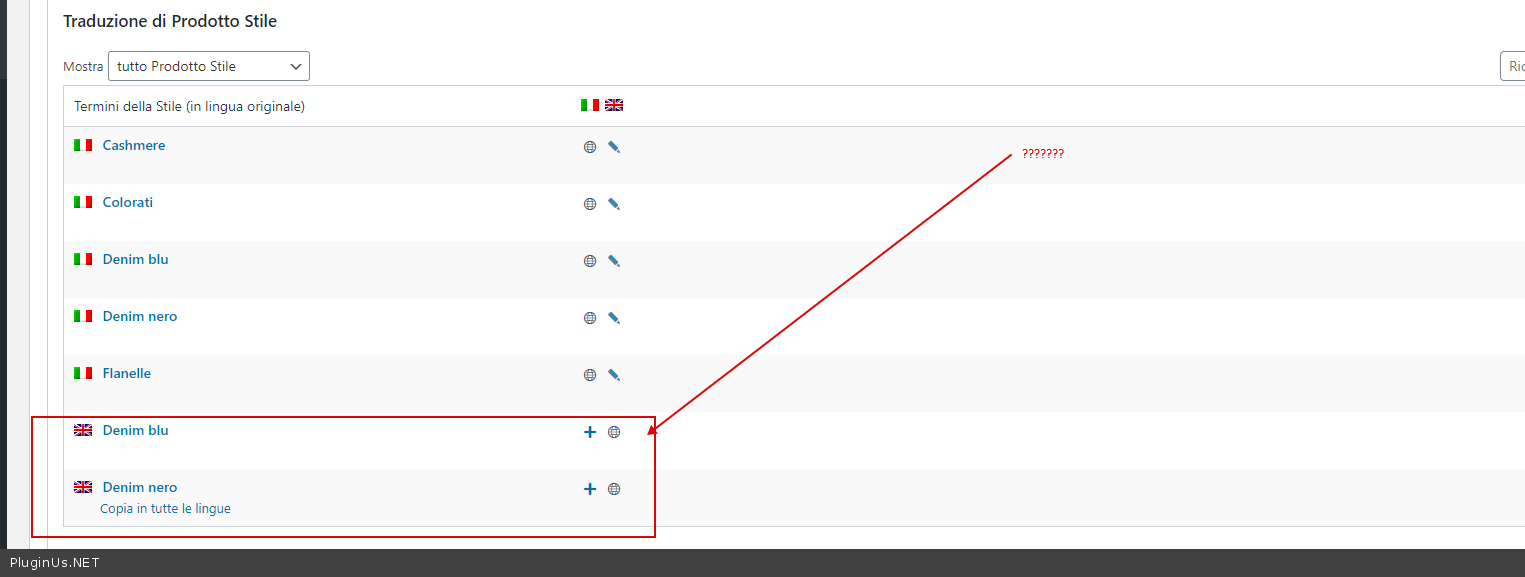
I check it and see that the filter is working correctly - https://c2n.me/4e7FmtC.jpg AND https://c2n.me/4e7FqbJ.png - The counter shows correct values, but you did not translate the attributes correctly - https://c2n.me/4e7FtLE.png - and assigned the wrong attributes for two products
Hello
I check it and see that the filter is working correctly - https://c2n.me/4e7FmtC.jpg AND https://c2n.me/4e7FqbJ.png - The counter shows correct values, but you did not translate the attributes correctly - https://c2n.me/4e7FtLE.png - and assigned the wrong attributes for two products

Quote from federicoslanzi on November 29, 2021, 12:43Hi,
have you tried here? https://richardjbrown.it/shop-test/ and https://richardjbrown.it/en/shop-test/ .
It seems not working again. No way to filter properly and reset button doesn't work (it shows only two results). See attached links.
Thanks.
https://ibb.co/Q8jVyLj
https://ibb.co/Cb7CHpJ - filter counter not working
https://ibb.co/Qp7MWWp - reset viewhttps://streamable.com/cuds4h - reset view clip
Hi,
have you tried here? https://richardjbrown.it/shop-test/ and https://richardjbrown.it/en/shop-test/ .
It seems not working again. No way to filter properly and reset button doesn't work (it shows only two results). See attached links.
Thanks.
https://ibb.co/Q8jVyLj
https://ibb.co/Cb7CHpJ - filter counter not working
https://ibb.co/Qp7MWWp - reset view
https://streamable.com/cuds4h - reset view clip
Quote from Pablo Borysenco on November 29, 2021, 14:10Hello
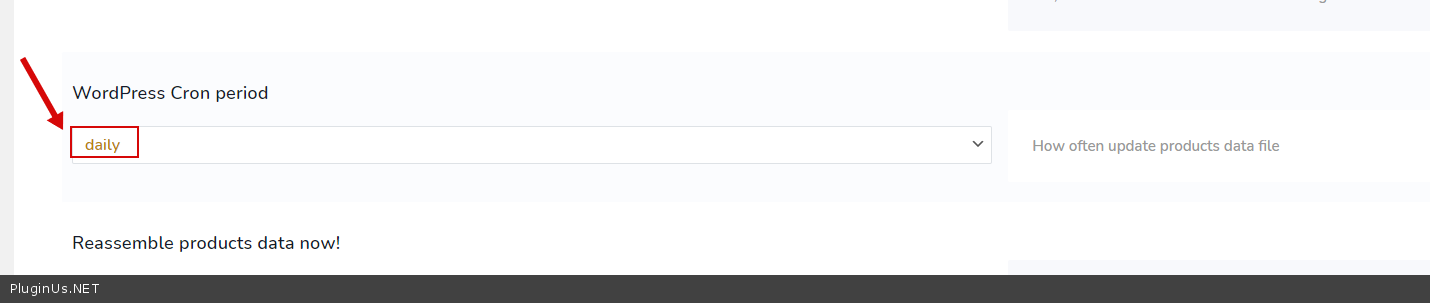
I think I understand what the problem is - Looks like the search file is not being updated correctly - when cron is running( https://c2n.me/4e9Re57.png )
So disable cron OR disable Turbo mode
Hello
I think I understand what the problem is - Looks like the search file is not being updated correctly - when cron is running( https://c2n.me/4e9Re57.png )
So disable cron OR disable Turbo mode
Quote from federicoslanzi on November 29, 2021, 15:41Hi, thanks! It works now!
Another (small) question: is there a way to hide all attributes in the dropdown choices that have zero products?
Thanks.
Hi, thanks! It works now!
Another (small) question: is there a way to hide all attributes in the dropdown choices that have zero products?
Thanks.
Quote from Pablo Borysenco on November 29, 2021, 17:11Please check options - https://c2n.me/4ea3zEC.png
Please check options - https://c2n.me/4ea3zEC.png
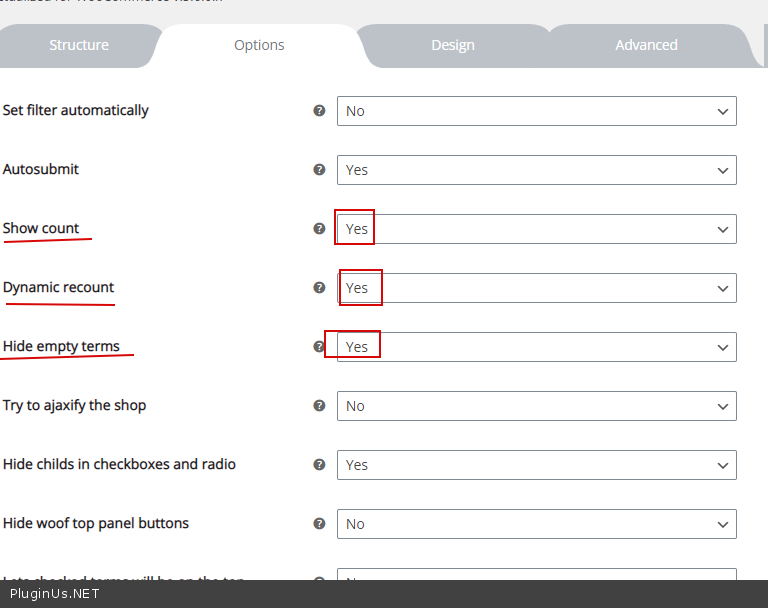
Quote from federicoslanzi on November 29, 2021, 17:22I've already tried to check these options but the options with zero products are still visible
I've already tried to check these options but the options with zero products are still visible
Quote from Pablo Borysenco on November 30, 2021, 11:41Hello
Ok ! Please delete your customizations - https://share.pluginus.net/video/v20211130124054.mp4
Hello
Ok ! Please delete your customizations - https://share.pluginus.net/video/v20211130124054.mp4