
I don't see the items in the category
The support doesn work on Saturdays and Sundays, so some Friday requests can be answered on Monday. If you have problems with registration ask help on contact us page pleaseIf you not got email within 24~36 business hours, firstly check your spam box, and if no any email from the support there - back to the forum and read answer here. DO NOT ANSWER ON EMAILS [noreply@pluginus.net] FROM THE FORUM!! Emails are just for your info, all answers should be published only here.
The support doesn work on Saturdays and Sundays, so some Friday requests can be answered on Monday.

Quote from simonelongato.it on February 1, 2022, 14:04
Hello, I bought the license to ask you for support. Because I don't understand what's wrong with the plugin on our site.
https://www.ametisgioielli.com/shop/
1: is it possible to make sidebar entries clickable? If I click on "Pietre preziose" or "PietreSemi preziose" it does not load the pages.
https://drive.google.com/file/d/1ePfMEjy-QpZy-kH3B3tC9CmXGwZGK_9o/view?usp=sharing > Image2: why do I not see all the objects in the items: “Pietre e Gemme” or "Pietre preziose" or "PietreSemi preziose"?
is there any display error?
About 120 objects should be seen on stones and gems (117 + 3)Thank you so much for your help
Hello, I bought the license to ask you for support. Because I don't understand what's wrong with the plugin on our site.
https://www.ametisgioielli.com/shop/
1: is it possible to make sidebar entries clickable? If I click on"Pietre preziose" or"PietreSemi preziose" it does not load the pages.
https://drive.google.com/file/d/1ePfMEjy-QpZy-kH3B3tC9CmXGwZGK_9o/view?usp=sharing > Image
2: why do I not see all the objects in the items: “Pietre e Gemme” or"Pietre preziose" or"PietreSemi preziose"?
is there any display error?
About 120 objects should be seen on stones and gems (117 + 3)
Thank you so much for your help

Quote from Pablo Borysenco on February 2, 2022, 11:41Hello
- I'm not sure I understood you correctly. which pages should load?
- Try to disable "Turbo Mode" and do a test
Hello
- I'm not sure I understood you correctly. which pages should load?
- Try to disable "Turbo Mode" and do a test
Quote from simonelongato.it on February 3, 2022, 22:39Hello thanks for the answer.
PROBLEM 1: The sidebar doesn't work
https://www.ametisgioielli.com/shop/If you try to click any of the sidebra items that I highlighted in red in this image:
https://drive.google.com/file/d/1scm4KKc8AAEtKjKmc2zvYwVTG0jfSVbj/view?usp=sharing
you can see that nothing works.
PROBLEM 2:
PROBLEM 2: You don't see all the objects in their respective categories
If you try to click on image 2
https://drive.google.com/file/d/1ePfMEjy-QpZy-kH3B3tC9CmXGwZGK_9o/view?usp=sharing
You can see that in the primary category:
https://www.ametisgioielli.com/pietre-e-gemme/
there is only one productand in the secondary category there are, respectively
https://www.ametisgioielli.com/pietre-e-gemme/pietre-preziose/ 2 products
https://www.ametisgioielli.com/pietre-e-gemme/pietre-semipreziose/ 117 productsConsequently in the primary category there should be: 1 + 2 + 117 = 120 products
But they are not seen.
I hope I have explained the two problems well.
It seems to me that I have entered the accesses to check, in my opinion there is some setting that blocks the correct functioning. But I don't understand what ...
thank you!
Hello thanks for the answer.
PROBLEM 1: The sidebar doesn't work
https://www.ametisgioielli.com/shop/
If you try to click any of the sidebra items that I highlighted in red in this image:
https://drive.google.com/file/d/1scm4KKc8AAEtKjKmc2zvYwVTG0jfSVbj/view?usp=sharing
you can see that nothing works.
PROBLEM 2:
PROBLEM 2: You don't see all the objects in their respective categories
If you try to click on image 2
https://drive.google.com/file/d/1ePfMEjy-QpZy-kH3B3tC9CmXGwZGK_9o/view?usp=sharing
You can see that in the primary category:
https://www.ametisgioielli.com/pietre-e-gemme/
there is only one product
and in the secondary category there are, respectively
https://www.ametisgioielli.com/pietre-e-gemme/pietre-preziose/ 2 products
https://www.ametisgioielli.com/pietre-e-gemme/pietre-semipreziose/ 117 products
Consequently in the primary category there should be: 1 + 2 + 117 = 120 products
But they are not seen.
I hope I have explained the two problems well.
It seems to me that I have entered the accesses to check, in my opinion there is some setting that blocks the correct functioning. But I don't understand what ...
thank you!
Quote from Pablo Borysenco on February 4, 2022, 13:16Hello
1 My test - https://c2n.me/4ePD8HH - it looks like it works
2 Yes! And my filter works correctly - https://c2n.me/4ePDt9w Unfortunately I don't know why your page is not working - https://www.ametisgioielli.com/pietre-e-gemme/ - Perhaps the current theme is making a request without regard to child elements
please disable ajax mode
Hello
1 My test - https://c2n.me/4ePD8HH - it looks like it works
2 Yes! And my filter works correctly - https://c2n.me/4ePDt9w Unfortunately I don't know why your page is not working - https://www.ametisgioielli.com/pietre-e-gemme/ - Perhaps the current theme is making a request without regard to child elements
please disable ajax mode
Quote from simonelongato.it on February 4, 2022, 15:24Hello, thanks for the answer
I was able to solve the two problems.
The problem that the products were not seen on the page is because they had the same name as the category tags and there was probably a conflict.Thanks for your help
However, I have subsequent questions that I report here with this figure:
https://drive.google.com/file/d/1JkPRMlYtuNqEva5UxkqYRDwTnUq0pOgA/view?usp=sharing
PROBLEM 3
how can I change the color and size of the X that I marked with the blue colorPROBLEM 4
Because the two sub-categories are seen one behind the other and not one under the other (bulleted list type)
Marked with red colorplease disable ajax mode> where do i find this function?
thank you very much and good job
Hello, thanks for the answer
I was able to solve the two problems.
The problem that the products were not seen on the page is because they had the same name as the category tags and there was probably a conflict.
Thanks for your help
However, I have subsequent questions that I report here with this figure:
https://drive.google.com/file/d/1JkPRMlYtuNqEva5UxkqYRDwTnUq0pOgA/view?usp=sharing
PROBLEM 3
how can I change the color and size of the X that I marked with the blue color
PROBLEM 4
Because the two sub-categories are seen one behind the other and not one under the other (bulleted list type)
Marked with red color
please disable ajax mode> where do i find this function?
thank you very much and good job
Quote from Pablo Borysenco on February 7, 2022, 12:43Hello
3
To cahge image - https://products-filter.com/hook/woof_delete_img_url
add css:
.woof .woof_radio_term_reset img{
width: 12px;
margin: 0px;}
4 Check an option please - https://c2n.me/4eR2OMY.png
Please watch this video - https://products-filter.com/video#beGT6p_look
please disable ajax mode> where do i find this function? - https://c2n.me/4eR3brF.png
Hello
3
To cahge image - https://products-filter.com/hook/woof_delete_img_url
add css:
.woof .woof_radio_term_reset img{
width: 12px;
margin: 0px;
}
4 Check an option please - https://c2n.me/4eR2OMY.png
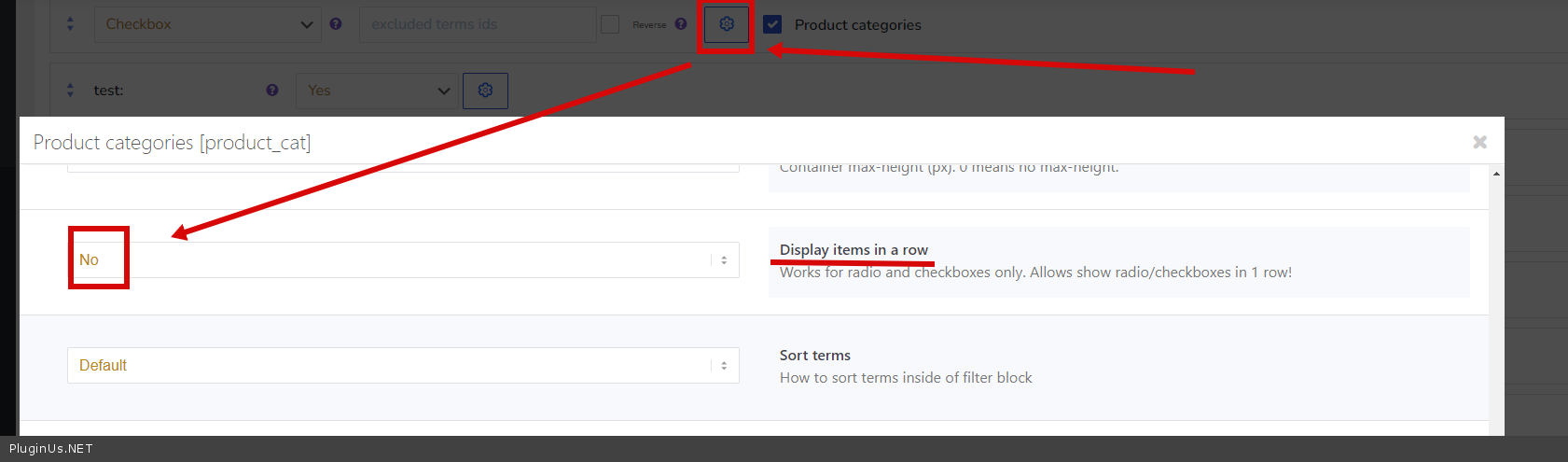
Please watch this video - https://products-filter.com/video#beGT6p_look
please disable ajax mode> where do i find this function? - https://c2n.me/4eR3brF.png
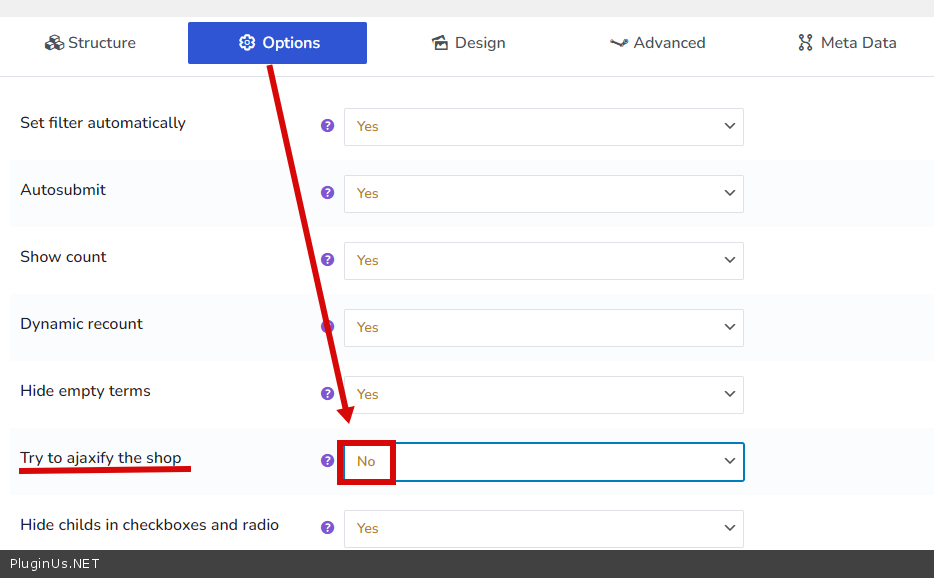
Quote from simonelongato.it on February 9, 2022, 11:46Good morning Pablo Borysenco
Thanks for your helpQuestion 3 (continued): I customized all the search (with colors and icons), I put everything in the plugin file. Is there a way to use the child theme and not lose the customizations of this plugin?
I managed to fix everything by giving the gold color (css on main style or on "css plugin customization", but the two red dots in the price range can't keep them stable on gold.
https://drive.google.com/file/d/1hmEVKiVdmLxnAu2nC58pDyykwZWING7u/view?usp=sharing
I don't use the base color file "sprite-skin-nice.png" but a custom one called "sprite-skin-nice-gold.png"
There is a solution?
Thanks so much!
Good morning Pablo Borysenco
Thanks for your help
Question 3 (continued): I customized all the search (with colors and icons), I put everything in the plugin file. Is there a way to use the child theme and not lose the customizations of this plugin?
I managed to fix everything by giving the gold color (css on main style or on"css plugin customization", but the two red dots in the price range can't keep them stable on gold.
https://drive.google.com/file/d/1hmEVKiVdmLxnAu2nC58pDyykwZWING7u/view?usp=sharing
I don't use the base color file"sprite-skin-nice.png" but a custom one called"sprite-skin-nice-gold.png"
There is a solution?
Thanks so much!
Quote from Pablo Borysenco on February 9, 2022, 13:37Hello
read this please - https://products-filter.com/can-i-override-any-extension-view-file-for-my-site-needs
Hello
read this please - https://products-filter.com/can-i-override-any-extension-view-file-for-my-site-needs
Quote from simonelongato.it on February 9, 2022, 15:40Thanks a lot
Example: wp-content/themes/my_child_theme/woof/ext/image/views/woof.php
but I have to write just WOOF or the name of the plugin folder on the main theme (which is "woocommerce-products-filter")
But not run for this problemhttps://drive.google.com/file/d/1hmEVKiVdmLxnAu2nC58pDyykwZWING7u/view?usp=sharing
I ise this CSS code, but not run!
span.irs-slider .from{background:url(https://www.ametisgioielli.com/wp-content/plugins/woocommerce-products-filter/js/ion.range-slider/img/sprite-skin-nice-gold.png)!important repeat-x}
.irs-slider {
background: url(https://www.ametisgioielli.com/wp-content/plugins/woocommerce-products-filter/js/ion.range-slider/img/sprite-skin-nice-gold.png)!important repeat-x;
}
Thanks a lot
Example: wp-content/themes/my_child_theme/woof/ext/image/views/woof.php
but I have to write just WOOF or the name of the plugin folder on the main theme (which is"woocommerce-products-filter")
But not run for this problemhttps://drive.google.com/file/d/1hmEVKiVdmLxnAu2nC58pDyykwZWING7u/view?usp=sharing
I ise this CSS code, but not run!
span.irs-slider .from{background:url(https://www.ametisgioielli.com/wp-content/plugins/woocommerce-products-filter/js/ion.range-slider/img/sprite-skin-nice-gold.png)!important repeat-x}

.irs-slider {
background: url(https://www.ametisgioielli.com/wp-content/plugins/woocommerce-products-filter/js/ion.range-slider/img/sprite-skin-nice-gold.png)!important repeat-x;
}
Quote from Pablo Borysenco on February 10, 2022, 13:20Hello
If you only change the CSS - https://www.wpbeginner.com/plugins/how-to-easily-add-custom-css-to-your-wordpress-site/
Hello
If you only change the CSS - https://www.wpbeginner.com/plugins/how-to-easily-add-custom-css-to-your-wordpress-site/
Quote from simonelongato.it on February 10, 2022, 23:22Good evening I didn't understand how I can change that red dot
https://drive.google.com/file/d/1hmEVKiVdmLxnAu2nC58pDyykwZWING7u/view?usp=sharingSo that it always remains correct with gold colors.
This CSS change doesn't work, but what am I wrong ??
Thank you very much and have a nice day
span.irs-slider .from {background: url (https://www.ametisgioielli.com/wp-content/plugins/woocommerce-products-filter/js/ion.range-slider/img/sprite-skin-nice- gold.png)! important repeat-x}
.irs-slider {
background: url (https://www.ametisgioielli.com/wp-content/plugins/woocommerce-products-filter/js/ion.range-slider/img/sprite-skin-nice-gold.png)! important repeat- x;
}
Good evening I didn't understand how I can change that red dot
https://drive.google.com/file/d/1hmEVKiVdmLxnAu2nC58pDyykwZWING7u/view?usp=sharing
So that it always remains correct with gold colors.
This CSS change doesn't work, but what am I wrong ??
Thank you very much and have a nice day
span.irs-slider .from {background: url (https://www.ametisgioielli.com/wp-content/plugins/woocommerce-products-filter/js/ion.range-slider/img/sprite-skin-nice- gold.png)! important repeat-x}
.irs-slider {
background: url (https://www.ametisgioielli.com/wp-content/plugins/woocommerce-products-filter/js/ion.range-slider/img/sprite-skin-nice-gold.png)! important repeat- x;
}
Quote from Pablo Borysenco on February 11, 2022, 13:38Hello
I think you'd better contact the developer who made these customizations for you
you can try this code:
.woof .irs-line-mid, .woof .irs-line-left, .woof .irs-line-right, .woof .irs-bar, .woof .irs-bar-edge, .woof .irs-slider {}
Hello
I think you'd better contact the developer who made these customizations for you
you can try this code:
Quote from simonelongato.it on February 16, 2022, 10:22Hi, thanks for the reply. It does not work.
But leave the CSS modification aloneThis is the file in the plugin root folder
www.ametisgioielli.com/wp-content/plugins/woocommerce-products-filter/js/ion.range-slider/img/sprite-skin-nice.pngand this is in the filgio theme:
www.ametisgioielli.com/wp-content/themes/salient-child/woof/js/ion.range-slider/img/sprite-skin-nice.pngWhy doesn't it take the picture of the child theme?
Hi, thanks for the reply. It does not work.
But leave the CSS modification alone
This is the file in the plugin root folder
http://www.ametisgioielli.com/wp-content/plugins/woocommerce-products-filter/js/ion.range-slider/img/sprite-skin-nice.png

and this is in the filgio theme:
http://www.ametisgioielli.com/wp-content/themes/salient-child/woof/js/ion.range-slider/img/sprite-skin-nice.png

Why doesn't it take the picture of the child theme?
Quote from Pablo Borysenco on February 16, 2022, 19:02Hello
Because it's CSS styles, it needs to be overridden properly
I gave a style that should work. you should insert the correct link to the image
it doesn't matter where the image is stored and it doesn't matter where you paste this CSS (plugin or child theme or additional CSS)
Hello
Because it's CSS styles, it needs to be overridden properly
I gave a style that should work. you should insert the correct link to the image
it doesn't matter where the image is stored and it doesn't matter where you paste this CSS (plugin or child theme or additional CSS)
Quote from Pablo Borysenco on February 16, 2022, 19:05Also, you are using the wrong styles - https://c2n.me/4eXHurj
Also, you are using the wrong styles - https://c2n.me/4eXHurj
Quote from simonelongato.it on February 16, 2022, 23:19Hello!
ok thanks for the video, but you should see the same circle and dot in gold (not red).
With the video you see the line.
Hello!
ok thanks for the video, but you should see the same circle and dot in gold (not red).
With the video you see the line.
Quote from Pablo Borysenco on February 17, 2022, 12:30Hello
Please follow my advice
Just use the code I gave you earlier, If you don't like it, please fix the code I showed you earlier
My test with new fix - https://c2n.me/4eY8GuL
Hello
Please follow my advice
Just use the code I gave you earlier, If you don't like it, please fix the code I showed you earlier
My test with new fix - https://c2n.me/4eY8GuL