

How can we Add AED currency Symbol in Currency Switcher
The support doesn work on Saturdays and Sundays, so some Friday requests can be answered on Monday. If you have problems with registration ask help on contact us page pleaseIf you not got email within 24~36 business hours, firstly check your spam box, and if no any email from the support there - back to the forum and read answer here. DO NOT ANSWER ON EMAILS [noreply@pluginus.net] FROM THE FORUM!! Emails are just for your info, all answers should be published only here.
The support doesn work on Saturdays and Sundays, so some Friday requests can be answered on Monday.

Quote from ashish.ag on January 15, 2026, 07:19We have paid FOX - Currency Switcher Professional for WooCommerce, and we are using it for our e-commerce website. There we are using multiple currencies, but as per our requirement, we are not able to add the AED currency symbol
for the UAE. please help us how can we add.
Item Purchase Code : [removed]
We have paid FOX - Currency Switcher Professional for WooCommerce, and we are using it for our e-commerce website. There we are using multiple currencies, but as per our requirement, we are not able to add the AED currency symbol for the UAE. please help us how can we add.
Item Purchase Code : [removed]

Quote from Alex Dovlatov on January 15, 2026, 13:13Hello
- go please to FOX settings page
- click on button "Add custom currency symbols" https://share.pluginus.net/image/i20260115130903.png
- place any symols you want https://share.pluginus.net/image/i20260115131022.png
- click save button
- click on button "Append Currency"
- write currency code AED and select your symbol and its position, click on synhronize rate button https://share.pluginus.net/image/i20260115131318.png
- click on save button
p.s. for future use please secret area for any private information like purchase code for example:
https://share.pluginus.net/image/i20230222134241.png
https://share.pluginus.net/image/i20230222134615.png
Hello
- go please to FOX settings page
- click on button"Add custom currency symbols" https://share.pluginus.net/image/i20260115130903.png
- place any symols you want https://share.pluginus.net/image/i20260115131022.png
- click save button
- click on button"Append Currency"
- write currency code AED and select your symbol and its position, click on synhronize rate button https://share.pluginus.net/image/i20260115131318.png
- click on save button


p.s. for future use please secret area for any private information like purchase code for example:
https://share.pluginus.net/image/i20230222134241.png
https://share.pluginus.net/image/i20230222134615.png


Quote from ashish.ag on January 15, 2026, 13:46Hi Alex,
thank you for the update , And there is any way to add this icon, because its available in image only
Hi Alex,
thank you for the update , And there is any way to add this icon, because its available in image only , we don't have Unicode.
Quote from Alex Dovlatov on January 16, 2026, 12:58Hello
Just looked into the web, and at the moment, it has not yet been added to the Unicode standard, so there is no official Unicode character for it yet, this simbol is very new, BUT I have an idea:
- open file classes/woocs.php
- find public function woocommerce_price_html($price_html, $product)
- replace return of it to return apply_filters('woocs_price_html', $price_html);
- this hook will be added into next versions
- go to file functions.php of your wp site
- place there next code:
add_filter('woocs_price_html', function($price_html) {
    global $WOOCS;

    if (isset($WOOCS) && $WOOCS->current_currency === 'AED') {
        $image = '<img src="https://lightyellow-chicken-161714.hostingersite.com/wp-content/uploads/2026/01/aed-d.webp" alt="AED" style="display:inline-block; width:15px; height:15px; vertical-align:middle;" />';

        $price_html = str_replace('AED', $image, $price_html);
        $price_html = str_replace('د.إ', '', $price_html);
    }

    return $price_html;
}, 10, 1);
- Result:
p.s. better upload that image to your own site to make its loading faster
Give me know about results please, maybe you will need using CSS place new image symbol more precise
Hello
Just looked into the web, and at the moment, it has not yet been added to the Unicode standard, so there is no official Unicode character for it yet, this simbol is very new, BUT I have an idea:
- open file classes/woocs.php
- find public function woocommerce_price_html($price_html, $product)
- replace return of it to return apply_filters('woocs_price_html', $price_html);
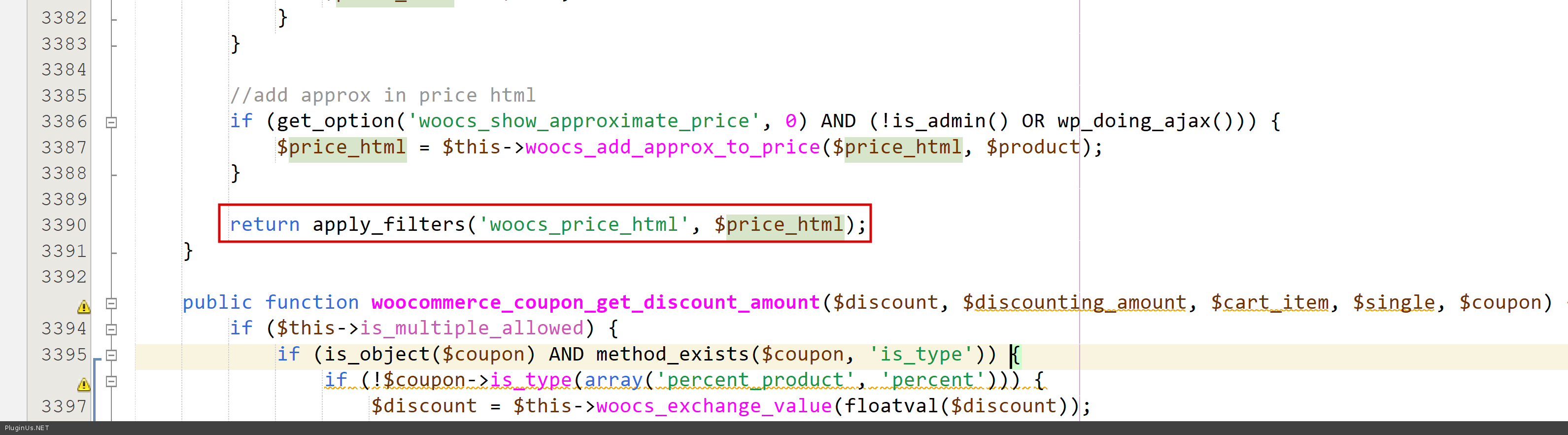
- this hook will be added into next versions
- go to file functions.php of your wp site
- place there next code:
add_filter('woocs_price_html', function($price_html) { global $WOOCS; if (isset($WOOCS) && $WOOCS->current_currency === 'AED') { $image = '<img src="https://lightyellow-chicken-161714.hostingersite.com/wp-content/uploads/2026/01/aed-d.webp" alt="AED" style="display:inline-block; width:15px; height:15px; vertical-align:middle;" />'; $price_html = str_replace('AED', $image, $price_html); $price_html = str_replace('د.إ', '', $price_html); } return $price_html; }, 10, 1); - Result:
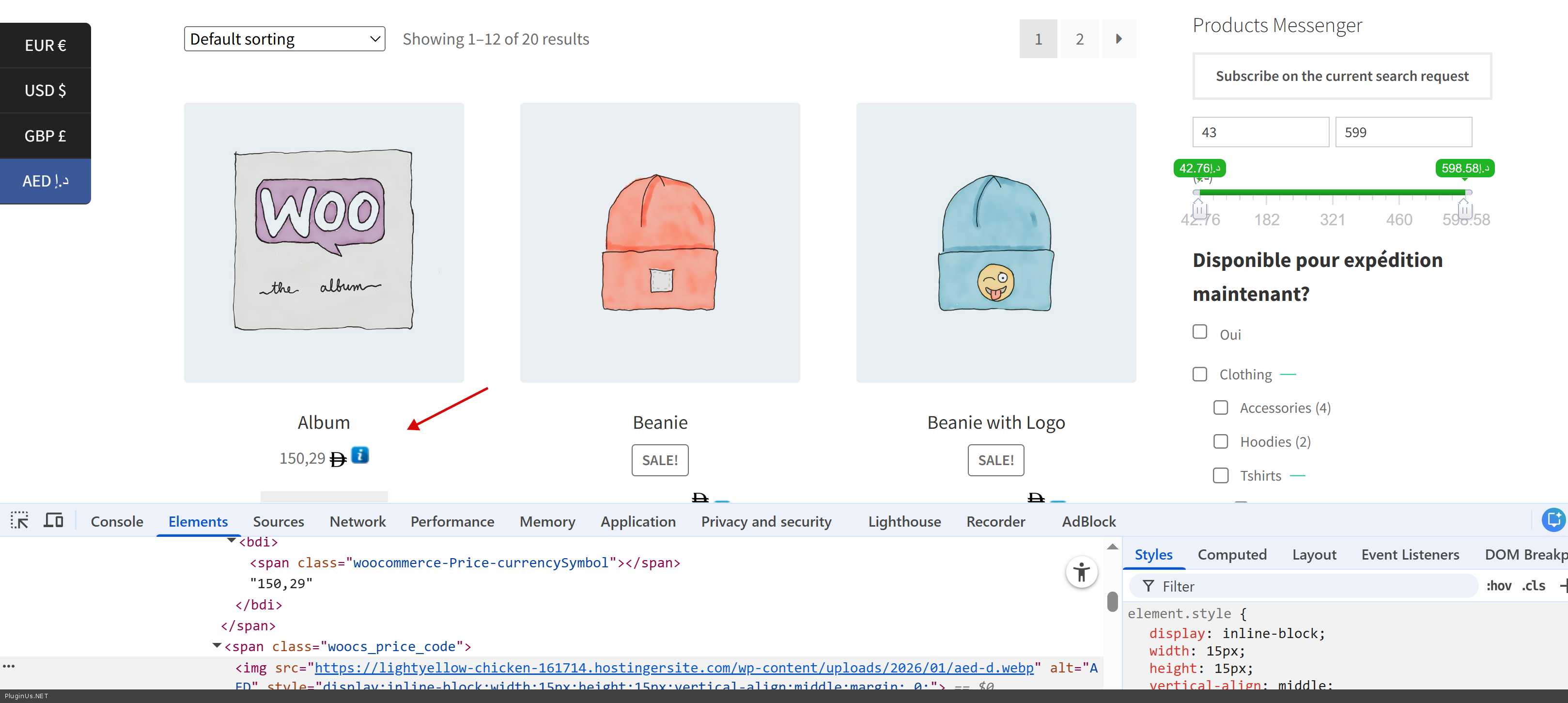
p.s. better upload that image to your own site to make its loading faster
Give me know about results please, maybe you will need using CSS place new image symbol more precise
Quote from ashish.ag on January 16, 2026, 15:20HI
We have updated as per your suggestion, and now it's working.
But somewhere it's not working; can you help me to update there also?
HI
We have updated as per your suggestion, and now it's working.

But somewhere it's not working; can you help me to update there also?

Quote from Alex Dovlatov on January 19, 2026, 13:07Hello
Here I can help only partly:
- go to file \views\auto_switcher\classic_blocks.php
- open it and completely replace code to
<?php
if (!defined('ABSPATH'))
    die('No direct access allowed');
global $WOOCS;
$currencies = apply_filters('woocs_currency_manipulation_before_show', $WOOCS->get_currencies());
?>
<?php ob_start() ?>
.woocs_auto_switcher {
top: <?php echo esc_attr($top) ?>;
}
.woocs_auto_switcher li a {
background:<?php echo esc_attr($color) ?>;
}
.woocs_auto_switcher li a.woocs_curr_curr {
background:<?php echo esc_attr($hover_color) ?>;
}
.woocs_auto_switcher li  a:hover {
background:<?php echo esc_attr($hover_color) ?>;
}
.woocs_auto_switcher li  a span {
background:<?php echo esc_attr($hover_color) ?>;
}
.woocs_auto_switcher.left li span:after {
border-right: 10px solid <?php echo esc_attr($hover_color) ?>;
}
.woocs_auto_switcher.right li a span:after {
border-left: 10px solid <?php echo esc_attr($hover_color) ?>;
}
<?php
$data = ob_get_clean();
wp_add_inline_style('woocommerce-currency-switcher', $data);
?>
<ul class='woocs_auto_switcher <?php echo esc_attr($side) ?>' data-view="classic_blocks">
    <?php
    foreach ($currencies as $key => $item):

        if (isset($item['hide_on_front']) AND $item['hide_on_front']) {
            continue;
        }

        $current = "";
        if ($key == $WOOCS->current_currency) {
            $current = "woocs_curr_curr";
        }
        $base_text = $this->prepare_field_text($item, $basic_field);
        $add_text = $this->prepare_field_text($item, $add_field);
        ?>
        <li>
            <a data-currency="<?php echo esc_html($key) ?>" class="  <?php echo esc_attr($current) ?> woocs_auto_switcher_link" href="#">
                <?php echo wp_kses_post(apply_filters('woocs_price_html', $base_text)) ?>
                <span>
                    <div>
                        <?php echo wp_kses_post($add_text) ?>
                    </div>
                </span>
            </a>
        </li>
    <?php endforeach; ?>

</ul>
What about price slider - its functionality of woocommerce, and its need custom code customization, you can drop link of the site here and I will look, but no warranty
Hello
Here I can help only partly:
- go to file \views\auto_switcher\classic_blocks.php
- open it and completely replace code to
<?php
if (!defined('ABSPATH'))
    die('No direct access allowed');
global $WOOCS;
$currencies = apply_filters('woocs_currency_manipulation_before_show', $WOOCS->get_currencies());
?>
<?php ob_start() ?>
.woocs_auto_switcher {
top: <?php echo esc_attr($top) ?>;
}
.woocs_auto_switcher li a {
background:<?php echo esc_attr($color) ?>;
}
.woocs_auto_switcher li a.woocs_curr_curr {
background:<?php echo esc_attr($hover_color) ?>;
}
.woocs_auto_switcher li  a:hover {
background:<?php echo esc_attr($hover_color) ?>;
}
.woocs_auto_switcher li  a span {
background:<?php echo esc_attr($hover_color) ?>;
}
.woocs_auto_switcher.left li span:after {
border-right: 10px solid <?php echo esc_attr($hover_color) ?>;
}
.woocs_auto_switcher.right li a span:after {
border-left: 10px solid <?php echo esc_attr($hover_color) ?>;
}
<?php
$data = ob_get_clean();
wp_add_inline_style('woocommerce-currency-switcher', $data);
?>
<ul class='woocs_auto_switcher <?php echo esc_attr($side) ?>' data-view="classic_blocks">
    <?php
    foreach ($currencies as $key => $item):

        if (isset($item['hide_on_front']) AND $item['hide_on_front']) {
            continue;
        }

        $current ="";
        if ($key == $WOOCS->current_currency) {
            $current ="woocs_curr_curr";
        }
        $base_text = $this->prepare_field_text($item, $basic_field);
        $add_text = $this->prepare_field_text($item, $add_field);
        ?>
        <li>
            <a data-currency="<?php echo esc_html($key) ?>" class="  <?php echo esc_attr($current) ?> woocs_auto_switcher_link" href="#">
                <?php echo wp_kses_post(apply_filters('woocs_price_html', $base_text)) ?>
                <span>
                    <div>
                        <?php echo wp_kses_post($add_text) ?>
                    </div>
                </span>
            </a>
        </li>
    <?php endforeach; ?>

</ul>
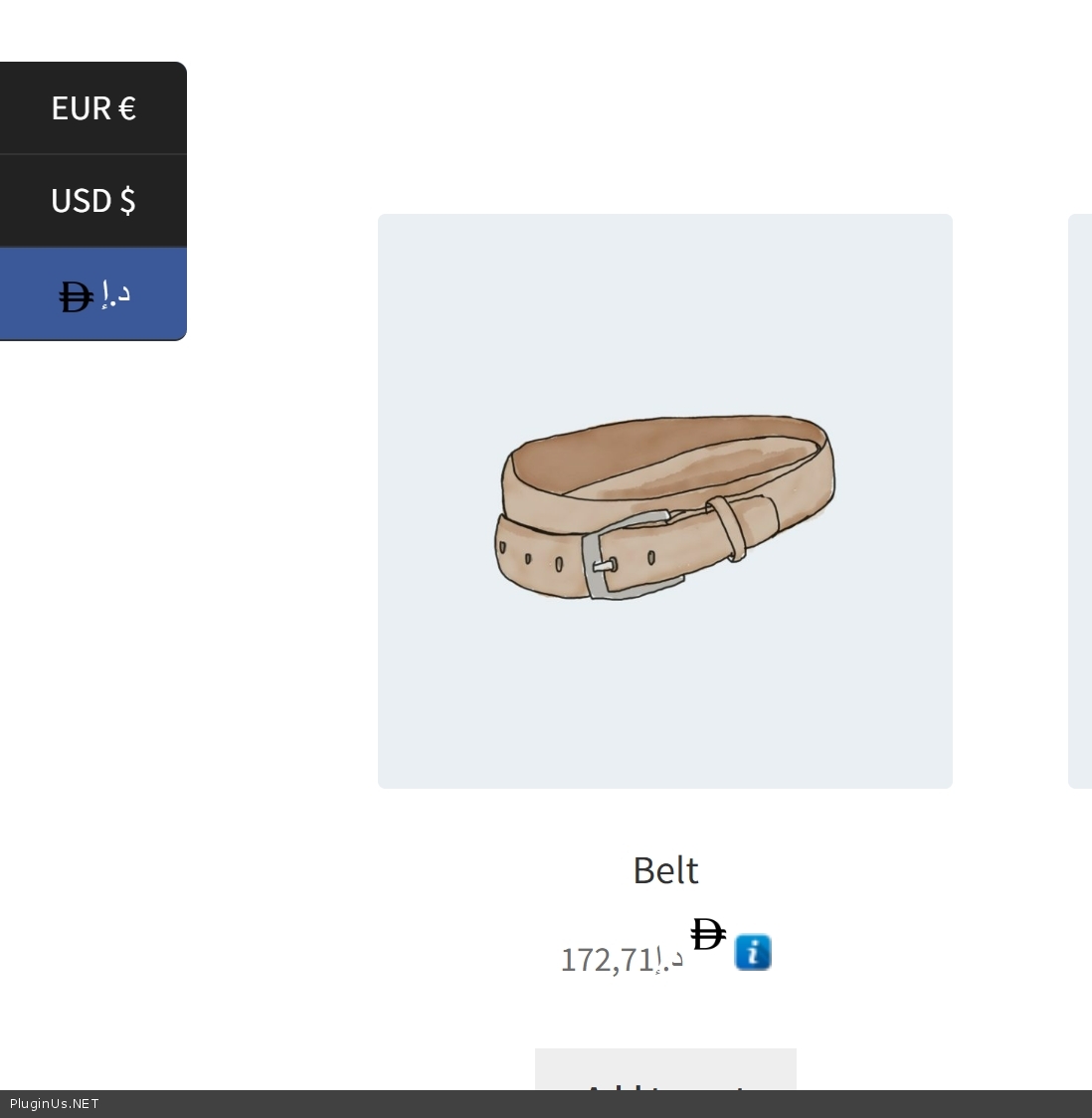
What about price slider - its functionality of woocommerce, and its need custom code customization, you can drop link of the site here and I will look, but no warranty
Quote from ashish.ag on January 20, 2026, 06:04Currently we are using working here you can check this link - https://lightyellow-chicken-161714.hostingersite.com/
Currently we are using working here you can check this link - https://lightyellow-chicken-161714.hostingersite.com/
Quote from ashish.ag on January 20, 2026, 06:12And when we have updated the code for the sidebar, it's updated on both the name and the symbol.
And when we have updated the code for the sidebar, it's updated on both the name and the symbol.

Quote from Alex Dovlatov on January 20, 2026, 15:03Hello
Into file functions.php place next script for customization:
add_action('wp_footer', function() {
    ?>
    <script>
    jQuery(document).ready(function($) {
        function replaceAEDInPriceFilter() {
            $('.woocommerce-Price-currencySymbol').each(function() {
                var $span = $(this);
                if ($span.text().trim() === 'AED') {
                    $span.html('<img src="https://lightyellow-chicken-161714.hostingersite.com/wp-content/uploads/2026/01/aed-d.webp" alt="AED" style="display:inline-block; width:15px; height:15px; vertical-align:middle; margin: 0; padding: 0;" />');
                }
            });
        }

        replaceAEDInPriceFilter();

        var observer = new MutationObserver(function() {
            replaceAEDInPriceFilter();
        });
        observer.observe(document.body, { childList: true, subtree: true });
    });
    </script>
    <?php
}, 999);
What about your screen
Use CSS code:
.woocs_auto_switcher_link > img:nth-of-type(2) { display: none !important; }
Hello
Into file functions.php place next script for customization:
add_action('wp_footer', function() {
    ?>
    <script>
    jQuery(document).ready(function($) {
        function replaceAEDInPriceFilter() {
            $('.woocommerce-Price-currencySymbol').each(function() {
                var $span = $(this);
                if ($span.text().trim() === 'AED') {
                    $span.html('<img src="https://lightyellow-chicken-161714.hostingersite.com/wp-content/uploads/2026/01/aed-d.webp" alt="AED" style="display:inline-block; width:15px; height:15px; vertical-align:middle; margin: 0; padding: 0;" />');
                }
            });
        }

        replaceAEDInPriceFilter();

        var observer = new MutationObserver(function() {
            replaceAEDInPriceFilter();
        });
        observer.observe(document.body, { childList: true, subtree: true });
    });
    </script>
    <?php
}, 999);
What about your screen
Use CSS code:
.woocs_auto_switcher_link > img:nth-of-type(2) { display: none !important; }
Quote from Alex Dovlatov on January 20, 2026, 15:03If no luck - provide please wp-afmin accsess to this tite using private area of this ticket
If no luck - provide please wp-afmin accsess to this tite using private area of this ticket
Quote from ashish.ag on February 4, 2026, 06:12Can i share the FTP? if it work
Can i share the FTP? if it work
Quote from Alex Dovlatov on February 4, 2026, 22:26Hello
Sure, use please private area of this ticket
https://share.pluginus.net/image/i20230222134241.png
https://share.pluginus.net/image/i20230222134615.png
Hello
Sure, use please private area of this ticket
https://share.pluginus.net/image/i20230222134241.png
https://share.pluginus.net/image/i20230222134615.png
Quote from ashish.ag on February 5, 2026, 14:02hi team,
Added please check in the private data.
hi team,
Added please check in the private data.
Quote from Alex Dovlatov on February 6, 2026, 12:54Hello
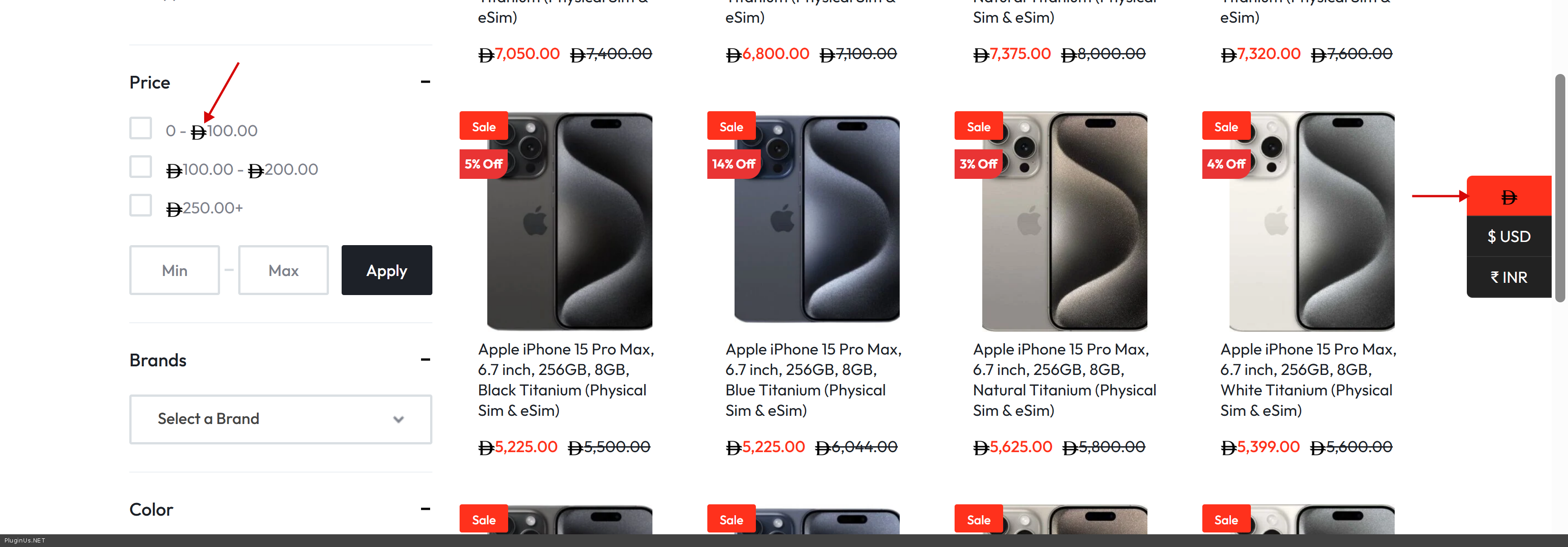
I inserted code to file: /public_html/wp-content/themes/motta/functions.php - better use child theme, you have it there but its not activated
Now all looks:
Full code added:
// AED currency symbol image replacement for price filter
add_action('wp_footer', function() {
    ?>
    <script>
    jQuery(document).ready(function($) {
        function replaceAEDInPriceFilter() {
            $('.woocommerce-Price-currencySymbol').each(function() {
                var $span = $(this);
                if ($span.text().trim() === 'AED') {
                    $span.html('<img src="https://lightyellow-chicken-161714.hostingersite.com/wp-content/uploads/2026/01/aed-d.webp" alt="AED" style="display:inline-block; width:15px; height:15px; vertical-align:middle; margin: 0; padding: 0;" />');
                }
            });
        }

        replaceAEDInPriceFilter();

        var observer = new MutationObserver(function() {
            replaceAEDInPriceFilter();
        });
        observer.observe(document.body, { childList: true, subtree: true });
    });
    </script>
    <?php
}, 999);

// Hide duplicate AED image in currency switcher
add_action('wp_head', function() {
    ?>
    <style>
    .woocs_auto_switcher_link > img:nth-of-type(2) {
        display: none !important;
    }
    </style>
    <?php
}, 999);
Hello
I inserted code to file: /public_html/wp-content/themes/motta/functions.php - better use child theme, you have it there but its not activated
Now all looks:
Full code added:
// AED currency symbol image replacement for price filter
add_action('wp_footer', function() {
    ?>
    <script>
    jQuery(document).ready(function($) {
        function replaceAEDInPriceFilter() {
            $('.woocommerce-Price-currencySymbol').each(function() {
                var $span = $(this);
                if ($span.text().trim() === 'AED') {
                    $span.html('<img src="https://lightyellow-chicken-161714.hostingersite.com/wp-content/uploads/2026/01/aed-d.webp" alt="AED" style="display:inline-block; width:15px; height:15px; vertical-align:middle; margin: 0; padding: 0;" />');
                }
            });
        }

        replaceAEDInPriceFilter();

        var observer = new MutationObserver(function() {
            replaceAEDInPriceFilter();
        });
        observer.observe(document.body, { childList: true, subtree: true });
    });
    </script>
    <?php
}, 999);

// Hide duplicate AED image in currency switcher
add_action('wp_head', function() {
    ?>
    <style>
    .woocs_auto_switcher_link > img:nth-of-type(2) {
        display: none !important;
    }
    </style>
    <?php
}, 999);
Quote from ashish.ag on February 10, 2026, 15:42Hi Team ,
But still one issue please check the screenshot

Hi Team ,
But still one issue please check the screenshot

Quote from Alex Dovlatov on February 10, 2026, 16:49Hello
I just replaced script from file functions.php to the new version and it also work for this case:
add_action('wp_footer', function() {
    ?>
    <script>
    jQuery(document).ready(function($) {
        function replaceAEDInPriceFilter() {
            $('.woocommerce-Price-currencySymbol').each(function() {
                var $span = $(this);
                if ($span.text().trim() === 'AED') {
                    $span.html('<img src="https://lightyellow-chicken-161714.hostingersite.com/wp-content/uploads/2026/01/aed-d.webp" alt="AED" style="display:inline-block; width:15px; height:15px; vertical-align:middle; margin: 0; padding: 0;" />');
                }
            });
        }

        function replaceAEDInSwitcher() {
            $('.woocs_auto_switcher_link[data-currency="AED"]').each(function() {
                var $link = $(this);
                var html = $link.html();

                // Replace "AED AED" text with image, keep the flag span intact
                if (html.indexOf('AED AED') !== -1) {
                    html = html.replace(/AED AED/g, '<img src="https://lightyellow-chicken-161714.hostingersite.com/wp-content/uploads/2026/01/aed-d.webp" alt="AED" style="display:inline-block; width:15px; height:15px; vertical-align:middle; margin-right: 5px; background: #777;" />');
                    $link.html(html);
                }
            });
        }

        replaceAEDInPriceFilter();
        replaceAEDInSwitcher();

        var observer = new MutationObserver(function() {
            replaceAEDInPriceFilter();
            replaceAEDInSwitcher();
        });
        observer.observe(document.body, { childList: true, subtree: true });
    });
    </script>
    <?php
}, 999);
Welcome!
Hello
I just replaced script from file functions.php to the new version and it also work for this case:
add_action('wp_footer', function() {
    ?>
    <script>
    jQuery(document).ready(function($) {
        function replaceAEDInPriceFilter() {
            $('.woocommerce-Price-currencySymbol').each(function() {
                var $span = $(this);
                if ($span.text().trim() === 'AED') {
                    $span.html('<img src="https://lightyellow-chicken-161714.hostingersite.com/wp-content/uploads/2026/01/aed-d.webp" alt="AED" style="display:inline-block; width:15px; height:15px; vertical-align:middle; margin: 0; padding: 0;" />');
                }
            });
        }

        function replaceAEDInSwitcher() {
            $('.woocs_auto_switcher_link[data-currency="AED"]').each(function() {
                var $link = $(this);
                var html = $link.html();

                // Replace"AED AED" text with image, keep the flag span intact
                if (html.indexOf('AED AED') !== -1) {
                    html = html.replace(/AED AED/g, '<img src="https://lightyellow-chicken-161714.hostingersite.com/wp-content/uploads/2026/01/aed-d.webp" alt="AED" style="display:inline-block; width:15px; height:15px; vertical-align:middle; margin-right: 5px; background: #777;" />');
                    $link.html(html);
                }
            });
        }

        replaceAEDInPriceFilter();
        replaceAEDInSwitcher();

        var observer = new MutationObserver(function() {
            replaceAEDInPriceFilter();
            replaceAEDInSwitcher();
        });
        observer.observe(document.body, { childList: true, subtree: true });
    });
    </script>
    <?php
}, 999);
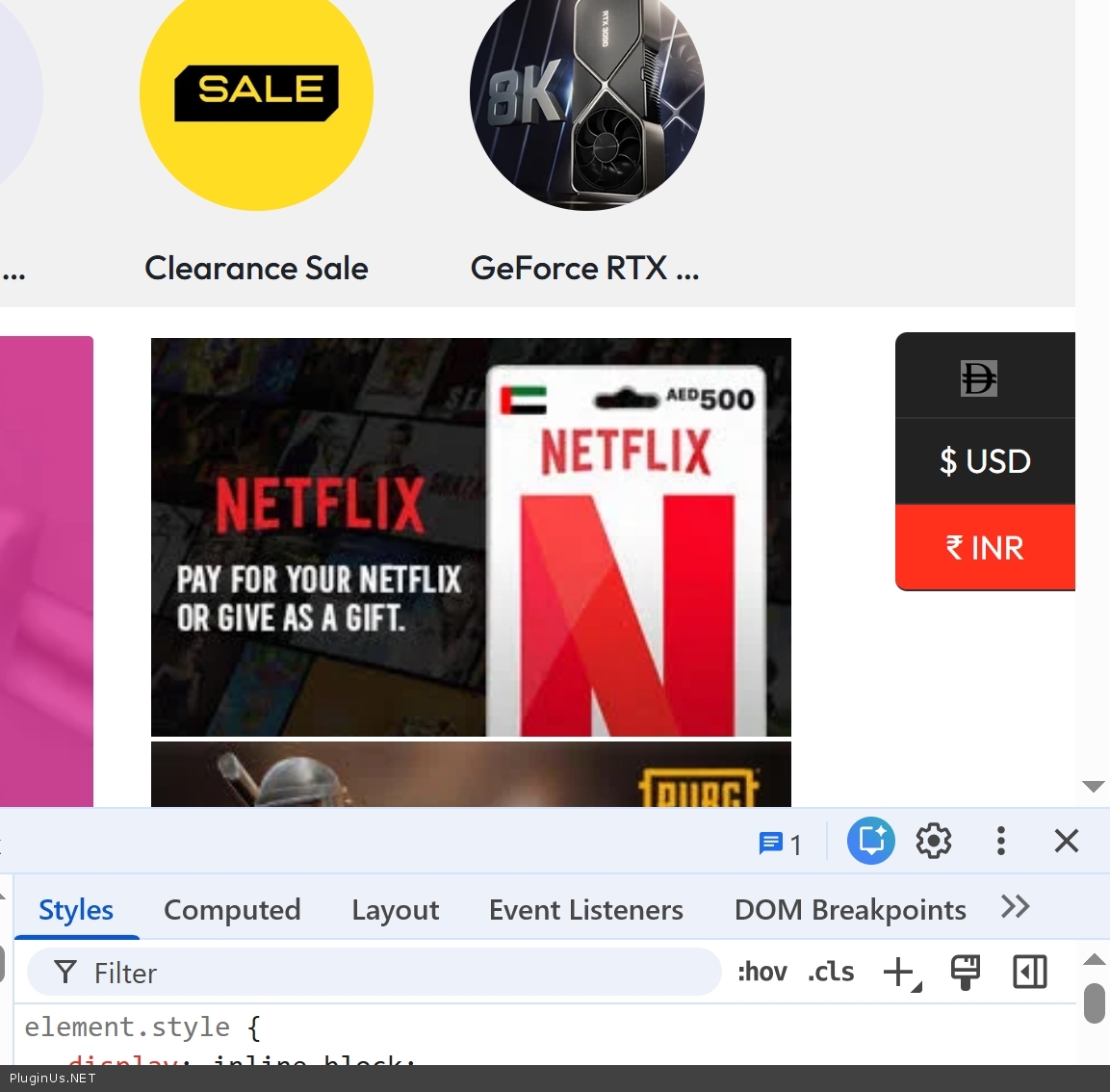
Welcome!
Quote from ashish.ag on February 12, 2026, 09:22We are facing one more issue - https://lightyellow-chicken-161714.hostingersite.com/
when activating the plugin- FOX - Currency Switcher Professional for WooCommerce
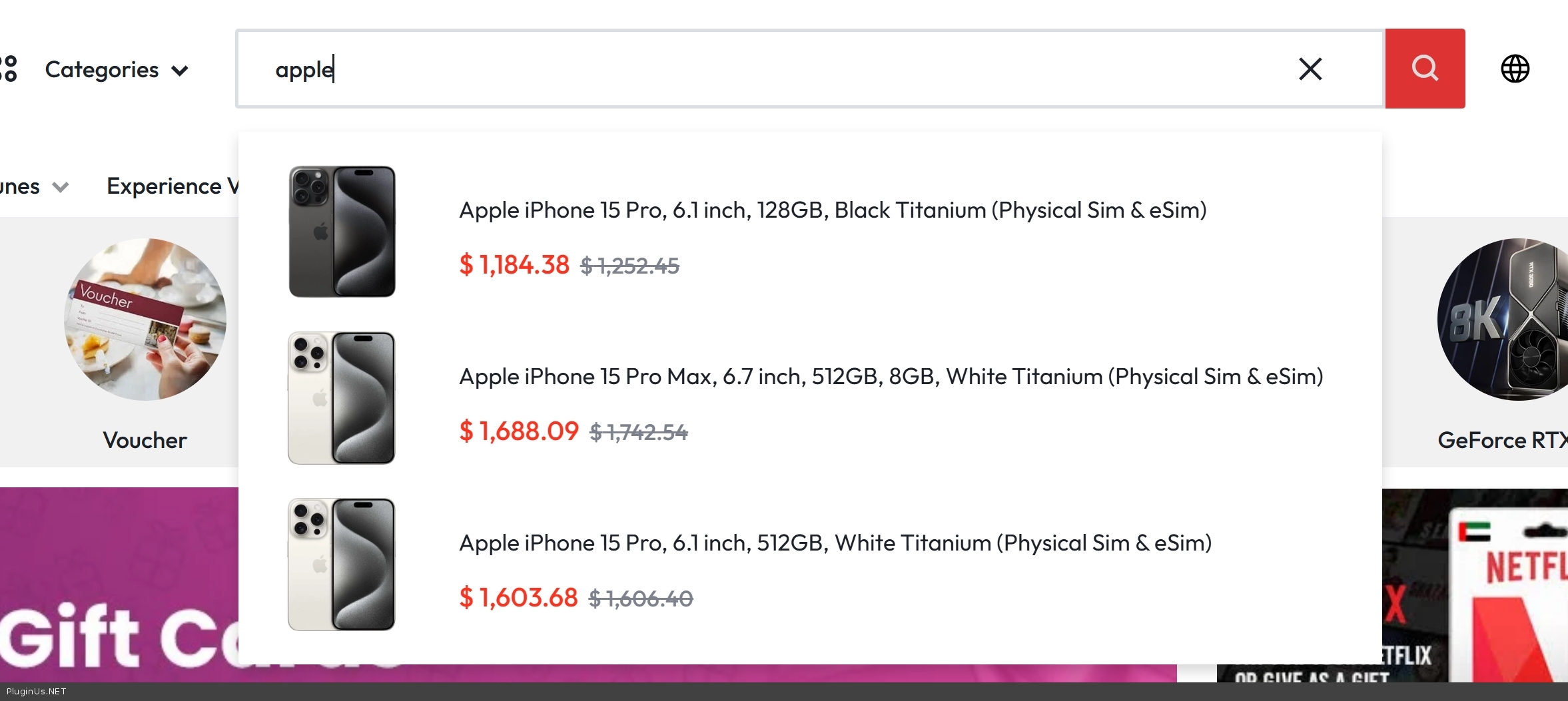
1- Search bar results pricing is not visible; only the loader is showing.
2- On the load more button category or shop page results, sometimes the product is not showing and the pricing is not visible; only the loader is showing.After deactivating this plugin its working fine
We are facing one more issue - https://lightyellow-chicken-161714.hostingersite.com/
when activating the plugin- FOX - Currency Switcher Professional for WooCommerce
1- Search bar results pricing is not visible; only the loader is showing.
2- On the load more button category or shop page results, sometimes the product is not showing and the pricing is not visible; only the loader is showing.
After deactivating this plugin its working fine


Quote from Alex Dovlatov on February 12, 2026, 13:36Hello
Fixed! Into current wp theme file functions.php was added next script:
add_action('wp_footer', function() {
    ?>
    <script>
    jQuery(function($) {
        setInterval(function() {
            // Find search results container
            var $container = $('.header-search__results, .search-list');

            if ($container.length > 0) {
                // Find prices with preloader class
                var $prices = $container.find('.woocs_preloader_ajax');

                if ($prices.length > 0) {
                    //console.log('WOOCS: Removing preloader from ' + $prices.length + ' prices');
                    // Just remove preloader class - that's it!
                    $prices.removeClass('woocs_preloader_ajax');
                }
            }
        }, 1000);
    });
    </script>
    <?php
}, 9999);
Hello
Fixed! Into current wp theme file functions.php was added next script:
add_action('wp_footer', function() {
    ?>
    <script>
    jQuery(function($) {
        setInterval(function() {
            // Find search results container
            var $container = $('.header-search__results, .search-list');

            if ($container.length > 0) {
                // Find prices with preloader class
                var $prices = $container.find('.woocs_preloader_ajax');

                if ($prices.length > 0) {
                    //console.log('WOOCS: Removing preloader from ' + $prices.length + ' prices');
                    // Just remove preloader class - that's it!
                    $prices.removeClass('woocs_preloader_ajax');
                }
            }
        }, 1000);
    });
    </script>
    <?php
}, 9999);
Quote from ashish.ag on February 12, 2026, 14:07Hi team,
Search is working now but the shop page load more product still have same issue - https://lightyellow-chicken-161714.hostingersite.com/shop/
Hi team,
Search is working now but the shop page load more product still have same issue - https://lightyellow-chicken-161714.hostingersite.com/shop/
Quote from Alex Dovlatov on February 12, 2026, 14:16Hello
Sorry, second issue also is fixed now:
add_action('wp_footer', function() {
    ?>
    <script>
    jQuery(function($) {
        setInterval(function() {
            // Find search results container
            //var $container = $('.header-search__results, .search-list');
            var $container = $('body');

            if ($container.length > 0) {
                // Find prices with preloader class
                var $prices = $container.find('.woocs_preloader_ajax');

                if ($prices.length > 0) {
                    //console.log('WOOCS: Removing preloader from ' + $prices.length + ' prices');
                    // Just remove preloader class - that's it!
                    $prices.removeClass('woocs_preloader_ajax');
                }
            }
        }, 1000);
    });
    </script>
    <?php
}, 9999);
Hello
Sorry, second issue also is fixed now:
add_action('wp_footer', function() {
    ?>
    <script>
    jQuery(function($) {
        setInterval(function() {
            // Find search results container
            //var $container = $('.header-search__results, .search-list');
            var $container = $('body');

            if ($container.length > 0) {
                // Find prices with preloader class
                var $prices = $container.find('.woocs_preloader_ajax');

                if ($prices.length > 0) {
                    //console.log('WOOCS: Removing preloader from ' + $prices.length + ' prices');
                    // Just remove preloader class - that's it!
                    $prices.removeClass('woocs_preloader_ajax');
                }
            }
        }, 1000);
    });
    </script>
    <?php
}, 9999);