PluginUs.Net - Business Tools for WooCommerce and WordPress

[realize your idea - make your dreams come true]

Support Forum

You need to log-in to create request (topic) to the support

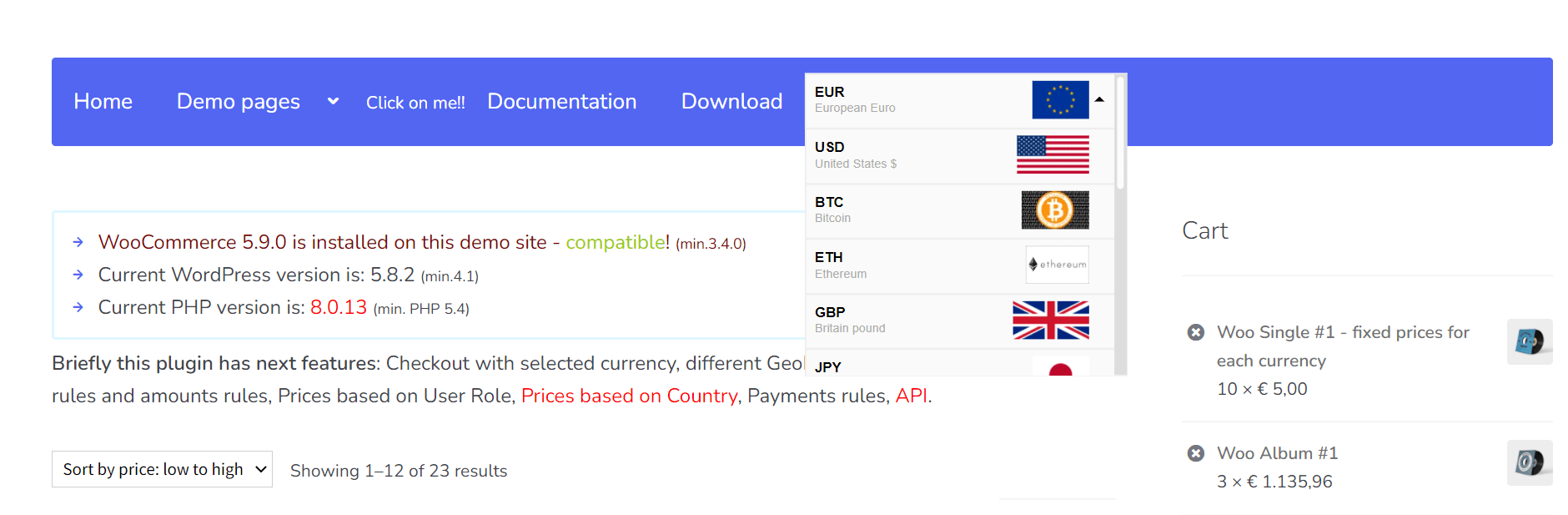
How can I add the WooCommerce Currency Switcher to the menu bar of the website?

The support doesn work on Saturdays and Sundays, so some Friday requests can be answered on Monday. If you have problems with registration ask help on contact us page please
If you not got email within 24~36 business hours, firstly check your spam box, and if no any email from the support there - back to the forum and read answer here. DO NOT ANSWER ON EMAILS [noreply@pluginus.net] FROM THE FORUM!! Emails are just for your info, all answers should be published only here.
The support doesn work on Saturdays and Sundays, so some Friday requests can be answered on Monday.

How can I add the WooCommerce Currency Switcher to the menu bar of the website?

1. How can I add a currency converter to the menu bar of the website? After adding, can all pages with product prices on the website be used? Please tell me the specific method of operation, thank you.

This is our website: forsuncnc.com

I plan to test the effect of the free version on our website first, and if possible, we will consider the premium version.

2. After purchasing your premium version, if you encounter problems during the installation and configuration process, can you get your help? If our website finds that the effect is not up to the desired effect when using it, can I apply for a refund?

Hello

  1.  Read  this  please - https://currency-switcher.com/how-to-drop-woocommerce-currency-switcher-in-menu
  2. if you encounter problems during the installation and configuration process, can you get your help? - Yes

can I apply for a refund?  - https://themeforest.net/page/customer_refund_policy