

Hierarchical dropdown and ajax refresh
The support doesn work on Saturdays and Sundays, so some Friday requests can be answered on Monday. If you have problems with registration ask help on contact us page pleaseIf you not got email within 24~36 business hours, firstly check your spam box, and if no any email from the support there - back to the forum and read answer here. DO NOT ANSWER ON EMAILS [noreply@pluginus.net] FROM THE FORUM!! Emails are just for your info, all answers should be published only here.
The support doesn work on Saturdays and Sundays, so some Friday requests can be answered on Monday.

Quote from langhedev on January 27, 2021, 10:24Hi,
I've just purchased the pro version of Woof product filters, and I have 2 questions:
- does the products needs to be assigned to the whole terms hierarchy, or just the "bottom" terms? If the first case is true, is it possible to change the behaviour with a hook/filter?
- I'm currently using a custom made theme, so ajax is not working (it's not refreshing the product list). I'm guessing it's a class names issue. What specific classes is the plugin using / looking for? So I can add them to my template.
Thanks :-)
Best
Hi,
I've just purchased the pro version of Woof product filters, and I have 2 questions:
- does the products needs to be assigned to the whole terms hierarchy, or just the"bottom" terms? If the first case is true, is it possible to change the behaviour with a hook/filter?
- I'm currently using a custom made theme, so ajax is not working (it's not refreshing the product list). I'm guessing it's a class names issue. What specific classes is the plugin using / looking for? So I can add them to my template.
Thanks :-)
Best

Quote from Pablo Borysenco on January 27, 2021, 13:28Hello
- this works for the whole hierarchy. Exceptions are category pages
- Use standard hooks woocommerce_before_shop_loop AND woocommerce_after_shop_loop in your custom template
Hello
- this works for the whole hierarchy. Exceptions are category pages
- Use standard hooks woocommerce_before_shop_loop AND woocommerce_after_shop_loop in your custom template
Quote from langhedev on January 28, 2021, 08:59Hi Pablo, thank you for your answer
- So if I have Country > Region > City, I can assign a product only to City, correct?
- I'm not sure I can do that (probably need to refactor a bit of stuff), can you just tell me which class/IDs ajax/js is looking for?
thanks
Hi Pablo, thank you for your answer
- So if I have Country > Region > City, I can assign a product only to City, correct?
- I'm not sure I can do that (probably need to refactor a bit of stuff), can you just tell me which class/IDs ajax/js is looking for?
thanks
Quote from Pablo Borysenco on January 28, 2021, 12:58Hello
- If you are on the taxonomy page "Region"
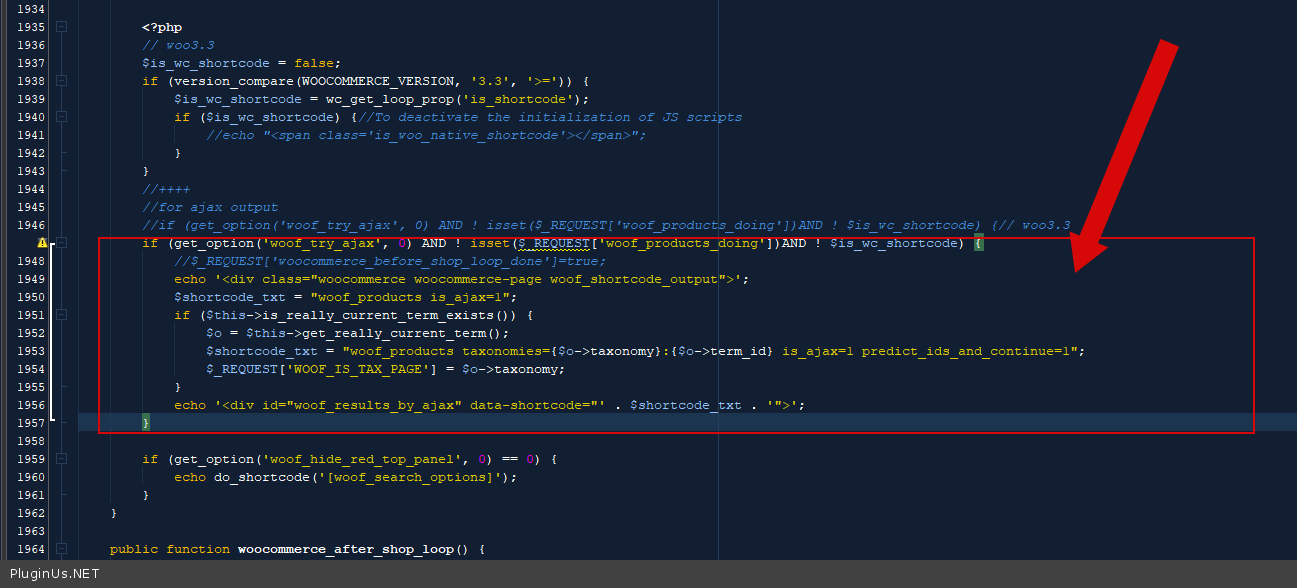
- It's not so easy. You can check it in file - wp-content\plugins\woocommerce-products-filter\index.php - function woocommerce_before_shop_loop() - https://c2n.me/4aJeJ7M.png It will be easier for you to call these two hooks.
Hello
- If you are on the taxonomy page"Region"
- It's not so easy. You can check it in file - wp-content\plugins\woocommerce-products-filter\index.php - function woocommerce_before_shop_loop() - https://c2n.me/4aJeJ7M.png It will be easier for you to call these two hooks.
Quote from langhedev on February 9, 2021, 12:51Hi Pablo, awesome I made it work, thank you :-)
On question though, the filters do not seems to work well with pagination, even in your demo: https://demo.products-filter.com/working-with-hierarchy-drop-down/.
If I go on page 2, and then filter, the filter does not work. Is it the default behaviour or some kind of bug?
Thanks!
Hi Pablo, awesome I made it work, thank you :-)
On question though, the filters do not seems to work well with pagination, even in your demo: https://demo.products-filter.com/working-with-hierarchy-drop-down/.
If I go on page 2, and then filter, the filter does not work. Is it the default behaviour or some kind of bug?
Thanks!
Quote from Pablo Borysenco on February 9, 2021, 14:49Hello
Is it the default behaviour or some kind of bug? - OK! Thank you for info! I'll pass it to the developers
Hello
Is it the default behaviour or some kind of bug? - OK! Thank you for info! I'll pass it to the developers
Quote from Pablo Borysenco on February 11, 2021, 14:22Hello
Please drop me exact link to your page with the issue
Hello
Please drop me exact link to your page with the issue
Quote from langhedev on March 4, 2021, 17:03Hi Pablo, sorry, I missed your reply.
The website is currently in local enviroment. But I can push it on a staging server..
Anyway I noticed that this problem happens also on your demo page: https://demo.products-filter.com/working-with-hierarchy-drop-down/, along with another problem: on the first try the filters do not actually filter anything. You have to filter, reset filter and then filter again, then it will work.
I have recorded a small video to show you: https://drive.google.com/file/d/1DmYo6BMofWJPqiW-CaoZPSMLQmC8YBcu/view
Hi Pablo, sorry, I missed your reply.
The website is currently in local enviroment. But I can push it on a staging server..
Anyway I noticed that this problem happens also on your demo page: https://demo.products-filter.com/working-with-hierarchy-drop-down/, along with another problem: on the first try the filters do not actually filter anything. You have to filter, reset filter and then filter again, then it will work.
I have recorded a small video to show you: https://drive.google.com/file/d/1DmYo6BMofWJPqiW-CaoZPSMLQmC8YBcu/view
Quote from Pablo Borysenco on March 5, 2021, 13:05Hello
Anyway I noticed that this problem happens also on your demo page: - I saw this in a previous post! And I know the reason for this. And your site shouldn't have such an error.
Better drop me a small video of your site
Hello
Anyway I noticed that this problem happens also on your demo page: - I saw this in a previous post! And I know the reason for this. And your site shouldn't have such an error.
Better drop me a small video of your site
Quote from langhedev on March 5, 2021, 19:16Hi Pablo, better yet, I deployed the code on a public host: https://ecpfrizioni.com/negozio/
Here you can see the same issues both with pagination and filtering :-)
Hi Pablo, better yet, I deployed the code on a public host: https://ecpfrizioni.com/negozio/
Here you can see the same issues both with pagination and filtering :-)
Quote from Pablo Borysenco on March 8, 2021, 16:47Hello
Please read this - https://products-filter.com/pagination-troubles-in-ajax-mode/
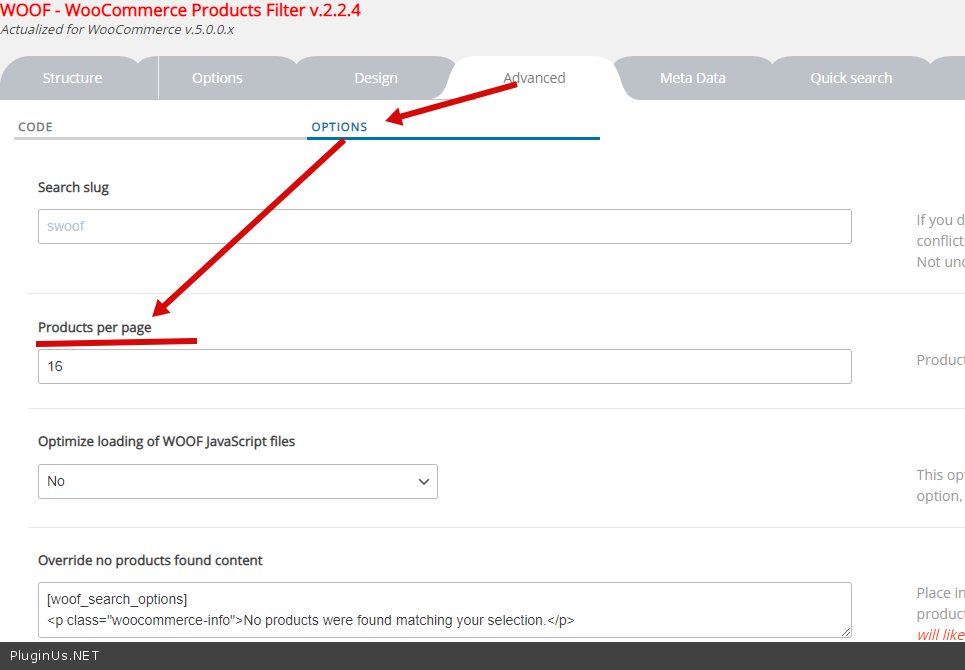
Set per-page - https://c2n.me/4bdJcqA.png
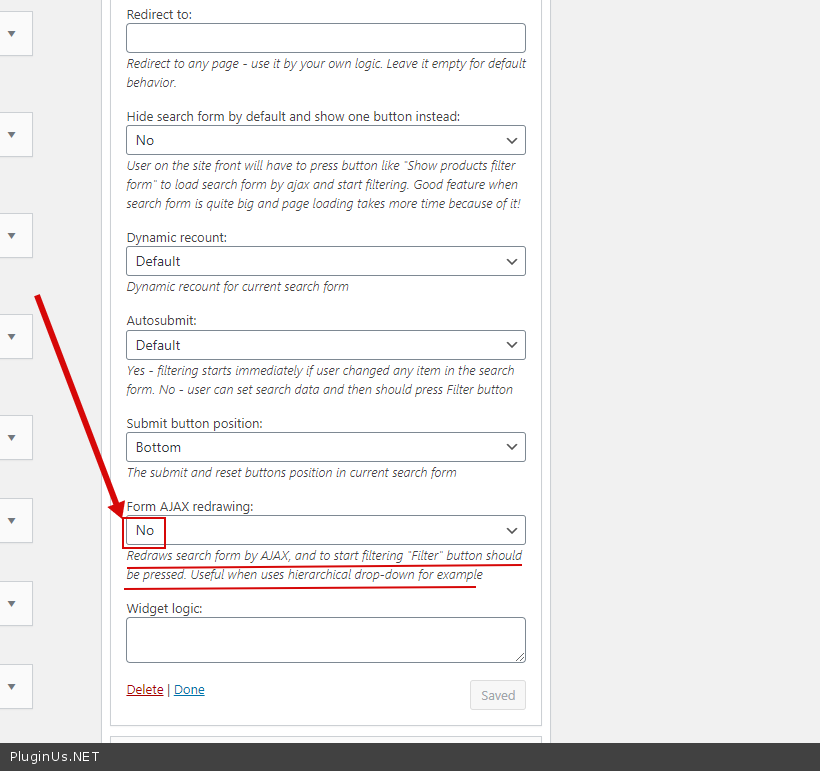
My short video - https://c2n.me/4bdJg6p Please check this option - https://c2n.me/4bdJhyv.png
Hello
Please read this - https://products-filter.com/pagination-troubles-in-ajax-mode/
Set per-page - https://c2n.me/4bdJcqA.png
My short video - https://c2n.me/4bdJg6p Please check this option - https://c2n.me/4bdJhyv.png
Quote from langhedev on March 9, 2021, 12:55Hi Pablo,
thanks, I'll check it out :-)
Hi Pablo,
thanks, I'll check it out :-)
Quote from Pablo Borysenco on March 9, 2021, 14:16Hello
Ok! Welcome;)
Hello
Ok! Welcome;)