

Hide filter when there are subcategories
The support doesn work on Saturdays and Sundays, so some Friday requests can be answered on Monday. If you have problems with registration ask help on contact us page pleaseIf you not got email within 24~36 business hours, firstly check your spam box, and if no any email from the support there - back to the forum and read answer here. DO NOT ANSWER ON EMAILS [noreply@pluginus.net] FROM THE FORUM!! Emails are just for your info, all answers should be published only here.
The support doesn work on Saturdays and Sundays, so some Friday requests can be answered on Monday.

Quote from khromakov on February 9, 2021, 13:15Dear Support,
I would like to hide filter (both standard auto filter and sidebar filter) in case there are subcategories.
For example, hide here: https://ortoteka.lv/katalogs/kompresija/ or https://ortoteka.lv/katalogs/
But definitely show here where there are just products left: https://ortoteka.lv/katalogs/kompresija/pusgaras-zekes/
Could you please help us.
Sincerely,
Dear Support,
I would like to hide filter (both standard auto filter and sidebar filter) in case there are subcategories.
For example, hide here: https://ortoteka.lv/katalogs/kompresija/ or https://ortoteka.lv/katalogs/
But definitely show here where there are just products left: https://ortoteka.lv/katalogs/kompresija/pusgaras-zekes/
Could you please help us.
Sincerely,

Quote from Pablo Borysenco on February 10, 2021, 12:16Hello
You can use this option - https://c2n.me/4aTwcte.png
Hello
You can use this option - https://c2n.me/4aTwcte.png
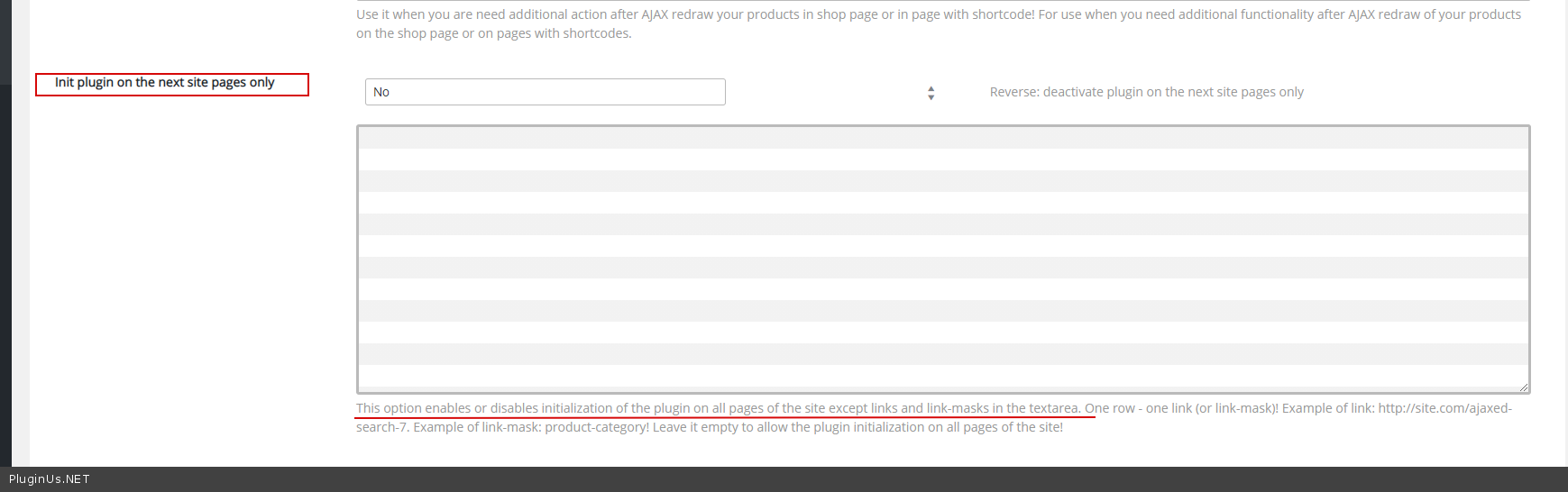
Quote from khromakov on February 10, 2021, 12:54Hello,
I do not think that this is a good option because it means manually entering the link for all the languages and tracking whether there are any changes.
However, even if I try, I need to hide the filters here:
https://ortoteka.lv/katalogs/
https://ortoteka.lv/katalogs/kompresija/
But to show them, e.g, here:
https://ortoteka.lv/katalogs/kompresija/pusgaras-zekes/
If I enter the first link in a list, the plugin considers it as a mask and hides everything. Please let me know how to correctly enter the links and tell whether it is possible to automate this hiding (in order not list the links manually).
Sincerely,
Hello,
I do not think that this is a good option because it means manually entering the link for all the languages and tracking whether there are any changes.
However, even if I try, I need to hide the filters here:
https://ortoteka.lv/katalogs/kompresija/
But to show them, e.g, here:
https://ortoteka.lv/katalogs/kompresija/pusgaras-zekes/
If I enter the first link in a list, the plugin considers it as a mask and hides everything. Please let me know how to correctly enter the links and tell whether it is possible to automate this hiding (in order not list the links manually).
Sincerely,
Quote from Pablo Borysenco on February 11, 2021, 12:26Hello
it is possible to automate this hiding (in order not list the links manually). - my plugin doesn't affect the display of widgets. In this case, use third-party plugins to hide widgets.
If I enter the first link in a list, the plugin considers it as a mask and hides everything. - I can give you a code that will change this behavior
Hello
it is possible to automate this hiding (in order not list the links manually). - my plugin doesn't affect the display of widgets. In this case, use third-party plugins to hide widgets.
If I enter the first link in a list, the plugin considers it as a mask and hides everything. - I can give you a code that will change this behavior
Quote from khromakov on February 11, 2021, 15:20Hello,
No, this is not about the widget (I could hide it easily). It concerns hiding the auto filter on mobile too, for example.
Yes, please give me the code so that I can add there main categories (the ones that have nested layout).
Sincerely,
Hello,
No, this is not about the widget (I could hide it easily). It concerns hiding the auto filter on mobile too, for example.
Yes, please give me the code so that I can add there main categories (the ones that have nested layout).
Sincerely,
Quote from Pablo Borysenco on February 12, 2021, 12:30Hello
Try in file - \wp-content\plugins\woocommerce-products-filter\index.php change this functions:
private function is_should_init() {
if (is_admin()) {
return true;
}//stop loading the plugins filters and its another functionality on all pages of the site
if (isset($this->settings['init_only_on']) AND ! empty($this->settings['init_only_on'])) {
$links = explode(PHP_EOL, trim($this->settings['init_only_on']));
$server_link = '';
//print_r($_SERVER);
if (isset($_SERVER['SCRIPT_URI'])) {
$server_link = $_SERVER['SCRIPT_URI'];
} else {
if (isset($_SERVER['REQUEST_URI'])) {
$server_link = site_url() . $_SERVER['REQUEST_URI'];
}
}//***
$removeChar = ["https://", "http://", "/"];
$init=true;
if (!empty($server_link)) {
$server_link_mask = str_replace($removeChar, '', trim(stripcslashes($server_link), " /"));
//echo stripcslashes($server_link_mask . '<br />');
foreach ($links as $key => $pattern_url) {$pattern_url = str_replace($removeChar, '', trim(stripcslashes($pattern_url), " /"));
$use_mask=true;
if(stripos($pattern_url,'#')===0){
$pattern_url=ltrim($pattern_url,"#");
$use_mask=false;
}if($use_mask){
preg_match('/(.+)?' . trim($pattern_url) . '(.+)?/', $server_link_mask, $matches);
$init_tmp = !empty($matches);
}else{
$init_tmp =($pattern_url== $server_link_mask);
}
if (isset($this->settings['init_only_on_reverse']) AND $this->settings['init_only_on_reverse']) {
$init_tmp = !$init_tmp ;
}if (!$init_tmp AND $init) {
$init = false;
}
}
if($init){
$this->is_activated=true;
return true;
}
}
} else {
return true;
}return false;
}
To exclude mask function use symbol #
An example:
#https://ortoteka.lv/katalogs/
#https://ortoteka.lv/katalogs/kompresija/
Hello
Try in file - \wp-content\plugins\woocommerce-products-filter\index.php change this functions:
private function is_should_init() {
if (is_admin()) {
return true;
}
//stop loading the plugins filters and its another functionality on all pages of the site
if (isset($this->settings['init_only_on']) AND ! empty($this->settings['init_only_on'])) {
$links = explode(PHP_EOL, trim($this->settings['init_only_on']));
$server_link = '';
//print_r($_SERVER);
if (isset($_SERVER['SCRIPT_URI'])) {
$server_link = $_SERVER['SCRIPT_URI'];
} else {
if (isset($_SERVER['REQUEST_URI'])) {
$server_link = site_url() . $_SERVER['REQUEST_URI'];
}
}
//***
$removeChar = ["https://","http://","/"];
$init=true;
if (!empty($server_link)) {
$server_link_mask = str_replace($removeChar, '', trim(stripcslashes($server_link)," /"));
//echo stripcslashes($server_link_mask . '<br />');
foreach ($links as $key => $pattern_url) {
$pattern_url = str_replace($removeChar, '', trim(stripcslashes($pattern_url)," /"));
$use_mask=true;
if(stripos($pattern_url,'#')===0){
$pattern_url=ltrim($pattern_url,"#");
$use_mask=false;
}
if($use_mask){
preg_match('/(.+)?' . trim($pattern_url) . '(.+)?/', $server_link_mask, $matches);
$init_tmp = !empty($matches);
}else{
$init_tmp =($pattern_url== $server_link_mask);
}
if (isset($this->settings['init_only_on_reverse']) AND $this->settings['init_only_on_reverse']) {
$init_tmp = !$init_tmp ;
}
if (!$init_tmp AND $init) {
$init = false;
}
}
if($init){
$this->is_activated=true;
return true;
}
}
} else {
return true;
}
return false;
}
To exclude mask function use symbol #
An example:
#https://ortoteka.lv/katalogs/
#https://ortoteka.lv/katalogs/kompresija/
Quote from khromakov on February 13, 2021, 22:55Hello,
Thank you! I have tried but unfortunately it works only if I enter one line. If there are 2+ lines, this code stops working. The filter becomes visible everywhere.
Sincerely,
Hello,
Thank you! I have tried but unfortunately it works only if I enter one line. If there are 2+ lines, this code stops working. The filter becomes visible everywhere.
Sincerely,
Quote from Pablo Borysenco on February 15, 2021, 13:56Hello
Ok! Please drop me wp-admin+FTP access - https://c2n.me/43SC6rb.png -> https://c2n.me/42BAoj4.png I will check it
Hello
Ok! Please drop me wp-admin+FTP access - https://c2n.me/43SC6rb.png -> https://c2n.me/42BAoj4.png I will check it


Quote from khromakov on June 2, 2021, 22:01Hello,
Unfortunately, our staging site is unfortunately not ready yet. Could we maybe somehow check it without access. Does it work perfectly on your test site?
Sincerely,
Hello,
Unfortunately, our staging site is unfortunately not ready yet. Could we maybe somehow check it without access. Does it work perfectly on your test site?
Sincerely,
Quote from Pablo Borysenco on June 3, 2021, 11:55Hello
Yes it works on our test sites
What version of the plugin are you using?
Hello
Yes it works on our test sites
What version of the plugin are you using?
Quote from khromakov on June 3, 2021, 12:27Hello,
The version is 2.2.5.3.
Hello,
The version is 2.2.5.3.
Quote from Pablo Borysenco on June 4, 2021, 11:52hello
Drop me screenshots of this setting - https://share.pluginus.net/image/i20210604125241.png
hello
Drop me screenshots of this setting - https://share.pluginus.net/image/i20210604125241.png

Quote from khromakov on June 4, 2021, 12:01Hello,
The situation is the following.
1. If I leave only one line of URL, it works fine and hides the widget where necessary.
https://ibb.co/zNGSHdX
2. If I enter any second line, the widget is visible on all the pages and therefore the function does not work as expected.
https://ibb.co/Q9Qy7qV
Hello,
The situation is the following.
1. If I leave only one line of URL, it works fine and hides the widget where necessary.
2. If I enter any second line, the widget is visible on all the pages and therefore the function does not work as expected.
Quote from Pablo Borysenco on June 8, 2021, 12:21Hello
Ok! Try in file - \wp-content\plugins\woocommerce-products-filter\index.php - change code - https://share.pluginus.net/image/i20210608132014.png
$pattern_url = trim(ltrim($pattern_url, "#"));
and do a terst
Hello
Ok! Try in file - \wp-content\plugins\woocommerce-products-filter\index.php - change code - https://share.pluginus.net/image/i20210608132014.png

$pattern_url = trim(ltrim($pattern_url,"#"));
and do a terst
Quote from khromakov on June 8, 2021, 15:05It works great, thank you! Will it be included in the next updates too?
It works great, thank you! Will it be included in the next updates too?
Quote from Pablo Borysenco on June 9, 2021, 10:16Hello
Great!
Will it be included in the next updates too? - Yes!
Hello
Great!
Will it be included in the next updates too? - Yes!