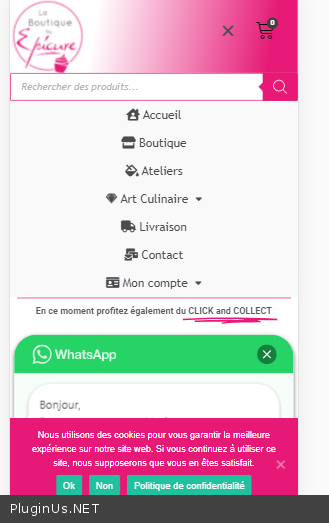
Hide category after reset filter
The support doesn work on Saturdays and Sundays, so some Friday requests can be answered on Monday. If you have problems with registration ask help on contact us page pleaseIf you not got email within 24~36 business hours, firstly check your spam box, and if no any email from the support there - back to the forum and read answer here. DO NOT ANSWER ON EMAILS [noreply@pluginus.net] FROM THE FORUM!! Emails are just for your info, all answers should be published only here.
The support doesn work on Saturdays and Sundays, so some Friday requests can be answered on Monday.

Quote from Bernard on November 30, 2020, 09:52Hello,
I have a category in my products that should never be displayed. It works well with a plugin like "Hide Category Product". But when I use WOOF Product Filter, when resetting the filter, the products belonging to the hidden category reappear again in the shop store including in the drop-down list of categories.
Is there a way to find a solution for this?
Thank you so much.
Cordially.
Bernard
Hello,
I have a category in my products that should never be displayed. It works well with a plugin like"Hide Category Product". But when I use WOOF Product Filter, when resetting the filter, the products belonging to the hidden category reappear again in the shop store including in the drop-down list of categories.
Is there a way to find a solution for this?
Thank you so much.
Cordially.
Bernard

Quote from Pablo Borysenco on November 30, 2020, 18:04Hello Bernard
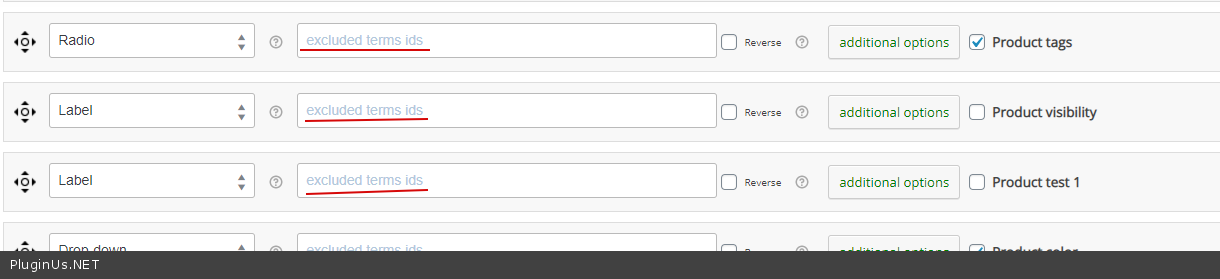
To exclude from dropdown lis - https://c2n.me/4a20wgM.png
But unfortunately the plugin cannot hide products by category.
You need code customization
Hello Bernard
To exclude from dropdown lis - https://c2n.me/4a20wgM.png
But unfortunately the plugin cannot hide products by category.
You need code customization
Quote from Bernard on November 30, 2020, 18:21Hello Pablo,
It's good for the dropdown list.
Thank you,
Hello Pablo,
It's good for the dropdown list.
Thank you,
Quote from Bernard on December 1, 2020, 04:52Hello,
In fact, the problem is that as soon as I use the "reset filter" button, my shop page displays the products of the hidden category.
I saw on a post of a request from someone that you have the front.js file modified on line 338 and 340 by replacing link with the site link. This is so, I suppose, that after the reset filter, we are not directed to "https://mydomain.com/boutique?swoof=1&paged=1" (this is where the products not to be displayed appear ) but rather towards "https://mydomain.com/boutique?swoof=1" because indeed there, these products are not there and it is what I would need.
So I modified this piece of code (photo attached).
My question is: did I enter my URLs correctly? Indeed, it does not appear to be operative.
Thank you very much while waiting for your really powerful plugin.
cordially
Bernard
Below is the piece of code modified by me
function woof_init_reset_button() {
jQuery('.woof_reset_search_form').life('click', function () {
//var link = jQuery(this).data('link');
woof_ajax_page_num = 1;
woof_ajax_redraw = 0;
woof_reset_btn_action=true;
if (woof_is_permalink) {
woof_current_values = {};
woof_submit_link(woof_get_submit_link().split("page/")[0]);
} else {
var link = woof_shop_page;
if (woof_current_values.hasOwnProperty('page_id')) {
link = location.protocol + '//' + location.host + "/?page_id=" + woof_current_values.page_id;
woof_current_values = {'page_id': woof_current_values.page_id};
woof_get_submit_link();
}
//***
woof_submit_link("https://laboutiquebyepicure.com/boutique");
if (woof_is_ajax) {
history.pushState({}, "", "https://laboutiquebyepicure.com/boutique");
if (woof_current_values.hasOwnProperty('page_id')) {
woof_current_values = {'page_id': woof_current_values.page_id};
} else {
woof_current_values = {};
}
}
}
return false;
});
}
Hello,
In fact, the problem is that as soon as I use the"reset filter" button, my shop page displays the products of the hidden category.
I saw on a post of a request from someone that you have the front.js file modified on line 338 and 340 by replacing link with the site link. This is so, I suppose, that after the reset filter, we are not directed to"https://mydomain.com/boutique?swoof=1&paged=1" (this is where the products not to be displayed appear ) but rather towards"https://mydomain.com/boutique?swoof=1" because indeed there, these products are not there and it is what I would need.
So I modified this piece of code (photo attached).
My question is: did I enter my URLs correctly? Indeed, it does not appear to be operative.
Thank you very much while waiting for your really powerful plugin.
cordially
Bernard
Below is the piece of code modified by me
function woof_init_reset_button() {
jQuery('.woof_reset_search_form').life('click', function () {
//var link = jQuery(this).data('link');
woof_ajax_page_num = 1;
woof_ajax_redraw = 0;
woof_reset_btn_action=true;
if (woof_is_permalink) {
woof_current_values = {};
woof_submit_link(woof_get_submit_link().split("page/")[0]);
} else {
var link = woof_shop_page;
if (woof_current_values.hasOwnProperty('page_id')) {
link = location.protocol + '//' + location.host +"/?page_id=" + woof_current_values.page_id;
woof_current_values = {'page_id': woof_current_values.page_id};
woof_get_submit_link();
}
//***
woof_submit_link("https://laboutiquebyepicure.com/boutique");
if (woof_is_ajax) {
history.pushState({},"", "https://laboutiquebyepicure.com/boutique");
if (woof_current_values.hasOwnProperty('page_id')) {
woof_current_values = {'page_id': woof_current_values.page_id};
} else {
woof_current_values = {};
}
}
}
return false;
});
}
Quote from Pablo Borysenco on December 1, 2020, 14:26Hello
Please try to disable ajax mode and do a test
Hello
Please try to disable ajax mode and do a test
Quote from Bernard on December 1, 2020, 16:23Hello,
Thank you very much.
It's all right by disabling Ajax.
Hourra
Bernard
Hello,
Thank you very much.
It's all right by disabling Ajax.
Hourra
Bernard
Quote from Pablo Borysenco on December 2, 2020, 13:08Hello Bernard
Welcome;)
Hello Bernard
Welcome;)
Quote from Bernard on December 11, 2020, 10:14Hello,
Great your plugin really. A question :
When I add a label (tag) to a series of products, this tag does not appear in the list of radio buttons of the filter.
Finally, we see it very quickly but the line disappears immediately?
Thank you very much for your answer.
cordially
Bernard
Hello,
Great your plugin really. A question :
When I add a label (tag) to a series of products, this tag does not appear in the list of radio buttons of the filter.
Finally, we see it very quickly but the line disappears immediately?
Thank you very much for your answer.
cordially
Bernard
Quote from Pablo Borysenco on December 11, 2020, 15:02Hello Bernard
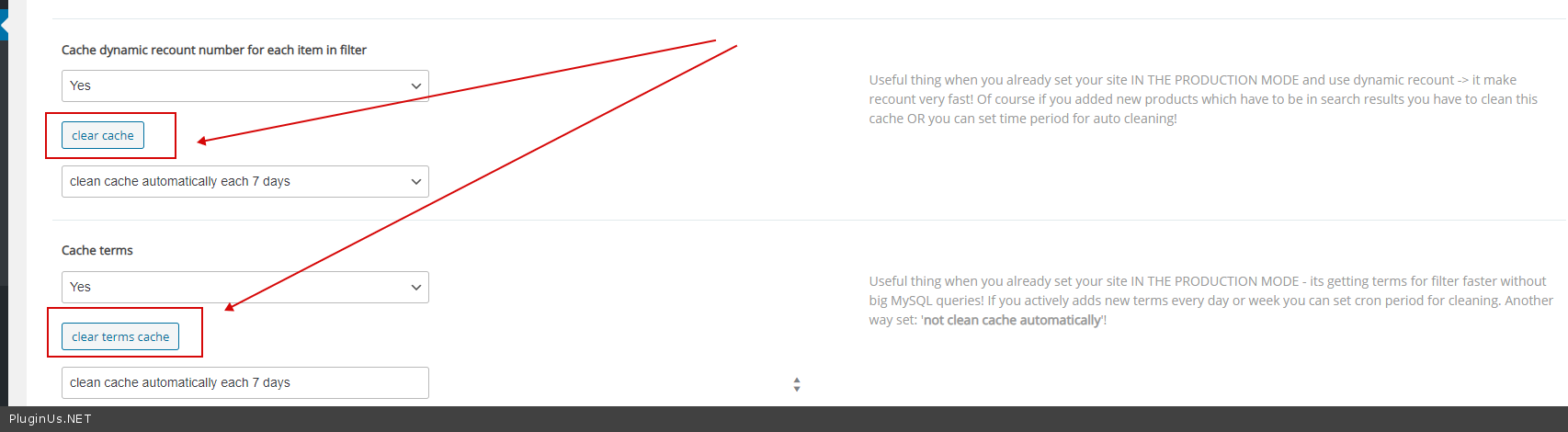
If you use "turbo mode" - please recreate a file
And clear all cache - https://c2n.me/4abJq20.png
Hello Bernard
If you use "turbo mode" - please recreate a file
And clear all cache - https://c2n.me/4abJq20.png
Quote from Bernard on December 11, 2020, 15:30Hello Pablo,
Il's ok.
Taank you very much.
Good day
Bernard
Hello Pablo,
Il's ok.
Taank you very much.
Good day
Bernard
Quote from Pablo Borysenco on December 14, 2020, 13:31Hello Bernard
Great! Welcome;)
Hello Bernard
Great! Welcome;)
Quote from Bernard on December 19, 2020, 08:27Hello, I'm in Turbo mode and I can't see the fields anywhere - Cache Dynamic recount and - Cahe terms Why Thank you cordially Bernard
Hello, I'm in Turbo mode and I can't see the fields anywhere - Cache Dynamic recount and - Cahe terms Why Thank you cordially Bernard
Quote from Bernard on December 19, 2020, 11:20My previous question is still linked to the fact that on the smartphone the last product label appears in the filter but not on the PC ???
thank you so much
Bernard
My previous question is still linked to the fact that on the smartphone the last product label appears in the filter but not on the PC ???
thank you so much
Bernard
Quote from Pablo Borysenco on December 21, 2020, 14:10Hello Bernard
Cache Dynamic recount and - Cahe terms Why - Because turbo mode has no caching
the last product label appear - Describe it in more detail. You can create screenshots.
Hello Bernard
Cache Dynamic recount and - Cahe terms Why - Because turbo mode has no caching
the last product label appear - Describe it in more detail. You can create screenshots.
Quote from Bernard on December 23, 2020, 19:58Hello, Before settling anyway to refine my request on the previous question, I would like to ask you a favor.
I would like to change the icon of the magnifying glass which allows you to open the filters of your plugin (on the smartphone and tablet version) with an icon of my choice, for example one which represents a filter.
Indeed, the user of my site may be led to confuse your filters magnifier with the more classic search magnifier that I use with an other plugin.
So could you agree to allow me to change this icon to a magnifying glass or show me how to do it myself.
Thank you so much.
Best regards.
Bernard
Hello, Before settling anyway to refine my request on the previous question, I would like to ask you a favor.
I would like to change the icon of the magnifying glass which allows you to open the filters of your plugin (on the smartphone and tablet version) with an icon of my choice, for example one which represents a filter.
Indeed, the user of my site may be led to confuse your filters magnifier with the more classic search magnifier that I use with an other plugin.
So could you agree to allow me to change this icon to a magnifying glass or show me how to do it myself.
Thank you so much.
Best regards.
Bernard
Quote from Pablo Borysenco on December 24, 2020, 13:32Hello Bernard
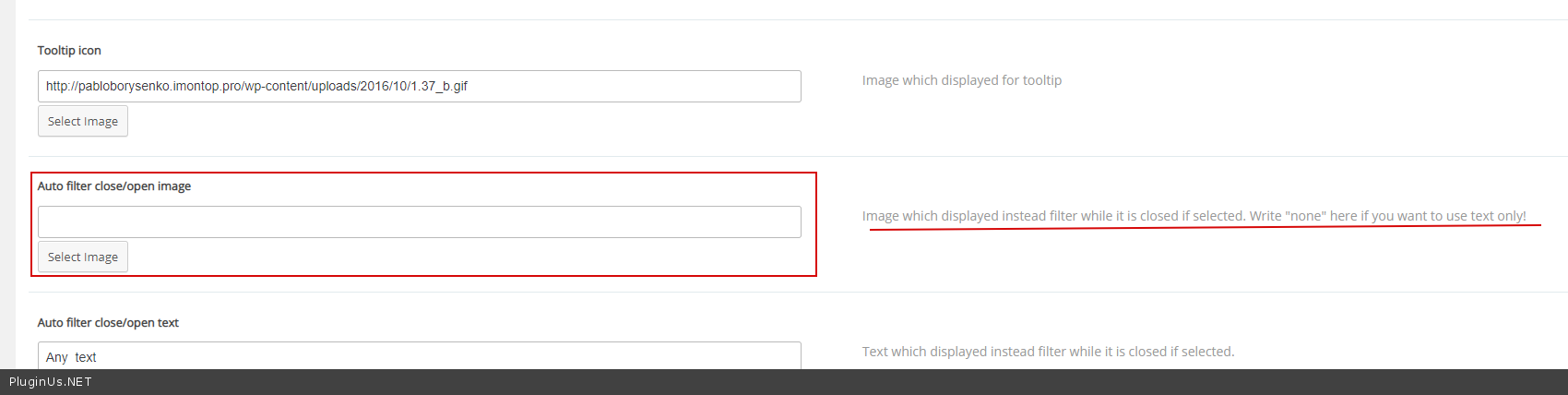
show me how to do it myself. - In Design Tab - https://c2n.me/4am1SYc.png
Hello Bernard
show me how to do it myself. - In Design Tab - https://c2n.me/4am1SYc.png
Quote from Bernard on April 13, 2021, 23:53Hello, I still have a little problem. On the phone, my filters are placed just below the header which includes the general menu with 3 lines as for many sites.
When I unfold the filters, if I also unfold the menu, it appears below. So I wanted to make my menu on top with the z-index method. However, although I put as a value, the unfolded filter menu always remains first.
How should I do it please?
Thank you so much.
Cordially.
Bernard
Hello, I still have a little problem. On the phone, my filters are placed just below the header which includes the general menu with 3 lines as for many sites.
When I unfold the filters, if I also unfold the menu, it appears below. So I wanted to make my menu on top with the z-index method. However, although I put as a value, the unfolded filter menu always remains first.
How should I do it please?
Thank you so much.
Cordially.
Bernard
Quote from Pablo Borysenco on April 14, 2021, 16:20Hello Bernard
Please paste your license key here - https://c2n.me/43SC6rb.png -> https://c2n.me/42HBIt7.png
Add css
.elementor-shortcode .woof_auto_show{
z-index: 10;
}
Result - https://c2n.me/4bH1T9u.png
Hello Bernard
Please paste your license key here - https://c2n.me/43SC6rb.png -> https://c2n.me/42HBIt7.png


Add css
.elementor-shortcode .woof_auto_show{
z-index: 10;
}
Result - https://c2n.me/4bH1T9u.png