marcinsipak(@marcinsipak)
4 Posts
Customers
Quote from marcinsipak on February 13, 2026, 13:43
Hello,
I’ve encountered a compatibility issue between FOX – Currency Switcher Professional for WooCommerce and the Super Page Cache plugin:
https://wordpress.org/plugins/wp-cloudflare-page-cache/
Problem description:
When both plugins are enabled and Disk Cache is turned on in WP Cloudflare Super Page Cache:
- Changing the currency using FOX works correctly only on the current page
- After navigating to another page, the currency is incorrect / falls back to the default
- Prices are no longer consistent with the previously selected currency
If I:
- disable Disk Cache in WP Cloudflare Super Page Cache, or
- completely disable the cache plugin
→ FOX works correctly across all pages.
This looks like a caching issue related to currency handling (cookies / session) when disk page cache is enabled.
Questions:
- Is FOX officially compatible with Super Page Cache?
- Are there any recommended settings (e.g. cookie exclusions, headers, cache rules) to make them work together?
- Is there any planned fix or workaround for page cache plugins using disk cache?
I can provide additional details or run further tests if needed.
Thank you for your support.
Hello,
I’ve encountered a compatibility issue between FOX – Currency Switcher Professional for WooCommerce and the Super Page Cache plugin:
https://wordpress.org/plugins/wp-cloudflare-page-cache/
Problem description:
When both plugins are enabled and Disk Cache is turned on in WP Cloudflare Super Page Cache:
- Changing the currency using FOX works correctly only on the current page
- After navigating to another page, the currency is incorrect / falls back to the default
- Prices are no longer consistent with the previously selected currency
If I:
- disable Disk Cache in WP Cloudflare Super Page Cache, or
- completely disable the cache plugin
→ FOX works correctly across all pages.
This looks like a caching issue related to currency handling (cookies / session) when disk page cache is enabled.
Questions:
- Is FOX officially compatible with Super Page Cache?
- Are there any recommended settings (e.g. cookie exclusions, headers, cache rules) to make them work together?
- Is there any planned fix or workaround for page cache plugins using disk cache?
I can provide additional details or run further tests if needed.
Thank you for your support.
marcinsipak(@marcinsipak)
4 PostsTopic Author
Customers
Quote from marcinsipak on February 16, 2026, 13:12
Hello Alex,
Thank you for your reply.
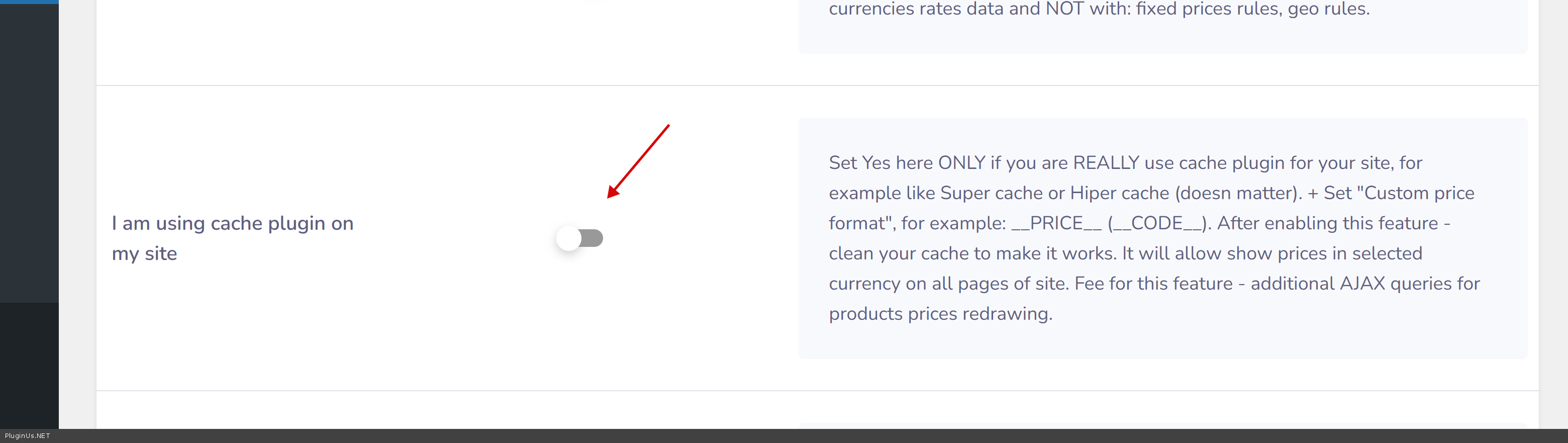
The option “I am using cache plugin on my site” in WOOCS → Options is already enabled, and I have reset all types of cache multiple times.
Unfortunately, the issue still persists.
Hello Alex,
Thank you for your reply.
The option “I am using cache plugin on my site” in WOOCS → Options is already enabled, and I have reset all types of cache multiple times.
Unfortunately, the issue still persists.