
Filters are getting hide
The support doesn work on Saturdays and Sundays, so some Friday requests can be answered on Monday. If you have problems with registration ask help on contact us page pleaseIf you not got email within 24~36 business hours, firstly check your spam box, and if no any email from the support there - back to the forum and read answer here. DO NOT ANSWER ON EMAILS [noreply@pluginus.net] FROM THE FORUM!! Emails are just for your info, all answers should be published only here.
The support doesn work on Saturdays and Sundays, so some Friday requests can be answered on Monday.

Quote from nimeshdev on August 21, 2026, 14:19Hey I am facing abnormal behaviour in you plugin. The filters I am using on shop page are getting hide on shop page sometimes. Also when I paginate and move to page 2 then also filters are getting removed and then filter doesn't get appeared again.
URL: https://staging.houtenzo.shop/alle-producten/
Also sometimes count are also not coming correct in filters for shop page.
I am not sure what issue is this please help me with this
Thanks
Hey I am facing abnormal behaviour in you plugin. The filters I am using on shop page are getting hide on shop page sometimes. Also when I paginate and move to page 2 then also filters are getting removed and then filter doesn't get appeared again.
URL: https://staging.houtenzo.shop/alle-producten/
Also sometimes count are also not coming correct in filters for shop page.
I am not sure what issue is this please help me with this
Thanks

Quote from Alex Dev on August 24, 2026, 11:51Hello
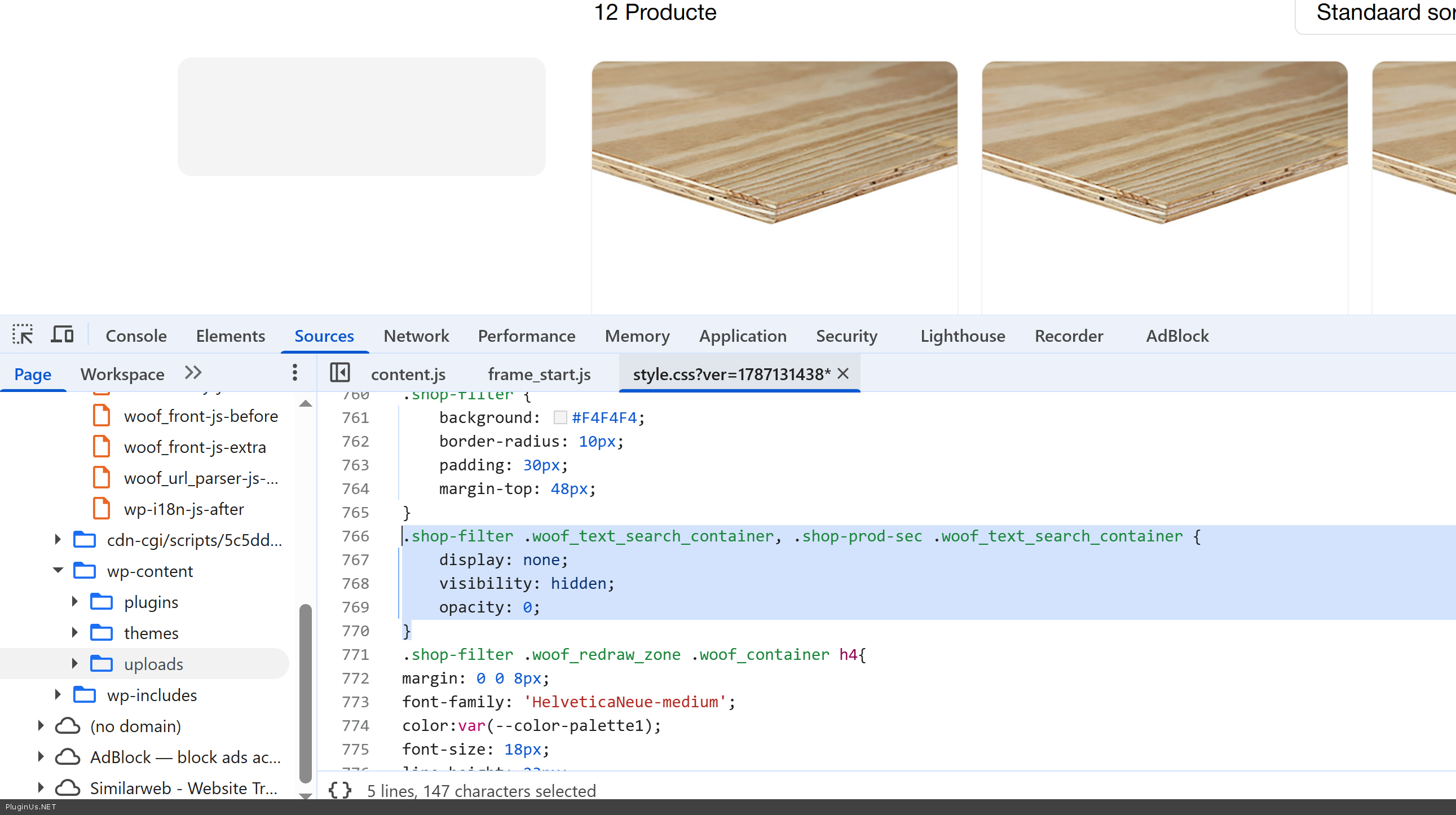
This is CSS of the current wp theme:
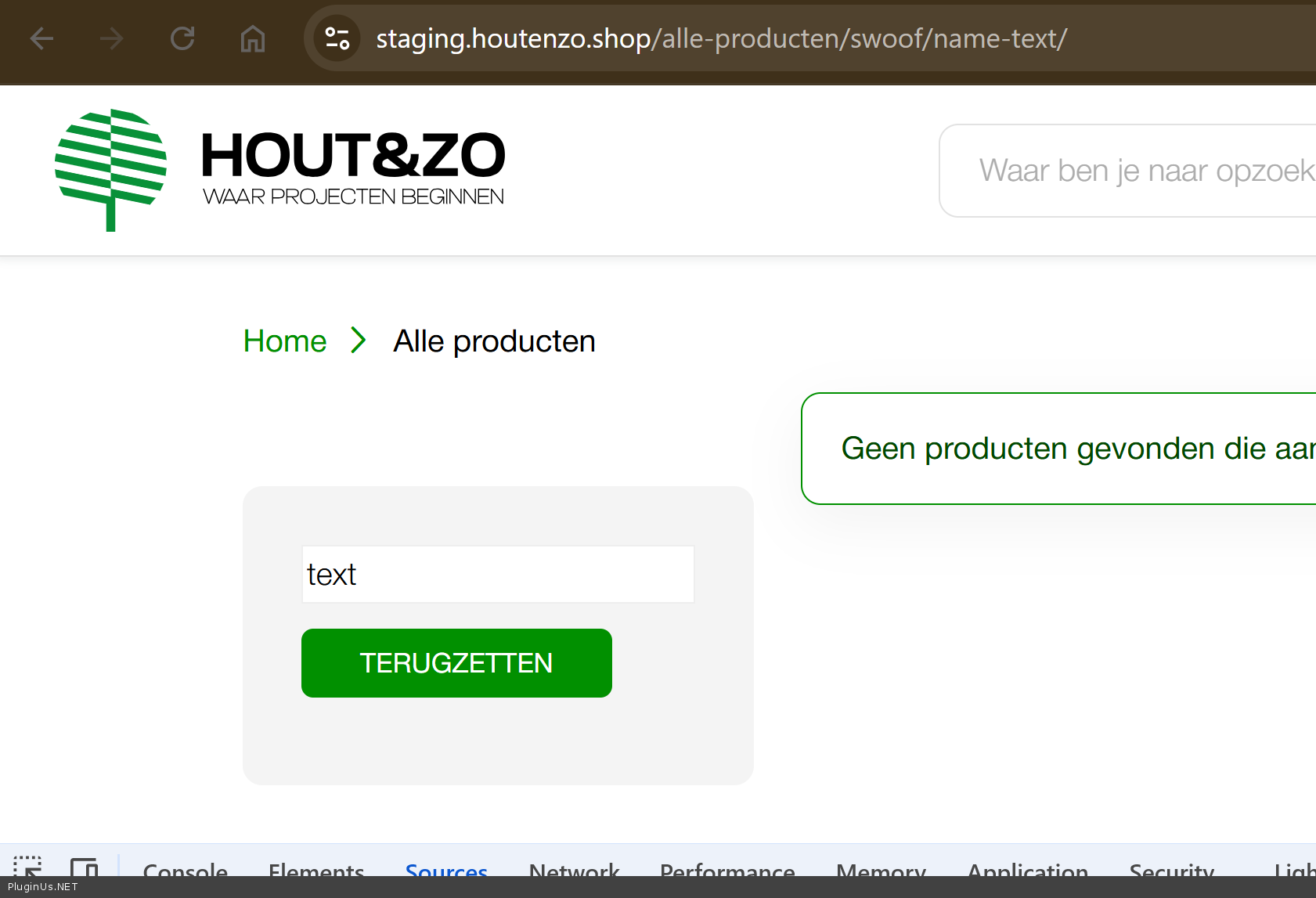
Styles should be rethink, and filter will be appeared
Welcome!
Hello
This is CSS of the current wp theme:
Styles should be rethink, and filter will be appeared
Welcome!
Quote from nimeshdev on August 24, 2026, 14:10I have other filters also enabled you can see please see the attached screenshot. I have disabled the search filter which you have mentioned hidden by css.
https://www.awesomescreenshot.com/image/62953731?key=779c75cdd29d038f2d668632537af7b3
My filters are not coming why?
Also filters sometimes comes but get removed when I go to page 2
See I am getting blank filters
https://www.awesomescreenshot.com/image/62954036?key=816d4bd972c27747bda8f5f0404111f6
Thanks
I have other filters also enabled you can see please see the attached screenshot. I have disabled the search filter which you have mentioned hidden by css.
https://www.awesomescreenshot.com/image/62953731?key=779c75cdd29d038f2d668632537af7b3
My filters are not coming why?
Also filters sometimes comes but get removed when I go to page 2
See I am getting blank filters
https://www.awesomescreenshot.com/image/62954036?key=816d4bd972c27747bda8f5f0404111f6
Thanks
Quote from Alex Dev on August 27, 2026, 12:15Hello
Our main suspect here is the CSS of your current theme. We already saw one filter element hidden by theme styles, and this looks like more of the same.
So let's confirm it first. Switch the theme to Storefront and look at the shop page and page 2 again. If the filters show up, we know for certain the styles of your theme are what removes them, and from there it is a matter of fixing those styles.
If the filters are still missing on Storefront, the next suspect is another plugin interfering. Deactivate everything except WooCommerce and HUSKY and check once more. If they appear, switch the other plugins back on one at a time until the problem comes back — the one that brings it back is the culprit.
If neither of these helps, then we need to look at the site ourselves. Please set up a staging copy of the site and leave the access details in the private section of this ticket: WordPress admin, FTP, and VPN credentials if the site is behind one. We will run the tests there directly.
Hello
Our main suspect here is the CSS of your current theme. We already saw one filter element hidden by theme styles, and this looks like more of the same.
So let's confirm it first. Switch the theme to Storefront and look at the shop page and page 2 again. If the filters show up, we know for certain the styles of your theme are what removes them, and from there it is a matter of fixing those styles.
If the filters are still missing on Storefront, the next suspect is another plugin interfering. Deactivate everything except WooCommerce and HUSKY and check once more. If they appear, switch the other plugins back on one at a time until the problem comes back — the one that brings it back is the culprit.
If neither of these helps, then we need to look at the site ourselves. Please set up a staging copy of the site and leave the access details in the private section of this ticket: WordPress admin, FTP, and VPN credentials if the site is behind one. We will run the tests there directly.
Quote from nimeshdev on August 31, 2026, 06:26Hi,
I have tried everything but issue is still there.
[deleted]
access details are added in private section. Please review it.
Hi,
I have tried everything but issue is still there.
[deleted]
access details are added in private section. Please review it.
Quote from Alex Dev on August 31, 2026, 11:54Hello
Check please wp-admin creds
FTP works fine ..
Hello
Check please wp-admin creds
FTP works fine ..
Quote from nimeshdev on August 31, 2026, 11:56Please try now it should work
Please try now it should work
Quote from nimeshdev on September 2, 2026, 06:53Hi there,
Is there any update
Hi there,
Is there any update
Quote from Alex Dev on September 4, 2026, 15:41Hello
Sorry for delay, our team was in vacations
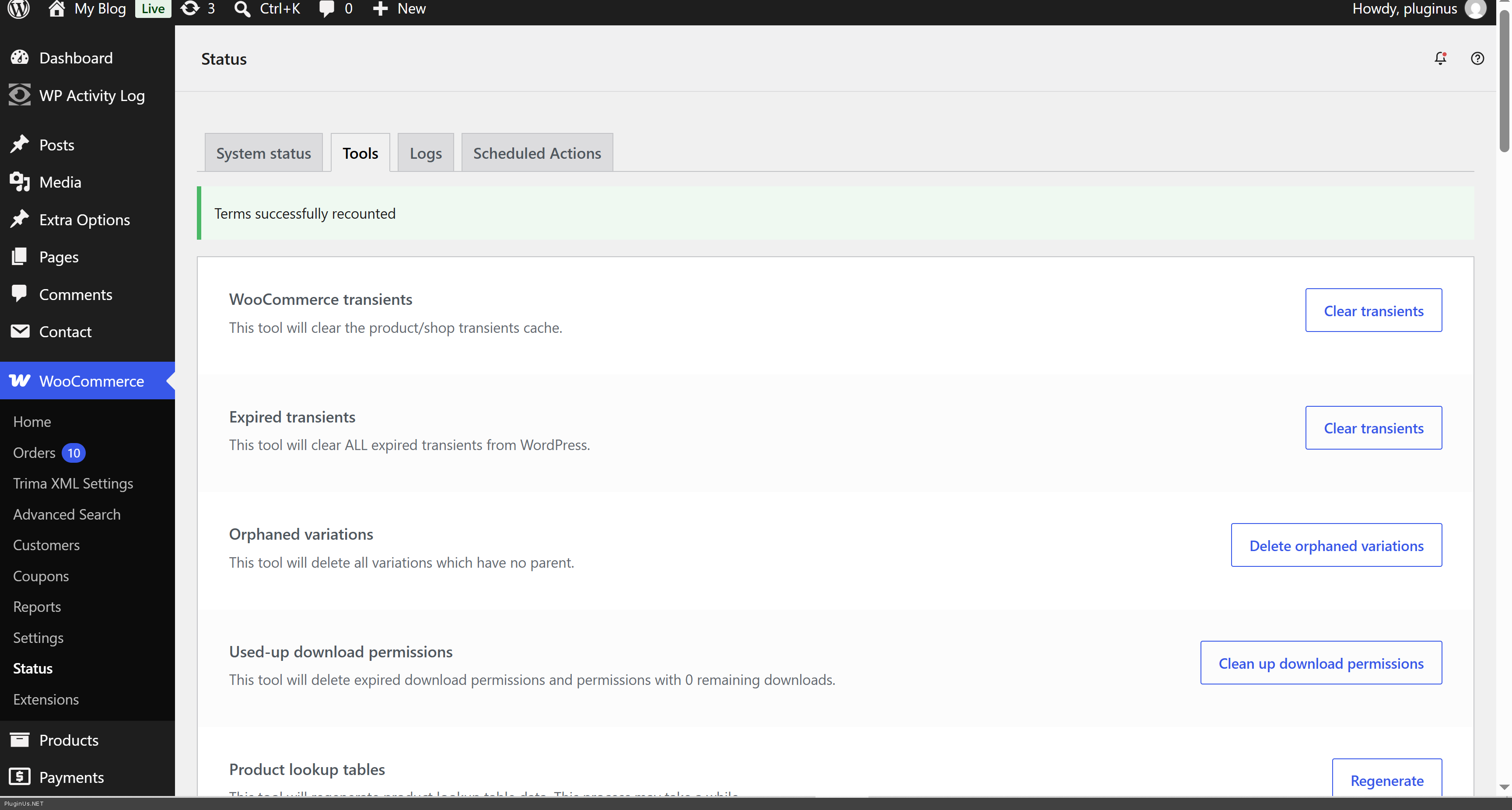
I did next: I wen to woocommerce tools page
and clicked to regenerate "Product lookup tables", "WooCommerce transients", "Term counts", "Clear template cache" and now items are visible
So, I entered this page https://dropship-vincent.aws-mob.in/shop/ and the filter is visible
alle-producten - this page is not exists on the sage site
Please give me exact pages where I should look and by your opinion the issue is still exists
The same is on categories page, for example: https://dropship-vincent.aws-mob.in/product-category/boards-vezel/constructief/
Hello
Sorry for delay, our team was in vacations
I did next: I wen to woocommerce tools page
and clicked to regenerate"Product lookup tables","WooCommerce transients","Term counts","Clear template cache" and now items are visible
So, I entered this page https://dropship-vincent.aws-mob.in/shop/ and the filter is visible
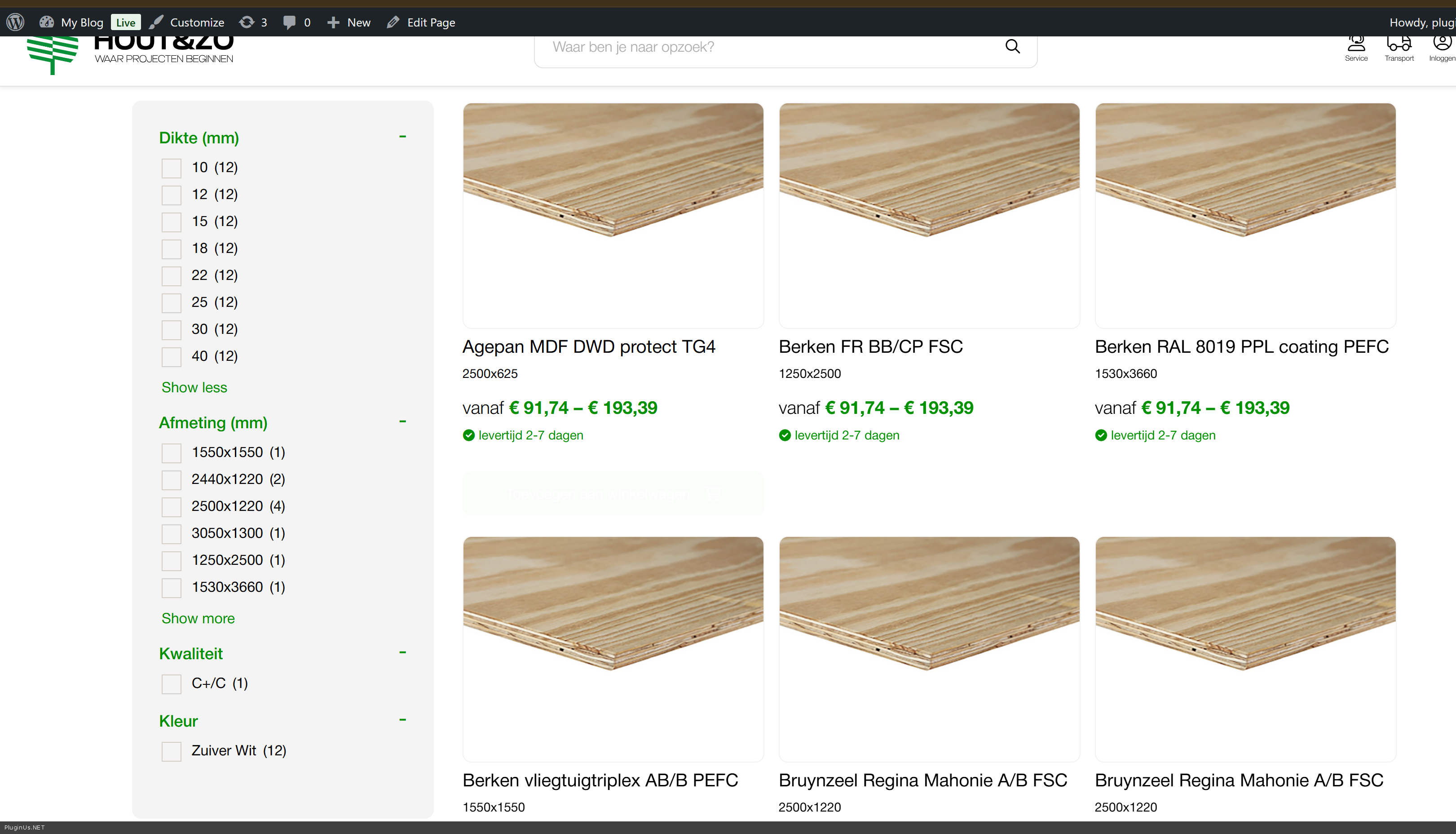
alle-producten - this page is not exists on the sage site
Please give me exact pages where I should look and by your opinion the issue is still exists
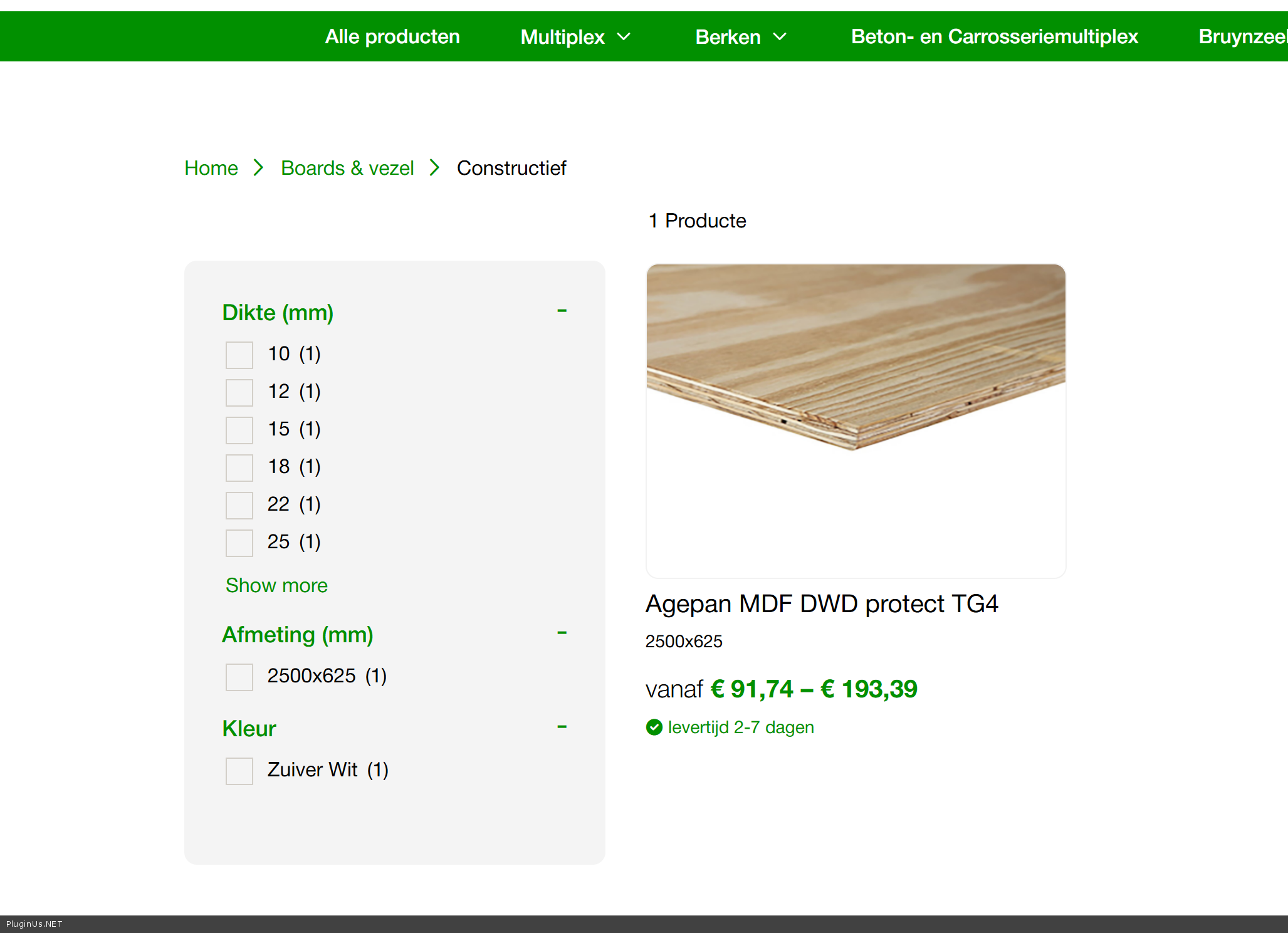
The same is on categories page, for example: https://dropship-vincent.aws-mob.in/product-category/boards-vezel/constructief/
Quote from nimeshdev on September 8, 2026, 06:16HI,
Yes filter are coming on shop page
https://www.awesomescreenshot.com/image/63371789?key=a85979c86d7371e1d1af2e16ce041118But when I go to page 2 in pagination then filter gets disappear on page 2 and when I go back to shop page again then filter doesn't appear again. See shared screenshots
https://www.awesomescreenshot.com/image/63371826?key=6783d4bdfe2c46c77a3fbd3ec9140101https://www.awesomescreenshot.com/image/63371841?key=28f02e342fb23e418a711961529450ad
Please have a look into it ASAP.
Thanks!
HI,
Yes filter are coming on shop page
https://www.awesomescreenshot.com/image/63371789?key=a85979c86d7371e1d1af2e16ce041118
But when I go to page 2 in pagination then filter gets disappear on page 2 and when I go back to shop page again then filter doesn't appear again. See shared screenshots
https://www.awesomescreenshot.com/image/63371826?key=6783d4bdfe2c46c77a3fbd3ec9140101
https://www.awesomescreenshot.com/image/63371841?key=28f02e342fb23e418a711961529450ad
Please have a look into it ASAP.
Thanks!
Quote from Alex Dev on September 9, 2026, 21:15Hello,
We have found what was going on, and it is not a problem with the filter itself.
Here is what we did on your staging site. We opened the products, checked the attribute checkboxes in the Attributes tab and saved the products, and we regenerated the WooCommerce lookup tables. After that the filter shows all the attribute blocks with correct counts again.
The important part is what actually fixed it. It was not the checkboxes, it was the act of saving the products. The "Visible on the product page" option only controls whether the attribute row is displayed on the product page, and our plugin does not read that setting at all. What matters is the link between a product and an attribute term in the database. When you save a product, WooCommerce rewrites those links and rebuilds its lookup tables, and that is what restored the counts.
This means the links were missing or incomplete before. We checked your database directly: for the Afmeting attribute only 8 of the 65 values had any product attached, and the attributes Afwerking, Houtsoort, Verlijming, Oppervlakte and Uitvoering had no products attached at all, across every value. The products showed those values in the admin, but the database had no connection between them, so nothing could count them. Our filter was reporting zero because zero was the correct answer to the question it asked.
That also explains the empty filter you saw. When all values count as zero and the option to hide empty positions is enabled, every value is removed, and with nothing left to show the filter block comes out empty.
There is something else you should know, and it is more serious than the filter. Before we saved the products, the shop page was showing 9 products. It now shows 12, which is the real number of products you have. We changed no setting that controls this. Three of your products were simply not being displayed to customers at all, because their records in the WooCommerce lookup tables were broken in the same way the attribute links were. So this was never only a filter problem, part of your catalogue was invisible in the shop.
Now the part that matters going forward. This is very likely caused by how products get into the site. If products are imported or synchronised automatically, and the import writes product data directly instead of going through WooCommerce, the term links and the lookup tables are never updated correctly. Saving a product by hand fixes it, which is why our work restored everything, but the next import run can break it again. Please check your import or synchronisation process. This needs fixing so that your products stay visible in the shop, not just for the sake of the filter.
One more thing we noticed, unrelated to all of the above. Your site returned a database error saying "Too many connections". That means the database server refuses new connections when the site gets busy, and while that happens queries return nothing at all, which can affect products, the cart and payments, not just the filter. Please raise this with your hosting provider and ask them to check the connection limit for your account.
Best regards
Alex
Hello,
We have found what was going on, and it is not a problem with the filter itself.
Here is what we did on your staging site. We opened the products, checked the attribute checkboxes in the Attributes tab and saved the products, and we regenerated the WooCommerce lookup tables. After that the filter shows all the attribute blocks with correct counts again.
The important part is what actually fixed it. It was not the checkboxes, it was the act of saving the products. The"Visible on the product page" option only controls whether the attribute row is displayed on the product page, and our plugin does not read that setting at all. What matters is the link between a product and an attribute term in the database. When you save a product, WooCommerce rewrites those links and rebuilds its lookup tables, and that is what restored the counts.
This means the links were missing or incomplete before. We checked your database directly: for the Afmeting attribute only 8 of the 65 values had any product attached, and the attributes Afwerking, Houtsoort, Verlijming, Oppervlakte and Uitvoering had no products attached at all, across every value. The products showed those values in the admin, but the database had no connection between them, so nothing could count them. Our filter was reporting zero because zero was the correct answer to the question it asked.
That also explains the empty filter you saw. When all values count as zero and the option to hide empty positions is enabled, every value is removed, and with nothing left to show the filter block comes out empty.
There is something else you should know, and it is more serious than the filter. Before we saved the products, the shop page was showing 9 products. It now shows 12, which is the real number of products you have. We changed no setting that controls this. Three of your products were simply not being displayed to customers at all, because their records in the WooCommerce lookup tables were broken in the same way the attribute links were. So this was never only a filter problem, part of your catalogue was invisible in the shop.
Now the part that matters going forward. This is very likely caused by how products get into the site. If products are imported or synchronised automatically, and the import writes product data directly instead of going through WooCommerce, the term links and the lookup tables are never updated correctly. Saving a product by hand fixes it, which is why our work restored everything, but the next import run can break it again. Please check your import or synchronisation process. This needs fixing so that your products stay visible in the shop, not just for the sake of the filter.
One more thing we noticed, unrelated to all of the above. Your site returned a database error saying"Too many connections". That means the database server refuses new connections when the site gets busy, and while that happens queries return nothing at all, which can affect products, the cart and payments, not just the filter. Please raise this with your hosting provider and ask them to check the connection limit for your account.
Best regards
Alex