
Filtering not working
The support doesn work on Saturdays and Sundays, so some Friday requests can be answered on Monday. If you have problems with registration ask help on contact us page pleaseIf you not got email within 24~36 business hours, firstly check your spam box, and if no any email from the support there - back to the forum and read answer here. DO NOT ANSWER ON EMAILS [noreply@pluginus.net] FROM THE FORUM!! Emails are just for your info, all answers should be published only here.
The support doesn work on Saturdays and Sundays, so some Friday requests can be answered on Monday.

Quote from andrea@interactive-design-group.com on September 17, 2022, 19:08Just updated and my filtering is no longer working. Here is an example https://miragesys.com/product-category/stock-containers/standard-series/m5/
Just updated and my filtering is no longer working. Here is an example https://miragesys.com/product-category/stock-containers/standard-series/m5/

Quote from Pablo Borysenco on September 19, 2022, 12:46Hello
Please disable JS optimization and do a test
Hello
Please disable JS optimization and do a test
Quote from andrea@interactive-design-group.com on September 19, 2022, 23:27I have disabled the js optimization with our wp rocket plugin, tested, still not working.
I have disabled the js optimization with our wp rocket plugin, tested, still not working.
Quote from Pablo Borysenco on September 20, 2022, 13:25Hello
Ok! I checked your site, JS is optimized
Do you use WP-rocket?
Please give me screenshots of the settings of the plugin that optimizes JS
Hello
Ok! I checked your site, JS is optimized
Do you use WP-rocket?
Please give me screenshots of the settings of the plugin that optimizes JS
Quote from andrea@interactive-design-group.com on September 20, 2022, 23:42I have disabled wp rocket and our cdn. still not working.
I have disabled wp rocket and our cdn. still not working.
Quote from Pablo Borysenco on September 21, 2022, 12:35Hello
Ok! Can you drop me wp-admin access - https://share.pluginus.net/image/i20210618130558.png -> https://share.pluginus.net/image/i20210618130637.png - I will check it
Hello
Ok! Can you drop me wp-admin access - https://share.pluginus.net/image/i20210618130558.png -> https://share.pluginus.net/image/i20210618130637.png - I will check it


Quote from andrea@interactive-design-group.com on September 21, 2022, 13:40PRIVATE DATA!!!
PRIVATE DATA!!!
Quote from Pablo Borysenco on September 22, 2022, 11:34Hello
This is an open forum. I showed you how to transfer data securely in a previous post.
I highly recommend changing your access as soon as possible
Hello
This is an open forum. I showed you how to transfer data securely in a previous post.
I highly recommend changing your access as soon as possible
Quote from andrea@interactive-design-group.com on October 12, 2022, 00:21I changed the access immediately, my appologies. I submitted your new credentials to log in via your secure method. Please advise.
I changed the access immediately, my appologies. I submitted your new credentials to log in via your secure method. Please advise.
Quote from Pablo Borysenco on October 12, 2022, 11:11Hello
Unfortunately, one password is not enough to enter the admin panel. Please provide full access data - https://share.pluginus.net/image/i20210618130558.png -> https://share.pluginus.net/image/i20210618130637.png
can you delete all your custom code - https://share.pluginus.net/image/i20221012091050.png - clear all cache and do a test
Hello
Unfortunately, one password is not enough to enter the admin panel. Please provide full access data - https://share.pluginus.net/image/i20210618130558.png -> https://share.pluginus.net/image/i20210618130637.png
can you delete all your custom code - https://share.pluginus.net/image/i20221012091050.png - clear all cache and do a test

Quote from andrea@interactive-design-group.com on October 12, 2022, 11:47I have added your user name to the private data area. Regarding your note to delete all custom code, I am not familiar with where you are referring to. Please advise.
I have added your user name to the private data area. Regarding your note to delete all custom code, I am not familiar with where you are referring to. Please advise.
Quote from Pablo Borysenco on October 12, 2022, 13:05Hello
Please try in file - wp-content\plugins\woocommerce-products-filter\index.php - remove those quotes - https://share.pluginus.net/image/i20221012110419.png clear all cache and do a test
OR drop me FTP access - https://share.pluginus.net/image/i20210618130558.png -> https://share.pluginus.net/image/i20210618130637.png - I will do it
Hello
Please try in file - wp-content\plugins\woocommerce-products-filter\index.php - remove those quotes - https://share.pluginus.net/image/i20221012110419.png clear all cache and do a test

OR drop me FTP access - https://share.pluginus.net/image/i20210618130558.png -> https://share.pluginus.net/image/i20210618130637.png - I will do it
Quote from andrea@interactive-design-group.com on October 13, 2022, 01:13Removed the snippit, flushed my server cache, and it still does not work. Please advise.
Removed the snippit, flushed my server cache, and it still does not work. Please advise.
Quote from Pablo Borysenco on October 13, 2022, 11:33Hello
https://c2n.me/4gRhOvE.png - Looks like you deleted everything
I think I didn't explain correctly. You only needed to remove two characters
The line should look like this:
woof_ext_init_functions = <?php echo json_encode(wc_clean(WOOF_EXT::$includes['js_init_functions'])); ?>;
Hello
https://c2n.me/4gRhOvE.png - Looks like you deleted everything
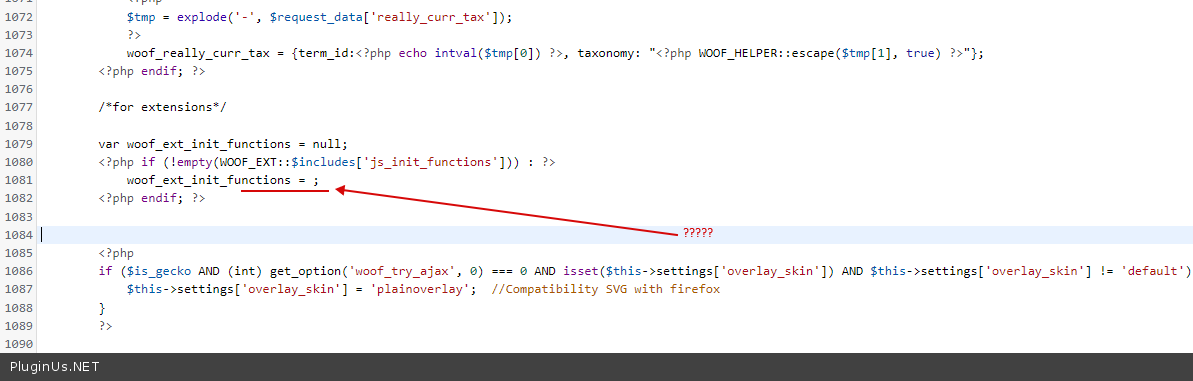
I think I didn't explain correctly. You only needed to remove two characters
The line should look like this:
woof_ext_init_functions = <?php echo json_encode(wc_clean(WOOF_EXT::$includes['js_init_functions'])); ?>;