
Filter shortcode and taxonomies
The support doesn work on Saturdays and Sundays, so some Friday requests can be answered on Monday. If you have problems with registration ask help on contact us page pleaseIf you not got email within 24~36 business hours, firstly check your spam box, and if no any email from the support there - back to the forum and read answer here. DO NOT ANSWER ON EMAILS [noreply@pluginus.net] FROM THE FORUM!! Emails are just for your info, all answers should be published only here.
The support doesn work on Saturdays and Sundays, so some Friday requests can be answered on Monday.

Quote from nielsjvd on April 2, 2021, 12:04I've got a non woocommerce page on which I want to show products and the filter bar.
I use both of the shortcodes of the plugin but something is going wrong.https://kruit.staging.jvdmedia.nl/seopages/stoelen-in-dwingeloo/
This is the link. On this page I want to show all the products in category "stoelen".
The products shown are all of the correct products. But when I look at the filterbar, it does not show the same as: https://kruit.staging.jvdmedia.nl/producten/stoelen
The shortcodes I use: [woof sid="auto_shortcode" autohide=0 taxonomies=product_cat:257]
and : [woof_products is_ajax=1 taxonomies=product_cat:257]EDIT:
I would like to show something like this:
https://kruit.staging.jvdmedia.nl/seopages/stoelen-in-dwingeloo/?product_cat=stoelen
But without the parameters
I've got a non woocommerce page on which I want to show products and the filter bar.
I use both of the shortcodes of the plugin but something is going wrong.
https://kruit.staging.jvdmedia.nl/seopages/stoelen-in-dwingeloo/
This is the link. On this page I want to show all the products in category"stoelen".
The products shown are all of the correct products. But when I look at the filterbar, it does not show the same as: https://kruit.staging.jvdmedia.nl/producten/stoelen
The shortcodes I use: [woof sid="auto_shortcode" autohide=0 taxonomies=product_cat:257]
and : [woof_products is_ajax=1 taxonomies=product_cat:257]
EDIT:
I would like to show something like this:
https://kruit.staging.jvdmedia.nl/seopages/stoelen-in-dwingeloo/?product_cat=stoelen
But without the parameters

Quote from Pablo Borysenco on April 5, 2021, 10:44Hello
Paste your license key here - https://c2n.me/43SC6rb.png -> https://c2n.me/42HBIt7.png
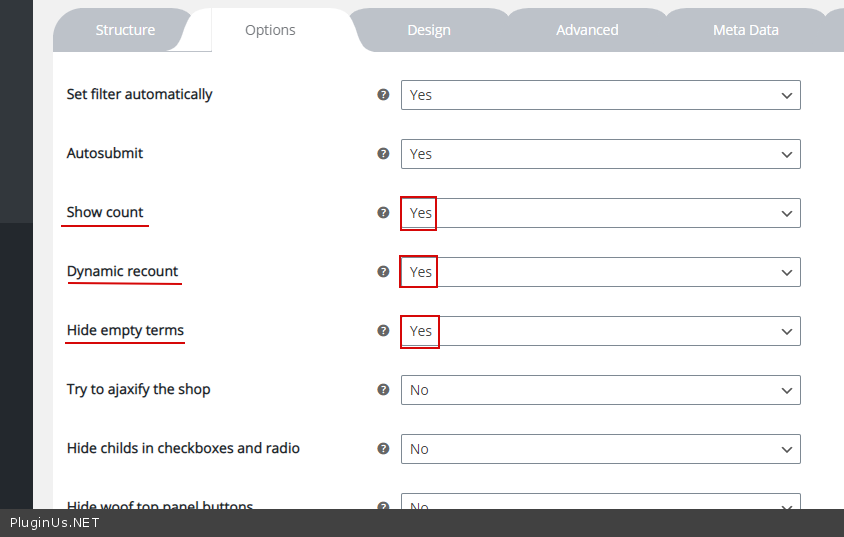
Check options - https://c2n.me/4bz8dG8.png
Hello
Paste your license key here - https://c2n.me/43SC6rb.png -> https://c2n.me/42HBIt7.png


Check options - https://c2n.me/4bz8dG8.png
Quote from nielsjvd on April 6, 2021, 09:53Hello,
Those options are already checked. I just pasted the license key in the private data.
Hello,
Those options are already checked. I just pasted the license key in the private data.
Quote from Pablo Borysenco on April 6, 2021, 11:46Hello
Those options are already checked. - Ok! Please add wp-admin - https://c2n.me/43SC6rb.png -> https://c2n.me/42BAoj4.png - I will check it
Hello
Those options are already checked. - Ok! Please add wp-admin - https://c2n.me/43SC6rb.png -> https://c2n.me/42BAoj4.png - I will check it

Quote from nielsjvd on April 6, 2021, 12:11I would rather not since the website contains private data.
What would you like to know from the admin enviroment?
I would rather not since the website contains private data.
What would you like to know from the admin enviroment?
Quote from Pablo Borysenco on April 7, 2021, 12:56I answered here - https://pluginus.net/support/topic/search-filters/
I answered here - https://pluginus.net/support/topic/search-filters/
Quote from nielsjvd on April 9, 2021, 09:30Hello,
Here are the screenshots:
https://ibb.co/mCZh2Kh
https://ibb.co/mJWCHSj
https://ibb.co/S7Rx6HD
Hello,
Here are the screenshots:
https://ibb.co/mCZh2Kh
https://ibb.co/mJWCHSj
https://ibb.co/S7Rx6HD
Quote from Pablo Borysenco on April 9, 2021, 15:54Hello
Try to use
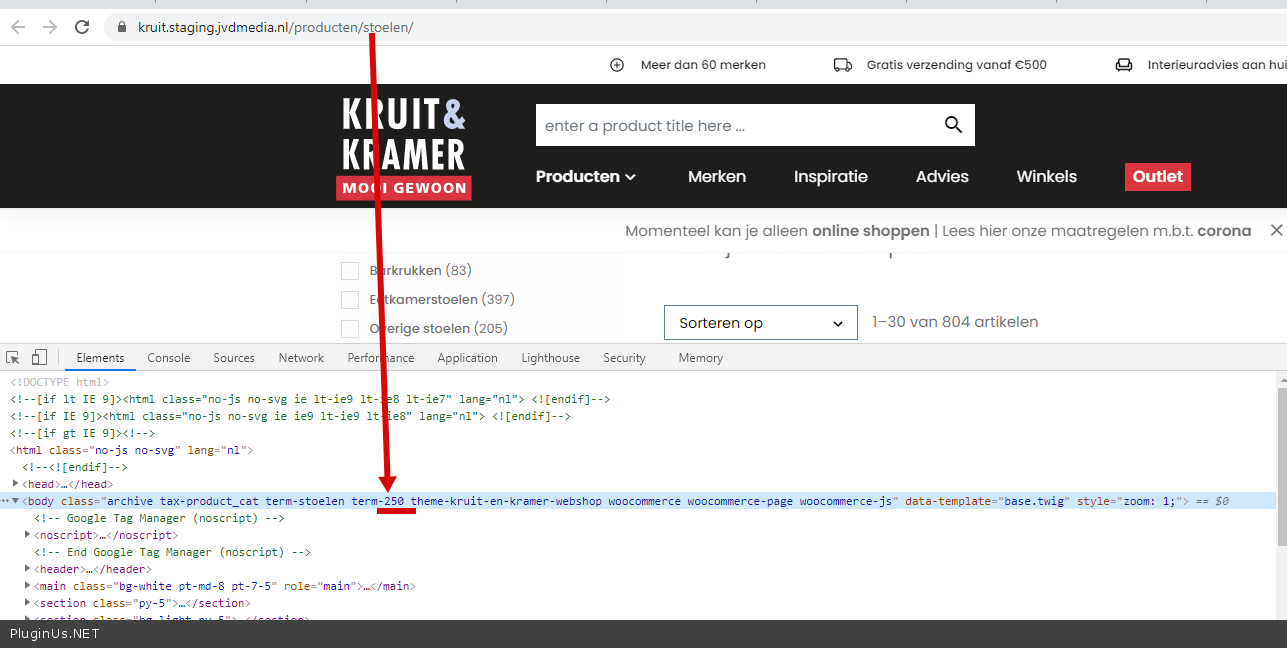
[woof sid="auto_shortcode" autohide=0 taxonomies=product_cat:250]
[woof_products is_ajax=1 taxonomies=product_cat:250]
Cat id - https://c2n.me/4bDjpZv.png
Hello
Try to use
[woof sid="auto_shortcode" autohide=0 taxonomies=product_cat:250]
[woof_products is_ajax=1 taxonomies=product_cat:250]
Cat id - https://c2n.me/4bDjpZv.png
Quote from nielsjvd on April 22, 2021, 10:58Hello,
unfortunately this still doesn't work.
Again the products are shown correctly but the filterbar doesn't update.
Hello,
unfortunately this still doesn't work.
Again the products are shown correctly but the filterbar doesn't update.
Quote from Pablo Borysenco on April 22, 2021, 12:13Hello
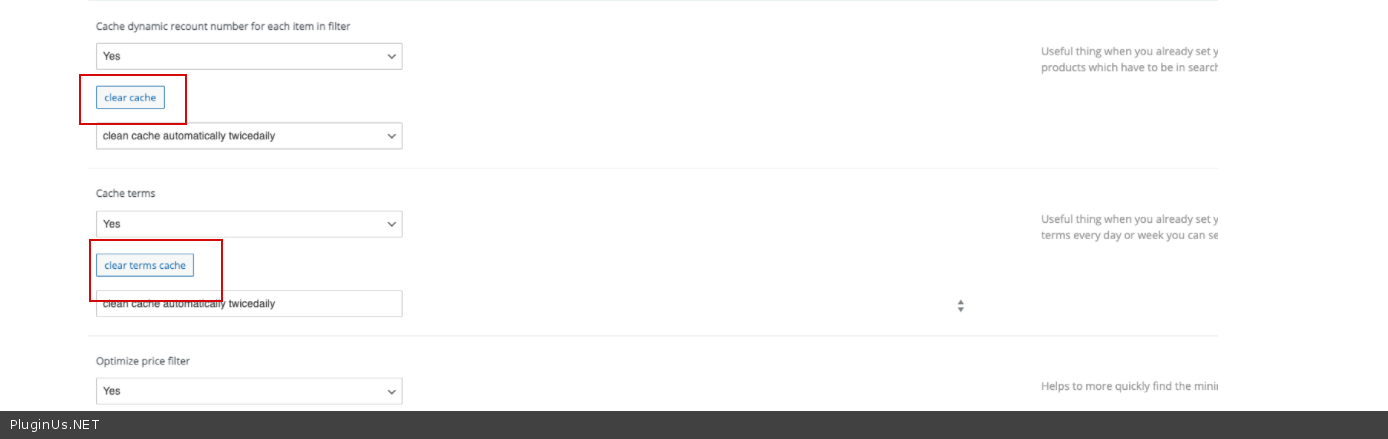
Ok! Please clear all cache - https://c2n.me/4bN12D7.png
Update the plugin to 2.2.5.3
Hello
Ok! Please clear all cache - https://c2n.me/4bN12D7.png
Update the plugin to 2.2.5.3
Quote from nielsjvd on April 22, 2021, 12:20Hello,
I already did both of those.
Hello,
I already did both of those.
Quote from Pablo Borysenco on April 23, 2021, 13:10Hello
Ok! Can you create a clone of your site - https://wordpress.org/plugins/duplicator/ - and drop me access to this test site
Hello
Ok! Can you create a clone of your site - https://wordpress.org/plugins/duplicator/ - and drop me access to this test site
Quote from nielsjvd on April 26, 2021, 08:52Unfortunately we don't have another server available.
If you are available for an online videocall I can show you everything.
My e-mail is in the private data.
Unfortunately we don't have another server available.
If you are available for an online videocall I can show you everything.
My e-mail is in the private data.
Quote from Pablo Borysenco on April 26, 2021, 15:53Hello
Unfortunately we don't have another server available. - you can create a subdomain. it is not difficult and super useful for any online business. You will be able to test updates without threatening the main site
I can show you everything. - I need to do tests, change the code to find the reason. video won't help
Hello
Unfortunately we don't have another server available. - you can create a subdomain. it is not difficult and super useful for any online business. You will be able to test updates without threatening the main site
I can show you everything. - I need to do tests, change the code to find the reason. video won't help
Quote from nielsjvd on April 26, 2021, 15:58Hello,
The URL described in the post is the test site.
If you need to change the code in the site to test you could replicate the issue.
We do not give someone outside our company access to our code.
Hello,
The URL described in the post is the test site.
If you need to change the code in the site to test you could replicate the issue.
We do not give someone outside our company access to our code.
Quote from Pablo Borysenco on April 27, 2021, 11:35Hello
Ok! Please disable all plugins except woo + woof , instal another theme and do a test
Let's try to find the functionality that causes the conflict
Hello
Ok! Please disable all plugins except woo + woof , instal another theme and do a test
Let's try to find the functionality that causes the conflict
Quote from nielsjvd on May 3, 2021, 15:40Hello,
Already tried disabling plugins. Unfortunately it did not solve the problem.
Disabling the theme would not help solve the issue because it is a custom theme.
Hello,
Already tried disabling plugins. Unfortunately it did not solve the problem.
Disabling the theme would not help solve the issue because it is a custom theme.
Quote from Pablo Borysenco on May 4, 2021, 11:51Hello
Disabling the theme would not help solve the issue because it is a custom theme. - Moreover, you need to make a test with a different theme. The task is to find the cause of the conflict. If we find a reason it will be possible to fix it
Hello
Disabling the theme would not help solve the issue because it is a custom theme. - Moreover, you need to make a test with a different theme. The task is to find the cause of the conflict. If we find a reason it will be possible to fix it