

Filter not working well
The support doesn work on Saturdays and Sundays, so some Friday requests can be answered on Monday. If you have problems with registration ask help on contact us page pleaseIf you not got email within 24~36 business hours, firstly check your spam box, and if no any email from the support there - back to the forum and read answer here. DO NOT ANSWER ON EMAILS [noreply@pluginus.net] FROM THE FORUM!! Emails are just for your info, all answers should be published only here.
The support doesn work on Saturdays and Sundays, so some Friday requests can be answered on Monday.

Quote from nickchr111 on February 3, 2021, 11:41Dear partner, I bought this plugin yesterday and i have the follow issues.
when I use the filter as shown in the link,
https://luxury-sports.com/product-category/for-rider/clothes-for-rider/woman-for-rider/breeches/?swoof=1&pa_size=48&stock=instock&really_curr_tax=324-product_cat
while I have activated "In stock", when I select "Product size" and size 48 then two products appear in the results but size 48 is not available (there was and it was sold so stock is 0).
I notice that the filter takes data from Attributes and ignores the variations. That is, while it is not available in the variations (0 stock) that has been made, it is unfortunately "confused" and sees that it exists as a size in the attributes.
So that variable product has been made and exists as a value in attributes but is not available in variations, the filter displays it in the results so my client can see things that are not available.
I face the above problem in all products. Please guide me in solving the problem.
Dear partner, I bought this plugin yesterday and i have the follow issues.
when I use the filter as shown in the link,
while I have activated"In stock", when I select"Product size" and size 48 then two products appear in the results but size 48 is not available (there was and it was sold so stock is 0).
I notice that the filter takes data from Attributes and ignores the variations. That is, while it is not available in the variations (0 stock) that has been made, it is unfortunately"confused" and sees that it exists as a size in the attributes.
So that variable product has been made and exists as a value in attributes but is not available in variations, the filter displays it in the results so my client can see things that are not available.
I face the above problem in all products. Please guide me in solving the problem.

Quote from Pablo Borysenco on February 3, 2021, 14:04Hello
Paste your license key here - https://c2n.me/43SC6rb.png -> https://c2n.me/42HBIt7.png and wp-admin access - https://c2n.me/42BAoj4.png
I will check it
Hello
Paste your license key here - https://c2n.me/43SC6rb.png -> https://c2n.me/42HBIt7.png and wp-admin access - https://c2n.me/42BAoj4.png



I will check it
Quote from nickchr111 on February 3, 2021, 15:06ok, i have paste the credentials
ok, i have paste the credentials
Quote from Pablo Borysenco on February 4, 2021, 12:31Hello
I checked it.
The filter works correctly. In fact, the product has this attribute. It doesn't matter if there is a variant with this attribute, but in the database the product has this size.
while I have activated "In stock", when I select "Product size" and size 48 then two products appear in the results but size 48 is not available (there was and it was sold so stock is 0). - Not! You have no such variation at all. My test - https://c2n.me/4aORpmC
Hello
I checked it.
The filter works correctly. In fact, the product has this attribute. It doesn't matter if there is a variant with this attribute, but in the database the product has this size.
while I have activated"In stock", when I select"Product size" and size 48 then two products appear in the results but size 48 is not available (there was and it was sold so stock is 0). - Not! You have no such variation at all. My test - https://c2n.me/4aORpmC
Quote from nickchr111 on February 4, 2021, 13:08Hello,
can you then explain, how is it possible to have in stock the color 7000 and size 40
-> https://luxury-sports.com/product/new-grip-system-breeches-4/
and when i use the filter and select Product color 7000 & the opinion in stock, it says "No products were found matching your selection."
-> https://luxury-sports.com/product-category/for-rider/clothes-for-rider/woman-for-rider/breeches/?swoof=1&pa_color=7000&stock=instock&really_curr_tax=324-product_cat
Hello,
can you then explain, how is it possible to have in stock the color 7000 and size 40
-> https://luxury-sports.com/product/new-grip-system-breeches-4/
and when i use the filter and select Product color 7000 & the opinion in stock, it says "No products were found matching your selection."
Quote from Pablo Borysenco on February 5, 2021, 12:31Hello
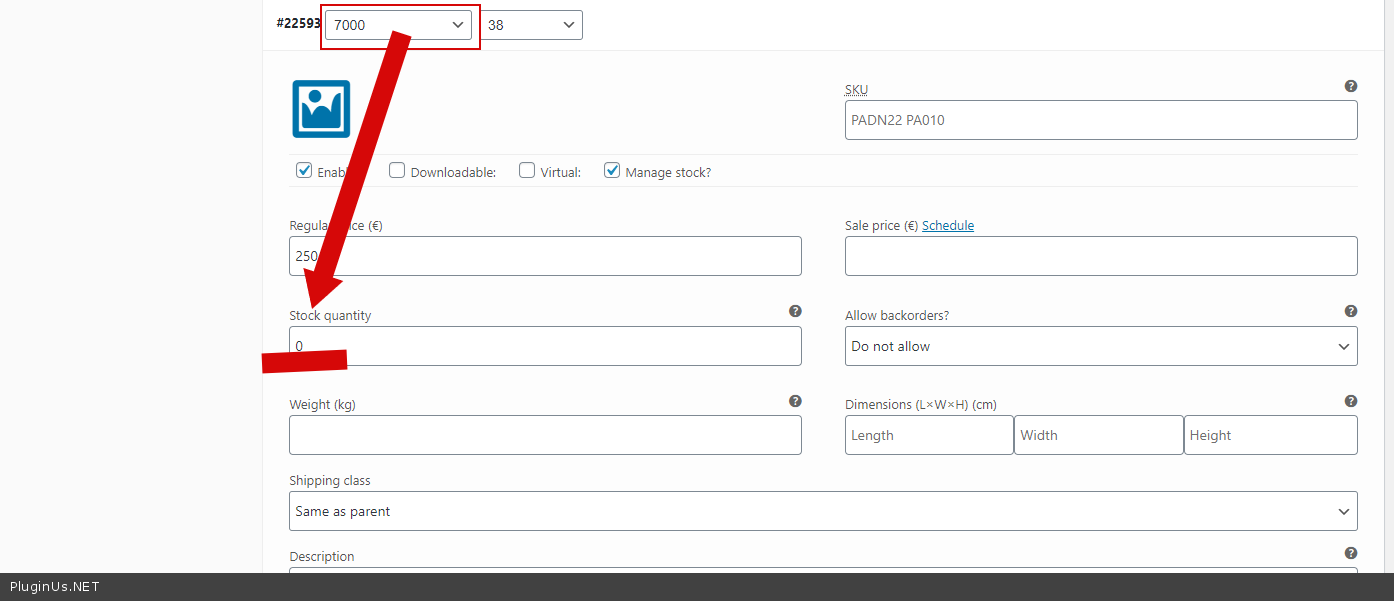
All is correct - https://c2n.me/4aPN0wG.png
Hello
All is correct - https://c2n.me/4aPN0wG.png
Quote from nickchr111 on February 6, 2021, 01:46Hello
can you please explain why i can see then, the size 40 with color 7000 that have 1 stock, on the search results
https://pasteboard.co/JN13N5T.png
when i have select color 7000 and "in stock"
https://pasteboard.co/JN15xxW.png
Thanks
PS this is only one example i have many issues like this


Hello
can you please explain why i can see then, the size 40 with color 7000 that have 1 stock, on the search results
https://pasteboard.co/JN13N5T.png
when i have select color 7000 and"in stock"
https://pasteboard.co/JN15xxW.png
Thanks
PS this is only one example i have many issues like this
Quote from nickchr111 on February 6, 2021, 10:53Another example of issue
for the same product i have in stock 1 quantity of Petrol Blue (5900) & size 36 and 1 quantity of size 34 (Petrol Blue (5900))
https://pasteboard.co/JN4E74S.jpg
https://pasteboard.co/JN4EkylM.jpg
but if i checked "in stock" & Petrol Blue (5900) the product is not listed
https://pasteboard.co/JN4EQWE.jpg
The path for this product category is RIDER -> CLOTHES -> WOMAN -> BREECHES if this help you
I repeat this kind of issue i have in many cases not only here


Another example of issue
for the same product i have in stock 1 quantity of Petrol Blue (5900) & size 36 and 1 quantity of size 34 (Petrol Blue (5900))
https://pasteboard.co/JN4E74S.jpg
https://pasteboard.co/JN4EkylM.jpg
but if i checked"in stock" & Petrol Blue (5900) the product is not listed
https://pasteboard.co/JN4EQWE.jpg
The path for this product category is RIDER -> CLOTHES -> WOMAN -> BREECHES if this help you
I repeat this kind of issue i have in many cases not only here
Quote from Pablo Borysenco on February 8, 2021, 12:36Hello
can you please explain why i can see then, the size 40 with color 7000 that have 1 stock, on the search results - Yes, because you have an out of stock variant - https://c2n.me/4aPN0wG.png
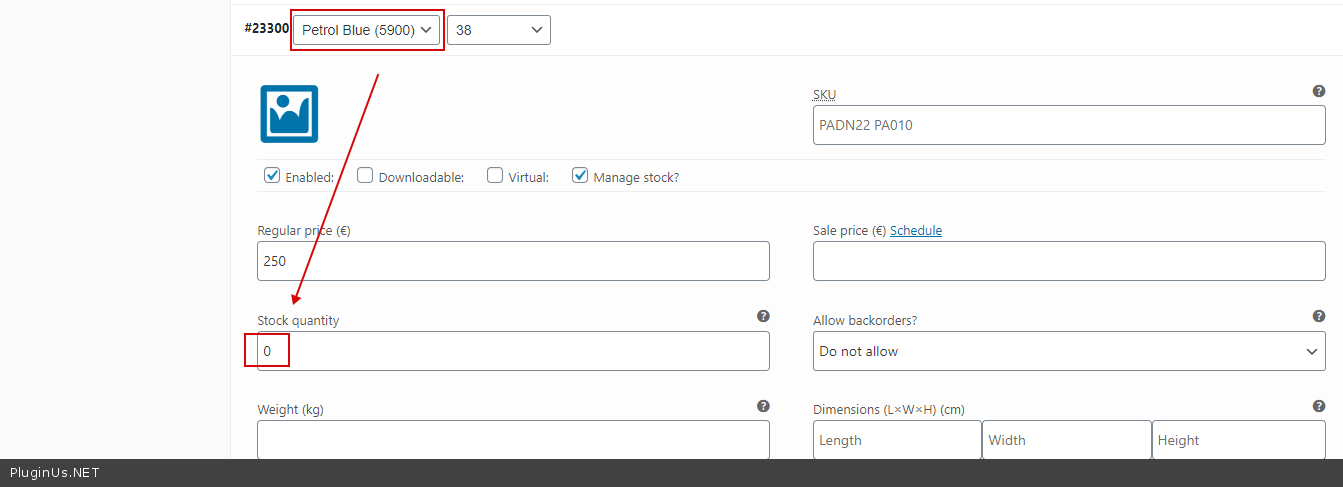
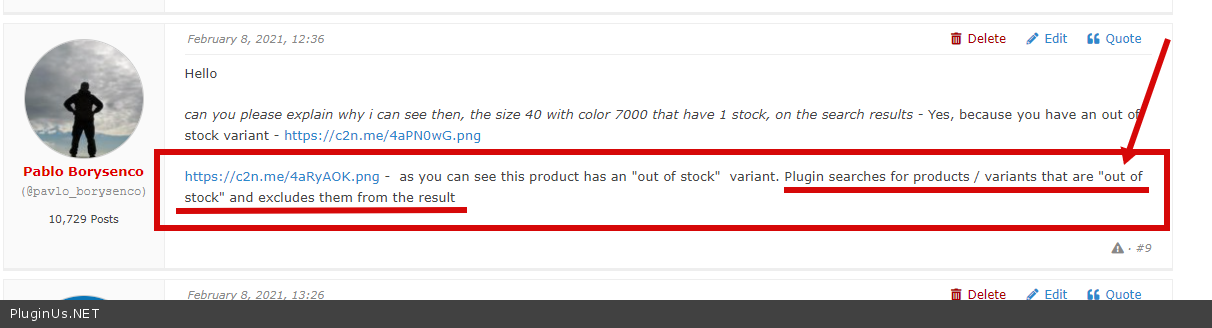
https://c2n.me/4aRyAOK.png - as you can see this product has an "out of stock" variant. Plugin searches for products / variants that are "out of stock" and excludes them from the result
Hello
can you please explain why i can see then, the size 40 with color 7000 that have 1 stock, on the search results - Yes, because you have an out of stock variant - https://c2n.me/4aPN0wG.png
https://c2n.me/4aRyAOK.png - as you can see this product has an"out of stock" variant. Plugin searches for products / variants that are"out of stock" and excludes them from the result
Quote from nickchr111 on February 8, 2021, 13:26Hello
"can you please explain why i can see then, the size 40 with color 7000 that have 1 stock, on the search results - Yes, because you have an out of stock variant - https://c2n.me/4aPN0wG.png "
the out of stock variant https://c2n.me/4aPN0wG.png is for size 38,
i explain you that i can see in the results the product with size 40 https://pasteboard.co/JN13N5T.png that is not out of stock.
Hello
"can you please explain why i can see then, the size 40 with color 7000 that have 1 stock, on the search results - Yes, because you have an out of stock variant - https://c2n.me/4aPN0wG.png"
the out of stock variant https://c2n.me/4aPN0wG.png is for size 38,
i explain you that i can see in the results the product with size 40 https://pasteboard.co/JN13N5T.png that is not out of stock.
Quote from Pablo Borysenco on February 9, 2021, 11:33Hello
Please read this - https://c2n.me/4aSrPtF.png
I will try to explain it differently.
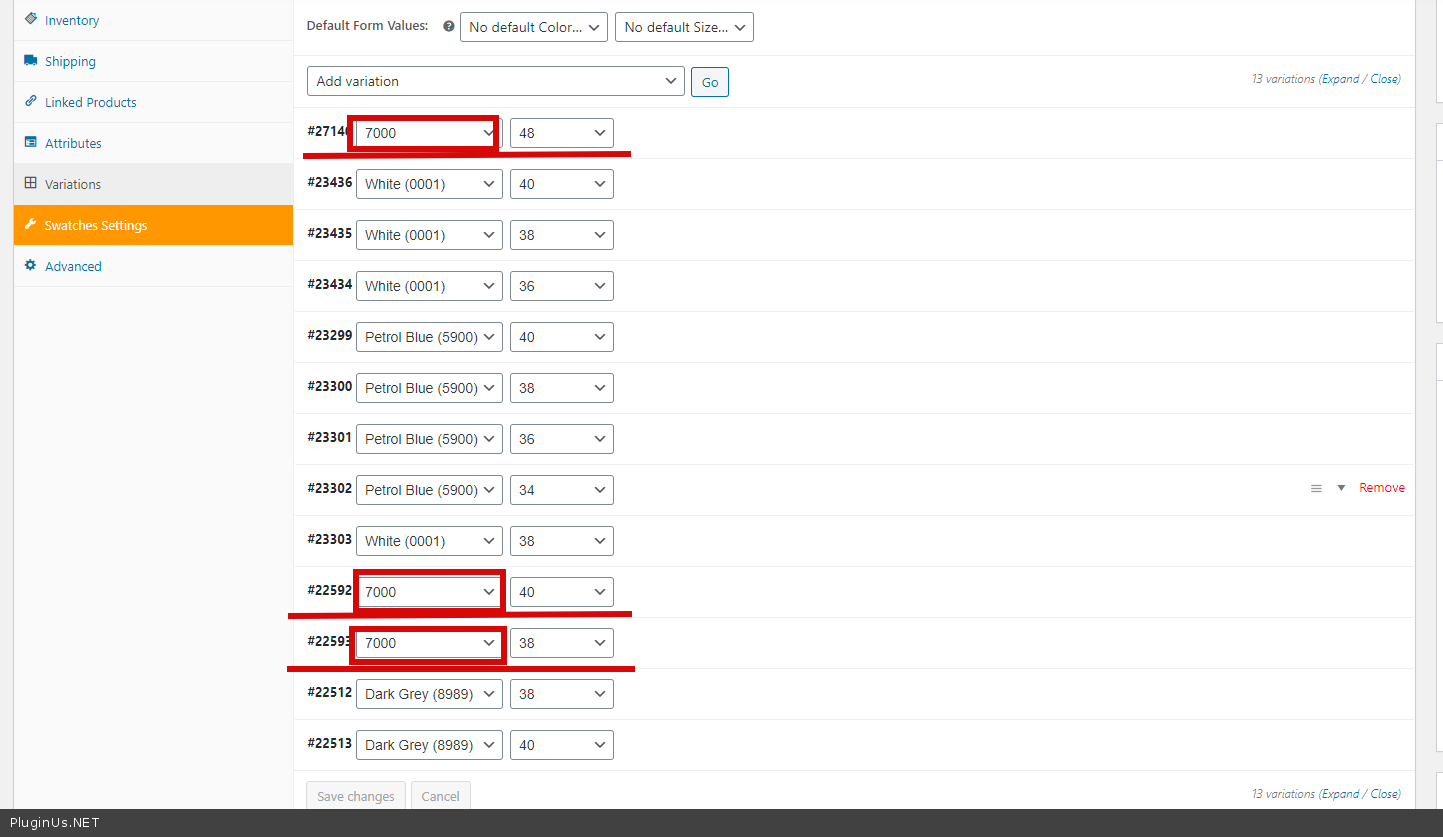
For example, let's do a search "color 7000" - the result will be these variations - https://c2n.me/4aSscn5.png
- 7000 / 48 - out of stock
- 7000 / 40 - in stock
- 7000 / 38 - out of stock
The filter sees that as a result there is an variation out of stock.
And since the template only displays the parent product. Parent product is excluded due to one variation(out of stock)
Hello
Please read this - https://c2n.me/4aSrPtF.png
I will try to explain it differently.
For example, let's do a search"color 7000" - the result will be these variations - https://c2n.me/4aSscn5.png
- 7000 / 48 - out of stock
- 7000 / 40 - in stock
- 7000 / 38 - out of stock
The filter sees that as a result there is an variation out of stock.
And since the template only displays the parent product. Parent product is excluded due to one variation(out of stock)
Quote from nickchr111 on February 9, 2021, 15:25Hello,
thank you for the support, but is it a way to avoid it ?
I mean that i want to exclude only the products out of stock (7000 / 48 & 7000 / 38) from the search results and not the in stock (7000 / 40).
Thank you
Hello,
thank you for the support, but is it a way to avoid it ?
I mean that i want to exclude only the products out of stock (7000 / 48 & 7000 / 38) from the search results and not the in stock (7000 / 40).
Thank you
Quote from Pablo Borysenco on February 10, 2021, 12:28Hello
Unfortunately no. as I described above, the shop/archive template only displays parent products. And the main database query is done only for parent products. All we can do is check the variations and then manipulate only parent products (exclude it if the product has an out of stock variant )
Hello
Unfortunately no. as I described above, the shop/archive template only displays parent products. And the main database query is done only for parent products. All we can do is check the variations and then manipulate only parent products (exclude it if the product has an out of stock variant )