
Filter by category not working using WPML
The support doesn work on Saturdays and Sundays, so some Friday requests can be answered on Monday. If you have problems with registration ask help on contact us page pleaseIf you not got email within 24~36 business hours, firstly check your spam box, and if no any email from the support there - back to the forum and read answer here. DO NOT ANSWER ON EMAILS [noreply@pluginus.net] FROM THE FORUM!! Emails are just for your info, all answers should be published only here.
The support doesn work on Saturdays and Sundays, so some Friday requests can be answered on Monday.

Quote from Carinejob on April 20, 2026, 13:57Hi
I created a filter by product categories. Works perfectly in French but using WPML for english version, nothing appear on the page where the filter is supposed to be.
Configuration : Theme Divi + Woocommerce
Page in french : https://www.herbessalees.com/nos-produits/
Page in english : https://www.herbessalees.com/en/our-products/
Thanks for your help!
Hi
I created a filter by product categories. Works perfectly in French but using WPML for english version, nothing appear on the page where the filter is supposed to be.
Configuration : Theme Divi + Woocommerce
Page in french : https://www.herbessalees.com/nos-produits/
Page in english : https://www.herbessalees.com/en/our-products/
Thanks for your help!

Quote from Alex Dev on April 21, 2026, 11:51Hello
To investigate this properly we need access to the site. Please create a staging copy using Duplicator (https://wordpress.org/plugins/duplicator/) and share wp-admin and FTP credentials in the private area of this ticket.
https://share.pluginus.net/image/i20230222134241.png
https://share.pluginus.net/image/i20230222134615.png
https://share.pluginus.net/image/i20230222134511.pngThere are several things we want to check directly in the code and database:
- Whether the active theme is adding hooks or scripts that interfere with the HUSKY onChange callback under WPML
- Conflicts with other installed plugins in the WPML + WooCommerce environment
- Whether there are any database inconsistencies, for example from a previous import or export, that could cause the filter URLs to resolve incorrectlyOnce we have access we can debug this properly. Looking forward to your credentials.


Hello
To investigate this properly we need access to the site. Please create a staging copy using Duplicator (https://wordpress.org/plugins/duplicator/) and share wp-admin and FTP credentials in the private area of this ticket.
https://share.pluginus.net/image/i20230222134241.png
https://share.pluginus.net/image/i20230222134615.png
https://share.pluginus.net/image/i20230222134511.png
There are several things we want to check directly in the code and database:
- Whether the active theme is adding hooks or scripts that interfere with the HUSKY onChange callback under WPML
- Conflicts with other installed plugins in the WPML + WooCommerce environment
- Whether there are any database inconsistencies, for example from a previous import or export, that could cause the filter URLs to resolve incorrectly
Once we have access we can debug this properly. Looking forward to your credentials.
Quote from Carinejob on April 21, 2026, 12:33Hi
Thanks for your answer. Is there a way to create a staging copy without subscribing to Duplicator pro ?
Thank you
Carine
Hi
Thanks for your answer. Is there a way to create a staging copy without subscribing to Duplicator pro ?
Thank you
Carine
Quote from Alex Dev on April 21, 2026, 12:37Hello Carine
Good news — Duplicator is free. You can install it directly from the WordPress plugin repository (Plugins - Add New - search "Duplicator") at no cost. The free version is fully capable of creating a staging copy of your site.
If for any reason Duplicator does not work for you, here are some alternatives that are also free:
- All-in-One WP Migration — very simple, one click export and import
- WP Migrate Lite — good for moving database and files separately
Also worth checking: your hosting provider may already have a built-in staging tool in their control panel (cPanel, Plesk, or a custom dashboard). Many hosts like SiteGround, WP Engine, Cloudways offer one-click staging without any plugin at all. It is worth checking there first.
Hello Carine
Good news — Duplicator is free. You can install it directly from the WordPress plugin repository (Plugins - Add New - search"Duplicator") at no cost. The free version is fully capable of creating a staging copy of your site.
If for any reason Duplicator does not work for you, here are some alternatives that are also free:
- All-in-One WP Migration — very simple, one click export and import
- WP Migrate Lite — good for moving database and files separately
Also worth checking: your hosting provider may already have a built-in staging tool in their control panel (cPanel, Plesk, or a custom dashboard). Many hosts like SiteGround, WP Engine, Cloudways offer one-click staging without any plugin at all. It is worth checking there first.
Quote from Carinejob on April 22, 2026, 11:23Hello
I sent you the private datas using the button as requested. Have you received them ?
Hello
I sent you the private datas using the button as requested. Have you received them ?
Quote from Alex Dev on April 22, 2026, 12:20Hello Carine
Thank you for the backup, but I need to clarify — you have shared credentials to the live site, not a staging site. I cannot work on the live site because I will be installing plugins, switching themes, and writing custom scripts. This WILL cause errors or take the site down completely.
Please either:
1. Create a separate staging site where I can work freely and break things without any risk — or
2. Confirm in writing that you give permission to work on the live site, that you have a working backup, and that you know how to restore it yourself if something goes wrong.Which option works better for you?
Hello Carine
Thank you for the backup, but I need to clarify — you have shared credentials to the live site, not a staging site. I cannot work on the live site because I will be installing plugins, switching themes, and writing custom scripts. This WILL cause errors or take the site down completely.
Please either:
1. Create a separate staging site where I can work freely and break things without any risk — or
2. Confirm in writing that you give permission to work on the live site, that you have a working backup, and that you know how to restore it yourself if something goes wrong.
Which option works better for you?
Quote from Carinejob on April 22, 2026, 22:13Hi
Here is the staging site : https://stagingsite.herbessalees.com/wp-admin/
Private datas that I sent you before work for this staging site.
Thank you!
Hi
Here is the staging site : https://stagingsite.herbessalees.com/wp-admin/
Private datas that I sent you before work for this staging site.
Thank you!
Quote from Alex Dev on April 23, 2026, 12:49Hello Carine
I did investigation and created tester EN page: https://stagingsite.herbessalees.com/en/tester/swoof/product-category-the-classics/ - filter is appears here and works also filter appears here: https://stagingsite.herbessalees.com/en/our-products/
So what was wrong is:
I removed EXCLUDED terms ids and filter appears, there was reverse enabled, that mean SHOW only next, but terms IDS there was belonging to french language, so them was invisible when english enabled.
Look please here: https://stagingsite.herbessalees.com/wp-admin/edit-tags.php?taxonomy=product_cat&post_type=product - terms for each language has its own ID so mind it please
Welcome!
Hello Carine
I did investigation and created tester EN page: https://stagingsite.herbessalees.com/en/tester/swoof/product-category-the-classics/ - filter is appears here and works also filter appears here: https://stagingsite.herbessalees.com/en/our-products/
So what was wrong is:

I removed EXCLUDED terms ids and filter appears, there was reverse enabled, that mean SHOW only next, but terms IDS there was belonging to french language, so them was invisible when english enabled.
Look please here: https://stagingsite.herbessalees.com/wp-admin/edit-tags.php?taxonomy=product_cat&post_type=product - terms for each language has its own ID so mind it please
Welcome!
Quote from Carinejob on April 23, 2026, 15:07Thank you for your answer!But I still got an issue because I don't want all categories to appear im my filter and if I remove exluded IDs (and uncheck "reverse"), all of them appear.And if I add excluded categories ID, it doesn't work and I'm not able to add different categories number in FR en EN.For example, if I add 17 and 27 in exluded ID categories in FR, it also change excluded categories ID for 17 and 27 in EN.And I'm not able to change the title "Catégories de produits". If I change the title in EN, it also change the title in FR.ThanksCarine
Quote from Alex Dev on April 24, 2026, 20:33Hello Carine
All is simple:
- look on links please: https://stagingsite.herbessalees.com/nos-produits/ + https://stagingsite.herbessalees.com/en/our-products/
- you see "Our products" categories
- look on the settings on the screen above: the trick is that in different languages terms which means the same has different IDs (WPML logic)
- You can use filter as you want, BUT you need to place terms IDs of both languages and apply reverse
Hello Carine
All is simple:
- look on links please: https://stagingsite.herbessalees.com/nos-produits/ + https://stagingsite.herbessalees.com/en/our-products/
- you see"Our products" categories
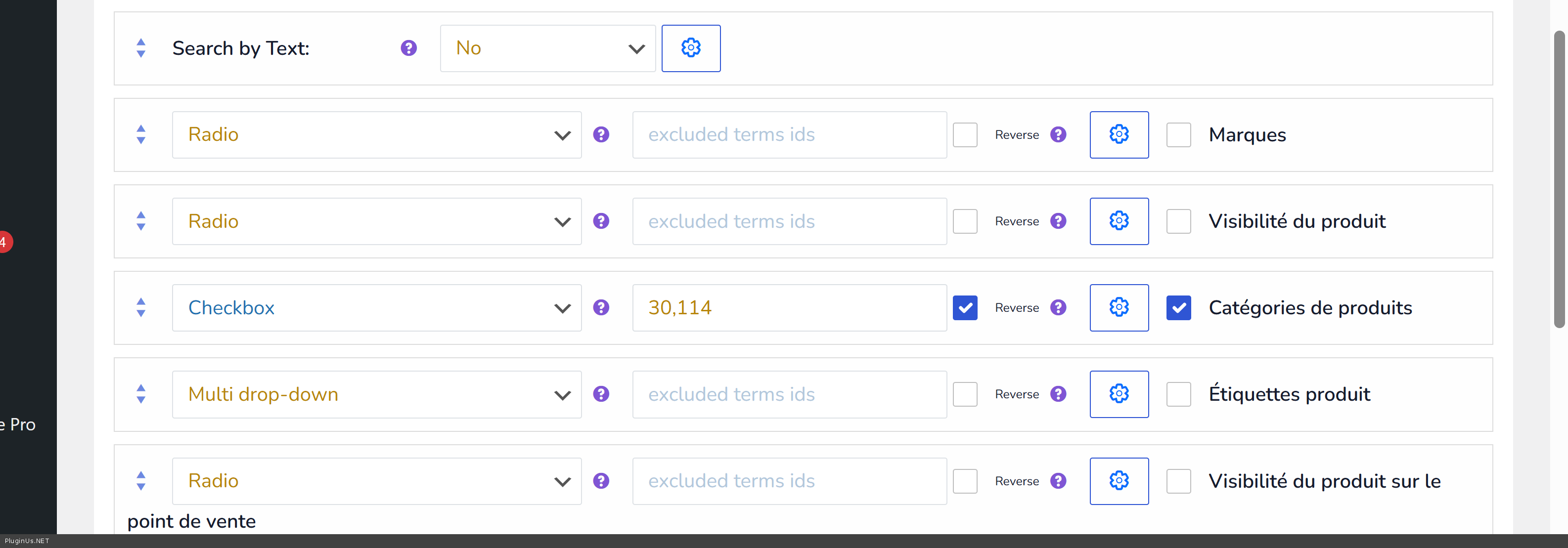
- look on the settings on the screen above: the trick is that in different languages terms which means the same has different IDs (WPML logic)
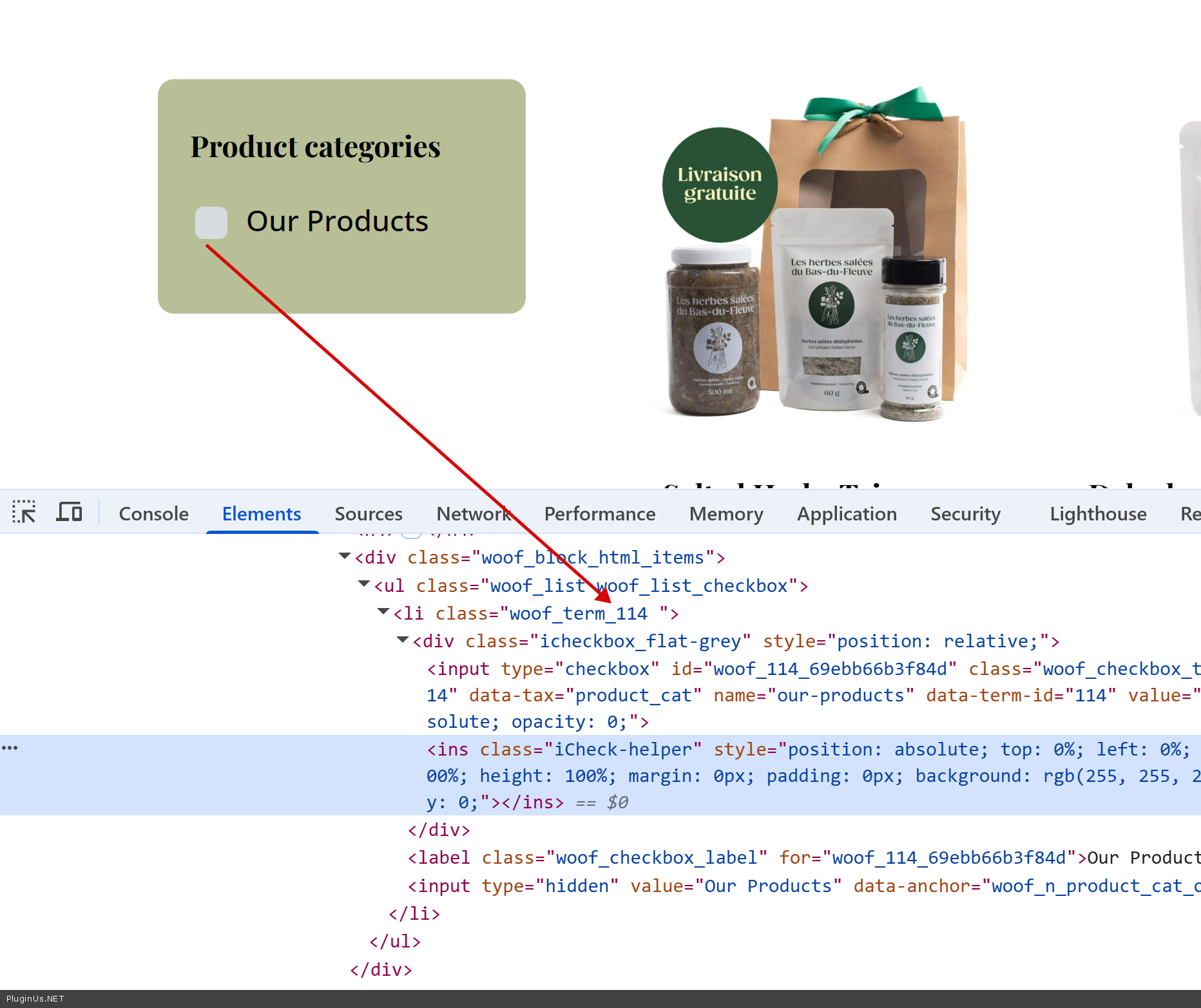
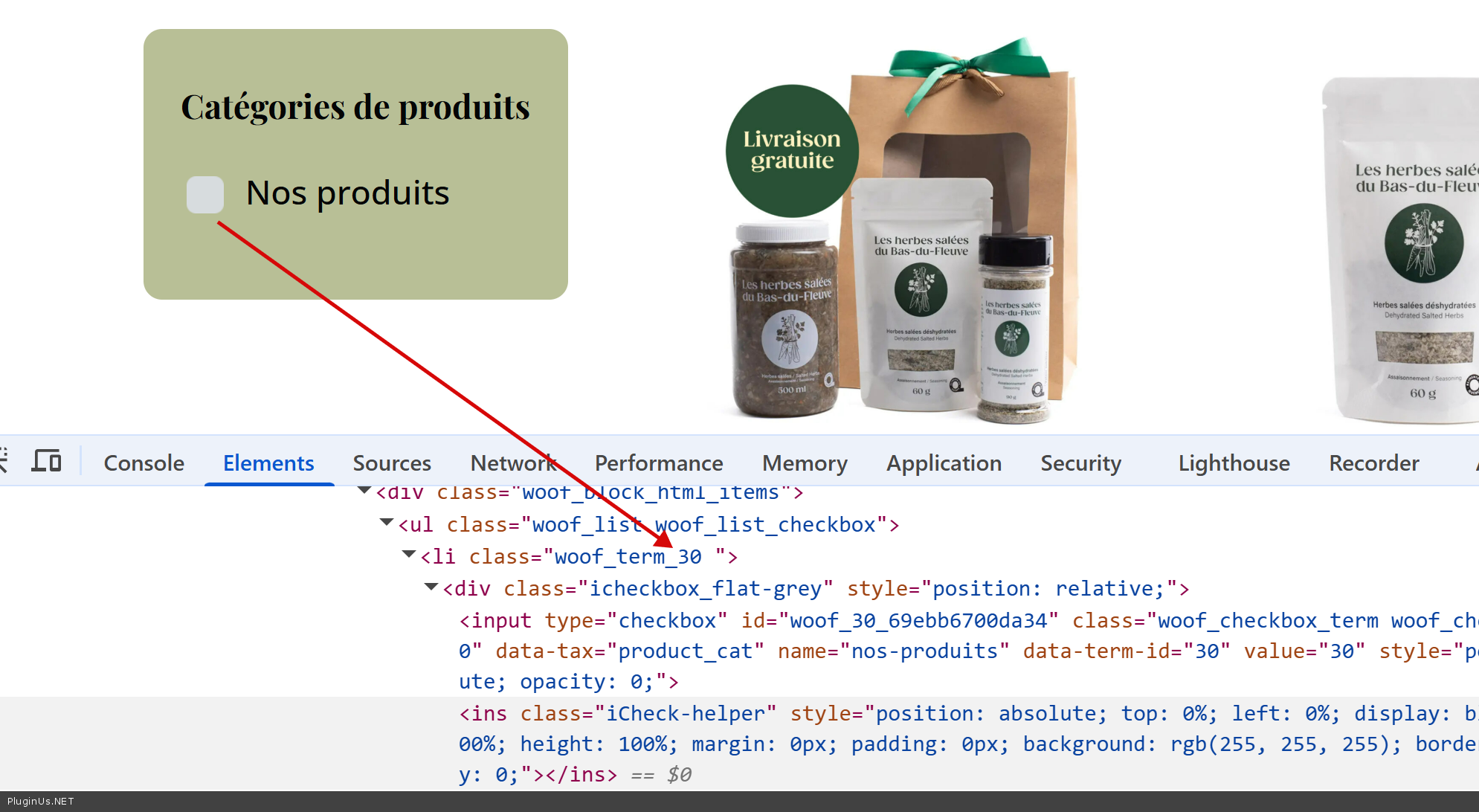
- You can use filter as you want, BUT you need to place terms IDs of both languages and apply reverse