
Filter buttons non-responsive and category icons (plus signs) missing in Incognito/Logged-out mode
The support doesn work on Saturdays and Sundays, so some Friday requests can be answered on Monday. If you have problems with registration ask help on contact us page pleaseIf you not got email within 24~36 business hours, firstly check your spam box, and if no any email from the support there - back to the forum and read answer here. DO NOT ANSWER ON EMAILS [noreply@pluginus.net] FROM THE FORUM!! Emails are just for your info, all answers should be published only here.
The support doesn work on Saturdays and Sundays, so some Friday requests can be answered on Monday.

Quote from admin@thertashop.com on April 4, 2026, 12:13The HUSKY filter is fully functional when logged in as an Administrator. However, for Guest users (Incognito mode), the filter becomes non-responsive. Specifically:
Clicking any filter button/radio/checkbox results in no action (the AJAX call does not seem to trigger or complete).
The "Plus" signs (+) used to expand/collapse hierarchies are missing in the Incognito view.
Steps I Have Already Taken (To rule out caching):
WP Rocket: Added
woof_frontto JavaScript Delay exclusions and safelisted all.woofCSS classes.Cloudflare: Disabled Rocket Loader and performed a "Purge Everything."
Server: Purged Hostinger Object Cache and NGINX edge cache.
CSS: Confirmed no
display: nonerules are blocking the#secondarysidebar or filter containers.Technical Environment:
Theme: Storefront (Child Theme)
Hosting: Hostinger Cloud
Caching/CDN: WP Rocket + Cloudflare
The HUSKY filter is fully functional when logged in as an Administrator. However, for Guest users (Incognito mode), the filter becomes non-responsive. Specifically:
Clicking any filter button/radio/checkbox results in no action (the AJAX call does not seem to trigger or complete).
The"Plus" signs (+) used to expand/collapse hierarchies are missing in the Incognito view.
Steps I Have Already Taken (To rule out caching):
WP Rocket: Added
woof_frontto JavaScript Delay exclusions and safelisted all.woofCSS classes.Cloudflare: Disabled Rocket Loader and performed a"Purge Everything."
Server: Purged Hostinger Object Cache and NGINX edge cache.
CSS: Confirmed no
display: nonerules are blocking the#secondarysidebar or filter containers.
Technical Environment:
Theme: Storefront (Child Theme)
Hosting: Hostinger Cloud
Caching/CDN: WP Rocket + Cloudflare

Quote from Alex Dev on April 6, 2026, 12:56Hello
Thank you for the detailed report and the steps you have already taken.
The missing plus signs and non-responsive filter buttons both point to the HUSKY frontend JavaScript not initializing correctly for guest users. The exclusions you added to WP Rocket are a good start, but we need to confirm whether the script is actually loading before we can pinpoint the fix.
Could you please do the following in an Incognito window and share the results:
- Open the page with the filter, right-click and choose View Page Source. Search for woof_front and paste here what you find around that line (the script tag src attribute is enough).
- Open the browser Developer Tools (F12), go to the Console tab, reload the page, and paste any red errors you see there.
- In the same Developer Tools, go to the Network tab, filter by JS, reload the page, and check whether woof_front.js appears in the list and what its status code is.
This will tell us whether the script is being loaded at all, and whether it is being bundled or deferred by WP Rocket in a way that breaks initialization.
Also, please share the exact link to the page with the issue and wp-admin access in the private area of this ticket.
https://share.pluginus.net/image/i20230222134241.png
https://share.pluginus.net/image/i20230222134615.png
https://share.pluginus.net/image/i20230222134511.png
Hello
Thank you for the detailed report and the steps you have already taken.
The missing plus signs and non-responsive filter buttons both point to the HUSKY frontend JavaScript not initializing correctly for guest users. The exclusions you added to WP Rocket are a good start, but we need to confirm whether the script is actually loading before we can pinpoint the fix.
Could you please do the following in an Incognito window and share the results:
- Open the page with the filter, right-click and choose View Page Source. Search for woof_front and paste here what you find around that line (the script tag src attribute is enough).
- Open the browser Developer Tools (F12), go to the Console tab, reload the page, and paste any red errors you see there.
- In the same Developer Tools, go to the Network tab, filter by JS, reload the page, and check whether woof_front.js appears in the list and what its status code is.
This will tell us whether the script is being loaded at all, and whether it is being bundled or deferred by WP Rocket in a way that breaks initialization.
Also, please share the exact link to the page with the issue and wp-admin access in the private area of this ticket.
https://share.pluginus.net/image/i20230222134241.png
https://share.pluginus.net/image/i20230222134615.png
https://share.pluginus.net/image/i20230222134511.png


Quote from admin@thertashop.com on April 6, 2026, 17:58Hello Alex,
Thank you for the quick response. I have gathered the information you requested from an Incognito window:
1. Page Source Check: When searching for
woof_front, I found that WP Rocket is still intercepting the script. Even after adding exclusions, the script tag looks like this:<script type="text/rocketlazyloadscript" data-rocket-src=".../woocommerce-products-filter/js/front.js?ver=3.3.8.1" id="woof_front-js">Thetype="text/rocketlazyloadscript"confirms that WP Rocket is preventing HUSKY from initializing until a user interaction occurs.2. Console Errors (F12): In Incognito mode, the console shows several "Uncaught ReferenceError" messages because the WOOF functions are being called before the actual script is allowed to run.
3. Network Tab: The
front.js(woof_front) appears in the list but shows a status that indicates it is being deferred/delayed by the caching engine.Current Status: I have already tried WP Rocket "Safe Mode" and manual exclusions for
woof_front, but the issue persists for guest users. I have provided the exact link to the affected page and the WP-Admin credentials in the private area of this ticket so you can take a closer look at the configuration.Affected Page:
https://thertashop.com/product-category/rta-cabinets/jarlin-cabinetry/dove-white-shaker-ds/
Hello Alex,
Thank you for the quick response. I have gathered the information you requested from an Incognito window:
1. Page Source Check: When searching for woof_front, I found that WP Rocket is still intercepting the script. Even after adding exclusions, the script tag looks like this: <script type="text/rocketlazyloadscript" data-rocket-src=".../woocommerce-products-filter/js/front.js?ver=3.3.8.1" id="woof_front-js"> The type="text/rocketlazyloadscript" confirms that WP Rocket is preventing HUSKY from initializing until a user interaction occurs.
2. Console Errors (F12): In Incognito mode, the console shows several"Uncaught ReferenceError" messages because the WOOF functions are being called before the actual script is allowed to run.
3. Network Tab: The front.js (woof_front) appears in the list but shows a status that indicates it is being deferred/delayed by the caching engine.
Current Status: I have already tried WP Rocket"Safe Mode" and manual exclusions for woof_front, but the issue persists for guest users. I have provided the exact link to the affected page and the WP-Admin credentials in the private area of this ticket so you can take a closer look at the configuration.
Affected Page: https://thertashop.com/product-category/rta-cabinets/jarlin-cabinetry/dove-white-shaker-ds/
Quote from Alex Dev on April 7, 2026, 12:55Hello
Just looked the site page for non-loged user: https://clip2net.com/s/4nREYM9 - problem is that file jquery.min.js not loaded, so I went to https://thertashop.com/wp-admin/options-general.php?page=wprocket#file_optimization and added some excluding:
Now filter works, but in console some another errors referred to content security policy
Please play with it ...
Hello
Just looked the site page for non-loged user: https://clip2net.com/s/4nREYM9 - problem is that file jquery.min.js not loaded, so I went to https://thertashop.com/wp-admin/options-general.php?page=wprocket#file_optimization and added some excluding:
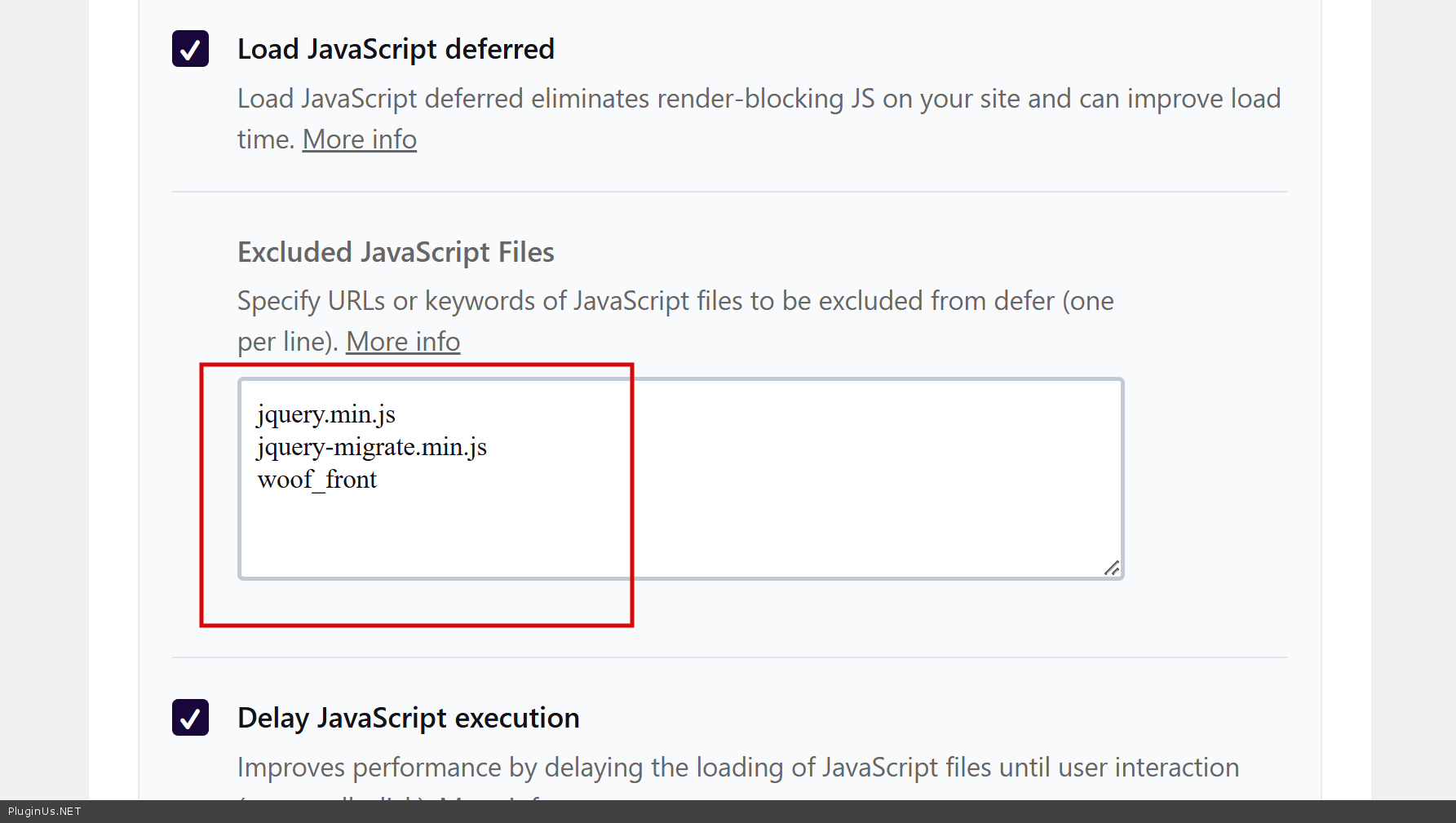
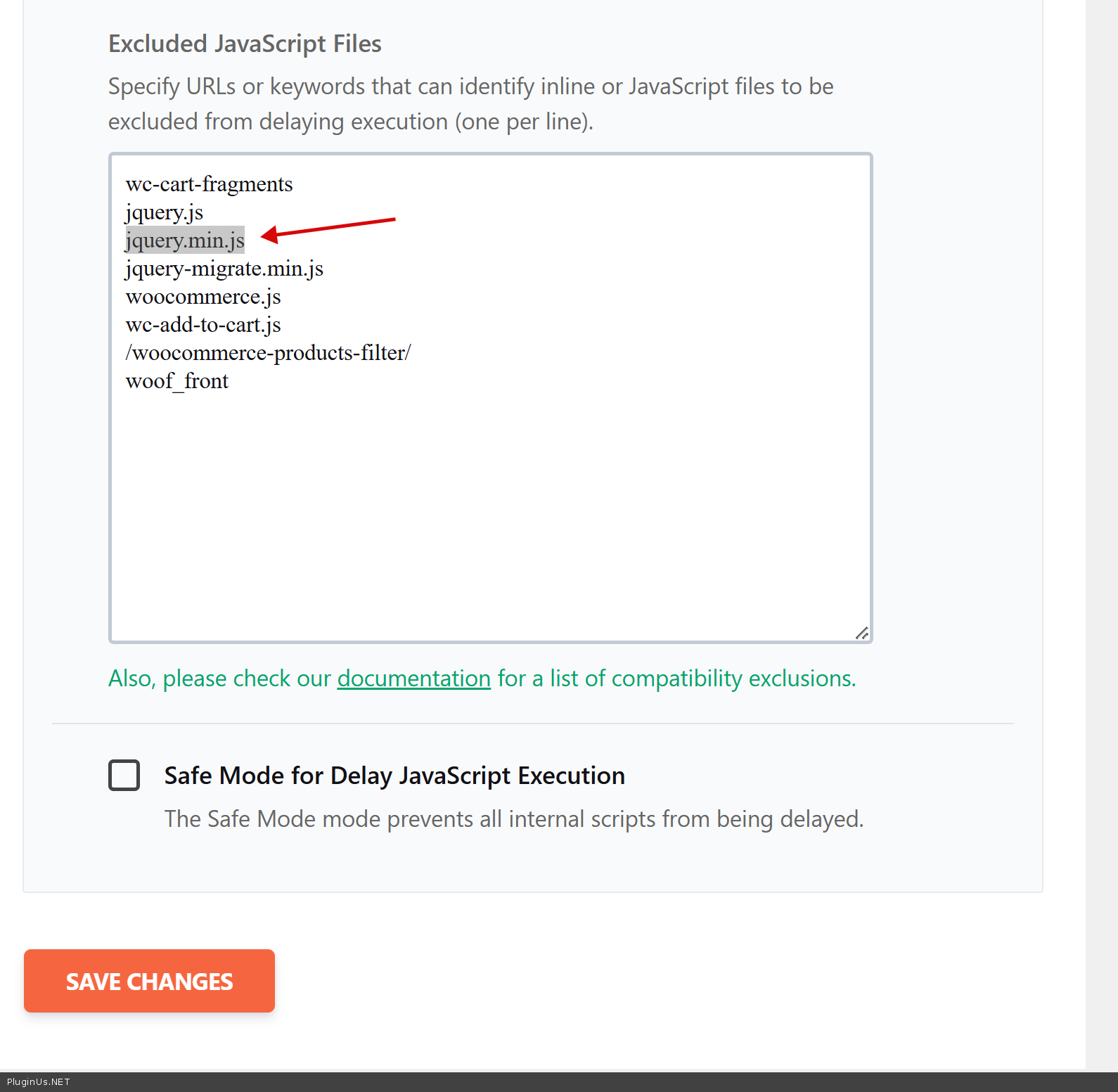
Now filter works, but in console some another errors referred to content security policy
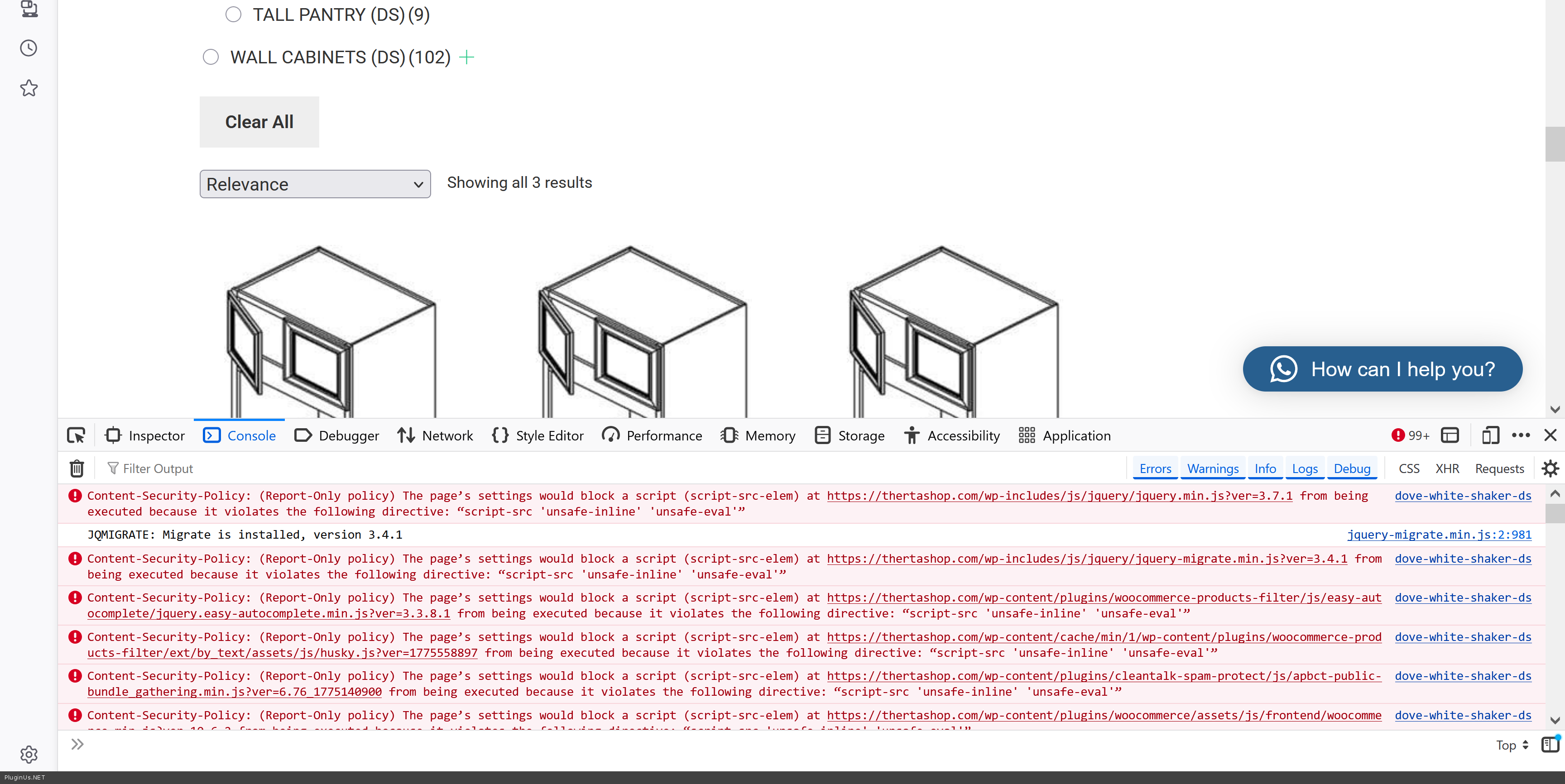
Please play with it ...
Quote from admin@thertashop.com on April 13, 2026, 17:58Technical Issue: Filter State Loss After Cart Redirect
The Workflow:
A user navigates to a specific category page (e.g., Avalon Ashen) where a Product Table is active.
The table correctly identifies 52 products spread across 3 pages.
The user adds an item to the cart and is redirected to the Cart Page.
The user clicks the "Continue Shopping" button in the cart.
The Failure:
Upon returning to the shop, the table no longer respects the original filtered category.
The filter interface disappears entirely.
The pagination incorrectly expands to 5 pages instead of 3.
Clicking on pages 4 or 5 results in a "No products were found" error, suggesting the table is losing its query parameters.
Current Setup:
Plugin: Woo Product Table Pro.
Table Query: Set to pull from specific taxonomies/sub-categories.
Mini Filter: Enabled for Categories.
Requested Fix: I need the table to maintain the filtered state and correct pagination count when a user returns from the cart via the "Continue Shopping" link. It appears the AJAX or query parameters are being stripped during the redirect.
Technical Issue: Filter State Loss After Cart Redirect
The Workflow:
A user navigates to a specific category page (e.g., Avalon Ashen) where a Product Table is active.
The table correctly identifies 52 products spread across 3 pages.
The user adds an item to the cart and is redirected to the Cart Page.
The user clicks the "Continue Shopping" button in the cart.
The Failure:
Upon returning to the shop, the table no longer respects the original filtered category.
The filter interface disappears entirely.
The pagination incorrectly expands to 5 pages instead of 3.
Clicking on pages 4 or 5 results in a "No products were found" error, suggesting the table is losing its query parameters.
Current Setup:
Plugin: Woo Product Table Pro.
Table Query: Set to pull from specific taxonomies/sub-categories.
Mini Filter: Enabled for Categories.
Requested Fix: I need the table to maintain the filtered state and correct pagination count when a user returns from the cart via the"Continue Shopping" link. It appears the AJAX or query parameters are being stripped during the redirect.
Quote from Alex Dev on April 14, 2026, 11:58Hello
Looking at the workflow you described, the filter state loss after the cart redirect is not related to HUSKY itself. HUSKY stores its active filters in the page URL as query parameters. When WooCommerce redirects the user from the cart back to the shop via the Continue Shopping button, it typically sends them to a generic shop or category URL without preserving any previously active filter parameters. That is standard WooCommerce behavior and is not something HUSKY controls.
The pagination expanding from 3 to 5 pages and the No products found errors on pages 4 and 5 are symptoms of the Product Table losing its taxonomy/sub-category context during the redirect, not a HUSKY issue. That part should be addressed with the Woo Product Table Pro support team.
What you can do on the WooCommerce side to partially help is to set the Continue Shopping destination to the specific filtered URL by using a custom redirect. Some themes and cart plugins allow overriding the woocommerce_continue_shopping_redirect filter to return the user to the last visited URL stored in the session.
The idea is to save the last filtered URL before the user leaves for the cart, and then redirect Continue Shopping back to that URL instead of the generic one.
Step 1. Add this small JavaScript snippet to your child theme, either via functions.php using wp_footer or via a custom script. It saves the current filtered URL into sessionStorage whenever HUSKY parameters are present in the URL.
if (window.location.search.indexOf('woof') !== -1) { sessionStorage.setItem('woof_last_url', window.location.href); }
Step 2. Add this to your child theme functions.php. It overrides the Continue Shopping redirect and sends the user back to the saved URL.
add_filter('woocommerce_continue_shopping_redirect', function($return_to) { return $return_to; });
Because the sessionStorage value is on the browser side, the actual redirect swap needs to happen in JavaScript after the cart page loads. Add this alongside the first snippet:
document.addEventListener('DOMContentLoaded', function() { var continueBtn = document.querySelector('.wc-proceed-to-checkout a, .cart-collaterals a[href*="shop"], a.button.wc-backward'); var savedUrl = sessionStorage.getItem('woof_last_url'); if (continueBtn && savedUrl) { continueBtn.href = savedUrl; } });
You may need to adjust the selector for the Continue Shopping button depending on your theme, but inspect the button in browser DevTools and match the class or href pattern accordingly.
This will restore the HUSKY filter state when the user returns. The Woo Product Table Pro pagination issue is a separate matter that their team will need to address on their end.
Hello
Looking at the workflow you described, the filter state loss after the cart redirect is not related to HUSKY itself. HUSKY stores its active filters in the page URL as query parameters. When WooCommerce redirects the user from the cart back to the shop via the Continue Shopping button, it typically sends them to a generic shop or category URL without preserving any previously active filter parameters. That is standard WooCommerce behavior and is not something HUSKY controls.
The pagination expanding from 3 to 5 pages and the No products found errors on pages 4 and 5 are symptoms of the Product Table losing its taxonomy/sub-category context during the redirect, not a HUSKY issue. That part should be addressed with the Woo Product Table Pro support team.
What you can do on the WooCommerce side to partially help is to set the Continue Shopping destination to the specific filtered URL by using a custom redirect. Some themes and cart plugins allow overriding the woocommerce_continue_shopping_redirect filter to return the user to the last visited URL stored in the session.
The idea is to save the last filtered URL before the user leaves for the cart, and then redirect Continue Shopping back to that URL instead of the generic one.
Step 1. Add this small JavaScript snippet to your child theme, either via functions.php using wp_footer or via a custom script. It saves the current filtered URL into sessionStorage whenever HUSKY parameters are present in the URL.
if (window.location.search.indexOf('woof') !== -1) { sessionStorage.setItem('woof_last_url', window.location.href); }
Step 2. Add this to your child theme functions.php. It overrides the Continue Shopping redirect and sends the user back to the saved URL.
add_filter('woocommerce_continue_shopping_redirect', function($return_to) { return $return_to; });
Because the sessionStorage value is on the browser side, the actual redirect swap needs to happen in JavaScript after the cart page loads. Add this alongside the first snippet:
document.addEventListener('DOMContentLoaded', function() { var continueBtn = document.querySelector('.wc-proceed-to-checkout a, .cart-collaterals a[href*="shop"], a.button.wc-backward'); var savedUrl = sessionStorage.getItem('woof_last_url'); if (continueBtn && savedUrl) { continueBtn.href = savedUrl; } });
You may need to adjust the selector for the Continue Shopping button depending on your theme, but inspect the button in browser DevTools and match the class or href pattern accordingly.
This will restore the HUSKY filter state when the user returns. The Woo Product Table Pro pagination issue is a separate matter that their team will need to address on their end.
Quote from admin@thertashop.com on April 14, 2026, 18:30I'm sorry but my message to you wasn't correct: I never had Woo Product Table Pro activated at the same time as Husky.
I'm sorry but my message to you wasn't correct: I never had Woo Product Table Pro activated at the same time as Husky.
Quote from Alex Dev on April 15, 2026, 14:23Hello
Thank you for the clarification.
Could you please tell us what is handling the product table and pagination on the category page? Is it a standard WooCommerce product loop, or a specific plugin? Knowing this will help us understand whether the pagination issue after the redirect is something we can address on the HUSKY side.
The JavaScript solution shared in the previous reply for restoring the HUSKY filter state should still apply regardless. Have you had a chance to test it? If possible, a short screen recording showing the full workflow from the category page through the cart and back would also help us see exactly what is happening on your end.
Hello
Thank you for the clarification.
Could you please tell us what is handling the product table and pagination on the category page? Is it a standard WooCommerce product loop, or a specific plugin? Knowing this will help us understand whether the pagination issue after the redirect is something we can address on the HUSKY side.
The JavaScript solution shared in the previous reply for restoring the HUSKY filter state should still apply regardless. Have you had a chance to test it? If possible, a short screen recording showing the full workflow from the category page through the cart and back would also help us see exactly what is happening on your end.