
Filter based on country not working
The support doesn work on Saturdays and Sundays, so some Friday requests can be answered on Monday. If you have problems with registration ask help on contact us page pleaseIf you not got email within 24~36 business hours, firstly check your spam box, and if no any email from the support there - back to the forum and read answer here. DO NOT ANSWER ON EMAILS [noreply@pluginus.net] FROM THE FORUM!! Emails are just for your info, all answers should be published only here.
The support doesn work on Saturdays and Sundays, so some Friday requests can be answered on Monday.

Quote from Brandon on November 10, 2020, 14:35Hi there, I am using the product filter shortcode to show products based on country. I have gotten the country taxonomie code following the directions on this video (https://www.youtube.com/
watch?v=kmrp4dAsrrw) but the shortcode is still showing all products. Can you please assist?
Hi there, I am using the product filter shortcode to show products based on country. I have gotten the country taxonomie code following the directions on this video (https://www.youtube.com/
Can you please assist?

Quote from Pablo Borysenco on November 11, 2020, 12:17Hello
Drop me exact link to the issue I will check it
Hello
Drop me exact link to the issue I will check it
Quote from Brandon on November 11, 2020, 16:52I added private data for this topic. Thanks for your help
I added private data for this topic. Thanks for your help
Quote from Pablo Borysenco on November 12, 2020, 13:01Hello
I checked it. It looks like you are using the correct shortcode
1002 - Are you sure there is ID?
Try these shortcodes on standard page.
try to use standard shortcodes - https://docs.woocommerce.com/document/woocommerce-shortcodes/
Hello
I checked it. It looks like you are using the correct shortcode
1002 - Are you sure there is ID?
Try these shortcodes on standard page.
try to use standard shortcodes - https://docs.woocommerce.com/document/woocommerce-shortcodes/
Quote from Brandon on November 12, 2020, 17:40Hi there, I rechecked the category ID and it is correct. Additionally, I created a brand new page and copy pasted the same code I use on the module into it and it displayed the same thing.
[woof]
[woof_products per_page=12 columns=3 is_ajax=1 taxonomies=product_cat:1240]If you could, please email me and I will attach screenshots to assist in solving this matter.
Thanks!
Hi there, I rechecked the category ID and it is correct. Additionally, I created a brand new page and copy pasted the same code I use on the module into it and it displayed the same thing.
[woof]
[woof_products per_page=12 columns=3 is_ajax=1 taxonomies=product_cat:1240]
If you could, please email me and I will attach screenshots to assist in solving this matter.
Thanks!
Quote from Pablo Borysenco on November 13, 2020, 13:50Hello
Please try it with woo shortcodes - https://docs.woocommerce.com/document/woocommerce-shortcodes/
It looks like this is a conflict with third-party functionality.
I created a brand new page and copy pasted the same code - drop me exact link please
Hello
Please try it with woo shortcodes - https://docs.woocommerce.com/document/woocommerce-shortcodes/
It looks like this is a conflict with third-party functionality.
I created a brand new page and copy pasted the same code - drop me exact link please
Quote from Brandon on November 13, 2020, 15:52Hi there,
I tried deactivating all plugins except Woof and Woocommerce and I am still experiencing the issue.
What WooCommerce shortcode should I be trying?
I am using the Divi Theme Builder. I added the link to the new page in the private data.
Hi there,
I tried deactivating all plugins except Woof and Woocommerce and I am still experiencing the issue.
What WooCommerce shortcode should I be trying?
I am using the Divi Theme Builder. I added the link to the new page in the private data.
Quote from Pablo Borysenco on November 16, 2020, 14:08Hello
What WooCommerce shortcode should I be trying? - Try to use [products] with attribute - https://c2n.me/49Q84yB.png
Hello
What WooCommerce shortcode should I be trying? - Try to use [products] with attribute - https://c2n.me/49Q84yB.png
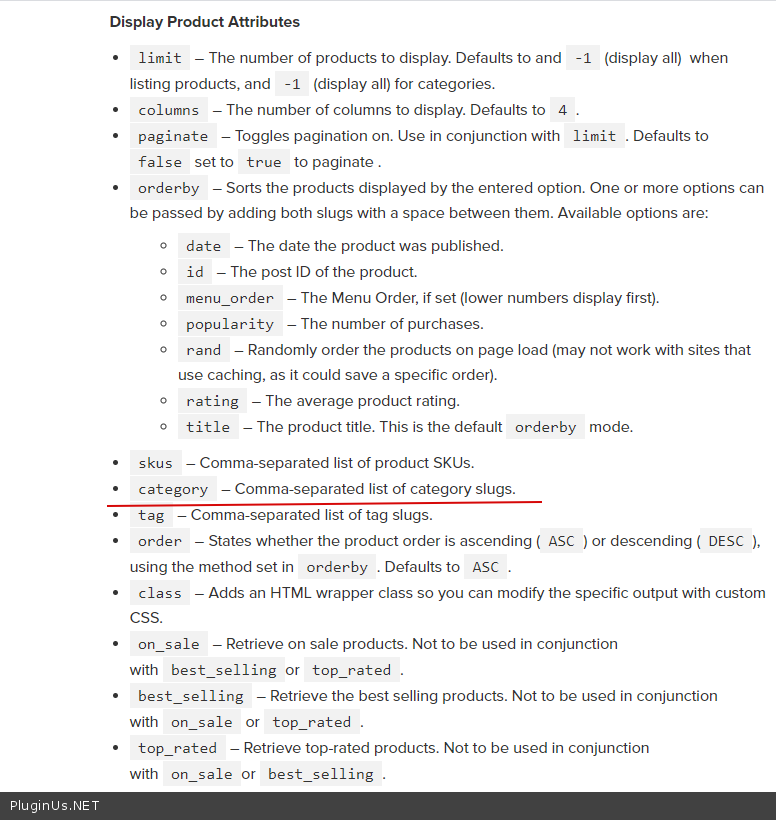
Quote from Brandon on November 16, 2020, 21:36Im sorry, I dont quite understand. Are you asking me to use the [products] shortcode with the woof shortcode? Or are you asking me to create a test page using the [products] shortcode to ensure that the attributes I am selecting are working?
Im sorry, I dont quite understand. Are you asking me to use the [products] shortcode with the woof shortcode? Or are you asking me to create a test page using the [products] shortcode to ensure that the attributes I am selecting are working?
Quote from Pablo Borysenco on November 17, 2020, 13:49Hello
Yes, I ask you to create a test page with a native shortcode [products] to check if it works at all on your site
Hello
Yes, I ask you to create a test page with a native shortcode [products] to check if it works at all on your site
Quote from Brandon on November 17, 2020, 16:10Hi there. Just added the shortcode to this page:
https://jansenwine.com/test-page/
It does work but for the woocommerce code, I used slugs rather than id's. Is there a way to do that with Woof?
Hi there. Just added the shortcode to this page:
https://jansenwine.com/test-page/
It does work but for the woocommerce code, I used slugs rather than id's. Is there a way to do that with Woof?
Quote from Pablo Borysenco on November 18, 2020, 12:47Hello
Now it looks like I understood your mistake( https://c2n.me/49RW8xo.png )
Try to use this shortcode:
[woof_products per_page=12 columns=3 is_ajax=1 taxonomies=pa_country:X] where X is id of armenia
Hello
Now it looks like I understood your mistake( https://c2n.me/49RW8xo.png )
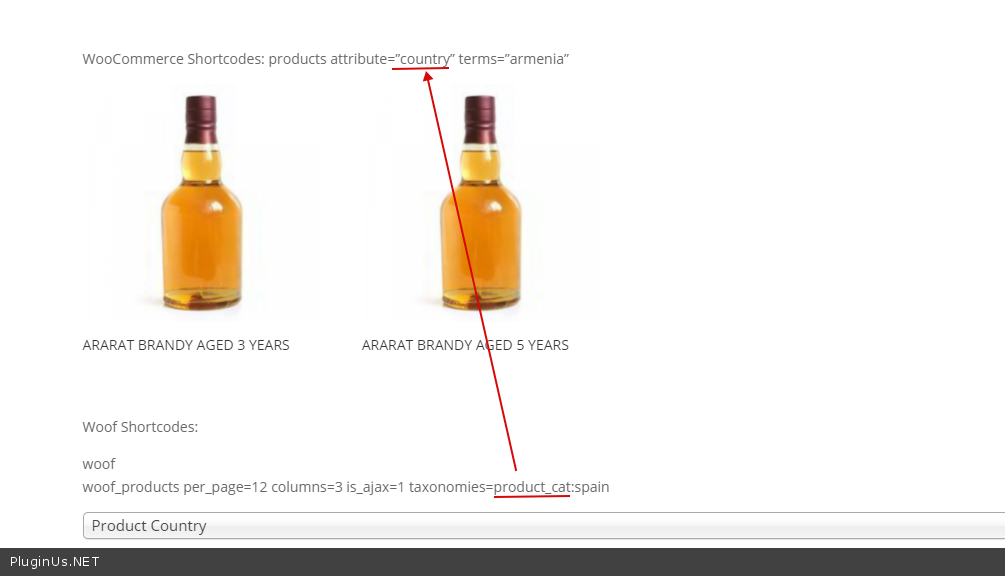
Try to use this shortcode:
[woof_products per_page=12 columns=3 is_ajax=1 taxonomies=pa_country:X] where X is id of armenia
Quote from Brandon on November 18, 2020, 14:25Hi there!
This solved it! Thank you very much for your help with this, I really appreciate it!!
Hi there!
This solved it! Thank you very much for your help with this, I really appreciate it!!
Quote from Pablo Borysenco on November 19, 2020, 12:23Hello
Welcome;)
Hello
Welcome;)