
Field added using ACF plugin does not appear as a BEAR column
The support doesn work on Saturdays and Sundays, so some Friday requests can be answered on Monday. If you have problems with registration ask help on contact us page pleaseIf you not got email within 24~36 business hours, firstly check your spam box, and if no any email from the support there - back to the forum and read answer here. DO NOT ANSWER ON EMAILS [noreply@pluginus.net] FROM THE FORUM!! Emails are just for your info, all answers should be published only here.
The support doesn work on Saturdays and Sundays, so some Friday requests can be answered on Monday.

Quote from Yaron on March 21, 2026, 22:27A product filed which was added using the Advanced Custom Fields plugin, does bot apear as a bear column and thefore can not be bulk edited.
The field definition can be seen in the attached screenshots. https://prnt.sc/tc_13DES5of9
How can I fix this please?
Thanks.
A product filed which was added using the Advanced Custom Fields plugin, does bot apear as a bear column and thefore can not be bulk edited.
The field definition can be seen in the attached screenshots. https://prnt.sc/tc_13DES5of9
How can I fix this please?
Thanks.

Quote from Alex Dev on March 23, 2026, 12:34Hello Yaron
BEAR doesn't auto-detect ACF fields, but you can add it manually:
Open BEAR → go to the Meta tab in the column panel
Type the field name tk_product_formats_ and add it as a custom meta columnHowever, there's a limitation: ACF Checkbox fields store their values as a serialized array in the database, not a plain string. BEAR's meta columns are designed for simple scalar values, so bulk-editing a checkbox array field won't work out of the box — it will likely show the raw serialized data.
For this type of field, the practical options are:If you only need to view the value in the table — adding it as a meta column will work fine
If you need to bulk edit it — that would require a custom solution or manual editing per product in BEAR's inline editor
Hello Yaron
BEAR doesn't auto-detect ACF fields, but you can add it manually:
Open BEAR → go to the Meta tab in the column panel
Type the field name tk_product_formats_ and add it as a custom meta column
However, there's a limitation: ACF Checkbox fields store their values as a serialized array in the database, not a plain string. BEAR's meta columns are designed for simple scalar values, so bulk-editing a checkbox array field won't work out of the box — it will likely show the raw serialized data.
For this type of field, the practical options are:
If you only need to view the value in the table — adding it as a meta column will work fine
If you need to bulk edit it — that would require a custom solution or manual editing per product in BEAR's inline editor
Quote from Yaron on March 23, 2026, 12:52Thanks Alex.
That is what I did but the info shown is not of a checkbox. Please see https://prnt.sc/mSlCdJ1eZU8m
Thanks.
Thanks Alex.
That is what I did but the info shown is not of a checkbox. Please see https://prnt.sc/mSlCdJ1eZU8m
Thanks.
Quote from Yaron on March 23, 2026, 12:54Also,
"a custom solution or manual editing per product in BEAR's inline editor"
Can you elaborate on that?
Thanks
Also,
"a custom solution or manual editing per product in BEAR's inline editor"
Can you elaborate on that?
Thanks
Quote from Alex Dev on March 24, 2026, 17:55Hello Yaron
I did tests, and now all is more simple, watch the video please: https://drive.google.com/file/d/16Xmjj12jbPy4nz58t7buf40dqDgTqBOv/view?usp=sharing
- add meta key as textinput/string
- save
- in tab settings enable it
- use it as string with drop-down values using comma, example: 1,2
IMPORTANT: to your site wp theme file functions.php add next code:
add_filter('update_post_metadata', function ($check, $object_id, $meta_key, $meta_value) {
    if ($meta_key === 'test_1') {
        if (is_string($meta_value) AND strpos($meta_value, ',') !== false) {
            $meta_value = array_map('trim', explode(',', $meta_value));
            $meta_value = array_map('strval', $meta_value);
            update_post_meta($object_id, $meta_key, $meta_value);
            return true;
        }
    }

    return $check;
}, 10, 4);
Try it ...
Hello Yaron
I did tests, and now all is more simple, watch the video please: https://drive.google.com/file/d/16Xmjj12jbPy4nz58t7buf40dqDgTqBOv/view?usp=sharing
- add meta key as textinput/string
- save
- in tab settings enable it
- use it as string with drop-down values using comma, example: 1,2
IMPORTANT: to your site wp theme file functions.php add next code:
add_filter('update_post_metadata', function ($check, $object_id, $meta_key, $meta_value) {
    if ($meta_key === 'test_1') {
        if (is_string($meta_value) AND strpos($meta_value, ',') !== false) {
            $meta_value = array_map('trim', explode(',', $meta_value));
            $meta_value = array_map('strval', $meta_value);
            update_post_meta($object_id, $meta_key, $meta_value);
            return true;
        }
    }

    return $check;
}, 10, 4);
Try it ...
Quote from Yaron on March 24, 2026, 18:59Thank you. It works. But admin has to be in recovery mode. What am I missing?
WordPress has a built-in feature that detects when a plugin or theme causes a fatal error on your site, and notifies you with this automated email.
Butiko - Child Theme.
First, visit your website (https://www.mendele.co.il/) and check for any visible issues. Next, visit the page where the error was caught (https://www.mendele.co.il/wp-admin/post.php?post=238763&action=edit) and check for any visible issues.
If your site appears broken and you can't access your dashboard normally, WordPress now has a special "recovery mode". This lets you safely login to your dashboard and investigate further.
In recovey mode it works.
The code:
}
// by Yaron 240326 Showing the Formats field in BEAR plugin for bulk editing
add_filter('update_post_metadata', function ($check, $object_id, $meta_key, $meta_value) {
if ($meta_key === 'tk_product_formats_') {
if (is_string($meta_value) AND strpos($meta_value, ',') !== false) {
$meta_value = array_map('trim', explode(',', $meta_value));
$meta_value = array_map('strval', $meta_value);
update_post_meta($object_id, $meta_key, $meta_value);
return true;
}
}return $check;
}, drm, pdf, printed, mobi, epub3);
?>META: https://prnt.sc/s_KHaK2pSP8R
SETTINGS: https://prnt.sc/PzaZW1yIWbqR
EDIT FIELD GROUP: https://prnt.sc/pootUwtQyMtT
BEAR: https://prnt.sc/wbcr6unlAOTa
Thank you. It works. But admin has to be in recovery mode. What am I missing?
WordPress has a built-in feature that detects when a plugin or theme causes a fatal error on your site, and notifies you with this automated email.
Butiko - Child Theme.
First, visit your website (https://www.mendele.co.il/) and check for any visible issues. Next, visit the page where the error was caught (https://www.mendele.co.il/wp-admin/post.php?post=238763&action=edit) and check for any visible issues.
If your site appears broken and you can't access your dashboard normally, WordPress now has a special"recovery mode". This lets you safely login to your dashboard and investigate further.
In recovey mode it works.
The code:
}
// by Yaron 240326 Showing the Formats field in BEAR plugin for bulk editing
add_filter('update_post_metadata', function ($check, $object_id, $meta_key, $meta_value) {
if ($meta_key === 'tk_product_formats_') {
if (is_string($meta_value) AND strpos($meta_value, ',') !== false) {
$meta_value = array_map('trim', explode(',', $meta_value));
$meta_value = array_map('strval', $meta_value);
update_post_meta($object_id, $meta_key, $meta_value);
return true;
}
}
return $check;
}, drm, pdf, printed, mobi, epub3);
?>
META: https://prnt.sc/s_KHaK2pSP8R
SETTINGS: https://prnt.sc/PzaZW1yIWbqR
EDIT FIELD GROUP: https://prnt.sc/pootUwtQyMtT
Quote from Yaron on March 24, 2026, 19:03Butiko - Child Theme This theme failed to load properly and was paused within the admin backend.
Butiko - Child Theme This theme failed to load properly and was paused within the admin backend.
Quote from Alex Dev on March 25, 2026, 12:48Hello Yaron
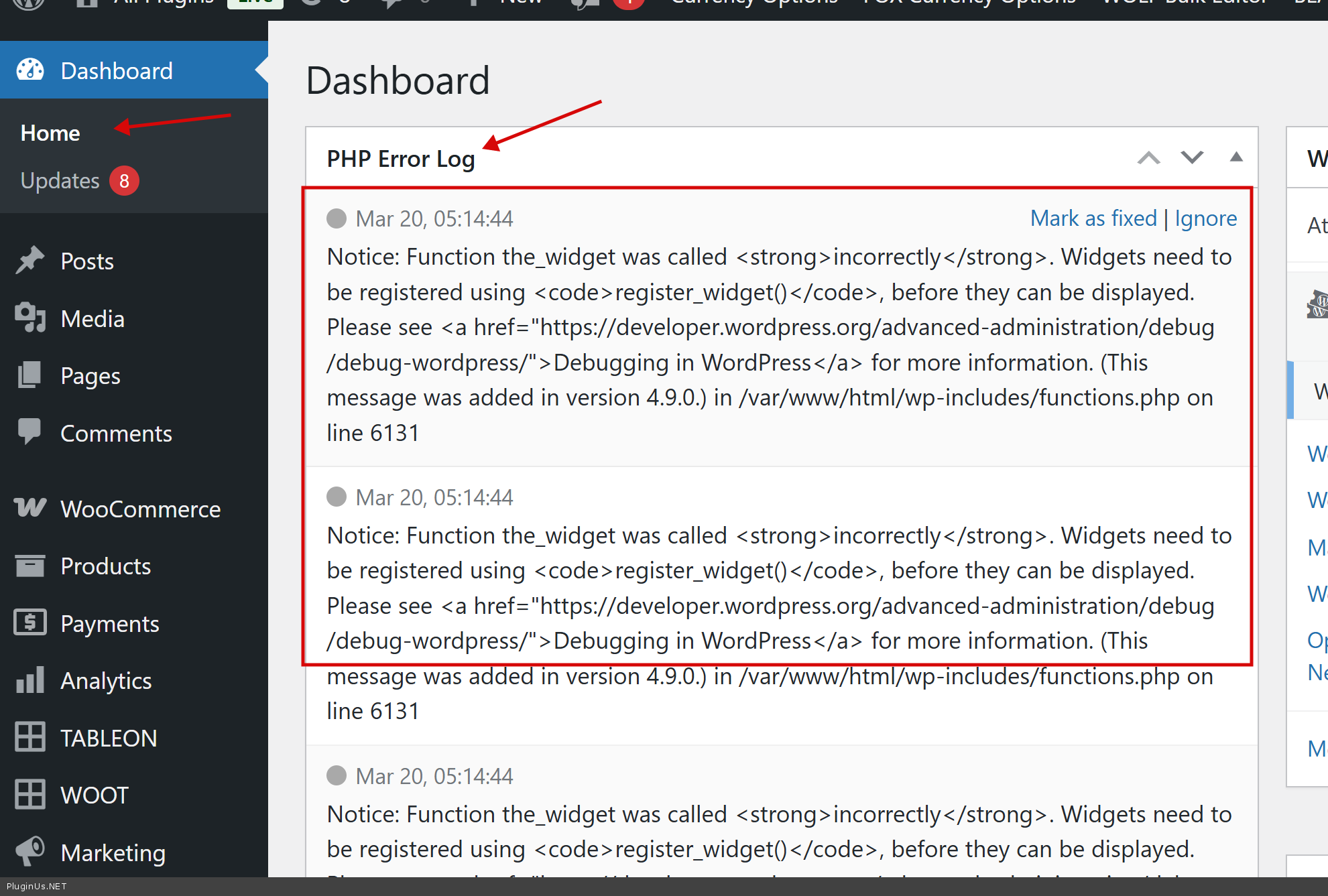
Install please this plugin https://wordpress.org/plugins/error-log-monitor/ and make its settings, then not in recovery mode catch the error, go to wp-admin dasboard and copy information from the plugin widget and paste here.
Hello Yaron
Install please this plugin https://wordpress.org/plugins/error-log-monitor/ and make its settings, then not in recovery mode catch the error, go to wp-admin dasboard and copy information from the plugin widget and paste here.
Quote from Alex Dev on March 27, 2026, 19:04Article is created: https://bulk-editor.com/howto/how-to-bulk-edit-acf-select-or-multiselect-fields/
Article is created: https://bulk-editor.com/howto/how-to-bulk-edit-acf-select-or-multiselect-fields/
Quote from Yaron on March 28, 2026, 12:30I copied the code again and there is no error now.
However, it looks like moving from checkbox to string affects the display of format availability. If you change to multiple formats (e.g.: drm,pdf) the formats display grays.
Before change: https://prnt.sc/SmHvUuAx2t4U
After change: https://prnt.sc/H_ttDfHdctiu
No issue if the change is made by multuselection of formats in the product page. The problem is only when the change is made throyugh BEAR. Bothe for bulk or single.
Perhaps it has to do with the setting of another plugin: FacetWP vrsion 4.2.7 where the display of "devices" is set according to the format selected: https://prnt.sc/DAEoM7wF46wT.
How should I modify this settings?
Many thanks.
I copied the code again and there is no error now.
However, it looks like moving from checkbox to string affects the display of format availability. If you change to multiple formats (e.g.: drm,pdf) the formats display grays.
Before change: https://prnt.sc/SmHvUuAx2t4U
After change: https://prnt.sc/H_ttDfHdctiu
No issue if the change is made by multuselection of formats in the product page. The problem is only when the change is made throyugh BEAR. Bothe for bulk or single.
Perhaps it has to do with the setting of another plugin: FacetWP vrsion 4.2.7 where the display of"devices" is set according to the format selected: https://prnt.sc/DAEoM7wF46wT.
How should I modify this settings?
Many thanks.
Quote from Yaron on March 28, 2026, 22:06PHP Error Log
Mar 28, 23:03:44
Deprecated: Function create_function() is deprecated in /var/www/html/mendele/wp-content/themes/butiko/inc/extras.php on line 669
Mar 28, 23:03:44
Notice: Undefined variable: tags_array in /var/www/html/mendele/wp-content/themes/butiko-child/functions.php on line 1648
Mar 28, 23:03:44
Notice: Undefined variable: headline in /var/www/html/mendele/wp-content/plugins/woocommerce-i4u-plugin-generic/class-wc-invoice4u-clearing.php on line 218
Mar 28, 23:03:44
Deprecated: הפונקציה woocommerce_get_page_id <strong>הוצאה משימוש</strong> בגרסה 3.0! יש להשתמש ב- wc_get_page_id במקום. in /var/www/html/mendele/wp-includes/functions.php on line 6131
Mar 28, 23:03:44
Deprecated: הפונקציה woocommerce_get_page_id <strong>הוצאה משימוש</strong> בגרסה 3.0! יש להשתמש ב- wc_get_page_id במקום. in /var/www/html/mendele/wp-includes/functions.php on line 6131
Mar 28, 23:03:44
Deprecated: הפונקציה WC_Product::get_gallery_attachment_ids <strong>הוצאה משימוש</strong> בגרסה 3.0! יש להשתמש ב- WC_Product::get_gallery_image_ids במקום. in /var/www/html/mendele/wp-includes/functions.php on line 6131
Mar 28, 23:03:44
Notice: הפונקציה id נקרא <strong>בצורה לא תקינה</strong>. אין לגשת ישירות למאפייני המוצר. Backtrace: require('wp-blog-header.php'), require_once('wp-includes/template-loader.php'), include('/themes/butiko/woocommerce/taxonomy-product_tag.php'), wc_get_template, include('/themes/butiko-child/woocommerce/archive-product.php'), wc_get_template_part, load_template, require('/themes/butiko-child/woocommerce/content-product.php'), WC_Abstract_Legacy_Product->__get, wc_doing_it_wrong למידע נוסף כנסו ל<a href="https://developer.wordpress.org/advanced-administration/debug/debug-wordpress/">ניפוי תקלות בוורדפרס</a>. (הודעה זו נוספה בגרסה 3.0.) in /var/www/html/mendele/wp-includes/functions.php on line 6131
Mar 28, 23:03:44
Deprecated: הפונקציה woocommerce_get_product_schema <strong>הוצאה משימוש</strong> בגרסה 3.0 ואין לו תחליף חלופי. in /var/www/html/mendele/wp-includes/functions.php on line 6131
Mar 28, 23:03:44
Notice: Undefined index: 187599_ebook4app in /var/www/html/mendele/wp-content/themes/butiko-child/woocommerce/single-product/add-to-cart/variable.php on line 257
Mar 28, 23:03:44
Notice: Undefined variable: text_style in /var/www/html/mendele/wp-content/themes/butiko-child/woocommerce/single-product/add-to-cart/variable.php on line 275
Mar 28, 23:03:44
Notice: Undefined variable: text_style in /var/www/html/mendele/wp-content/themes/butiko-child/woocommerce/single-product/add-to-cart/variable.php on line 275
Mar 28, 23:03:44
Notice: הפונקציה id נקרא <strong>בצורה לא תקינה</strong>. אין לגשת ישירות למאפייני המוצר. Backtrace: require('wp-blog-header.php'), require_once('wp-includes/template-loader.php'), include('/themes/butiko/woocommerce/taxonomy-product_tag.php'), wc_get_template, include('/themes/butiko-child/woocommerce/archive-product.php'), wc_get_template_part, load_template, require('/themes/butiko-child/woocommerce/content-product.php'), do_action('woocommerce_after_shop_loop_item'), WP_Hook->do_action, WP_Hook->apply_filters, woocommerce_template_loop_add_to_cart, woocommerce_variable_add_to_cart, wc_get_template, include('/themes/butiko-child/woocommerce/single-product/add-to-cart/variable.php'), WC_Abstract_Legacy_Product->__get, wc_doing_it_wrong למידע נוסף כנסו ל<a href="https://developer.wordpress.org/advanced-administration/debug/debug-wordpress/">ניפוי תקלות בוורדפרס</a>. (הודעה זו נוספה בגרסה 3.0.) in /var/www/html/mendele/wp-includes/functions.php on line 6131
Mar 28, 23:03:44
Notice: הפונקציה id נקרא <strong>בצורה לא תקינה</strong>. אין לגשת ישירות למאפייני המוצר. Backtrace: require('wp-blog-header.php'), require_once('wp-includes/template-loader.php'), include('/themes/butiko/woocommerce/taxonomy-product_tag.php'), wc_get_template, include('/themes/butiko-child/woocommerce/archive-product.php'), wc_get_template_part, load_template, require('/themes/butiko-child/woocommerce/content-product.php'), WC_Abstract_Legacy_Product->__get, wc_doing_it_wrong למידע נוסף כנסו ל<a href="https://developer.wordpress.org/advanced-administration/debug/debug-wordpress/">ניפוי תקלות בוורדפרס</a>. (הודעה זו נוספה בגרסה 3.0.) in /var/www/html/mendele/wp-includes/functions.php on line 6131
Mar 28, 23:03:44
Notice: הפונקציה id נקרא <strong>בצורה לא תקינה</strong>. אין לגשת ישירות למאפייני המוצר. Backtrace: require('wp-blog-header.php'), require_once('wp-includes/template-loader.php'), include('/themes/butiko/woocommerce/taxonomy-product_tag.php'), wc_get_template, include('/themes/butiko-child/woocommerce/archive-product.php'), wc_get_template_part, load_template, require('/themes/butiko-child/woocommerce/content-product.php'), WC_Abstract_Legacy_Product->__get, wc_doing_it_wrong למידע נוסף כנסו ל<a href="https://developer.wordpress.org/advanced-administration/debug/debug-wordpress/">ניפוי תקלות בוורדפרס</a>. (הודעה זו נוספה בגרסה 3.0.) in /var/www/html/mendele/wp-includes/functions.php on line 6131
Mar 28, 23:03:44
Notice: הפונקציה id נקרא <strong>בצורה לא תקינה</strong>. אין לגשת ישירות למאפייני המוצר. Backtrace: require('wp-blog-header.php'), require_once('wp-includes/template-loader.php'), include('/themes/butiko/woocommerce/taxonomy-product_tag.php'), wc_get_template, include('/themes/butiko-child/woocommerce/archive-product.php'), wc_get_template_part, load_template, require('/themes/butiko-child/woocommerce/content-product.php'), WC_Abstract_Legacy_Product->__get, wc_doing_it_wrong למידע נוסף כנסו ל<a href="https://developer.wordpress.org/advanced-administration/debug/debug-wordpress/">ניפוי תקלות בוורדפרס</a>. (הודעה זו נוספה בגרסה 3.0.) in /var/www/html/mendele/wp-includes/functions.php on line 6131
Mar 28, 23:03:44
Notice: הפונקציה id נקרא <strong>בצורה לא תקינה</strong>. אין לגשת ישירות למאפייני המוצר. Backtrace: require('wp-blog-header.php'), require_once('wp-includes/template-loader.php'), include('/themes/butiko/woocommerce/taxonomy-product_tag.php'), wc_get_template, include('/themes/butiko-child/woocommerce/archive-product.php'), wc_get_template_part, load_template, require('/themes/butiko-child/woocommerce/content-product.php'), WC_Abstract_Legacy_Product->__get, wc_doing_it_wrong למידע נוסף כנסו ל<a href="https://developer.wordpress.org/advanced-administration/debug/debug-wordpress/">ניפוי תקלות בוורדפרס</a>. (הודעה זו נוספה בגרסה 3.0.) in /var/www/html/mendele/wp-includes/functions.php on line 6131
Mar 28, 23:03:44
Notice: הפונקציה id נקרא <strong>בצורה לא תקינה</strong>. אין לגשת ישירות למאפייני המוצר. Backtrace: require('wp-blog-header.php'), require_once('wp-includes/template-loader.php'), include('/themes/butiko/woocommerce/taxonomy-product_tag.php'), wc_get_template, include('/themes/butiko-child/woocommerce/archive-product.php'), wc_get_template_part, load_template, require('/themes/butiko-child/woocommerce/content-product.php'), WC_Abstract_Legacy_Product->__get, wc_doing_it_wrong למידע נוסף כנסו ל<a href="https://developer.wordpress.org/advanced-administration/debug/debug-wordpress/">ניפוי תקלות בוורדפרס</a>. (הודעה זו נוספה בגרסה 3.0.) in /var/www/html/mendele/wp-includes/functions.php on line 6131
Mark as fixed | Ignore
Mar 28, 23:03:44
Notice: הפונקציה id נקרא <strong>בצורה לא תקינה</strong>. אין לגשת ישירות למאפייני המוצר. Backtrace: require('wp-blog-header.php'), require_once('wp-includes/template-loader.php'), include('/themes/butiko/woocommerce/taxonomy-product_tag.php'), wc_get_template, include('/themes/butiko-child/woocommerce/archive-product.php'), wc_get_template_part, load_template, require('/themes/butiko-child/woocommerce/content-product.php'), WC_Abstract_Legacy_Product->__get, wc_doing_it_wrong למידע נוסף כנסו ל<a href="https://developer.wordpress.org/advanced-administration/debug/debug-wordpress/">ניפוי תקלות בוורדפרס</a>. (הודעה זו נוספה בגרסה 3.0.) in /var/www/html/mendele/wp-includes/functions.php on line 6131
PHP Error Log
Mar 28, 23:03:44
Deprecated: Function create_function() is deprecated in /var/www/html/mendele/wp-content/themes/butiko/inc/extras.php on line 669
Mar 28, 23:03:44
Notice: Undefined variable: tags_array in /var/www/html/mendele/wp-content/themes/butiko-child/functions.php on line 1648
Mar 28, 23:03:44
Notice: Undefined variable: headline in /var/www/html/mendele/wp-content/plugins/woocommerce-i4u-plugin-generic/class-wc-invoice4u-clearing.php on line 218
Mar 28, 23:03:44
Deprecated: הפונקציה woocommerce_get_page_id <strong>הוצאה משימוש</strong> בגרסה 3.0! יש להשתמש ב- wc_get_page_id במקום. in /var/www/html/mendele/wp-includes/functions.php on line 6131
Mar 28, 23:03:44
Deprecated: הפונקציה woocommerce_get_page_id <strong>הוצאה משימוש</strong> בגרסה 3.0! יש להשתמש ב- wc_get_page_id במקום. in /var/www/html/mendele/wp-includes/functions.php on line 6131
Mar 28, 23:03:44
Deprecated: הפונקציה WC_Product::get_gallery_attachment_ids <strong>הוצאה משימוש</strong> בגרסה 3.0! יש להשתמש ב- WC_Product::get_gallery_image_ids במקום. in /var/www/html/mendele/wp-includes/functions.php on line 6131
Mar 28, 23:03:44
Notice: הפונקציה id נקרא <strong>בצורה לא תקינה</strong>. אין לגשת ישירות למאפייני המוצר. Backtrace: require('wp-blog-header.php'), require_once('wp-includes/template-loader.php'), include('/themes/butiko/woocommerce/taxonomy-product_tag.php'), wc_get_template, include('/themes/butiko-child/woocommerce/archive-product.php'), wc_get_template_part, load_template, require('/themes/butiko-child/woocommerce/content-product.php'), WC_Abstract_Legacy_Product->__get, wc_doing_it_wrong למידע נוסף כנסו ל<a href="https://developer.wordpress.org/advanced-administration/debug/debug-wordpress/">ניפוי תקלות בוורדפרס</a>. (הודעה זו נוספה בגרסה 3.0.) in /var/www/html/mendele/wp-includes/functions.php on line 6131
Mar 28, 23:03:44
Deprecated: הפונקציה woocommerce_get_product_schema <strong>הוצאה משימוש</strong> בגרסה 3.0 ואין לו תחליף חלופי. in /var/www/html/mendele/wp-includes/functions.php on line 6131
Mar 28, 23:03:44
Notice: Undefined index: 187599_ebook4app in /var/www/html/mendele/wp-content/themes/butiko-child/woocommerce/single-product/add-to-cart/variable.php on line 257
Mar 28, 23:03:44
Notice: Undefined variable: text_style in /var/www/html/mendele/wp-content/themes/butiko-child/woocommerce/single-product/add-to-cart/variable.php on line 275
Mar 28, 23:03:44
Notice: Undefined variable: text_style in /var/www/html/mendele/wp-content/themes/butiko-child/woocommerce/single-product/add-to-cart/variable.php on line 275
Mar 28, 23:03:44
Notice: הפונקציה id נקרא <strong>בצורה לא תקינה</strong>. אין לגשת ישירות למאפייני המוצר. Backtrace: require('wp-blog-header.php'), require_once('wp-includes/template-loader.php'), include('/themes/butiko/woocommerce/taxonomy-product_tag.php'), wc_get_template, include('/themes/butiko-child/woocommerce/archive-product.php'), wc_get_template_part, load_template, require('/themes/butiko-child/woocommerce/content-product.php'), do_action('woocommerce_after_shop_loop_item'), WP_Hook->do_action, WP_Hook->apply_filters, woocommerce_template_loop_add_to_cart, woocommerce_variable_add_to_cart, wc_get_template, include('/themes/butiko-child/woocommerce/single-product/add-to-cart/variable.php'), WC_Abstract_Legacy_Product->__get, wc_doing_it_wrong למידע נוסף כנסו ל<a href="https://developer.wordpress.org/advanced-administration/debug/debug-wordpress/">ניפוי תקלות בוורדפרס</a>. (הודעה זו נוספה בגרסה 3.0.) in /var/www/html/mendele/wp-includes/functions.php on line 6131
Mar 28, 23:03:44
Notice: הפונקציה id נקרא <strong>בצורה לא תקינה</strong>. אין לגשת ישירות למאפייני המוצר. Backtrace: require('wp-blog-header.php'), require_once('wp-includes/template-loader.php'), include('/themes/butiko/woocommerce/taxonomy-product_tag.php'), wc_get_template, include('/themes/butiko-child/woocommerce/archive-product.php'), wc_get_template_part, load_template, require('/themes/butiko-child/woocommerce/content-product.php'), WC_Abstract_Legacy_Product->__get, wc_doing_it_wrong למידע נוסף כנסו ל<a href="https://developer.wordpress.org/advanced-administration/debug/debug-wordpress/">ניפוי תקלות בוורדפרס</a>. (הודעה זו נוספה בגרסה 3.0.) in /var/www/html/mendele/wp-includes/functions.php on line 6131
Mar 28, 23:03:44
Notice: הפונקציה id נקרא <strong>בצורה לא תקינה</strong>. אין לגשת ישירות למאפייני המוצר. Backtrace: require('wp-blog-header.php'), require_once('wp-includes/template-loader.php'), include('/themes/butiko/woocommerce/taxonomy-product_tag.php'), wc_get_template, include('/themes/butiko-child/woocommerce/archive-product.php'), wc_get_template_part, load_template, require('/themes/butiko-child/woocommerce/content-product.php'), WC_Abstract_Legacy_Product->__get, wc_doing_it_wrong למידע נוסף כנסו ל<a href="https://developer.wordpress.org/advanced-administration/debug/debug-wordpress/">ניפוי תקלות בוורדפרס</a>. (הודעה זו נוספה בגרסה 3.0.) in /var/www/html/mendele/wp-includes/functions.php on line 6131
Mar 28, 23:03:44
Notice: הפונקציה id נקרא <strong>בצורה לא תקינה</strong>. אין לגשת ישירות למאפייני המוצר. Backtrace: require('wp-blog-header.php'), require_once('wp-includes/template-loader.php'), include('/themes/butiko/woocommerce/taxonomy-product_tag.php'), wc_get_template, include('/themes/butiko-child/woocommerce/archive-product.php'), wc_get_template_part, load_template, require('/themes/butiko-child/woocommerce/content-product.php'), WC_Abstract_Legacy_Product->__get, wc_doing_it_wrong למידע נוסף כנסו ל<a href="https://developer.wordpress.org/advanced-administration/debug/debug-wordpress/">ניפוי תקלות בוורדפרס</a>. (הודעה זו נוספה בגרסה 3.0.) in /var/www/html/mendele/wp-includes/functions.php on line 6131
Mar 28, 23:03:44
Notice: הפונקציה id נקרא <strong>בצורה לא תקינה</strong>. אין לגשת ישירות למאפייני המוצר. Backtrace: require('wp-blog-header.php'), require_once('wp-includes/template-loader.php'), include('/themes/butiko/woocommerce/taxonomy-product_tag.php'), wc_get_template, include('/themes/butiko-child/woocommerce/archive-product.php'), wc_get_template_part, load_template, require('/themes/butiko-child/woocommerce/content-product.php'), WC_Abstract_Legacy_Product->__get, wc_doing_it_wrong למידע נוסף כנסו ל<a href="https://developer.wordpress.org/advanced-administration/debug/debug-wordpress/">ניפוי תקלות בוורדפרס</a>. (הודעה זו נוספה בגרסה 3.0.) in /var/www/html/mendele/wp-includes/functions.php on line 6131
Mar 28, 23:03:44
Notice: הפונקציה id נקרא <strong>בצורה לא תקינה</strong>. אין לגשת ישירות למאפייני המוצר. Backtrace: require('wp-blog-header.php'), require_once('wp-includes/template-loader.php'), include('/themes/butiko/woocommerce/taxonomy-product_tag.php'), wc_get_template, include('/themes/butiko-child/woocommerce/archive-product.php'), wc_get_template_part, load_template, require('/themes/butiko-child/woocommerce/content-product.php'), WC_Abstract_Legacy_Product->__get, wc_doing_it_wrong למידע נוסף כנסו ל<a href="https://developer.wordpress.org/advanced-administration/debug/debug-wordpress/">ניפוי תקלות בוורדפרס</a>. (הודעה זו נוספה בגרסה 3.0.) in /var/www/html/mendele/wp-includes/functions.php on line 6131
Mark as fixed | Ignore
Mar 28, 23:03:44
Notice: הפונקציה id נקרא <strong>בצורה לא תקינה</strong>. אין לגשת ישירות למאפייני המוצר. Backtrace: require('wp-blog-header.php'), require_once('wp-includes/template-loader.php'), include('/themes/butiko/woocommerce/taxonomy-product_tag.php'), wc_get_template, include('/themes/butiko-child/woocommerce/archive-product.php'), wc_get_template_part, load_template, require('/themes/butiko-child/woocommerce/content-product.php'), WC_Abstract_Legacy_Product->__get, wc_doing_it_wrong למידע נוסף כנסו ל<a href="https://developer.wordpress.org/advanced-administration/debug/debug-wordpress/">ניפוי תקלות בוורדפרס</a>. (הודעה זו נוספה בגרסה 3.0.) in /var/www/html/mendele/wp-includes/functions.php on line 6131
Quote from Alex Dev on March 30, 2026, 15:48Hello Yaron
The PHP notices in your log are all coming from your theme (butiko / butiko-child) and the woocommerce-i4u-plugin-generic plugin — deprecated WooCommerce 3.0 functions and undefined variables in the theme files. None of them are related to BEAR.
Regarding the formats display graying out after editing through BEAR: BEAR is saving the data correctly as an array, which you can confirm in the META screenshot you shared. The issue is that FacetWP needs to reindex the product after the value changes. When you edit through the native product page, WooCommerce and ACF trigger all the usual hooks that FacetWP listens to for reindexing. When editing through BEAR, those hooks may not all fire in the same way.
Please try going to FacetWP settings and running a full re-index after making changes through BEAR, and check if the display updates correctly. If it does, the issue is that FacetWP needs to be triggered to reindex after bulk edits — that is outside of BEAR's scope and would need to be handled on the FacetWP side.
+
The gray display issue after editing through BEAR is caused by FacetWP not reindexing the product when the value is saved via the custom filter you added. The filter calls update_post_meta directly, which bypasses the normal WooCommerce save flow that FacetWP listens to.
To fix this, add the following code to your functions.php right alongside your existing code:
add_action( 'woobe_after_update_page_field', function( $product_id, $product, $field_key ) {
    if ( $field_key === 'tk_product_formats_' && function_exists( 'FWP' ) ) {
        FWP()->indexer->index( $product_id );
    }
}, 10, 3 );
This uses BEAR's built-in hook that fires after each field is updated. It tells FacetWP to reindex only that specific product immediately after BEAR saves the formats field, so the display will update correctly without needing a full manual reindex.
Please try the code above, should help, if not only manual reset of indexes will work fine ...
Hello Yaron
The PHP notices in your log are all coming from your theme (butiko / butiko-child) and the woocommerce-i4u-plugin-generic plugin — deprecated WooCommerce 3.0 functions and undefined variables in the theme files. None of them are related to BEAR.
Regarding the formats display graying out after editing through BEAR: BEAR is saving the data correctly as an array, which you can confirm in the META screenshot you shared. The issue is that FacetWP needs to reindex the product after the value changes. When you edit through the native product page, WooCommerce and ACF trigger all the usual hooks that FacetWP listens to for reindexing. When editing through BEAR, those hooks may not all fire in the same way.
Please try going to FacetWP settings and running a full re-index after making changes through BEAR, and check if the display updates correctly. If it does, the issue is that FacetWP needs to be triggered to reindex after bulk edits — that is outside of BEAR's scope and would need to be handled on the FacetWP side.
+
The gray display issue after editing through BEAR is caused by FacetWP not reindexing the product when the value is saved via the custom filter you added. The filter calls update_post_meta directly, which bypasses the normal WooCommerce save flow that FacetWP listens to.
To fix this, add the following code to your functions.php right alongside your existing code:
add_action( 'woobe_after_update_page_field', function( $product_id, $product, $field_key ) {
    if ( $field_key === 'tk_product_formats_' && function_exists( 'FWP' ) ) {
        FWP()->indexer->index( $product_id );
    }
}, 10, 3 );
This uses BEAR's built-in hook that fires after each field is updated. It tells FacetWP to reindex only that specific product immediately after BEAR saves the formats field, so the display will update correctly without needing a full manual reindex.
Please try the code above, should help, if not only manual reset of indexes will work fine ...
Quote from Yaron on March 30, 2026, 19:42Istalled BEAR 2.7.1 and tried going to FacetWP settings and running a full re-index after making changes through BEAR.
The display does not updates correctly.
Is it not an issue that the field in "chackboxes" in FacetWP while it is textinput string in BEAR?
Thanks.
Istalled BEAR 2.7.1 and tried going to FacetWP settings and running a full re-index after making changes through BEAR.
The display does not updates correctly.
Is it not an issue that the field in"chackboxes" in FacetWP while it is textinput string in BEAR?
Thanks.
Quote from Alex Dev on March 31, 2026, 11:59Hello Yaron
We investigated your issue and your assumption was correct. The problem is in how ACF saves data compared to how BEAR saves data.
When ACF saves a checkbox field, it writes two records to the database: the actual value (e.g. test_1) and a shadow field with an underscore prefix (_test_1) that contains the ACF field key reference (something like field_69c2ac77c3cde). FacetWP uses this shadow field to recognize that the value comes from ACF and to process it correctly for indexing. When editing through BEAR, the custom filter we added writes the array value correctly, but it does not write the shadow field. FacetWP then cannot identify the field as an ACF field and the display does not update correctly.
The fix is to add one extra line to your existing filter code so that the shadow field is also written when BEAR saves the value.
Here is the updated code:
add_filter('update_post_metadata', function ($check, $object_id, $meta_key, $meta_value) {
    if ($meta_key === 'tk_product_formats_') {
        if (is_string($meta_value) AND strpos($meta_value, ',') !== false) {
            $meta_value = array_map('trim', explode(',', $meta_value));
            $meta_value = array_map('strval', $meta_value);
            update_post_meta($object_id, $meta_key, $meta_value);
            update_post_meta($object_id, '_' . $meta_key, 'YOUR_FIELD_KEY_HERE');
            return true;
        }
    }
    return $check;
}, 10, 4);
You need to replace YOUR_FIELD_KEY_HERE with the actual ACF field key for tk_product_formats_ from your site. The field key looks like field_xxxxxxxxx.
To find it, go to your phpMyAdmin and run this query:
SELECT meta_value FROM wp_postmeta WHERE meta_key = '_tk_product_formats_' LIMIT 1
This will return the field key. Alternatively you can find it in your ACF admin by opening the field group that contains this field and enabling Show field keys in Screen Options at the top right of the page.
Replace YOUR_FIELD_KEY_HERE with the value you find, add the updated code to your functions.php replacing the old version, and the display should update correctly after editing through BEAR.
More ways to find second meta key:
To find the ACF field key for tk_product_formats_ you have several options.
Option 1 - phpMyAdmin query (easiest if you have database access):
SELECT meta_value FROM wp_postmeta WHERE meta_key = '_tk_product_formats_' LIMIT 1
This works if at least one product was ever saved through the native WooCommerce product editor. The result will look like field_xxxxxxxxx.
Option 2 - ACF admin interface:
Go to wp-admin, then Custom Fields, then find the field group that contains the Formats field. In the top right corner of the page click Screen Options and enable Show field keys. The field key will then appear under each field name directly in the field group editor.
Option 3 - WP-CLI (if you have command line access to the server):
wp post meta list <any_product_id> --meta_key=_tk_product_formats_
Replace <any_product_id> with the ID of any product that has this field set.
Option 4 - PHP snippet run once (if none of the above are available):
Add this temporarily to your functions.php, load any page, check the result in the page source or error log, then remove it:
add_action('init', function() {
$key = get_field_object('tk_product_formats_');
if ($key) error_log('ACF field key: ' . $key['key']);
});
Option 5 - browser developer tools on the product edit page:
Open any product in the WP admin editor, open browser DevTools, go to the Elements tab and search for tk_product_formats_. ACF renders a hidden input with the field key in the name attribute, something like acf[field_xxxxxxxxx].
Any of these will give you the same value. Option 1 or 2 are the most straightforward.
p.s. What test we done on our side (just for info clarification):
Product 228 (saved via native WordPress):
test_1 = a:2:{i:0;s:1:"1";i:1;s:1:"2";}
_test_1 = field_69c2ac77c3cde ← ACF field key referenceProduct 226 (saved via BEAR):
test_1 = a:2:{i:0;s:1:"0";i:1;s:1:"1";} ← the array is there, everything is OK
_test_1 — MISSING ← that's the root of the problemTry it please ...
Hello Yaron
We investigated your issue and your assumption was correct. The problem is in how ACF saves data compared to how BEAR saves data.
When ACF saves a checkbox field, it writes two records to the database: the actual value (e.g. test_1) and a shadow field with an underscore prefix (_test_1) that contains the ACF field key reference (something like field_69c2ac77c3cde). FacetWP uses this shadow field to recognize that the value comes from ACF and to process it correctly for indexing. When editing through BEAR, the custom filter we added writes the array value correctly, but it does not write the shadow field. FacetWP then cannot identify the field as an ACF field and the display does not update correctly.
The fix is to add one extra line to your existing filter code so that the shadow field is also written when BEAR saves the value.
Here is the updated code:
add_filter('update_post_metadata', function ($check, $object_id, $meta_key, $meta_value) {
    if ($meta_key === 'tk_product_formats_') {
        if (is_string($meta_value) AND strpos($meta_value, ',') !== false) {
            $meta_value = array_map('trim', explode(',', $meta_value));
            $meta_value = array_map('strval', $meta_value);
            update_post_meta($object_id, $meta_key, $meta_value);
            update_post_meta($object_id, '_' . $meta_key, 'YOUR_FIELD_KEY_HERE');
            return true;
        }
    }
    return $check;
}, 10, 4);
You need to replace YOUR_FIELD_KEY_HERE with the actual ACF field key for tk_product_formats_ from your site. The field key looks like field_xxxxxxxxx.
To find it, go to your phpMyAdmin and run this query:
SELECT meta_value FROM wp_postmeta WHERE meta_key = '_tk_product_formats_' LIMIT 1
This will return the field key. Alternatively you can find it in your ACF admin by opening the field group that contains this field and enabling Show field keys in Screen Options at the top right of the page.
Replace YOUR_FIELD_KEY_HERE with the value you find, add the updated code to your functions.php replacing the old version, and the display should update correctly after editing through BEAR.
More ways to find second meta key:
To find the ACF field key for tk_product_formats_ you have several options.
Option 1 - phpMyAdmin query (easiest if you have database access):
SELECT meta_value FROM wp_postmeta WHERE meta_key = '_tk_product_formats_' LIMIT 1
This works if at least one product was ever saved through the native WooCommerce product editor. The result will look like field_xxxxxxxxx.
Option 2 - ACF admin interface:
Go to wp-admin, then Custom Fields, then find the field group that contains the Formats field. In the top right corner of the page click Screen Options and enable Show field keys. The field key will then appear under each field name directly in the field group editor.
Option 3 - WP-CLI (if you have command line access to the server):
wp post meta list <any_product_id> --meta_key=_tk_product_formats_
Replace <any_product_id> with the ID of any product that has this field set.
Option 4 - PHP snippet run once (if none of the above are available):
Add this temporarily to your functions.php, load any page, check the result in the page source or error log, then remove it:
add_action('init', function() {
$key = get_field_object('tk_product_formats_');
if ($key) error_log('ACF field key: ' . $key['key']);
});
Option 5 - browser developer tools on the product edit page:
Open any product in the WP admin editor, open browser DevTools, go to the Elements tab and search for tk_product_formats_. ACF renders a hidden input with the field key in the name attribute, something like acf[field_xxxxxxxxx].
Any of these will give you the same value. Option 1 or 2 are the most straightforward.
p.s. What test we done on our side (just for info clarification):
Product 228 (saved via native WordPress):
test_1 = a:2:{i:0;s:1:"1";i:1;s:1:"2";}
_test_1 = field_69c2ac77c3cde ← ACF field key reference
Product 226 (saved via BEAR):
test_1 = a:2:{i:0;s:1:"0";i:1;s:1:"1";} ← the array is there, everything is OK
_test_1 — MISSING ← that's the root of the problem
Try it please ...
Quote from Yaron on April 3, 2026, 16:03I just got to test it now. It is still the same.
I do not undestand the test you specified at the end.
Thanks again for the effort. It is indeed appreciated.
I just got to test it now. It is still the same.
I do not undestand the test you specified at the end.
Thanks again for the effort. It is indeed appreciated.
Quote from Alex Dev on April 6, 2026, 12:11Hello Yaron
Share please wp-admin+ftp access to the site or create stage site using https://wordpress.org/plugins/duplicator/ in private area of this ticket, I will set scruipts to work
https://share.pluginus.net/image/i20230222134241.png
https://share.pluginus.net/image/i20230222134615.png
https://share.pluginus.net/image/i20230222134511.png
Hello Yaron
Share please wp-admin+ftp access to the site or create stage site using https://wordpress.org/plugins/duplicator/ in private area of this ticket, I will set scruipts to work
https://share.pluginus.net/image/i20230222134241.png
https://share.pluginus.net/image/i20230222134615.png
https://share.pluginus.net/image/i20230222134511.png


