

Fatal error when adding snippet for price rounding
The support doesn work on Saturdays and Sundays, so some Friday requests can be answered on Monday. If you have problems with registration ask help on contact us page pleaseIf you not got email within 24~36 business hours, firstly check your spam box, and if no any email from the support there - back to the forum and read answer here. DO NOT ANSWER ON EMAILS [noreply@pluginus.net] FROM THE FORUM!! Emails are just for your info, all answers should be published only here.
The support doesn work on Saturdays and Sundays, so some Friday requests can be answered on Monday.

Quote from kenarp45 on July 20, 2021, 23:33When I added the snippet below via Filezilla in the function.php doc within the current theme for our site the site gets a fatal error. My understanding is by adding this snippet below, prices will be rounded to show as ending with 99 cents. I just installed the currency switcher today and otherwise it appears to be working fine, the site is leguanoshoes.com.
add_filter('woocs_raw_woocommerce_price', function($price) {
return round($price + 0.01) – 0.01;
});Please let me know if there is an alternative snippet or some other workaround.
Thank you.
When I added the snippet below via Filezilla in the function.php doc within the current theme for our site the site gets a fatal error. My understanding is by adding this snippet below, prices will be rounded to show as ending with 99 cents. I just installed the currency switcher today and otherwise it appears to be working fine, the site is leguanoshoes.com.
add_filter('woocs_raw_woocommerce_price', function($price) {
return round($price + 0.01) – 0.01;
});
Please let me know if there is an alternative snippet or some other workaround.
Thank you.

Quote from Pablo Borysenco on July 21, 2021, 10:04Hello
Paste your license key here - https://share.pluginus.net/image/i20210618130558.png -> https://share.pluginus.net/image/i20210618130614.png
This code is 100% correct, but it looks like you inserted a code with invalid characters.
Before copying the snippet, click on this button - https://share.pluginus.net/image/i20210721110446.png
Hello
Paste your license key here - https://share.pluginus.net/image/i20210618130558.png -> https://share.pluginus.net/image/i20210618130614.png


This code is 100% correct, but it looks like you inserted a code with invalid characters.
Before copying the snippet, click on this button - https://share.pluginus.net/image/i20210721110446.png

Quote from kenarp45 on July 21, 2021, 18:28I bought the currency switcher plugin from Envato yesterday. I can't seem to locate the license key, can I find it in the backend of the website somewhere? Here is the Envato purchase code with 8 characters x'd out for security, I tried entering that where you asked but don't think it worked.
21c6eaae-5c8a-xxxx-xxxx-2a1edbf3b69a
I just tried adding the snippet again to the function.php file in the manner you suggested and it didn't work again. What's worse, I somehow managed to end up with a blank function.php file and so now the site is broken. I tried restoring using Updraft backup but that didn't work. I'm in trouble now.
I bought the currency switcher plugin from Envato yesterday. I can't seem to locate the license key, can I find it in the backend of the website somewhere? Here is the Envato purchase code with 8 characters x'd out for security, I tried entering that where you asked but don't think it worked.
21c6eaae-5c8a-xxxx-xxxx-2a1edbf3b69a
I just tried adding the snippet again to the function.php file in the manner you suggested and it didn't work again. What's worse, I somehow managed to end up with a blank function.php file and so now the site is broken. I tried restoring using Updraft backup but that didn't work. I'm in trouble now.
Quote from kenarp45 on July 21, 2021, 18:36OK, I restored the theme and all is good again.
I've tried adding the code below multiple times, after copying it from Notepad so it's clean, but each time I get a fatal error;
add_filter('woocs_raw_woocommerce_price', function($price) {
return round($price + 0.01) – 0.01;
});You note that I entered a code with invalid characters, can you tell me what code that I should be entering? What my error is?
OK, I restored the theme and all is good again.
I've tried adding the code below multiple times, after copying it from Notepad so it's clean, but each time I get a fatal error;
add_filter('woocs_raw_woocommerce_price', function($price) {
return round($price + 0.01) – 0.01;
});
You note that I entered a code with invalid characters, can you tell me what code that I should be entering? What my error is?
Quote from Pablo Borysenco on July 22, 2021, 10:01Hello
It is very strange. This code is used by thousands of users without any problems
Please drop me wp-admin+FTP - https://share.pluginus.net/image/i20210618130558.png -> https://share.pluginus.net/image/i20210618130637.png I will check it
Hello
It is very strange. This code is used by thousands of users without any problems
Please drop me wp-admin+FTP - https://share.pluginus.net/image/i20210618130558.png -> https://share.pluginus.net/image/i20210618130637.png I will check it

Quote from kenarp45 on July 22, 2021, 18:02OK, I've left the info you asked for. Thanks a million for doing this.
OK, I've left the info you asked for. Thanks a million for doing this.
Quote from kenarp45 on July 22, 2021, 22:56Another problem has cropped up, well 2 actually. We need the website to have a base currency of CAN because we are also using the Oliver POS plugin which provides us with a POS system that's directly connected to the website that we're using for in store sales and our stores are located in Canada so payment is made in Canadian dollars. We implemented the currency switcher today and see that some products are now showing in USD and some in CAN in the Oliver POS (CAN all end in .99 so easy to identify), for example Beat's are $234.99 CAN and the Beat Pink's are correct but the Beat Silver's are showing as the USD converted price of $185.35 even though they are correctly priced in the product. And sales have been done in USD even though we collected CAN and therefore lost substantially. Oliver POS uses the base currency of the website, and we've made CAN the base currency in the plugin, so how is this happening?
In addition, we use MyWorks to synchronize with our Quickbooks, and for some reason transactions are not syncing now that we activated the currency switcher plugin.
I really hope you can help us to make this work.
Another problem has cropped up, well 2 actually. We need the website to have a base currency of CAN because we are also using the Oliver POS plugin which provides us with a POS system that's directly connected to the website that we're using for in store sales and our stores are located in Canada so payment is made in Canadian dollars. We implemented the currency switcher today and see that some products are now showing in USD and some in CAN in the Oliver POS (CAN all end in .99 so easy to identify), for example Beat's are $234.99 CAN and the Beat Pink's are correct but the Beat Silver's are showing as the USD converted price of $185.35 even though they are correctly priced in the product. And sales have been done in USD even though we collected CAN and therefore lost substantially. Oliver POS uses the base currency of the website, and we've made CAN the base currency in the plugin, so how is this happening?
In addition, we use MyWorks to synchronize with our Quickbooks, and for some reason transactions are not syncing now that we activated the currency switcher plugin.
I really hope you can help us to make this work.
Quote from Pablo Borysenco on July 23, 2021, 11:58Hello
Paste your license key here - https://share.pluginus.net/image/i20210618130558.png -> https://share.pluginus.net/image/i20210618130614.png
It looks like the problem is in your server. I added some simple code that is not relevant to my plugin - https://c2n.me/4cMO8MK.png
And going to any page causes a fatal error - https://c2n.me/4cMOhET
About second issue - https://currency-switcher.com/woocs-labs/
Hello
Paste your license key here - https://share.pluginus.net/image/i20210618130558.png -> https://share.pluginus.net/image/i20210618130614.png
It looks like the problem is in your server. I added some simple code that is not relevant to my plugin - https://c2n.me/4cMO8MK.png
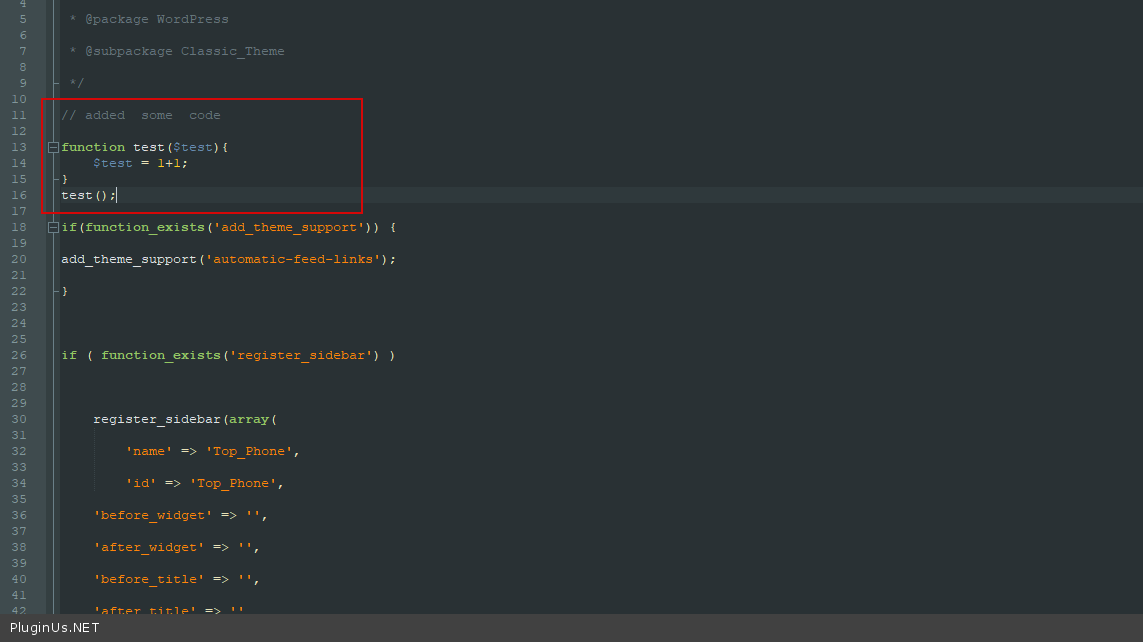
And going to any page causes a fatal error - https://c2n.me/4cMOhET
About second issue - https://currency-switcher.com/woocs-labs/