
Empty results page .
The support doesn work on Saturdays and Sundays, so some Friday requests can be answered on Monday. If you have problems with registration ask help on contact us page pleaseIf you not got email within 24~36 business hours, firstly check your spam box, and if no any email from the support there - back to the forum and read answer here. DO NOT ANSWER ON EMAILS [noreply@pluginus.net] FROM THE FORUM!! Emails are just for your info, all answers should be published only here.
The support doesn work on Saturdays and Sundays, so some Friday requests can be answered on Monday.

Quote from patH on August 21, 2026, 10:07Hi there.
I am using your great plugin for some months.
It works perfectly fine on any product catégory page.
https://boutique.ramscores.com/categorie-produit/formations/
I wanted to do the same on Shop page, but it failed.
https://boutique.ramscores.com/catalogue/
The result is an empty page...
My Shop page is build with Divi Theme Builder.
Thanks in advance for any help.
Hi there.
I am using your great plugin for some months.
It works perfectly fine on any product catégory page.
https://boutique.ramscores.com/categorie-produit/formations/
I wanted to do the same on Shop page, but it failed.
https://boutique.ramscores.com/catalogue/
The result is an empty page...
My Shop page is build with Divi Theme Builder.
Thanks in advance for any help.

Quote from Alex Dev on August 24, 2026, 11:41Hello
Thank you for your kind words :)
Please run the following three tests in this order, and report the result of each one.
Test 1. Isolated test page
Create a new ordinary WordPress page. Name it "tester". Do not build it with the Divi Theme Builder, use the plain editor.
Put into it exactly the same two shortcodes you use on your shop page: the filter shortcode and the products shortcode. Publish the page, open it and filter something.
If filtering works there, the plugin and your settings are fine and the problem belongs to the /catalogue/ page itself, either its address or the Divi template assigned to it. If it fails there as well, go on to test 2.
Test 2. Disable swoof influence
Open the plugin settings, Advanced tab, Options section. Find the option "Disable swoof influence" and set it to Yes. Save.
Open your shop page and filter again. Then open one of your category pages, for example your Formations category, and filter there too.
Report both results, the shop page and the category page. We need to know whether this option fixes one and breaks the other.
Test 3. Change the way the filter writes into the address bar
If test 2 changed nothing, leave it as it was and switch the filter to the other available mode of passing its values in the page address. Save, then open your shop page and filter again.
The two modes build the address differently, and a page produced by a builder can react to one of them and not to the other.
One more thing to check while you are in the settings
In the Advanced tab there is a field that limits the plugin to certain pages, filled in one link or link mask per line, with a reverse switch beside it. Look at that field. If anything is written in it, empty it, save, and test your shop page again. A mask matching your category address would let the plugin work on category pages and stay switched off on the shop page, which is exactly the difference you are seeing.
Report each result separately, including the ones where nothing changes. If none of the three tests helps, place WordPress administrator access into the private area of this ticket, and we will take it from there.
https://share.pluginus.net/image/i20230222134241.png
https://share.pluginus.net/image/i20230222134615.png
Hello
Thank you for your kind words :)
Please run the following three tests in this order, and report the result of each one.
Test 1. Isolated test page
Create a new ordinary WordPress page. Name it"tester". Do not build it with the Divi Theme Builder, use the plain editor.
Put into it exactly the same two shortcodes you use on your shop page: the filter shortcode and the products shortcode. Publish the page, open it and filter something.
If filtering works there, the plugin and your settings are fine and the problem belongs to the /catalogue/ page itself, either its address or the Divi template assigned to it. If it fails there as well, go on to test 2.
Test 2. Disable swoof influence
Open the plugin settings, Advanced tab, Options section. Find the option"Disable swoof influence" and set it to Yes. Save.
Open your shop page and filter again. Then open one of your category pages, for example your Formations category, and filter there too.
Report both results, the shop page and the category page. We need to know whether this option fixes one and breaks the other.
Test 3. Change the way the filter writes into the address bar
If test 2 changed nothing, leave it as it was and switch the filter to the other available mode of passing its values in the page address. Save, then open your shop page and filter again.
The two modes build the address differently, and a page produced by a builder can react to one of them and not to the other.
One more thing to check while you are in the settings
In the Advanced tab there is a field that limits the plugin to certain pages, filled in one link or link mask per line, with a reverse switch beside it. Look at that field. If anything is written in it, empty it, save, and test your shop page again. A mask matching your category address would let the plugin work on category pages and stay switched off on the shop page, which is exactly the difference you are seeing.
Report each result separately, including the ones where nothing changes. If none of the three tests helps, place WordPress administrator access into the private area of this ticket, and we will take it from there.
https://share.pluginus.net/image/i20230222134241.png
https://share.pluginus.net/image/i20230222134615.png


Quote from patH on August 24, 2026, 16:55Hi and thank you for your help.
Test 1. Isolated test page
If I use
[woof]
[woof_products per_page='15']
It works !
But If I use, what I tried on my catalogue page
[woof is_ajax='1' dynamic_recount='1' autosubmit='0' redirect="https://boutique.ramscores.com/catalogue/"] [woof_products per_page='15']
It did not work, same problem
Test 2. Disable swoof influence.
It was already done.
Test 3. I did not uderstand.
Hi and thank you for your help.
Test 1. Isolated test page
If I use
[woof]
[woof_products per_page='15']
It works !
But If I use, what I tried on my catalogue page
[woof is_ajax='1' dynamic_recount='1' autosubmit='0' redirect="https://boutique.ramscores.com/catalogue/"] [woof_products per_page='15']
It did not work, same problem
Test 2. Disable swoof influence.
It was already done.
Test 3. I did not uderstand.
Quote from Alex Dev on August 27, 2026, 12:18Hello
Your test 1 answered the question, thank you for running it properly. The problem is the redirect attribute.
Remove it. On your /catalogue/ page use exactly this:
[woof is_ajax='1' dynamic_recount='1' autosubmit='0']
[woof_products per_page='15']Why it breaks things here: the redirect attribute exists for the opposite situation, when the filter form sits on one page and the results have to be shown on a different one — a filter in the sidebar or on the home page, sending visitors to the shop. It only works in redirect mode, so with is_ajax='1' it is ignored anyway. And when [woof_products] is present on the same page, the plugin deliberately switches redirect off, because the results are already right there. Pointing redirect at the very page the filter lives on gives the plugin two contradictory instructions.
Note that this also clears Divi of suspicion. You got the same failure on a plain page built with the standard editor, so the theme builder is not involved.
About test 3, which was unclear — you can skip it now, but for reference it meant this: in the plugin settings there is an extension called SEO URL request with an Enable/Disable switch. When it is on, filter values become part of the address as path segments, like /swoof/color-red/. When it is off, they are passed as ordinary query parameters. The test was to switch it to the other state and see whether the page behaves differently.
Please try the shortcodes above on /catalogue/ and tell me the result.
Hello
Your test 1 answered the question, thank you for running it properly. The problem is the redirect attribute.
Remove it. On your /catalogue/ page use exactly this:
[woof is_ajax='1' dynamic_recount='1' autosubmit='0']
[woof_products per_page='15']
Why it breaks things here: the redirect attribute exists for the opposite situation, when the filter form sits on one page and the results have to be shown on a different one — a filter in the sidebar or on the home page, sending visitors to the shop. It only works in redirect mode, so with is_ajax='1' it is ignored anyway. And when [woof_products] is present on the same page, the plugin deliberately switches redirect off, because the results are already right there. Pointing redirect at the very page the filter lives on gives the plugin two contradictory instructions.
Note that this also clears Divi of suspicion. You got the same failure on a plain page built with the standard editor, so the theme builder is not involved.
About test 3, which was unclear — you can skip it now, but for reference it meant this: in the plugin settings there is an extension called SEO URL request with an Enable/Disable switch. When it is on, filter values become part of the address as path segments, like /swoof/color-red/. When it is off, they are passed as ordinary query parameters. The test was to switch it to the other state and see whether the page behaves differently.
Please try the shortcodes above on /catalogue/ and tell me the result.
Quote from patH on August 28, 2026, 15:28Thank you for your help.
I tried what you told , the simple code.
Starting on French shop page, it failed again with an empty page with slug https://boutique.ramscores.com/catalogue/?swoof=1&pa_instrumentation=guitare,piano&pa_genre=chanson
If you have any idea.
Thanks again.
Thank you for your help.
I tried what you told , the simple code.
Starting on French shop page, it failed again with an empty page with slug https://boutique.ramscores.com/catalogue/?swoof=1&pa_instrumentation=guitare,piano&pa_genre=chanson
If you have any idea.
Thanks again.
Quote from Alex Dev on August 31, 2026, 11:34Hello
Thank you for testing. Before we go for access, please check one thing you mentioned in passing, because it may be the whole answer.
On test 2 you wrote that "Disable swoof influence" was already done. That means the option was already set to Yes before you contacted us, and that changes the picture.
That option switches off the part of the plugin that forces the product archive context onto the current query. On a category page you do not need it, because WordPress is already querying products there. On the shop page you usually do, and a page built with the Divi Theme Builder is exactly the case where the query has to be corrected. So having it on Yes can produce precisely what you see: category pages work, the shop page comes back empty.
Please set "Disable swoof influence" back to No, save, and test both pages again. Tell us the result for the shop page and for one category page, even if nothing changes.
One more question: is the site multilingual, with Polylang or WPML installed? You mention the French shop page, and if there is a second language we need to know about it.
If that does not solve it, we will look at the site ourselves
For that we need one of the following.
If this is a live shop, please make a staging copy of it and give us access to the copy: FTP and a WordPress administrator account. We will run the tests there without touching your live site.
If the site is still in development and not taking orders, full access to it is fine as well: FTP and a WordPress administrator account. In that case please make a full backup first, before you send us anything. We will be changing settings and testing shortcodes, and we want you to be able to roll back at any moment.
Put the credentials into the private area of this ticket. The private section is visible only to you and to us:
https://share.pluginus.net/image/i20230222134241.png
https://share.pluginus.net/image/i20230222134615.png
Hello
Thank you for testing. Before we go for access, please check one thing you mentioned in passing, because it may be the whole answer.
On test 2 you wrote that"Disable swoof influence" was already done. That means the option was already set to Yes before you contacted us, and that changes the picture.
That option switches off the part of the plugin that forces the product archive context onto the current query. On a category page you do not need it, because WordPress is already querying products there. On the shop page you usually do, and a page built with the Divi Theme Builder is exactly the case where the query has to be corrected. So having it on Yes can produce precisely what you see: category pages work, the shop page comes back empty.
Please set"Disable swoof influence" back to No, save, and test both pages again. Tell us the result for the shop page and for one category page, even if nothing changes.
One more question: is the site multilingual, with Polylang or WPML installed? You mention the French shop page, and if there is a second language we need to know about it.
If that does not solve it, we will look at the site ourselves
For that we need one of the following.
If this is a live shop, please make a staging copy of it and give us access to the copy: FTP and a WordPress administrator account. We will run the tests there without touching your live site.
If the site is still in development and not taking orders, full access to it is fine as well: FTP and a WordPress administrator account. In that case please make a full backup first, before you send us anything. We will be changing settings and testing shortcodes, and we want you to be able to roll back at any moment.
Put the credentials into the private area of this ticket. The private section is visible only to you and to us:
https://share.pluginus.net/image/i20230222134241.png
https://share.pluginus.net/image/i20230222134615.png
Quote from patH on August 31, 2026, 12:07Thanks a lot @alexdev for your help.
First I tried change "Disable swoof influence" to no.
So I tried my shop page and it seems to work fine.
However when I tried my filter on a category page it failed.
It does not show a blank page, but it seems it was back to shop page and show all products from all categories with the matching filter.About multilingual, yes I am using WPML, premium version (WPML Multilingual & Multicurrency for WooCommerce).
So The main language is French, and there are 2 additional languages English and Spanish.
I tried only in English and the problem is the same: it works on Shop page but did not work on category page as it shows all products.So I think I have to send you my credentials.
Thanks again.
Thanks a lot @alexdev for your help.
First I tried change"Disable swoof influence" to no.
So I tried my shop page and it seems to work fine.
However when I tried my filter on a category page it failed.
It does not show a blank page, but it seems it was back to shop page and show all products from all categories with the matching filter.
About multilingual, yes I am using WPML, premium version (WPML Multilingual & Multicurrency for WooCommerce).
So The main language is French, and there are 2 additional languages English and Spanish.
I tried only in English and the problem is the same: it works on Shop page but did not work on category page as it shows all products.
So I think I have to send you my credentials.
Thanks again.
Quote from Alex Dev on September 4, 2026, 15:54Hello
First, our apologies for the delay. We were away until 3 September, so this ticket sat longer than it should have.
Status on our side: the FTP access works fine, and we have uploaded the latest version of the plugin to your site. The WordPress admin account does not work, though. When we log in we get:
Désolé, vous n'avez pas l'autorisation d'accéder à cette page.
That account does not have administrator rights, so we cannot open the plugin settings or test anything ourselves. Everything below is therefore what we would like you to try.
Our main suspect is the /catalogue/ page itself, not the plugin settings. Please run this experiment:
- Create a new ordinary WordPress page. Name it simply "shop", in English, so the slug is /shop/. Do not build it with the Divi Theme Builder and do not put any shortcodes in it. Leave it completely empty and publish it.
- Go to WooCommerce, Settings, Products tab, and set that new page as the shop page.
- Set the plugin options back to the combination that worked for you on the shop page.
- Open /shop/ and filter. Then open a category page and filter there too.
The point of leaving the page empty is that WooCommerce renders the product archive on the shop page by itself. The filter then works on the standard archive, which is the case the plugin is built around. Your current /catalogue/ page carries a Divi template and shortcodes on top of that, and one of those is very likely what breaks it.
Second thing, and this may be the whole explanation for the category pages.
The [woof] shortcode accepts an attribute called redirect. It looks like this:
[woof redirect="https://boutique.ramscores.com/catalogue/"]
That attribute means "wherever this filter is used, send the visitor to this address and show the results there". It exists for one situation only: when the filter form sits somewhere that cannot display products, a sidebar or a home page, and the results must appear on the shop.
You removed it from the shortcode on /catalogue/, but the filter on your category pages is a separate instance and may still have it. That would produce exactly what you reported: filtering on a category takes you to the shop page and shows all products with the matching filter.
So please check every place the filter appears and make sure no redirect is set:
Divi Theme Builder templates assigned to product category archives and to the shop, including any global module reused between them.
Widgets, if the filter is placed in a sidebar. The widget has a field named "Redirect to" and it must be empty.
Any other shortcode placement.
You can verify it in one look. Open a category page, apply a filter, and read the address bar. If the address stays on the category and contains a really_curr_tax parameter, the filter is behaving correctly. If the address turns into your /catalogue/ address, a redirect is still configured somewhere.
If any of this is unclear, or if you try it and the problem remains, then we need to work on the site directly.
Please do two things in that case. First, make a full backup of the site, because we will be changing settings and testing shortcodes and you should be able to roll back at any moment. Second, give us a WordPress account with full administrator rights, and confirm in the ticket that you have done so. The current account does not allow us to open any settings page.
Best regards Alex
Hello
First, our apologies for the delay. We were away until 3 September, so this ticket sat longer than it should have.
Status on our side: the FTP access works fine, and we have uploaded the latest version of the plugin to your site. The WordPress admin account does not work, though. When we log in we get:
Désolé, vous n'avez pas l'autorisation d'accéder à cette page.
That account does not have administrator rights, so we cannot open the plugin settings or test anything ourselves. Everything below is therefore what we would like you to try.
Our main suspect is the /catalogue/ page itself, not the plugin settings. Please run this experiment:
- Create a new ordinary WordPress page. Name it simply"shop", in English, so the slug is /shop/. Do not build it with the Divi Theme Builder and do not put any shortcodes in it. Leave it completely empty and publish it.
- Go to WooCommerce, Settings, Products tab, and set that new page as the shop page.
- Set the plugin options back to the combination that worked for you on the shop page.
- Open /shop/ and filter. Then open a category page and filter there too.
The point of leaving the page empty is that WooCommerce renders the product archive on the shop page by itself. The filter then works on the standard archive, which is the case the plugin is built around. Your current /catalogue/ page carries a Divi template and shortcodes on top of that, and one of those is very likely what breaks it.
Second thing, and this may be the whole explanation for the category pages.
The [woof] shortcode accepts an attribute called redirect. It looks like this:
[woof redirect="https://boutique.ramscores.com/catalogue/"]
That attribute means"wherever this filter is used, send the visitor to this address and show the results there". It exists for one situation only: when the filter form sits somewhere that cannot display products, a sidebar or a home page, and the results must appear on the shop.
You removed it from the shortcode on /catalogue/, but the filter on your category pages is a separate instance and may still have it. That would produce exactly what you reported: filtering on a category takes you to the shop page and shows all products with the matching filter.
So please check every place the filter appears and make sure no redirect is set:
Divi Theme Builder templates assigned to product category archives and to the shop, including any global module reused between them.
Widgets, if the filter is placed in a sidebar. The widget has a field named"Redirect to" and it must be empty.
Any other shortcode placement.
You can verify it in one look. Open a category page, apply a filter, and read the address bar. If the address stays on the category and contains a really_curr_tax parameter, the filter is behaving correctly. If the address turns into your /catalogue/ address, a redirect is still configured somewhere.
If any of this is unclear, or if you try it and the problem remains, then we need to work on the site directly.
Please do two things in that case. First, make a full backup of the site, because we will be changing settings and testing shortcodes and you should be able to roll back at any moment. Second, give us a WordPress account with full administrator rights, and confirm in the ticket that you have done so. The current account does not allow us to open any settings page.
Best regards Alex
Quote from patH on September 7, 2026, 09:47Thank you Alex for your help.
I tried first thing, create a Shop page, empty and set it as Shop Page in WooCommerce parameter.
When I tried that page it showed a product archive page will all products , but no filter.Second point, I checked on Catalogue Page, built with Divi, there is no redirect="https://boutique.ramscores.com/catalogue/" parameter in the code filter.
When I filter on the catalogue page, any language, it works fine with that kind of result
https://mywebsite.com/catalogue/?swoof=1&pa_instrumentation=piano&product_cat=orchestresHowever the Products' category page, which worked great before, didn't work anymore.
It used to remain on the same category page and it is not the case anymore.
I get that kind of results page
https://mywebsite.com/categorie-produit/formations/?swoof=1&pa_instrumentation=saxophone-alto&really_curr_tax=242-product_cat
But the result is not only the current category but the whole shop.I am really sorry for the WordPress account without full administrator rights.
I just changed that.Thanks again.
Thank you Alex for your help.
I tried first thing, create a Shop page, empty and set it as Shop Page in WooCommerce parameter.
When I tried that page it showed a product archive page will all products , but no filter.
Second point, I checked on Catalogue Page, built with Divi, there is no redirect="https://boutique.ramscores.com/catalogue/" parameter in the code filter.
When I filter on the catalogue page, any language, it works fine with that kind of result
https://mywebsite.com/catalogue/?swoof=1&pa_instrumentation=piano&product_cat=orchestres
However the Products' category page, which worked great before, didn't work anymore.
It used to remain on the same category page and it is not the case anymore.
I get that kind of results page
https://mywebsite.com/categorie-produit/formations/?swoof=1&pa_instrumentation=saxophone-alto&really_curr_tax=242-product_cat
But the result is not only the current category but the whole shop.
I am really sorry for the WordPress account without full administrator rights.
I just changed that.
Thanks again.
Quote from patH on September 9, 2026, 11:08Hi there.
I tried a few other things, but it didn't really help.
Same problem on category page when I chose "Guitare" on the filter, there should be fewer results...
Hi there.
I tried a few other things, but it didn't really help.
Same problem on category page when I chose"Guitare" on the filter, there should be fewer results...
Quote from Alex Dev on September 9, 2026, 21:56Hello
I logged into your site, enabled the SEO URL request extension and set "Disable swoof influence" back to Yes. After that we ran the following tests, and everything works.
Your category page without any filter, /categorie-produit/formations/, now shows counts belonging to that category only: Flûte 12, Guitare 3, Piano 20. The whole shop has Flûte 34, Guitare 28, Piano 40. Before, the category page was showing the shop wide numbers, which was exactly the problem you reported.
The same category page with two filters applied, at /categorie-produit/formations/swoof/genre-chanson/instrumentation-clarinette-alto/, returns two products, both clarinet quartets, and the remaining counts drop accordingly. So the category, the genre and the instrument are applied together and the category is no longer lost.
Your shop page filters correctly too. At /catalogue/swoof/instrumentation-chant/ we selected Chant and got three products, all vocal combo items.
So the working configuration is these two options together: the SEO URL request extension enabled, and "Disable swoof influence" set to Yes. Please keep both as they are now. They work as a pair, and that is why the earlier tests kept fixing one page while breaking the other.
Please check the site on your side and tell us if you see anything that does not match what we describe above.
Screenshots:
- https://clip2net.com/s/4ojYghk
- https://clip2net.com/s/4ojYgpR
- https://clip2net.com/s/4ojYgXu
- https://clip2net.com/s/4ojYhvj
Best regards
Alex
Hello
I logged into your site, enabled the SEO URL request extension and set"Disable swoof influence" back to Yes. After that we ran the following tests, and everything works.
Your category page without any filter, /categorie-produit/formations/, now shows counts belonging to that category only: Flûte 12, Guitare 3, Piano 20. The whole shop has Flûte 34, Guitare 28, Piano 40. Before, the category page was showing the shop wide numbers, which was exactly the problem you reported.
The same category page with two filters applied, at /categorie-produit/formations/swoof/genre-chanson/instrumentation-clarinette-alto/, returns two products, both clarinet quartets, and the remaining counts drop accordingly. So the category, the genre and the instrument are applied together and the category is no longer lost.
Your shop page filters correctly too. At /catalogue/swoof/instrumentation-chant/ we selected Chant and got three products, all vocal combo items.
So the working configuration is these two options together: the SEO URL request extension enabled, and"Disable swoof influence" set to Yes. Please keep both as they are now. They work as a pair, and that is why the earlier tests kept fixing one page while breaking the other.
Please check the site on your side and tell us if you see anything that does not match what we describe above.
Screenshots:
- https://clip2net.com/s/4ojYghk
- https://clip2net.com/s/4ojYgpR
- https://clip2net.com/s/4ojYgXu
- https://clip2net.com/s/4ojYhvj
Best regards
Alex
Quote from patH on September 10, 2026, 11:19Thanks a lot Alex for your help !
Indeed it works, but one things still fails.
The last attribute of my filters is "Niveau" which is range slider and I can not use it.
I can try any value on that, it loads again the same page with teh same url (no additional parameter showed in the url).
https://boutique.ramscores.com/catalogue/Thanks for any idea.
Thanks a lot Alex for your help !
Indeed it works, but one things still fails.
The last attribute of my filters is"Niveau" which is range slider and I can not use it.
I can try any value on that, it loads again the same page with teh same url (no additional parameter showed in the url).
https://boutique.ramscores.com/catalogue/
Thanks for any idea.
Quote from patH on September 11, 2026, 10:54To give you more information, when I try to use direct url :
https://boutique.ramscores.com/categorie-produit/formations/trios/?swoof=1&pa_niveau=6
It works !
But when I try to use the slider directly on the page nothing works and it goes to the url :
https://boutique.ramscores.com/categorie-produit/formations/trios/
Thanks.
To give you more information, when I try to use direct url :
https://boutique.ramscores.com/categorie-produit/formations/trios/?swoof=1&pa_niveau=6
It works !
But when I try to use the slider directly on the page nothing works and it goes to the url :
https://boutique.ramscores.com/categorie-produit/formations/trios/
Thanks.
Quote from Alex Dev on September 11, 2026, 16:28Hello
Thank you for the extra details and the direct URL, they helped a lot.
We looked into it on your site. The filtering itself works: when the level is passed directly in the address, the products are filtered correctly. What fails is the attribute slider on your pages. For some reason it does not pass its value when the filter is applied, most likely because of a script conflict specific to your site. The same slider works as expected on our demo site with the same plugin version.
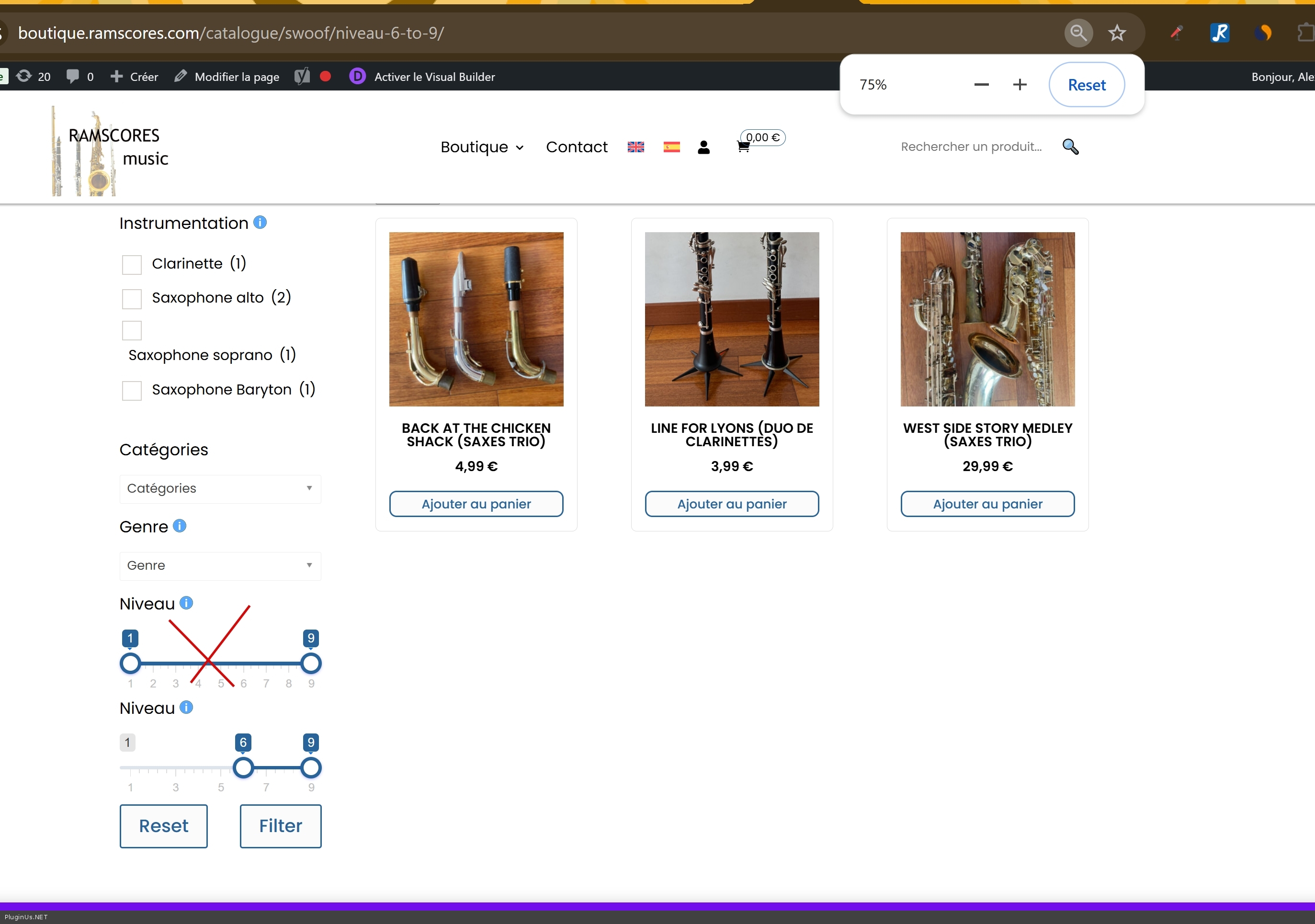
Instead of spending your time on hunting down that conflict, we set up a more reliable solution for you: a slider based on product meta data instead of the attribute. We filled in the level as a meta field on your products and activated the meta slider in the filter. It works now, you can check it here:
https://boutique.ramscores.com/catalogue/swoof/niveau-6-to-9/
In our experience a meta based slider is also the more reliable option for numeric values like a level, so we recommend keeping it this way.
Two things to take care of:
1. Right now the filter shows two level sliders, the old attribute one "Niveau" and the new one "Niveau" (meta). Please remove the old attribute slider from the filter, so your visitors only see the working one. You can also rename the new one to "Niveau" with a capital letter in the filter settings.
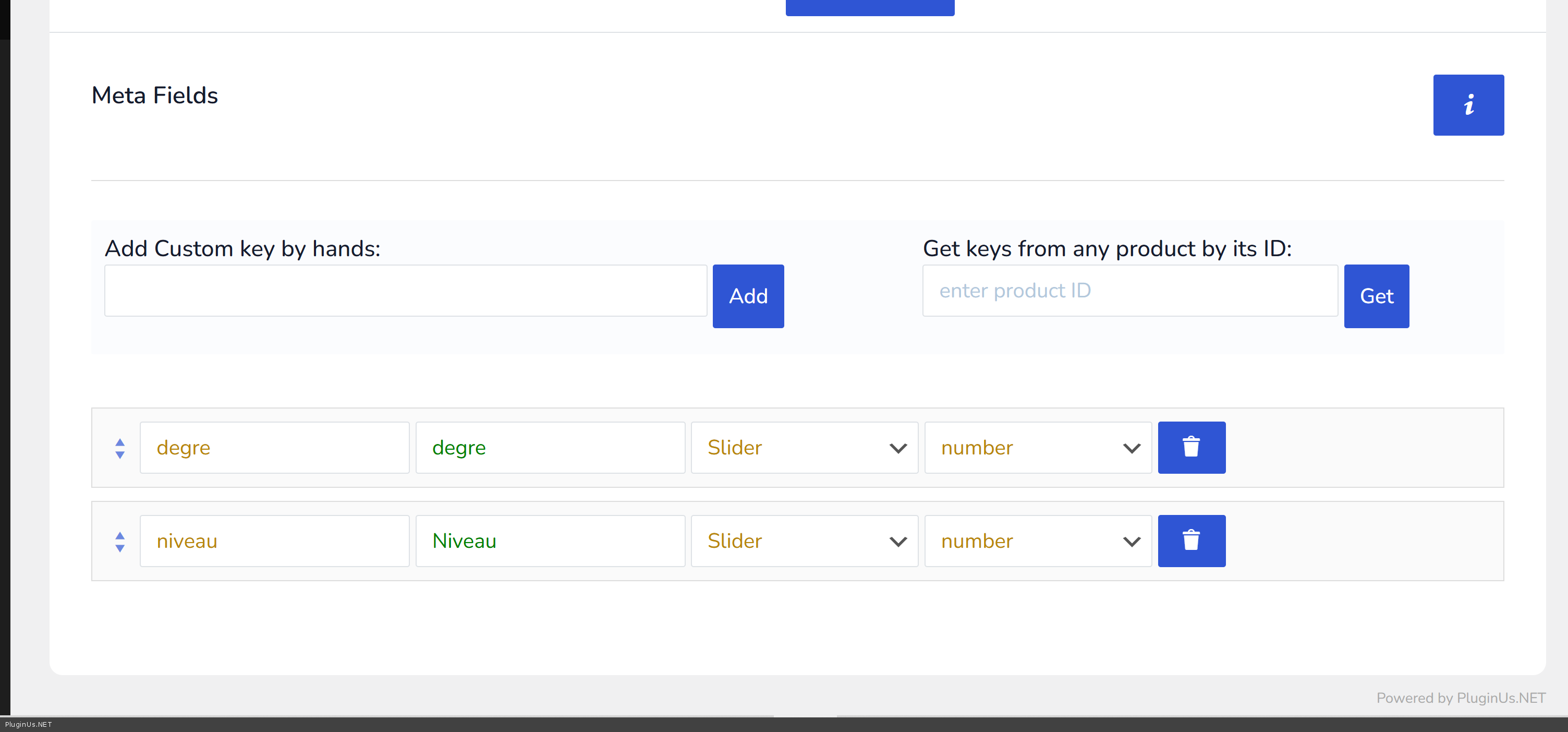
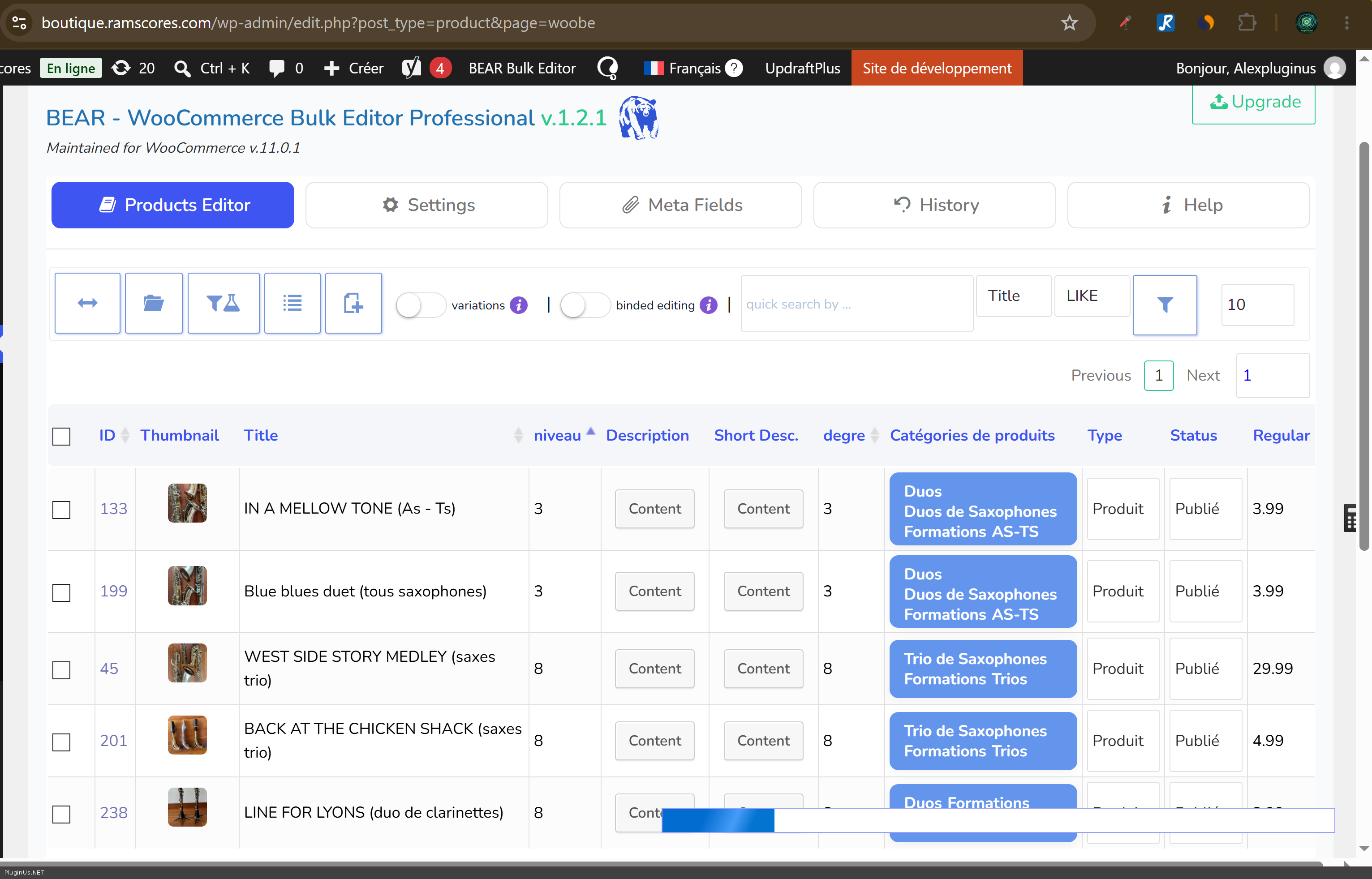
2. When you add new products, please fill in the level meta field for them as well, otherwise they will not appear in the slider results.3. Manage meta data here https://boutique.ramscores.com/wp-admin/edit.php?post_type=product&page=woobe
Please check it on your side and let us know if everything works as expected.
Best regards
Alex
Hello
Thank you for the extra details and the direct URL, they helped a lot.
We looked into it on your site. The filtering itself works: when the level is passed directly in the address, the products are filtered correctly. What fails is the attribute slider on your pages. For some reason it does not pass its value when the filter is applied, most likely because of a script conflict specific to your site. The same slider works as expected on our demo site with the same plugin version.
Instead of spending your time on hunting down that conflict, we set up a more reliable solution for you: a slider based on product meta data instead of the attribute. We filled in the level as a meta field on your products and activated the meta slider in the filter. It works now, you can check it here:
https://boutique.ramscores.com/catalogue/swoof/niveau-6-to-9/
In our experience a meta based slider is also the more reliable option for numeric values like a level, so we recommend keeping it this way.
Two things to take care of:
1. Right now the filter shows two level sliders, the old attribute one"Niveau" and the new one"Niveau" (meta). Please remove the old attribute slider from the filter, so your visitors only see the working one. You can also rename the new one to"Niveau" with a capital letter in the filter settings.
2. When you add new products, please fill in the level meta field for them as well, otherwise they will not appear in the slider results.
3. Manage meta data here https://boutique.ramscores.com/wp-admin/edit.php?post_type=product&page=woobe
Please check it on your side and let us know if everything works as expected.
Best regards
Alex
Quote from patH on September 14, 2026, 09:40Hi and thank you Alex For your help.
Several points:
- Is it possible the conflict is due to a former custom field I created with ACF and I could not definitley delete it.
- Change my global attribute into Product meta data is quiet a problem as I set the whole website on the first decision.
- Than means changing on all products already created
- To create a new product there will be a different way to do , because I will have to create global attributes Plus that new meta data.
There is no way to solve the current problem ?
Thank you for your precious help.
Hi and thank you Alex For your help.
Several points:
- Is it possible the conflict is due to a former custom field I created with ACF and I could not definitley delete it.
- Change my global attribute into Product meta data is quiet a problem as I set the whole website on the first decision.
- Than means changing on all products already created
- To create a new product there will be a different way to do , because I will have to create global attributes Plus that new meta data.
There is no way to solve the current problem ?
Thank you for your precious help.
Quote from patH on September 14, 2026, 09:52Additional information : I tried to change the theme for Storefront and deactivate all plugins but WooCommerce and Husky and I still have the same problem...
By the way, why is there 2 meta fields : degre and niveau ?
For the person who will manage new product it will be difficult to manage that new Meta Field differently that attributes on product edit screen.Thanks.
Additional information : I tried to change the theme for Storefront and deactivate all plugins but WooCommerce and Husky and I still have the same problem...
By the way, why is there 2 meta fields : degre and niveau ?
For the person who will manage new product it will be difficult to manage that new Meta Field differently that attributes on product edit screen.
Thanks.
Quote from Alex Dev on September 15, 2026, 21:57Hello
Good news: the slider works now, and you do not need to migrate anything to meta fields. Your attributes stay exactly as they are.
What it was: a bug in our plugin, not a conflict on your site. Your ACF field is not involved, and your test with Storefront and all plugins disabled was correct - it could not have helped, because the problem was in our code.
The details, since you spent a lot of time on this. When the SEO URL extension is enabled, the plugin builds a map of filter names for the address bar. In that map the "pa_" prefix is stripped from attribute names, so the attribute pa_niveau asked for the name "niveau" and the meta field niveau asked for the same name. The second one silently overwrote the first, and from that moment the attribute slider had no name to write into the address. That is why the slider moved, the value was calculated, and then disappeared without any error, and why passing pa_niveau directly in the address always worked.
This also explains the timing: the slider broke at the moment we enabled the SEO URL extension for you, and we were looking for a conflict on your site while the cause was on ours.
About the two meta fields you asked about: both of them are ours, not yours. We created "niveau" to show you a working slider while the attribute one was broken, and "degre" was most probably created during the same demonstration. Neither is needed now. Open the filter settings, remove both of them from the list and press Save. Nothing else has to be done, and nothing special has to be filled in when you create new products: attributes only, exactly as before.
What we changed on your site: the fix is applied to your installation now, and it will be included in the next release. Until that release, please do not update the plugin, otherwise the patched files will be replaced by the old ones.
Please check the filter on your side and tell us if anything still behaves differently from what you expect.
Best regards
Alex
Hello
Good news: the slider works now, and you do not need to migrate anything to meta fields. Your attributes stay exactly as they are.
What it was: a bug in our plugin, not a conflict on your site. Your ACF field is not involved, and your test with Storefront and all plugins disabled was correct - it could not have helped, because the problem was in our code.
The details, since you spent a lot of time on this. When the SEO URL extension is enabled, the plugin builds a map of filter names for the address bar. In that map the"pa_" prefix is stripped from attribute names, so the attribute pa_niveau asked for the name"niveau" and the meta field niveau asked for the same name. The second one silently overwrote the first, and from that moment the attribute slider had no name to write into the address. That is why the slider moved, the value was calculated, and then disappeared without any error, and why passing pa_niveau directly in the address always worked.
This also explains the timing: the slider broke at the moment we enabled the SEO URL extension for you, and we were looking for a conflict on your site while the cause was on ours.
About the two meta fields you asked about: both of them are ours, not yours. We created"niveau" to show you a working slider while the attribute one was broken, and"degre" was most probably created during the same demonstration. Neither is needed now. Open the filter settings, remove both of them from the list and press Save. Nothing else has to be done, and nothing special has to be filled in when you create new products: attributes only, exactly as before.
What we changed on your site: the fix is applied to your installation now, and it will be included in the next release. Until that release, please do not update the plugin, otherwise the patched files will be replaced by the old ones.
Please check the filter on your side and tell us if anything still behaves differently from what you expect.
Best regards
Alex
Quote from patH on September 16, 2026, 11:16Thanks a lot Alex for your help.
I really appreciate you admit it was a code problem on your side, it can happen.
It seems to work great.So I delete the 2 meta Data Filters Niveau and Degre, but this time they are definitely deleted, no hidden data remaining, either from what I did or what you did?
Thanks a lot again.
Thanks a lot Alex for your help.
I really appreciate you admit it was a code problem on your side, it can happen.
It seems to work great.
So I delete the 2 meta Data Filters Niveau and Degre, but this time they are definitely deleted, no hidden data remaining, either from what I did or what you did?
Thanks a lot again.
Quote from patH on September 16, 2026, 11:43I tested again and it seems to work well.
However, sorry, I have one question again.
On my main category, fisst, I used the filter with the range slider for Niveau, it gave results.
Then I chose one Instrument, it gave results.
And then again I changed the Niveau.
It worked but the url of the results page is a bit weird with 2 "niveau" parameters...
https://boutique.ramscores.com/catalogue/swoof/niveau-2-and-3-and-4-and-5-and-6-and-7-and-8/instrumentation-piano/niveau-1-and-2-and-3-and-4-and-5-and-6-and-7-and-8-and-9/
I tested again and it seems to work well.
However, sorry, I have one question again.
On my main category, fisst, I used the filter with the range slider for Niveau, it gave results.
Then I chose one Instrument, it gave results.
And then again I changed the Niveau.
It worked but the url of the results page is a bit weird with 2"niveau" parameters...
https://boutique.ramscores.com/catalogue/swoof/niveau-2-and-3-and-4-and-5-and-6-and-7-and-8/instrumentation-piano/niveau-1-and-2-and-3-and-4-and-5-and-6-and-7-and-8-and-9/
Quote from Alex Dev on September 16, 2026, 11:45Hello
You are Welcome :)
Yes, you can remove both of them safely fro HUSKY Settings -> Save.
Removing them from the filter settings removes them from the filter only. The values themselves stay in the WordPress meta table for those products, as plain rows named niveau and degre. They are just short strings, they take a negligible amount of space, they are not used by the filter, by WooCommerce or by anything else on your site, and they are not shown on the product edit screen. You can simply forget about them.
If you prefer the site to be completely clean anyway, they can be deleted in bulk with our BEAR plugin, which is already installed on your site. Open the bulk editor, add the field to the columns and clear it for all products at once, or use the meta data manager to delete the field entirely:
https://boutique.ramscores.com/wp-admin/edit.php?post_type=product&page=woobe
Either way, your attributes are untouched and nothing about creating new products changes.
Best regards
Alex
Hello
You are Welcome :)
Yes, you can remove both of them safely fro HUSKY Settings -> Save.
Removing them from the filter settings removes them from the filter only. The values themselves stay in the WordPress meta table for those products, as plain rows named niveau and degre. They are just short strings, they take a negligible amount of space, they are not used by the filter, by WooCommerce or by anything else on your site, and they are not shown on the product edit screen. You can simply forget about them.
If you prefer the site to be completely clean anyway, they can be deleted in bulk with our BEAR plugin, which is already installed on your site. Open the bulk editor, add the field to the columns and clear it for all products at once, or use the meta data manager to delete the field entirely:
https://boutique.ramscores.com/wp-admin/edit.php?post_type=product&page=woobe
Either way, your attributes are untouched and nothing about creating new products changes.
Best regards
Alex