cannageneticsbank(@cannageneticsbank)
8 Posts
Customers
Quote from cannageneticsbank on May 17, 2021, 04:09
I'm getting these weird jquery errors trying to load the plugin out of nowhere. 2 plugins did update but disabling them do not fix the problem.
the first error is:
load-scripts.php?c=1&load[chunk_0]=jquery-core,jquery-migrate,utils,jquery-ui-core,moxiejs,plupload,jquery-ui-mouse,jquery-ui-sortable&ver=b9e695db0d0b5ba1bd250da8196b8e60:2 jQuery.Deferred exception: jQuery.growl is not a function TypeError: jQuery.growl is not a function
at woobe_message (https://www.mydomian.com/wp-content/plugins/woocommerce-bulk-editor/assets/js/data-tables.js?ver=2.0.8:2522:20)
After this it just keeps naming function after function saying they do not exist.
I'm getting these weird jquery errors trying to load the plugin out of nowhere. 2 plugins did update but disabling them do not fix the problem.
the first error is:
load-scripts.php?c=1&load[chunk_0]=jquery-core,jquery-migrate,utils,jquery-ui-core,moxiejs,plupload,jquery-ui-mouse,jquery-ui-sortable&ver=b9e695db0d0b5ba1bd250da8196b8e60:2 jQuery.Deferred exception: jQuery.growl is not a function TypeError: jQuery.growl is not a function
at woobe_message (https://www.mydomian.com/wp-content/plugins/woocommerce-bulk-editor/assets/js/data-tables.js?ver=2.0.8:2522:20)
After this it just keeps naming function after function saying they do not exist.

Pablo Borysenco(@pavlo_borysenco)
34,196 Posts
Quote from Pablo Borysenco on May 17, 2021, 09:40
Hello
Please drop me wp-admin + FTP access https://c2n.me/43SC6rb.png ->https://c2n.me/42BAoj4.png I will check it
Hello
Please drop me wp-admin + FTP access https://c2n.me/43SC6rb.png ->https://c2n.me/42BAoj4.png I will check it
cannageneticsbank(@cannageneticsbank)
8 PostsTopic Author
Customers
Quote from cannageneticsbank on May 18, 2021, 02:50
Information has been saved boss.
Information has been saved boss.
Pablo Borysenco(@pavlo_borysenco)
34,196 Posts
Quote from Pablo Borysenco on May 18, 2021, 15:37
Please disable minified JS files and do a test
Please disable minified JS files and do a test
cannageneticsbank(@cannageneticsbank)
8 PostsTopic Author
Customers
Quote from cannageneticsbank on May 18, 2021, 16:45
When I logged in Autoptimize was already disabled and it didn't change anything on my end at least. I still only get the preloader loading.
When I logged in Autoptimize was already disabled and it didn't change anything on my end at least. I still only get the preloader loading.
Pablo Borysenco(@pavlo_borysenco)
34,196 Posts
Quote from Pablo Borysenco on May 18, 2021, 17:03
this optimization is enabled on the server side
my test - https://c2n.me/4c4jgxW.mp4 - all JS files are minified
this optimization is enabled on the server side
my test - https://c2n.me/4c4jgxW.mp4 - all JS files are minified
cannageneticsbank(@cannageneticsbank)
8 PostsTopic Author
Customers
Quote from cannageneticsbank on May 18, 2021, 17:11
Could that be happening at cloudflare? everything on the site was turned off by you.
Could that be happening at cloudflare? everything on the site was turned off by you.
Pablo Borysenco(@pavlo_borysenco)
34,196 Posts
Quote from Pablo Borysenco on May 18, 2021, 17:13
yes it is possible. please disable it
yes it is possible. please disable it
cannageneticsbank(@cannageneticsbank)
8 PostsTopic Author
Customers
Quote from cannageneticsbank on May 18, 2021, 17:28
So I've disabled it on cloudflare and even put cloudflare into development mode but still its staying minified.
So I've disabled it on cloudflare and even put cloudflare into development mode but still its staying minified.
cannageneticsbank(@cannageneticsbank)
8 PostsTopic Author
Customers
Quote from cannageneticsbank on May 18, 2021, 17:48
Ok looks like it just took awhile. The only other minified files are whats included with wordpress from as far as I can tell.
Ok looks like it just took awhile. The only other minified files are whats included with wordpress from as far as I can tell.
Pablo Borysenco(@pavlo_borysenco)
34,196 Posts
Quote from Pablo Borysenco on May 19, 2021, 15:41
Hello
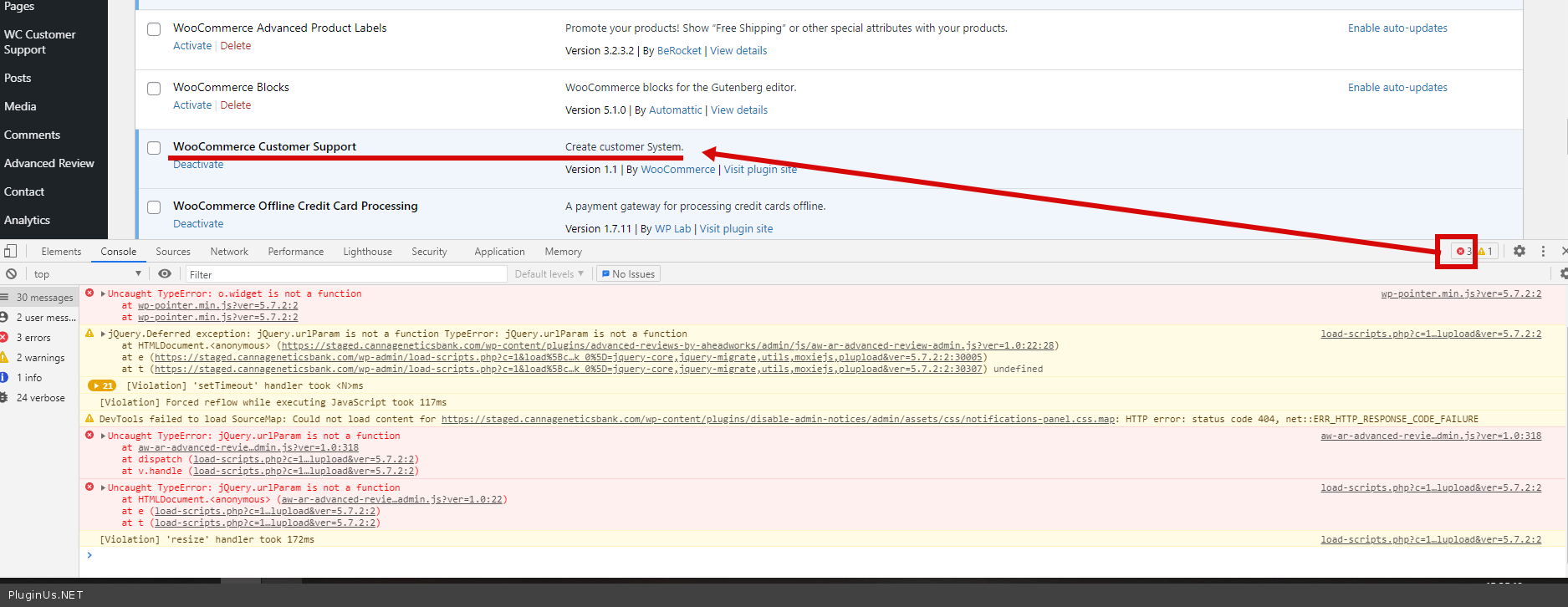
https://c2n.me/4c5axsL.png - this plugin throws JS errors( https://c2n.me/4c5aFSd.png ). Please disable it and do a test
My test - https://share.pluginus.net/image/i20210519163700.png
Hello
https://c2n.me/4c5axsL.png - this plugin throws JS errors( https://c2n.me/4c5aFSd.png ). Please disable it and do a test
My test - https://share.pluginus.net/image/i20210519163700.png
cannageneticsbank(@cannageneticsbank)
8 PostsTopic Author
Customers
Quote from cannageneticsbank on May 19, 2021, 15:45
Cool so was there any code change or just this plugin needs to be disable/fixed?
Cool so was there any code change or just this plugin needs to be disable/fixed?
Pablo Borysenco(@pavlo_borysenco)
34,196 Posts
Quote from Pablo Borysenco on May 20, 2021, 09:26
Hello
Only disable this third party plugin
Hello
Only disable this third party plugin