
Designer editor not showing design options for button
The support doesn work on Saturdays and Sundays, so some Friday requests can be answered on Monday. If you have problems with registration ask help on contact us page pleaseIf you not got email within 24~36 business hours, firstly check your spam box, and if no any email from the support there - back to the forum and read answer here. DO NOT ANSWER ON EMAILS [noreply@pluginus.net] FROM THE FORUM!! Emails are just for your info, all answers should be published only here.
The support doesn work on Saturdays and Sundays, so some Friday requests can be answered on Monday.

Quote from ardeleans on January 26, 2026, 00:10Hi, I click "edit" on a button in the designer tab for a dropdown and then I'm re-directed to a screen of what should be all the editing options for that dropdown, however none of them appear. any idea what it could be?
Hi, I click"edit" on a button in the designer tab for a dropdown and then I'm re-directed to a screen of what should be all the editing options for that dropdown, however none of them appear. any idea what it could be?

Quote from Alex Dev on January 26, 2026, 13:42Hello
Thank you for reporting this issue. This sounds like a JavaScript conflict or caching problem preventing the designer options from loading.
Please help me troubleshoot by checking the following:
- What version of FOX are you currently using? (See FOX oprions panel)
- Check browser console for errors:
- Press F12 in your browser (or right-click > Inspect)
- Go to the Console tab
- Click "Edit" on the dropdown again
- Do you see any red error messages in the console? If yes, please send me a screenshot
- Check for plugin conflicts:
- What other plugins do you have installed? (Especially caching plugins like WP Rocket, W3 Total Cache, optimization plugins, or page builders)
- Try temporarily disabling all other plugins except FOX and WooCommerce - does the designer work then?
- If yes, re-enable plugins one by one to find which one causes the conflict
- Clear all caches:
- Clear your browser cache (Ctrl+Shift+Delete)
- If you have any caching plugins, clear their cache completely
- Try again in an incognito/private browser window
- Test with default theme:
- Temporarily switch to a default WordPress theme (like Twenty Twenty-Four)
- Does the designer work with the default theme?
Please let me know the results of these tests, especially any console errors you see, and I'll help you resolve this.
Hello
Thank you for reporting this issue. This sounds like a JavaScript conflict or caching problem preventing the designer options from loading.
Please help me troubleshoot by checking the following:
- What version of FOX are you currently using? (See FOX oprions panel)
- Check browser console for errors:
- Press F12 in your browser (or right-click > Inspect)
- Go to the Console tab
- Click"Edit" on the dropdown again
- Do you see any red error messages in the console? If yes, please send me a screenshot
- Check for plugin conflicts:
- What other plugins do you have installed? (Especially caching plugins like WP Rocket, W3 Total Cache, optimization plugins, or page builders)
- Try temporarily disabling all other plugins except FOX and WooCommerce - does the designer work then?
- If yes, re-enable plugins one by one to find which one causes the conflict
- Clear all caches:
- Clear your browser cache (Ctrl+Shift+Delete)
- If you have any caching plugins, clear their cache completely
- Try again in an incognito/private browser window
- Test with default theme:
- Temporarily switch to a default WordPress theme (like Twenty Twenty-Four)
- Does the designer work with the default theme?
Please let me know the results of these tests, especially any console errors you see, and I'll help you resolve this.
Quote from ardeleans on January 27, 2026, 01:28Than you for your reply. Please see below my feedback:
- What version of FOX are you currently using? (See FOX oprions panel) - Version 2.4.4
- Check browser console for errors:
- Press F12 in your browser (or right-click > Inspect)
- Go to the Console tab
- Click"Edit" on the dropdown again
- Do you see any red error messages in the console? If yes, please send me a screenshot
Yes i do see error message, see below what appears:
selectron23.js?ver=2.4.4:238 Uncaught TypeError: Cannot read properties of null (reading 'querySelector')
at Selectron23.select (selectron23.js?ver=2.4.4:238:33)
at Selectron23._draw (selectron23.js?ver=2.4.4:146:18)
at new Selectron23 (selectron23.js?ver=2.4.4:109:14)
at WOOCS_SD_DD.create_dd (drop-down.js?ver=2.4.4:66:25)
at new WOOCS_SD_DD (drop-down.js?ver=2.4.4:39:14)
at Object.success (smart-designer.js?ver=2.4.4:97:27)
at c (load-scripts.php?c=0&load%5Bchunk_0%5D=wp-hooks,jquery-core,jquery-migrate,utils&ver=6.9:4:25304)
at Object.fireWith [as resolveWith] (load-scripts.php?c=0&load%5Bchunk_0%5D=wp-hooks,jquery-core,jquery-migrate,utils&ver=6.9:4:26053)
at l (load-scripts.php?c=0&load%5Bchunk_0%5D=wp-hooks,jquery-core,jquery-migrate,utils&ver=6.9:4:77782)
at XMLHttpRequest.<anonymous> (load-scripts.php?c=0&load%5Bchunk_0%5D=wp-hooks,jquery-core,jquery-migrate,utils&ver=6.9:4:80265)
- Check for plugin conflicts:
- What other plugins do you have installed? (Especially caching plugins like WP Rocket, W3 Total Cache, optimization plugins, or page builders)
- Try temporarily disabling all other plugins except FOX and WooCommerce - does the designer work then?
- If yes, re-enable plugins one by one to find which one causes the conflict
I tested with only woocommerce and fox as the only enabled plugins and it still didn't work.- Clear all caches:
- Clear your browser cache (Ctrl+Shift+Delete)
- If you have any caching plugins, clear their cache completely
- Try again in an incognito/private browser window
I cleared all types of cahces, including site cache, browser cache, tested in incognito, different browser and even different pc and error still persists- Test with default theme:
- Temporarily switch to a default WordPress theme (like Twenty Twenty-Four)
- Does the designer work with the default theme?
I also tested with default WordPress theme and the issue still persists
Than you for your reply. Please see below my feedback:
- What version of FOX are you currently using? (See FOX oprions panel) - Version 2.4.4
- Check browser console for errors:
- Press F12 in your browser (or right-click > Inspect)
- Go to the Console tab
- Click"Edit" on the dropdown again
- Do you see any red error messages in the console? If yes, please send me a screenshot
Yes i do see error message, see below what appears:
selectron23.js?ver=2.4.4:238 Uncaught TypeError: Cannot read properties of null (reading 'querySelector')
at Selectron23.select (selectron23.js?ver=2.4.4:238:33)
at Selectron23._draw (selectron23.js?ver=2.4.4:146:18)
at new Selectron23 (selectron23.js?ver=2.4.4:109:14)
at WOOCS_SD_DD.create_dd (drop-down.js?ver=2.4.4:66:25)
at new WOOCS_SD_DD (drop-down.js?ver=2.4.4:39:14)
at Object.success (smart-designer.js?ver=2.4.4:97:27)
at c (load-scripts.php?c=0&load%5Bchunk_0%5D=wp-hooks,jquery-core,jquery-migrate,utils&ver=6.9:4:25304)
at Object.fireWith [as resolveWith] (load-scripts.php?c=0&load%5Bchunk_0%5D=wp-hooks,jquery-core,jquery-migrate,utils&ver=6.9:4:26053)
at l (load-scripts.php?c=0&load%5Bchunk_0%5D=wp-hooks,jquery-core,jquery-migrate,utils&ver=6.9:4:77782)
at XMLHttpRequest.<anonymous> (load-scripts.php?c=0&load%5Bchunk_0%5D=wp-hooks,jquery-core,jquery-migrate,utils&ver=6.9:4:80265)
- Check for plugin conflicts:
- What other plugins do you have installed? (Especially caching plugins like WP Rocket, W3 Total Cache, optimization plugins, or page builders)
- Try temporarily disabling all other plugins except FOX and WooCommerce - does the designer work then?
- If yes, re-enable plugins one by one to find which one causes the conflict
I tested with only woocommerce and fox as the only enabled plugins and it still didn't work.
- Clear all caches:
- Clear your browser cache (Ctrl+Shift+Delete)
- If you have any caching plugins, clear their cache completely
- Try again in an incognito/private browser window
I cleared all types of cahces, including site cache, browser cache, tested in incognito, different browser and even different pc and error still persists
- Test with default theme:
- Temporarily switch to a default WordPress theme (like Twenty Twenty-Four)
- Does the designer work with the default theme?
I also tested with default WordPress theme and the issue still persists
Quote from Alex Dev on January 27, 2026, 15:36Hello
Ok, check please currency visiblity:
They should be visible
If still problem please provide in the secret area of this ticket actual purchase code and temp wp admin acess to the site
https://share.pluginus.net/image/i20230222134241.png
https://share.pluginus.net/image/i20230222134615.png
https://share.pluginus.net/image/i20230222134511.png
Hello
Ok, check please currency visiblity:
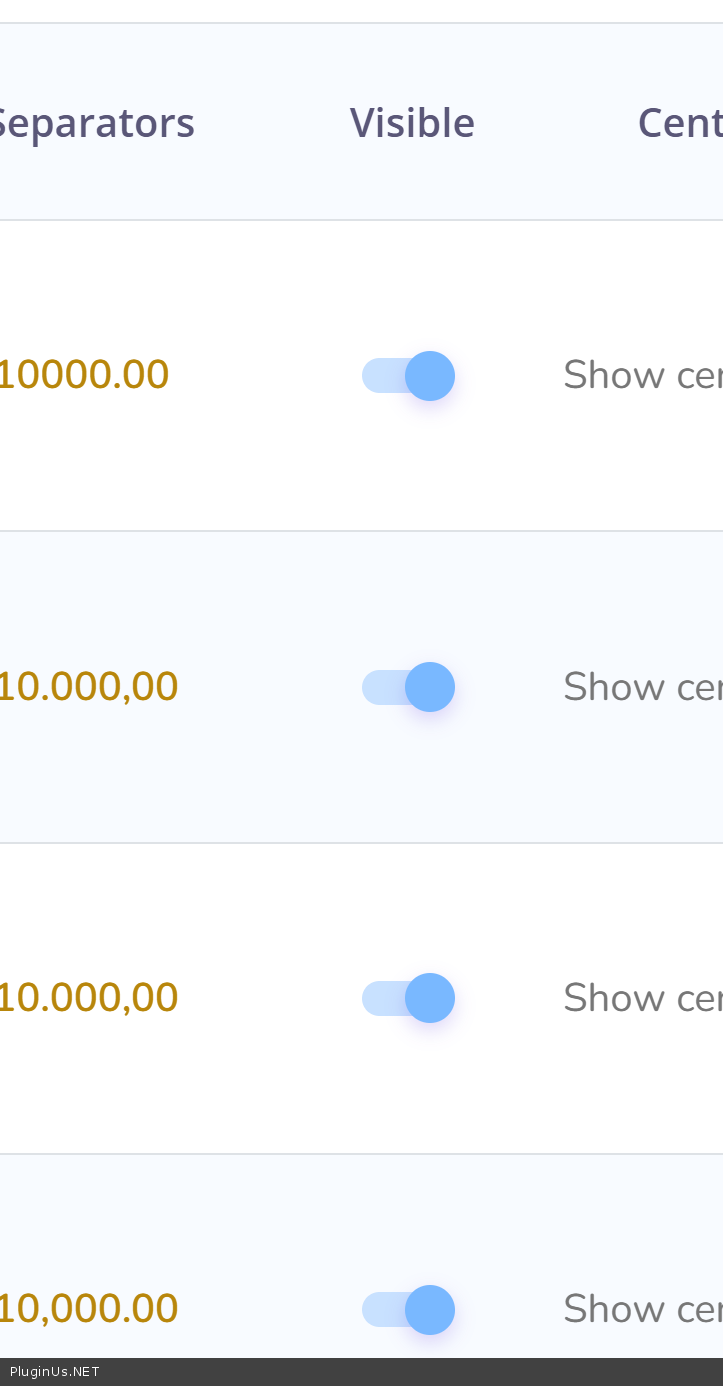
They should be visible
If still problem please provide in the secret area of this ticket actual purchase code and temp wp admin acess to the site
https://share.pluginus.net/image/i20230222134241.png
https://share.pluginus.net/image/i20230222134615.png
https://share.pluginus.net/image/i20230222134511.png


Quote from ardeleans on January 27, 2026, 22:04That was the issue in the end, thank you for your help!
That was the issue in the end, thank you for your help!