

Date translating - WOOT
The support doesn work on Saturdays and Sundays, so some Friday requests can be answered on Monday. If you have problems with registration ask help on contact us page pleaseIf you not got email within 24~36 business hours, firstly check your spam box, and if no any email from the support there - back to the forum and read answer here. DO NOT ANSWER ON EMAILS [noreply@pluginus.net] FROM THE FORUM!! Emails are just for your info, all answers should be published only here.
The support doesn work on Saturdays and Sundays, so some Friday requests can be answered on Monday.

Quote from Stono on April 29, 2021, 00:25Hello,
I have same problem as guy had couple days ago. I did everything you have advised but it isn't working.
What I did:
- Edited Woocommerce.php code
- Translated date through Loco Translate
- Translated date through Vocabulary
- Used hook and added code to functions.php
I'm still seeing "April" as month, although I've translated it to another word.
Thanks for help
Hello,
I have same problem as guy had couple days ago. I did everything you have advised but it isn't working.
What I did:
- Edited Woocommerce.php code
- Translated date through Loco Translate
- Translated date through Vocabulary
- Used hook and added code to functions.php
I'm still seeing"April" as month, although I've translated it to another word.
Thanks for help

Quote from Pablo Borysenco on April 29, 2021, 09:30Hello
Try in file - plugins\woot-products-tables\profiles\woocommerce\woocommerce.php - add code - https://c2n.me/4bS3Uv1.png
setlocale(LC_TIME, get_locale());
return strftime('%d %B %Y', strtotime($post->post_date));
Hello
Try in file - plugins\woot-products-tables\profiles\woocommerce\woocommerce.php - add code - https://c2n.me/4bS3Uv1.png
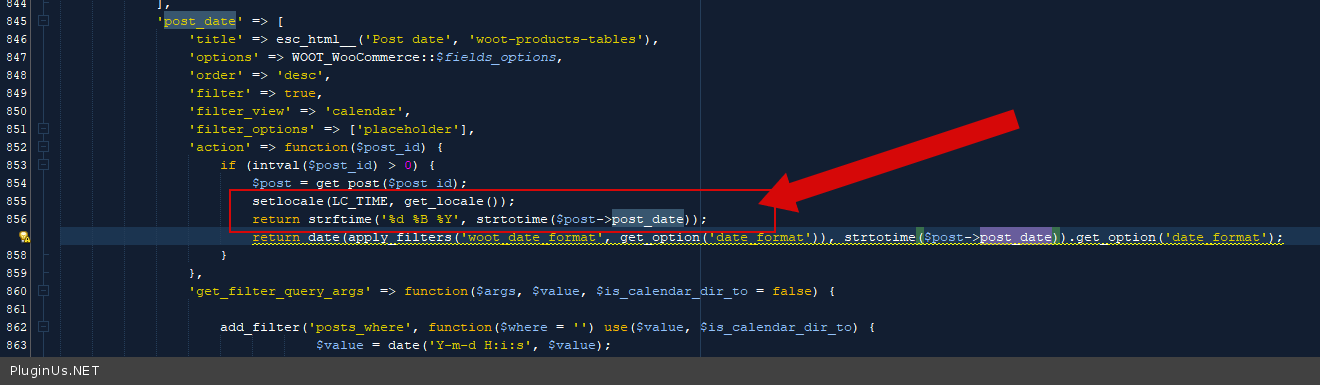
setlocale(LC_TIME, get_locale());
return strftime('%d %B %Y', strtotime($post->post_date));
Quote from Stono on April 29, 2021, 12:22Hello,
sorry but I already tried it. In my first post I said I edited woocommerce.php code.
Hello,
sorry but I already tried it. In my first post I said I edited woocommerce.php code.
Quote from Stono on April 29, 2021, 23:01And it still isn't working. No idea what more can I do.
And it still isn't working. No idea what more can I do.
Quote from Pablo Borysenco on April 30, 2021, 10:36Hello
Ok ! Please drop me wp-admin+FTP access - https://c2n.me/43SC6rb.png ->https://c2n.me/42BAoj4.png
Hello
Ok ! Please drop me wp-admin+FTP access - https://c2n.me/43SC6rb.png ->https://c2n.me/42BAoj4.png


Quote from Stono on April 30, 2021, 16:01Building on localhost. Can't do that. Can u guide me what can I do next?
Thanks :)
Building on localhost. Can't do that. Can u guide me what can I do next?
Thanks :)
Quote from Pablo Borysenco on May 3, 2021, 09:25Hello
Unfortunately, I don’t know why this doesn’t work on your site. And so I need access to investigate this.
Hello
Unfortunately, I don’t know why this doesn’t work on your site. And so I need access to investigate this.
Quote from Stono on May 4, 2021, 12:36What do you need to check?
What do you need to check?
Quote from Pablo Borysenco on May 5, 2021, 09:16Hello
I need wp-admin access to check settings and FTP access to a folder of my plugin
Hello
I need wp-admin access to check settings and FTP access to a folder of my plugin
Quote from Stono on May 5, 2021, 10:21I can screenshot you everything you need to check. Just tell me which files :) Can't give you wp-admin access, because it's on localhost.
I can screenshot you everything you need to check. Just tell me which files :) Can't give you wp-admin access, because it's on localhost.
Quote from Pablo Borysenco on May 6, 2021, 09:47Hello
Drop me screenshots of your changes on woot-products-tables\profiles\woocommerce\woocommerce.php
and the table on front-end
Hello
Drop me screenshots of your changes on woot-products-tables\profiles\woocommerce\woocommerce.php
and the table on front-end
Quote from Stono on May 6, 2021, 12:36I'm sorry, already changed it to only number format. Couldn't wait forever for solution. Thank you though.
I'm sorry, already changed it to only number format. Couldn't wait forever for solution. Thank you though.
Quote from Stono on May 7, 2021, 13:33TEMPORARY FIX
For users who have also problem with this. Just go into woocommerce.php file in plugin-folder\profiles\woocommerce\.
Remove line starting with "return date..." (should be 851) and replace it with:
setlocale(LC_TIME, get_locale()); --- this line is propably useless in this temporary fix, haven't tested, so don't rely on it
return strftime('%d. %m. %Y', strtotime($post->post_date)); --- my date is looking as this - 7.5.2021 (day,month,year)d - day (number format), m - month (number format), y - year (4 digit year) --- these parameters can be found here - https://www.php.net/manual/en/function.strftime.php.
You can also change the order of them in "return strftime" line or exchange them for other parameters from php.net site.
TEMPORARY FIX
For users who have also problem with this. Just go into woocommerce.php file in plugin-folder\profiles\woocommerce\.
Remove line starting with"return date..." (should be 851) and replace it with:
setlocale(LC_TIME, get_locale()); --- this line is propably useless in this temporary fix, haven't tested, so don't rely on it
return strftime('%d. %m. %Y', strtotime($post->post_date)); --- my date is looking as this - 7.5.2021 (day,month,year)
d - day (number format), m - month (number format), y - year (4 digit year) --- these parameters can be found here - https://www.php.net/manual/en/function.strftime.php.
You can also change the order of them in"return strftime" line or exchange them for other parameters from php.net site.
Quote from Pablo Borysenco on May 10, 2021, 09:41Hello
Ok! Thank you for cooperation
Hello
Ok! Thank you for cooperation