Quote from Alex Dovlatov on December 24, 2025, 12:54
Hello
I see its using cacje plugin "LiteSpeed Cache" - in this case you see cached page, prices should be redrawn, in tab Options of FOX -> "I am using cache plugin on my site" -> Yes and reset all kinds of cache - from now currency will be redrawn to selected one
By the way agressive cache is bad, look for balanse. I just looked your site shop page and I see broken layout:
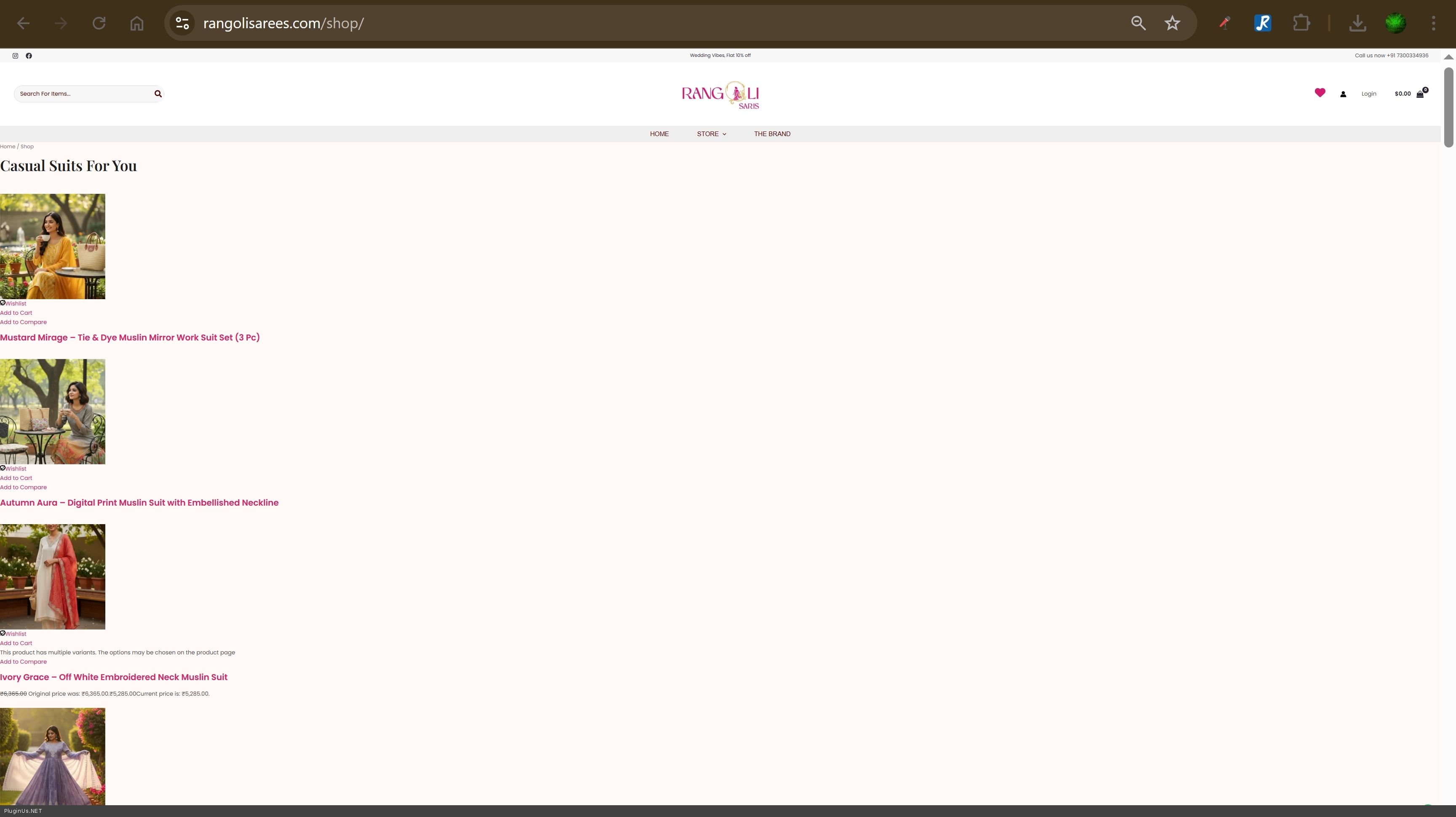
Вот для кастомера:
Important note about page caching:
Yes, this is a real problem with page cache plugins (WP Rocket, W3 Total Cache, LiteSpeed Cache, etc.).
How it happens:
- First visitor loads the page
- Something goes wrong during loading:
- CSS file fails to load → broken layout
- JavaScript error → search/filters don't work
- AJAX request times out → missing content
- The cache plugin saves this broken page as HTML
- All other visitors now see the same broken page until cache expires
Why this happens:
Page cache plugins save the final HTML output of the page. They don't know if the page loaded correctly or not - they just cache whatever was rendered.
If the first user had:
- Slow connection
- Network timeout
- Browser extension blocking something
- Server temporary glitch
→ The broken version gets cached → Everyone sees it
This is why:
- Admin area should never be cached (you need real-time data)
- Logged-in users should be excluded from cache
- Cache should clear automatically on product updates
- Object cache (Redis/Memcached) should be disabled in admin
Your search and filter issues might be caused by this - a cached broken state being served to everyone.
Test: Clear all cache completely and test search again in incognito mode.
Hello
I see its using cacje plugin"LiteSpeed Cache" - in this case you see cached page, prices should be redrawn, in tab Options of FOX ->"I am using cache plugin on my site" -> Yes and reset all kinds of cache - from now currency will be redrawn to selected one
By the way agressive cache is bad, look for balanse. I just looked your site shop page and I see broken layout:
Вот для кастомера:
Important note about page caching:
Yes, this is a real problem with page cache plugins (WP Rocket, W3 Total Cache, LiteSpeed Cache, etc.).
How it happens:
- First visitor loads the page
- Something goes wrong during loading:
- CSS file fails to load → broken layout
- JavaScript error → search/filters don't work
- AJAX request times out → missing content
- The cache plugin saves this broken page as HTML
- All other visitors now see the same broken page until cache expires
Why this happens:
Page cache plugins save the final HTML output of the page. They don't know if the page loaded correctly or not - they just cache whatever was rendered.
If the first user had:
- Slow connection
- Network timeout
- Browser extension blocking something
- Server temporary glitch
→ The broken version gets cached → Everyone sees it
This is why:
- Admin area should never be cached (you need real-time data)
- Logged-in users should be excluded from cache
- Cache should clear automatically on product updates
- Object cache (Redis/Memcached) should be disabled in admin
Your search and filter issues might be caused by this - a cached broken state being served to everyone.
Test: Clear all cache completely and test search again in incognito mode.



