
Hierachy Dropdown
The support doesn work on Saturdays and Sundays, so some Friday requests can be answered on Monday. If you have problems with registration ask help on contact us page pleaseIf you not got email within 24~36 business hours, firstly check your spam box, and if no any email from the support there - back to the forum and read answer here. DO NOT ANSWER ON EMAILS [noreply@pluginus.net] FROM THE FORUM!! Emails are just for your info, all answers should be published only here.
The support doesn work on Saturdays and Sundays, so some Friday requests can be answered on Monday.

Quote from WebdesignNH on July 9, 2020, 11:49Ok now the code seems to work. But for all pages. I just want this type of code just for the subsections.
So on these pages with the different sub-services:
http://bauen-in-bergisch-gladbach.de/produkt-kategorie/elektriker/
http://bauen-in-bergisch-gladbach.de/produkt-kategorie/fliesenleger-bergisch-gladbach/So that the starting page shows all categories like before and than the subpages with hierarchie.
For example on this page im using the code for the "Leistungen" - "Fliesenleger":
[woof is_ajax=1 taxonomies='leistungen:146']
So a different code that im using for "Elektriker". But your function.php code let them both look the same.Thanks for your help!
Ok now the code seems to work. But for all pages. I just want this type of code just for the subsections.
So on these pages with the different sub-services:
http://bauen-in-bergisch-gladbach.de/produkt-kategorie/elektriker/
http://bauen-in-bergisch-gladbach.de/produkt-kategorie/fliesenleger-bergisch-gladbach/
So that the starting page shows all categories like before and than the subpages with hierarchie.
For example on this page im using the code for the"Leistungen" -"Fliesenleger":
[woof is_ajax=1 taxonomies='leistungen:146']
So a different code that im using for"Elektriker". But your function.php code let them both look the same.
Thanks for your help!

Quote from Pablo Borysenco on July 9, 2020, 12:14Hello
https://c2n.me/48k9Ibz.png - you need to play with this condition - https://docs.woocommerce.com/document/conditional-tags/
Hello
https://c2n.me/48k9Ibz.png - you need to play with this condition - https://docs.woocommerce.com/document/conditional-tags/
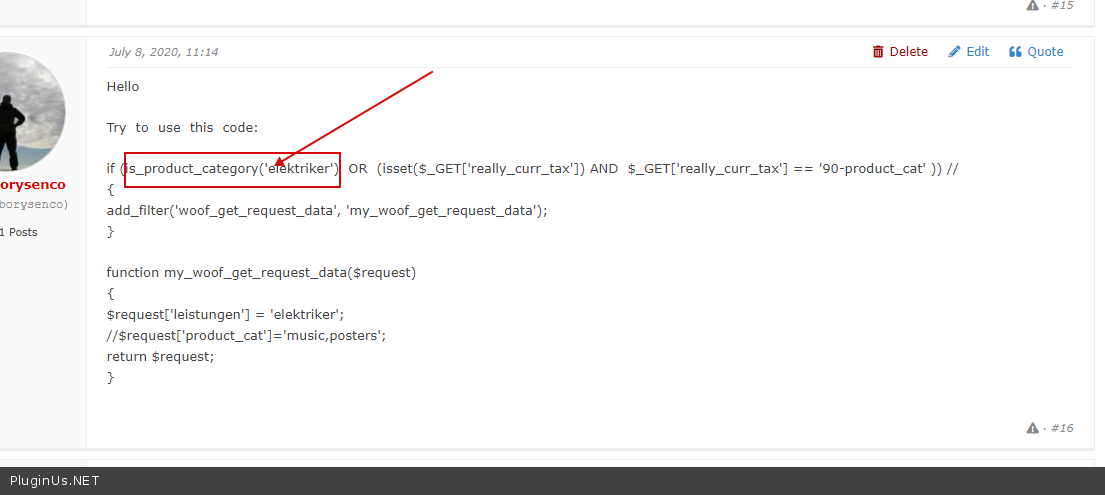
Quote from WebdesignNH on July 9, 2020, 14:53Ok but than i dont understand this function in your documentary:
[woof is_ajax=1 taxonomies='leistungen:116']Because its not working correct right?
Ok but than i dont understand this function in your documentary:
[woof is_ajax=1 taxonomies='leistungen:116']
Because its not working correct right?
Quote from WebdesignNH on July 9, 2020, 19:15i got it :-) With a different way. So i think we missunderstand each other :-)
i got it :-) With a different way. So i think we missunderstand each other :-)
Quote from WebdesignNH on July 9, 2020, 19:34But maybe you have an idea how i can make the field ".chosen-container" the dropdown responsive?
So its getting smaller like the search field
But maybe you have an idea how i can make the field".chosen-container" the dropdown responsive?
So its getting smaller like the search field
Quote from Pablo Borysenco on July 10, 2020, 12:22Hello
taxonomies='leistungen:116' - This is a prefiltration.
$request['leistungen'] = 'elektriker'; - This is the default choice.
".chosen-container" the dropdown responsive? - it's responsive please drop me exact link to the issue
Hello
taxonomies='leistungen:116' - This is a prefiltration.
$request['leistungen'] = 'elektriker'; - This is the default choice.
".chosen-container" the dropdown responsive? - it's responsive please drop me exact link to the issue
Quote from WebdesignNH on July 10, 2020, 12:25Yes now its fine for me thank you :-)
Responsive Problem:
http://bauen-in-bergisch-gladbach.de/produkt-kategorie/elektriker/
If you open the dropdown and make your browser window smaller you can see it.
Thank you!
Yes now its fine for me thank you :-)
Responsive Problem:
http://bauen-in-bergisch-gladbach.de/produkt-kategorie/elektriker/
If you open the dropdown and make your browser window smaller you can see it.
Thank you!
Quote from Pablo Borysenco on July 13, 2020, 11:10Hello
make your browser window smaller you can see it. - Ok! and please reload the browser. This is a third-party library, and it adapts to the size of the container.
Hello
make your browser window smaller you can see it. - Ok! and please reload the browser. This is a third-party library, and it adapts to the size of the container.
Quote from WebdesignNH on July 15, 2020, 05:56Ok i understand this :-)
http://bauen-in-bergisch-gladbach.de/produkt-kategorie/elektriker/
Please check this site. In the subcategory (in the dropdown) "Elektroinstallationen" there are 2 products but inside the dropdown it says 0 and its outgreyed.
Do you have an idea why?
Ok i understand this :-)
http://bauen-in-bergisch-gladbach.de/produkt-kategorie/elektriker/
Please check this site. In the subcategory (in the dropdown)"Elektroinstallationen" there are 2 products but inside the dropdown it says 0 and its outgreyed.
Do you have an idea why?
Quote from Pablo Borysenco on July 15, 2020, 11:28Hello
Is everything ok now?
Hello
Is everything ok now?
Quote from WebdesignNH on July 15, 2020, 12:21Yes thanks a lot for your support! Have a nice day! :-)
Yes thanks a lot for your support! Have a nice day! :-)
Quote from Pablo Borysenco on July 16, 2020, 14:31Hello
Welcome;)
Hello
Welcome;)