
Critical Bug: Bulk Edit Removes Sale Prices & Custom Taxonomy Filter Fails
The support doesn work on Saturdays and Sundays, so some Friday requests can be answered on Monday. If you have problems with registration ask help on contact us page pleaseIf you not got email within 24~36 business hours, firstly check your spam box, and if no any email from the support there - back to the forum and read answer here. DO NOT ANSWER ON EMAILS [noreply@pluginus.net] FROM THE FORUM!! Emails are just for your info, all answers should be published only here.
The support doesn work on Saturdays and Sundays, so some Friday requests can be answered on Monday.

Quote from glowydiamonds on June 25, 2026, 09:15Hi BEAR Support,
I'm experiencing what appears to be a bug in the Bulk Editor and would appreciate your assistance investigating it.
Environment
- WooCommerce
- BEAR Bulk Editor
- Products have a custom taxonomy called "Diamond Type".
Issue 1 – Filtering by custom taxonomy
When I filter products by the custom taxonomy Diamond Type, the filter does not work correctly.
Steps to reproduce:
- Open BEAR Bulk Editor.
- Filter products by the custom taxonomy Diamond Type.
- Apply the filter.
Expected result:
Only products assigned to the selected Diamond Type should be displayed.Actual result:
All products are displayed, as if the taxonomy filter is ignored.Interestingly, if I also add a Title LIKE filter with any matching value, the filtering suddenly works correctly and only the expected products are shown.
This makes me think there may be an issue with how the taxonomy filter is applied when used on its own.
Issue 2 – Bulk editing prices
After filtering the products, I perform a bulk price update.
Goal:
Decrease both Regular Price and Sale Price by 40%.Steps:
- Select the filtered products.
- Bulk Edit.
- Set:
- Regular Price → decrease by 40%
- Sale Price → decrease by 40%
- Apply the changes.
Expected result:
Both Regular Price and Sale Price should be reduced by 40%.Actual result:
- Regular Price is updated correctly.
- Sale Price is not updated.
- Instead, the existing Sale Price values are removed/emptied from all affected products.
Because of this, all selected products lose their Sale Price after the bulk edit.
Could you please investigate whether these are known issues?
If needed, I'd be happy to provide:
- Plugin version
- WooCommerce version
- WordPress version
- Screenshots
- Screen recording
- Access to a staging site
Thank you!
Hi BEAR Support,
I'm experiencing what appears to be a bug in the Bulk Editor and would appreciate your assistance investigating it.
Environment
- WooCommerce
- BEAR Bulk Editor
- Products have a custom taxonomy called "Diamond Type".
Issue 1 – Filtering by custom taxonomy
When I filter products by the custom taxonomy Diamond Type, the filter does not work correctly.
Steps to reproduce:
- Open BEAR Bulk Editor.
- Filter products by the custom taxonomy Diamond Type.
- Apply the filter.
Expected result:
Only products assigned to the selected Diamond Type should be displayed.
Actual result:
All products are displayed, as if the taxonomy filter is ignored.
Interestingly, if I also add a Title LIKE filter with any matching value, the filtering suddenly works correctly and only the expected products are shown.
This makes me think there may be an issue with how the taxonomy filter is applied when used on its own.
Issue 2 – Bulk editing prices
After filtering the products, I perform a bulk price update.
Goal:
Decrease both Regular Price and Sale Price by 40%.
Steps:
- Select the filtered products.
- Bulk Edit.
- Set:
- Regular Price → decrease by 40%
- Sale Price → decrease by 40%
- Apply the changes.
Expected result:
Both Regular Price and Sale Price should be reduced by 40%.
Actual result:
- Regular Price is updated correctly.
- Sale Price is not updated.
- Instead, the existing Sale Price values are removed/emptied from all affected products.
Because of this, all selected products lose their Sale Price after the bulk edit.
Could you please investigate whether these are known issues?
If needed, I'd be happy to provide:
- Plugin version
- WooCommerce version
- WordPress version
- Screenshots
- Screen recording
- Access to a staging site
Thank you!

Quote from Alex Dev on June 25, 2026, 11:47Hello
Thank you for the detailed report, this was very helpful. We looked into both issues and found the cause for each.
Issue 1 - Taxonomy filter not working alone
This is a known situation related to how the filter state is stored on the server (PHP session vs transient). On some server configurations, session data does not get saved or saved in time when only a taxonomy filter is applied, which is why the filter is effectively ignored, while adding a Title field changes the request flow enough for it to work. There is a documented hook that switches the filter storage from session to transient, which resolves this in most cases. Please add this to your active theme's functions.php file:
add_filter('woobe_storage_type', function($type) {
return 'transient';
});After adding this, please clear the BEAR filter settings and test the Diamond Type filter again on its own.
Issue 2 - Sale Price being removed during bulk edit
This happens because Regular Price and Sale Price are processed in two separate passes: when you bulk edit both at once, Regular Price is updated and saved for all selected products first, and only afterwards is Sale Price processed. By that point, the old Sale Price value is being compared against the already-lowered Regular Price, which is why it gets cleared instead of updated.
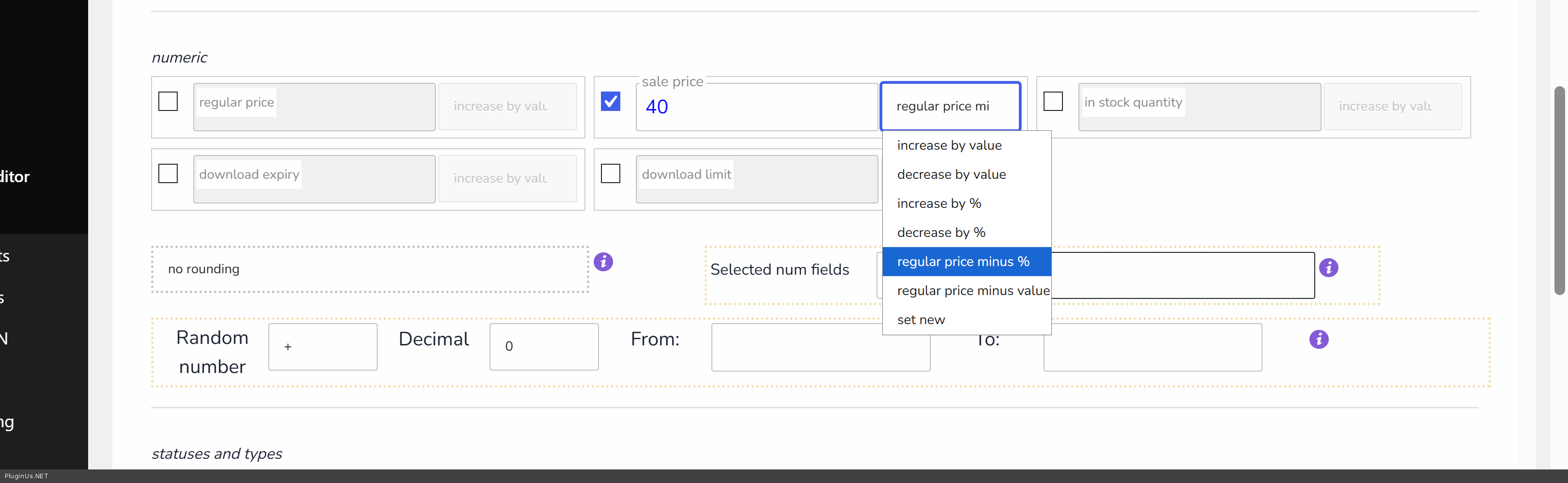
The fix is to use a different option for the Sale Price field, one that is built specifically for this situation. Instead of setting Sale Price to "decrease by %", please set it to "regular price minus %" and enter 40 there as well. This option calculates the new Sale Price directly from the already-updated Regular Price, rather than from the old Sale Price, so the two stay in the correct relationship to each other.
To summarize the bulk edit setup that should give you the correct result:
Regular Price: decrease by % = 40
Sale Price: regular price minus % = 40Please give both of these a try and let us know how it goes.
Hello
Thank you for the detailed report, this was very helpful. We looked into both issues and found the cause for each.
Issue 1 - Taxonomy filter not working alone
This is a known situation related to how the filter state is stored on the server (PHP session vs transient). On some server configurations, session data does not get saved or saved in time when only a taxonomy filter is applied, which is why the filter is effectively ignored, while adding a Title field changes the request flow enough for it to work. There is a documented hook that switches the filter storage from session to transient, which resolves this in most cases. Please add this to your active theme's functions.php file:
add_filter('woobe_storage_type', function($type) {
return 'transient';
});
After adding this, please clear the BEAR filter settings and test the Diamond Type filter again on its own.
Issue 2 - Sale Price being removed during bulk edit
This happens because Regular Price and Sale Price are processed in two separate passes: when you bulk edit both at once, Regular Price is updated and saved for all selected products first, and only afterwards is Sale Price processed. By that point, the old Sale Price value is being compared against the already-lowered Regular Price, which is why it gets cleared instead of updated.
The fix is to use a different option for the Sale Price field, one that is built specifically for this situation. Instead of setting Sale Price to"decrease by %", please set it to"regular price minus %" and enter 40 there as well. This option calculates the new Sale Price directly from the already-updated Regular Price, rather than from the old Sale Price, so the two stay in the correct relationship to each other.
To summarize the bulk edit setup that should give you the correct result:
Regular Price: decrease by % = 40
Sale Price: regular price minus % = 40
Please give both of these a try and let us know how it goes.
Quote from glowydiamonds on June 25, 2026, 13:07Thanks for the super detailed response! highly appreciated.
As for the 1st issue - unfortunately it worked but after refreshing and trying again - it didn't . yet while filtering according to a variation value - it doesn't filter and shows all variations
Thanks for the super detailed response! highly appreciated.
As for the 1st issue - unfortunately it worked but after refreshing and trying again - it didn't . yet while filtering according to a variation value - it doesn't filter and shows all variations
Quote from Alex Dev on June 26, 2026, 14:31Hello
Thank you for the update and for testing the suggested fix.
We have tested both scenarios on our own server (taxonomy filter alone, and after refreshing and repeating the filter) and everything works correctly on our end, including the variation value filtering you mentioned.
Since we are unable to reproduce the issue on our setup, the most reliable way for us to investigate further is to have direct access to an environment where the problem occurs. Could you please create a staging clone of your site and share it with us in the private section of this ticket, along with FTP access. This will allow us to test directly under the same conditions you are experiencing and identify what might be different on your server configuration.
Looking forward to your reply.
https://share.pluginus.net/image/i20230222134241.png
https://share.pluginus.net/image/i20230222134615.png
https://share.pluginus.net/image/i20230222134511.png
Hello
Thank you for the update and for testing the suggested fix.
We have tested both scenarios on our own server (taxonomy filter alone, and after refreshing and repeating the filter) and everything works correctly on our end, including the variation value filtering you mentioned.
Since we are unable to reproduce the issue on our setup, the most reliable way for us to investigate further is to have direct access to an environment where the problem occurs. Could you please create a staging clone of your site and share it with us in the private section of this ticket, along with FTP access. This will allow us to test directly under the same conditions you are experiencing and identify what might be different on your server configuration.
Looking forward to your reply.
https://share.pluginus.net/image/i20230222134241.png
https://share.pluginus.net/image/i20230222134615.png
https://share.pluginus.net/image/i20230222134511.png


