

Convert orders that's made in other currencies to EURO
The support doesn work on Saturdays and Sundays, so some Friday requests can be answered on Monday. If you have problems with registration ask help on contact us page pleaseIf you not got email within 24~36 business hours, firstly check your spam box, and if no any email from the support there - back to the forum and read answer here. DO NOT ANSWER ON EMAILS [noreply@pluginus.net] FROM THE FORUM!! Emails are just for your info, all answers should be published only here.
The support doesn work on Saturdays and Sundays, so some Friday requests can be answered on Monday.

Quote from mehmetali61 on May 7, 2021, 20:49Hi,
Bought yesterday the plugin and hope to get worked. I have added 3 currencies EURO, USD, GBP.
I want to convert the order made in GBP or USD automatically to EURO at my back-end on Woocommerce.It is needed for my bookkeeping software. I need all my orders converted to EURO automatically
Hope you guys can help me with this.
Thank You.
Hi,
Bought yesterday the plugin and hope to get worked. I have added 3 currencies EURO, USD, GBP.
I want to convert the order made in GBP or USD automatically to EURO at my back-end on Woocommerce.
It is needed for my bookkeeping software. I need all my orders converted to EURO automatically
Hope you guys can help me with this.
Thank You.

Quote from Pablo Borysenco on May 10, 2021, 11:16Hello
Paste your license key here - https://c2n.me/43SC6rb.png -> https://c2n.me/42HBIt7.png
EURO - Please use correct currency codes - http://en.wikipedia.org/wiki/ISO_4217#Active_codes
I need all my orders converted to EURO automatically - Unfortunately the plugin does not have this feature.
Hello
Paste your license key here - https://c2n.me/43SC6rb.png -> https://c2n.me/42HBIt7.png


EURO - Please use correct currency codes - http://en.wikipedia.org/wiki/ISO_4217#Active_codes
I need all my orders converted to EURO automatically - Unfortunately the plugin does not have this feature.
Quote from mehmetali61 on May 10, 2021, 19:25Hi,
Just added my credentials. Hope you can help me out of this issue or maybe you have a solution for me. I have 2 currencies (GBP and USD) and 1 base currency EUR.
It's for me important that the orders that are made in different currencies converted automatically to EUR. So I can see at my back-end Woocommerce the orders is EUR. I need this for my bookkeeping software.
Thank You,
Mehmet
Hi,
Just added my credentials. Hope you can help me out of this issue or maybe you have a solution for me. I have 2 currencies (GBP and USD) and 1 base currency EUR.
It's for me important that the orders that are made in different currencies converted automatically to EUR. So I can see at my back-end Woocommerce the orders is EUR. I need this for my bookkeeping software.
Thank You,
Mehmet
Quote from Pablo Borysenco on May 11, 2021, 10:16Hello Mehmet
You need customization of the code. Unfortunately we do not have a ready-made solution for you.
If you have no experience in programming, you should hire a developer.
Hello Mehmet
You need customization of the code. Unfortunately we do not have a ready-made solution for you.
If you have no experience in programming, you should hire a developer.
Quote from mehmetali61 on May 11, 2021, 12:50Hi Pablo,
Do you have any other options for me with this plugin? I need all my orders in EUR. So what's the best option that we can do?
I want still to give my customers the option of how much in their currency the product is. But I want the order in the base currency of the shop.
Hope you can find a solution for me.
Thanks,
Mehmet
Hi Pablo,
Do you have any other options for me with this plugin? I need all my orders in EUR. So what's the best option that we can do?
I want still to give my customers the option of how much in their currency the product is. But I want the order in the base currency of the shop.
Hope you can find a solution for me.
Thanks,
Mehmet
Quote from Pablo Borysenco on May 12, 2021, 11:12Hello Mehmet
You can convert each order manually
OR
use this - https://c2n.me/4bZJCY1.png - but if you have a lot of orders, your server may not have enough resources to do it
Hello Mehmet
You can convert each order manually
OR
use this - https://c2n.me/4bZJCY1.png - but if you have a lot of orders, your server may not have enough resources to do it
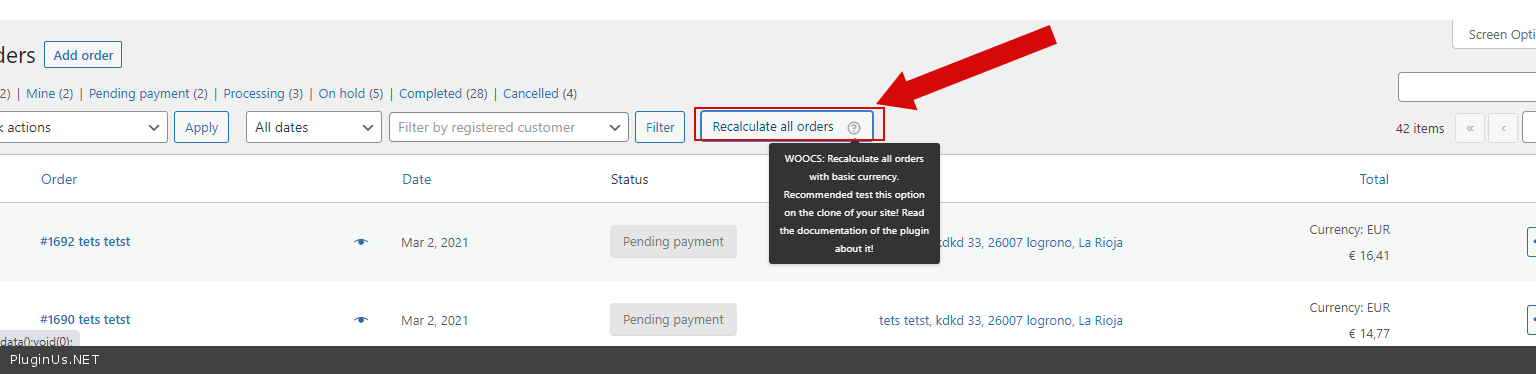
Quote from mehmetali61 on May 12, 2021, 11:23Hi Pablo,
What does this button do? How can I do manually 1? Because if you logged in to my account and check the orders you will see 3 currencies. Can you do 1 of the USD/GBP orders to EUR?
So I understand what's happening?
Thanks,
Mehmet
Hi Pablo,
What does this button do? How can I do manually 1? Because if you logged in to my account and check the orders you will see 3 currencies. Can you do 1 of the USD/GBP orders to EUR?
So I understand what's happening?
Thanks,
Mehmet
Quote from Pablo Borysenco on May 13, 2021, 09:47Hello Mehmet
My short video - https://c2n.me/4c0xHQx
Hello Mehmet
My short video - https://c2n.me/4c0xHQx
Quote from mehmetali61 on May 18, 2021, 23:47Hi Pablo,
This is not really working for me. Because the API that I'm using getting the wrong amount.
Can you help me with making the settings so the customer always pays in EURO? But will see the GBP and USD price.
I have tried the change the settings to 1 currency but then all my orders going wrong.
Hope you can find a solution for me.
Thanks,
Mehmet
Hi Pablo,
This is not really working for me. Because the API that I'm using getting the wrong amount.
Can you help me with making the settings so the customer always pays in EURO? But will see the GBP and USD price.
I have tried the change the settings to 1 currency but then all my orders going wrong.
Hope you can find a solution for me.
Thanks,
Mehmet
Quote from Pablo Borysenco on May 19, 2021, 10:28Hello Mehmet
This is not really working for me. Because the API that I'm using getting the wrong amount. - Describe in more detail what is wrong. Which API? give me a link to order which I can change for the test
so the customer always pays in EURO? But will see the GBP and USD price. - The plugin does not have such a feature, the user pays in the currency that he sees
Hello Mehmet
This is not really working for me. Because the API that I'm using getting the wrong amount. - Describe in more detail what is wrong. Which API? give me a link to order which I can change for the test
so the customer always pays in EURO? But will see the GBP and USD price. - The plugin does not have such a feature, the user pays in the currency that he sees
Quote from mehmetali61 on May 19, 2021, 19:21Hi Pablo,
Sorry bad from my side. I have updated the information with the API and the software that we are using for our bookkeeping.
Please look at the hidden data information added all the screenshots and text.
Thank You,
Mehmet
Hi Pablo,
Sorry bad from my side. I have updated the information with the API and the software that we are using for our bookkeeping.
Please look at the hidden data information added all the screenshots and text.
Thank You,
Mehmet
Quote from Pablo Borysenco on May 20, 2021, 10:23Hello Mehmet
this plugin is designed for woocommerce and only works with woocommerce orders and products
Give me a link to the order that I can change for the test
Hello Mehmet
this plugin is designed for woocommerce and only works with woocommerce orders and products
Give me a link to the order that I can change for the test
Quote from mehmetali61 on May 20, 2021, 13:11Hi Pablo,
You can use one of my orders at Woocommerce. Just grab for example the Order #3532.
I have already made a screenshot of it so if something going wrong I have the original one.
Thank You,
Mehmet
Hi Pablo,
You can use one of my orders at Woocommerce. Just grab for example the Order #3532.
I have already made a screenshot of it so if something going wrong I have the original one.
Thank You,
Mehmet
Quote from Pablo Borysenco on May 21, 2021, 10:56Hello Mehmet
My test - https://share.pluginus.net/image/i20210521115309.png - everything is converted correctly. Except - https://share.pluginus.net/image/i20210521115556.png - because these are third party fields
Hello Mehmet
My test - https://share.pluginus.net/image/i20210521115309.png - everything is converted correctly. Except - https://share.pluginus.net/image/i20210521115556.png - because these are third party fields


Quote from mehmetali61 on May 21, 2021, 21:29Hi Pablo,
Thanks for your support, but this is not really working for me because the amount that is showing on woocommerce orders is not the same as Stripe. Because the amount that is now showing is not the same as the payment of stripe so it's not mapping at my bookkeeping software.
I think the best solution is to remove the multi-currency payment option. Can you help me with the settings? So I want only 1 currency EURO. And all the others USDT and GBP are only showing but the payment is with EURO.
Thank You,
Mehmet
Hi Pablo,
Thanks for your support, but this is not really working for me because the amount that is showing on woocommerce orders is not the same as Stripe. Because the amount that is now showing is not the same as the payment of stripe so it's not mapping at my bookkeeping software.
I think the best solution is to remove the multi-currency payment option. Can you help me with the settings? So I want only 1 currency EURO. And all the others USDT and GBP are only showing but the payment is with EURO.
Thank You,
Mehmet
Quote from Pablo Borysenco on May 24, 2021, 11:08Hello Mehmet
Read this please - https://currency-switcher.com/force-currency-on-checkout-page/
In your case:
add_filter('wp_head',function(){
if(is_checkout() AND class_exists('WOOCS') ){
global $WOOCS;
$WOOCS->set_currency('EUR');
}
});
Hello Mehmet
Read this please - https://currency-switcher.com/force-currency-on-checkout-page/
In your case:
add_filter('wp_head',function(){
if(is_checkout() AND class_exists('WOOCS') ){
global $WOOCS;
$WOOCS->set_currency('EUR');
}
});