

Configuration Help
The support doesn work on Saturdays and Sundays, so some Friday requests can be answered on Monday. If you have problems with registration ask help on contact us page pleaseIf you not got email within 24~36 business hours, firstly check your spam box, and if no any email from the support there - back to the forum and read answer here. DO NOT ANSWER ON EMAILS [noreply@pluginus.net] FROM THE FORUM!! Emails are just for your info, all answers should be published only here.
The support doesn work on Saturdays and Sundays, so some Friday requests can be answered on Monday.

Quote from uwe.twelker on February 1, 2021, 15:49Here’s the webpage where your plugin comes in play: https://prodogromania.de/hundegalerie/The button „Hundeauswahl“ is using WOOF Filter for WooCommerce.The „Hundegalerie“ is the catalogue of all dogs in various shelters. Besides your plugin we are using
- Catalog Mode For WooCommerce (https://wordpress.org/plugins/catalog-mode-for-woocommerce/)
- WooCommerce Product Search (https://woocommerce.com/products/woocommerce-product-search/#)
- WooCommerce Product Badge Manager (https://boomdevs.com/docs/woocommerce-product-badge-manager/)
So, each dog is setup as a „product“ with a lot of attributes, including unique numbers for „chip“, „Ohrmarke“ (ear mark), and „Erfassung“ (registration). These values are in the product long descriptionWe are using WooCommerce Product Search because the „Searching by Text“ extension of the WOOF Filter doesn’t search in the WooCommerce long description. This is what we would like the „Searching by Text“ to be able to:
- Search also in the WooCommerce field „Long Description“
- If possible the option to narrow the search in only a few data fields by checking „Product Title“, „Long Description“ (see example screenshot from istockphoto.com)
- Search also Search with wildcard (if chip number is „642090001906982" and I type „64209“ the dog will already be found
- Search with autocomplete (nice to have, not necessary)
For the filter functionality:
- We would like to flip through the product (dog) detail pages of a selection by the filters. And we also would like to have a button that brings us back to the overview of the selection we got by that filter.
- We would like to combine WOOF filter and WooCommerce product categorie selection by „and“-logic .
- Possibility to select several values of an attribute (e.g. Shelter: Baile + Bucov) so that all dogs meeting one of the criteria are found. Problem: If I go to Attribute „Shelter“ –> „Additional Attribute“ –> „Logic of Filtering“ and set it to „or“ it works only if I only select values of one attribute. attributes filter with „and“ logic and values with in attributes filter with „or“ logic. In the example: I want to find all dogs who are either „frei & zutraulich“ or „frei & etwas zutraulig“ or „frei & etwas scheu“ and come from either „Baile“ or „Bucov“ (maybe it can do it already and we just didn’t set it up correctly).
Please let me know what is possible with just having the settings correctly and also if there are tasks that need special programming.
Thanks a lot!
- Catalog Mode For WooCommerce (https://wordpress.org/plugins/catalog-mode-for-woocommerce/)
- WooCommerce Product Search (https://woocommerce.com/products/woocommerce-product-search/#)
- WooCommerce Product Badge Manager (https://boomdevs.com/docs/woocommerce-product-badge-manager/)
- Search also in the WooCommerce field „Long Description“
- If possible the option to narrow the search in only a few data fields by checking „Product Title“, „Long Description“ (see example screenshot from istockphoto.com)
- Search also Search with wildcard (if chip number is „642090001906982" and I type „64209“ the dog will already be found
- Search with autocomplete (nice to have, not necessary)
- We would like to flip through the product (dog) detail pages of a selection by the filters. And we also would like to have a button that brings us back to the overview of the selection we got by that filter.
- We would like to combine WOOF filter and WooCommerce product categorie selection by „and“-logic .
- Possibility to select several values of an attribute (e.g. Shelter: Baile + Bucov) so that all dogs meeting one of the criteria are found. Problem: If I go to Attribute „Shelter“ –> „Additional Attribute“ –> „Logic of Filtering“ and set it to „or“ it works only if I only select values of one attribute. attributes filter with „and“ logic and values with in attributes filter with „or“ logic. In the example: I want to find all dogs who are either „frei & zutraulich“ or „frei & etwas zutraulig“ or „frei & etwas scheu“ and come from either „Baile“ or „Bucov“ (maybe it can do it already and we just didn’t set it up correctly).
Please let me know what is possible with just having the settings correctly and also if there are tasks that need special programming.
Thanks a lot!


Quote from Pablo Borysenco on February 2, 2021, 12:35Hello
Firstly please watch a video - https://products-filter.com/video-tutorials/#video_beGT6p_look
WOOF Filter doesn’t search in the WooCommerce long description - try this option - https://c2n.me/4aMUB33.png
by checking „Product Title“, „Long Description“ - https://c2n.me/4aMUKac.png
Search also Search with wildcard - what field do you use for this
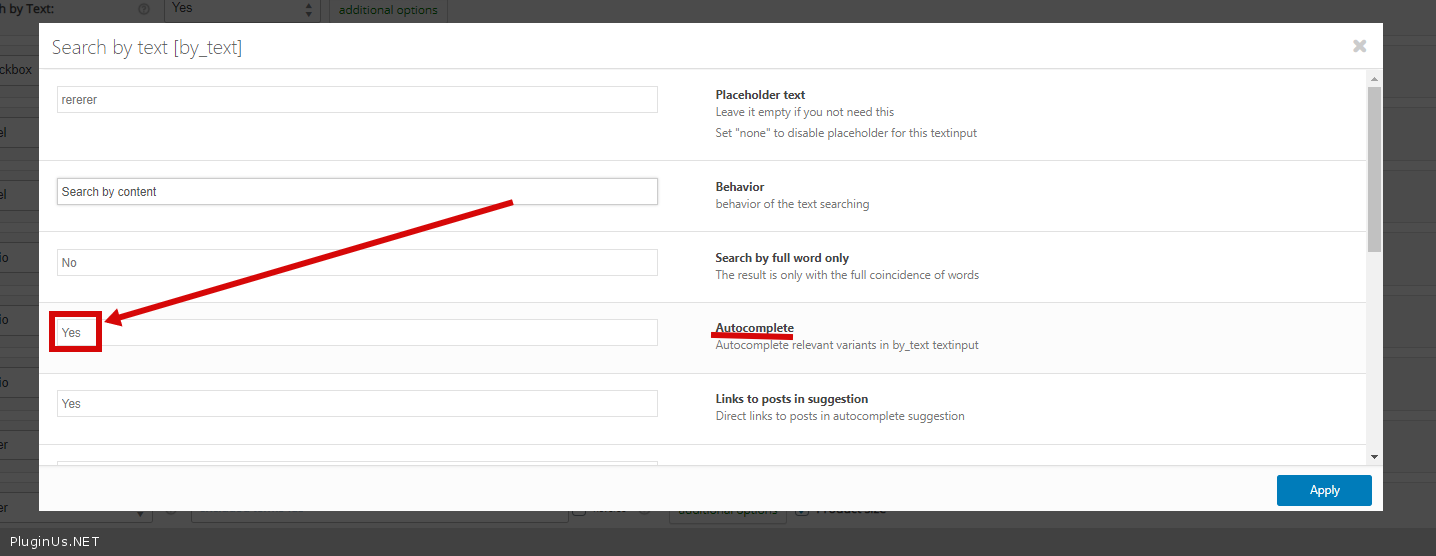
Search with autocomplete - https://c2n.me/4aMUV8z.png
For the filter functionality:
- this plugin does not affect the product display template. It depends on the current theme
- It's impossible! WooCommerce product categorie - this is just a link to the archive page. But on the archive page, the plugin correctly takes into account the current category and will display only the current filters
- This should work with basic settings. For these attributes select the "OR" logic/ Between these taxonomies, the logic will be "AND". If this does not work, then there may be a conflict with third-party plugins
Hello
Firstly please watch a video - https://products-filter.com/video-tutorials/#video_beGT6p_look
WOOF Filter doesn’t search in the WooCommerce long description - try this option - https://c2n.me/4aMUB33.png
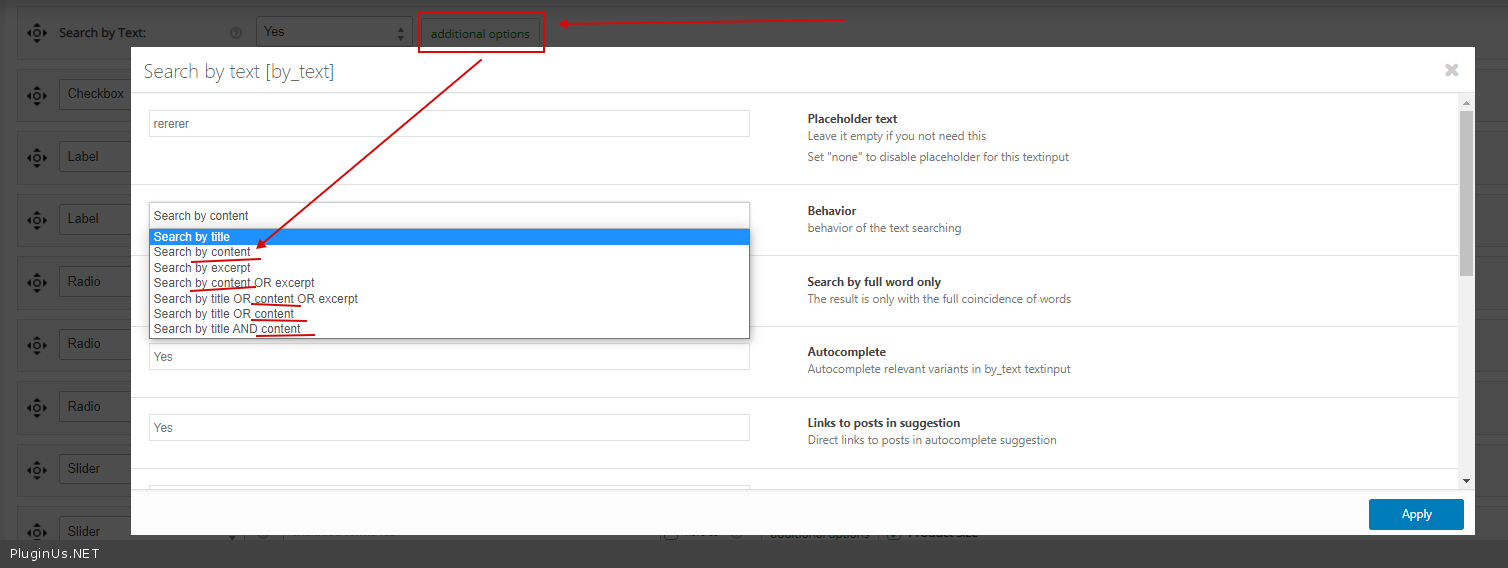
by checking „Product Title“, „Long Description“ - https://c2n.me/4aMUKac.png
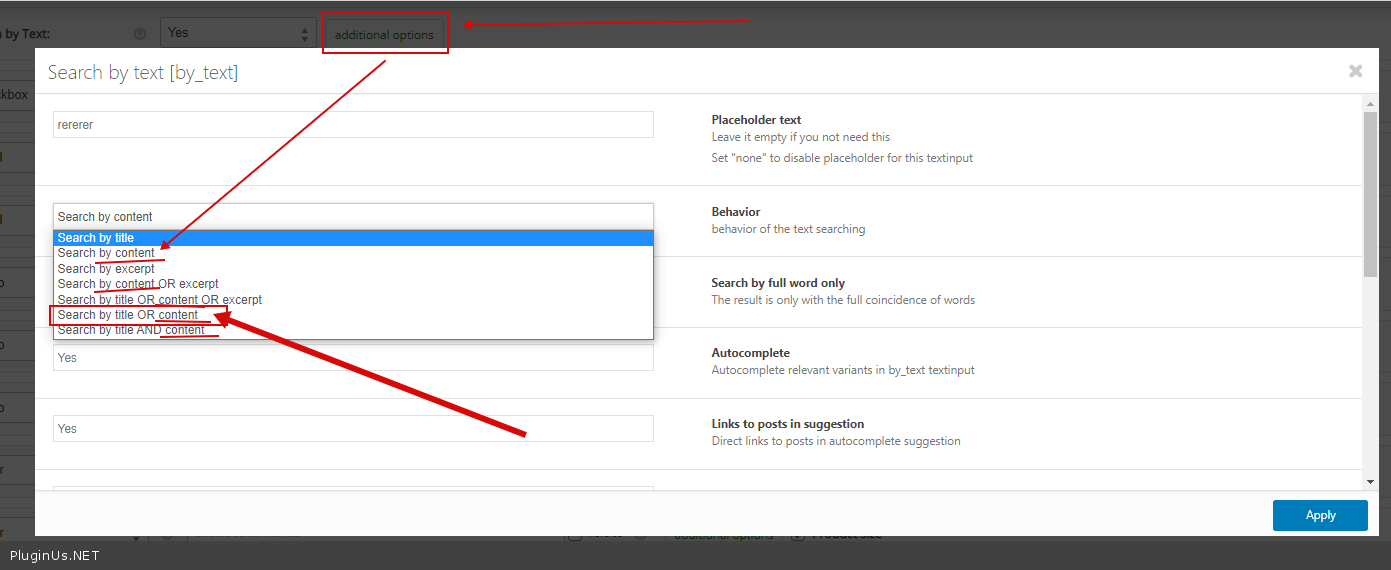
Search also Search with wildcard - what field do you use for this
Search with autocomplete - https://c2n.me/4aMUV8z.png
For the filter functionality:
- this plugin does not affect the product display template. It depends on the current theme
- It's impossible! WooCommerce product categorie - this is just a link to the archive page. But on the archive page, the plugin correctly takes into account the current category and will display only the current filters
- This should work with basic settings. For these attributes select the"OR" logic/ Between these taxonomies, the logic will be"AND". If this does not work, then there may be a conflict with third-party plugins
Quote from uwe.twelker on February 2, 2021, 18:11Hi Pablo
Thank you for your rich reply. It will take a couple of days to work myself through this. But I wanted to have my appreciation for your help come through in advance: Thank You!!!
Uwe
Hi Pablo
Thank you for your rich reply. It will take a couple of days to work myself through this. But I wanted to have my appreciation for your help come through in advance: Thank You!!!
Uwe
Quote from Pablo Borysenco on February 3, 2021, 12:36Hello Uwe
Welcome;)
Hello Uwe
Welcome;)