

Compatibility issue with other plugins that use #texthere in URL
The support doesn work on Saturdays and Sundays, so some Friday requests can be answered on Monday. If you have problems with registration ask help on contact us page pleaseIf you not got email within 24~36 business hours, firstly check your spam box, and if no any email from the support there - back to the forum and read answer here. DO NOT ANSWER ON EMAILS [noreply@pluginus.net] FROM THE FORUM!! Emails are just for your info, all answers should be published only here.
The support doesn work on Saturdays and Sundays, so some Friday requests can be answered on Monday.

Quote from gabrielle on May 17, 2021, 08:35Hi there,
I use JetElements Scroll Navigation widget on my home page
When you scroll through sections this adds /#section1 etc to the URL
So you get www.mywebsite.com/#section1 (I imagine various other plugins put data in the URL too using #)
If a user clicks on the currency switcher, this redirects the page to: https://www.mywebsite.com/section1?currency=USD instead of https://www.mywebsite.com/#section1?currency=USD
So the re-direct removes the #
This causes the user to get a page not found
The plugin should keep the full URL in place (including the #) and add ?currency=USD etc at the end
Can this be fixed as users getting lots of page not founds is a big problem :-)
Thanks
Gabrielle
Hi there,
I use JetElements Scroll Navigation widget on my home page
When you scroll through sections this adds /#section1 etc to the URL
So you get http://www.mywebsite.com/#section1 (I imagine various other plugins put data in the URL too using #)
If a user clicks on the currency switcher, this redirects the page to: https://www.mywebsite.com/section1?currency=USD instead of https://www.mywebsite.com/#section1?currency=USD
So the re-direct removes the #
This causes the user to get a page not found
The plugin should keep the full URL in place (including the #) and add ?currency=USD etc at the end
Can this be fixed as users getting lots of page not founds is a big problem :-)
Thanks
Gabrielle

Quote from Pablo Borysenco on May 17, 2021, 10:28Hello Gabrielle
Try in file - \wp-content\plugins\woocommerce-currency-switcher\views\shortcodes\styles\style-1\actions.js delete this code - https://c2n.me/4c2YAX5.png - clear all cache and do a test
Hello Gabrielle
Try in file - \wp-content\plugins\woocommerce-currency-switcher\views\shortcodes\styles\style-1\actions.js delete this code - https://c2n.me/4c2YAX5.png - clear all cache and do a test
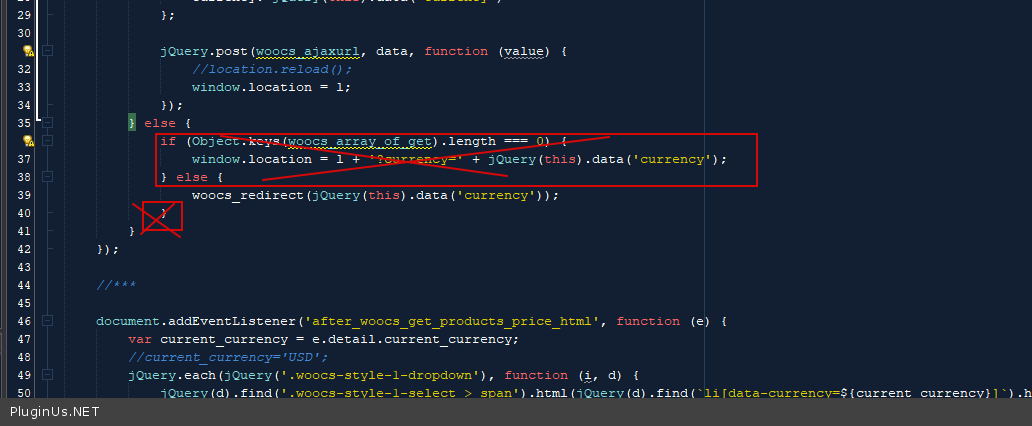
Quote from gabrielle on May 17, 2021, 12:16Hi Pablo,
I tried the above but this didnt work
I have both Style1 and Style3 currency switchers on my homepage (Style1 at the top, Style3 in the footer)
I found similar code in the Style3 .js and removed that as well:
} else {
if (Object.keys(woocs_array_of_get).length === 0) {
window.location = l + '?currency=' + $(this).val();However, this hasnt helped
Have tried with fresh browser (with all cache cleared etc)
Thanks
Gabrielle
Hi Pablo,
I tried the above but this didnt work
I have both Style1 and Style3 currency switchers on my homepage (Style1 at the top, Style3 in the footer)
I found similar code in the Style3 .js and removed that as well:
} else {
if (Object.keys(woocs_array_of_get).length === 0) {
window.location = l + '?currency=' + $(this).val();
However, this hasnt helped
Have tried with fresh browser (with all cache cleared etc)
Thanks
Gabrielle
Quote from Pablo Borysenco on May 18, 2021, 09:53Hello Gabrielle
Ok! Please drop me FTP access - https://c2n.me/43SC6rb.png -> https://c2n.me/42BAoj4.png I will fix it
Hello Gabrielle
Ok! Please drop me FTP access - https://c2n.me/43SC6rb.png -> https://c2n.me/42BAoj4.png I will fix it


Quote from gabrielle on May 18, 2021, 10:06Great, thank you
Have supplied details in the private data section
* I have 2 x currency switchers, style 1 in the header and style 3 in the footer
(you can see the issue if you scroll to the second half of the homepage, the tag #s1 etc then gets added to the URL. If you then try and switch currency the issue happens)
Thanks :-)
Great, thank you
Have supplied details in the private data section
* I have 2 x currency switchers, style 1 in the header and style 3 in the footer
(you can see the issue if you scroll to the second half of the homepage, the tag #s1 etc then gets added to the URL. If you then try and switch currency the issue happens)
Thanks :-)
Quote from Pablo Borysenco on May 18, 2021, 15:15Hello
Please delete all cache and re-create minified JS files
Hello
Please delete all cache and re-create minified JS files
Quote from gabrielle on May 18, 2021, 17:20Hi there,
Deleted all cache, deleted all data in browser, but problem still occurs
Is it possible to arrange to show you over zoom or similar?
Hi there,
Deleted all cache, deleted all data in browser, but problem still occurs
Is it possible to arrange to show you over zoom or similar?
Quote from Pablo Borysenco on May 19, 2021, 10:13Hello
Please do a test
Hello
Please do a test
Quote from gabrielle on May 19, 2021, 12:33Hi Pablo,
That seems all sorted now
Thanks so much for your help :-)
Gabrielle
Hi Pablo,
That seems all sorted now
Thanks so much for your help :-)
Gabrielle
Quote from Pablo Borysenco on May 20, 2021, 09:34Hello Gabrielle
Welcome;)
Hello Gabrielle
Welcome;)