
Categories Issue
The support doesn work on Saturdays and Sundays, so some Friday requests can be answered on Monday. If you have problems with registration ask help on contact us page pleaseIf you not got email within 24~36 business hours, firstly check your spam box, and if no any email from the support there - back to the forum and read answer here. DO NOT ANSWER ON EMAILS [noreply@pluginus.net] FROM THE FORUM!! Emails are just for your info, all answers should be published only here.
The support doesn work on Saturdays and Sundays, so some Friday requests can be answered on Monday.

Quote from Alex on September 8, 2020, 14:12Hey there,
Our website links directly to categories within our shop (you can choose between, ceramic, porcelain, glass or stone). When someone clicks this from the menu, the filter then only works within that category (which makes sense) however, this is a little confusing because the filter does not show that one of them has "technically" been selected by virtue of being placed directly into that category. So if you were to click the Stone section from the header menu. The filter then has the option to filter out ceramic, glass, porcelain, or stone which makes no sense.Links:https://saranatile.com/
If you click Product at the tops, no issues at all.
If you click any of the dropdowns under product - that is where things get messy.
Hey there,
Our website links directly to categories within our shop (you can choose between, ceramic, porcelain, glass or stone). When someone clicks this from the menu, the filter then only works within that category (which makes sense) however, this is a little confusing because the filter does not show that one of them has"technically" been selected by virtue of being placed directly into that category. So if you were to click the Stone section from the header menu. The filter then has the option to filter out ceramic, glass, porcelain, or stone which makes no sense.
Links:https://saranatile.com/
If you click Product at the tops, no issues at all.
If you click any of the dropdowns under product - that is where things get messy.

Quote from admin on September 9, 2020, 12:58Hello Alex
By logic this this section https://c2n.me/491ryLH.png should be hidden on the page like https://saranatile.com/products/ceramics/, so I can suggest 3 ways:
- Enable dynamic recount and hide empty terms
- Hide this block by CSS on this pages:
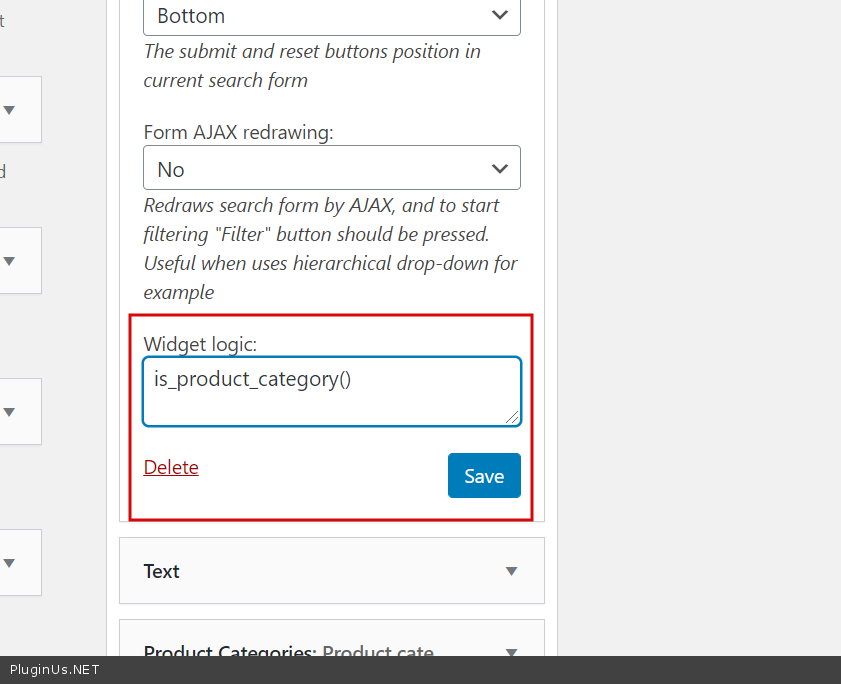
body.archive .woof_container_pa_type-filter {display: none}- Use shortcode [woof] in ususal text widget and attribute 'tax_only' https://products-filter.com/shortcode/woof/ + install plugin like 'Widget logic' https://wordpress.org/plugins/widget-logic/ and apply there condition is_product_category() ( https://docs.woocommerce.com/document/conditional-tags/ )
Hello Alex
By logic this this section https://c2n.me/491ryLH.png should be hidden on the page like https://saranatile.com/products/ceramics/, so I can suggest 3 ways:

- Enable dynamic recount and hide empty terms
- Hide this block by CSS on this pages:
body.archive .woof_container_pa_type-filter {display: none} - Use shortcode [woof] in ususal text widget and attribute 'tax_only' https://products-filter.com/shortcode/woof/ + install plugin like 'Widget logic' https://wordpress.org/plugins/widget-logic/ and apply there condition is_product_category() ( https://docs.woocommerce.com/document/conditional-tags/ )
Quote from Alex on September 10, 2020, 15:12Hey there,
I really appreciate all the options. Option two is the quickest and easiest but I have a feeling option 3 is the one I'm looking for.
Can you explain the last option a little more - I'm quite confused but I think it's the correct option.
Hey there,
I really appreciate all the options. Option two is the quickest and easiest but I have a feeling option 3 is the one I'm looking for.
Can you explain the last option a little more - I'm quite confused but I think it's the correct option.
Quote from admin on September 11, 2020, 12:13Hello
Its more quick will be if you will provide wp-admin access in private area (see button on the righr side) and I will do it there self, then you will see how its done and understand, because by words I already descibed it
Hello
Its more quick will be if you will provide wp-admin access in private area (see button on the righr side) and I will do it there self, then you will see how its done and understand, because by words I already descibed it
Quote from Alex on September 14, 2020, 15:50Hey there,
I've provided the requested data. I appreciate the help.
Hey there,
I've provided the requested data. I appreciate the help.

Quote from Pablo Borysenco on September 15, 2020, 12:35Hello
Paste your license key here - https://c2n.me/43SC6rb.png -> https://c2n.me/42HBIt7.png
Hello
Paste your license key here - https://c2n.me/43SC6rb.png -> https://c2n.me/42HBIt7.png


Quote from Alex on September 17, 2020, 14:42The license code has been added! Sorry!
The license code has been added! Sorry!
Quote from Pablo Borysenco on September 18, 2020, 13:02Hello
Example if you use this shortcode [woof tax_exclude='pa_type-filter' ] - filter will exclude this section - https://c2n.me/4983AHj.jpg
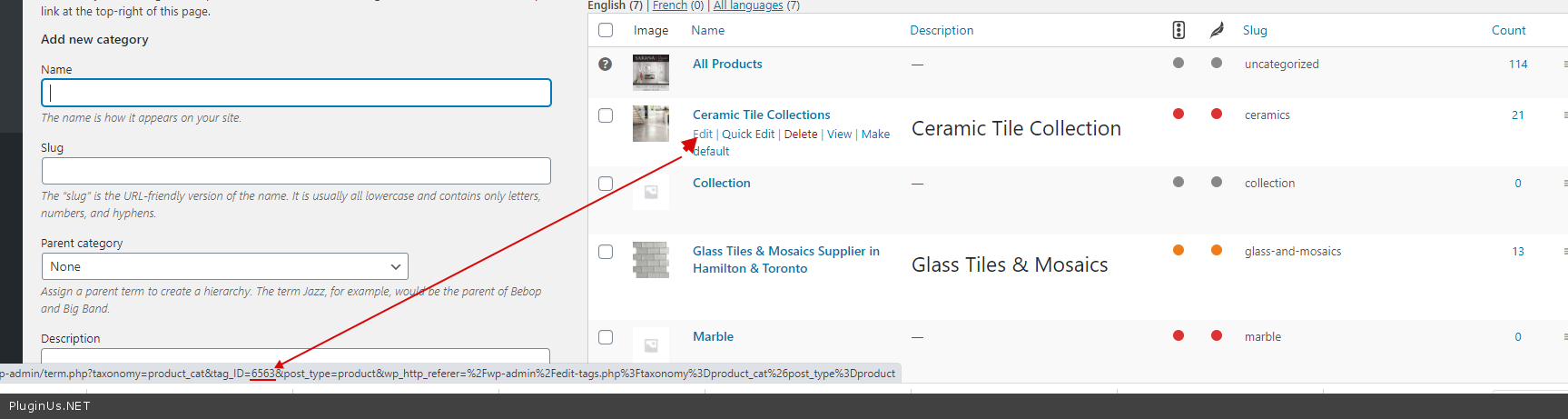
to adapt the shortcode to the current category - [woof tax_exclude='pa_type-filter' taxonomies="product_cat:6563" ] where 6563 is id of current category"Ceramic " ( https://c2n.me/49847Lb.png )
Hello
Example if you use this shortcode [woof tax_exclude='pa_type-filter' ] - filter will exclude this section - https://c2n.me/4983AHj.jpg
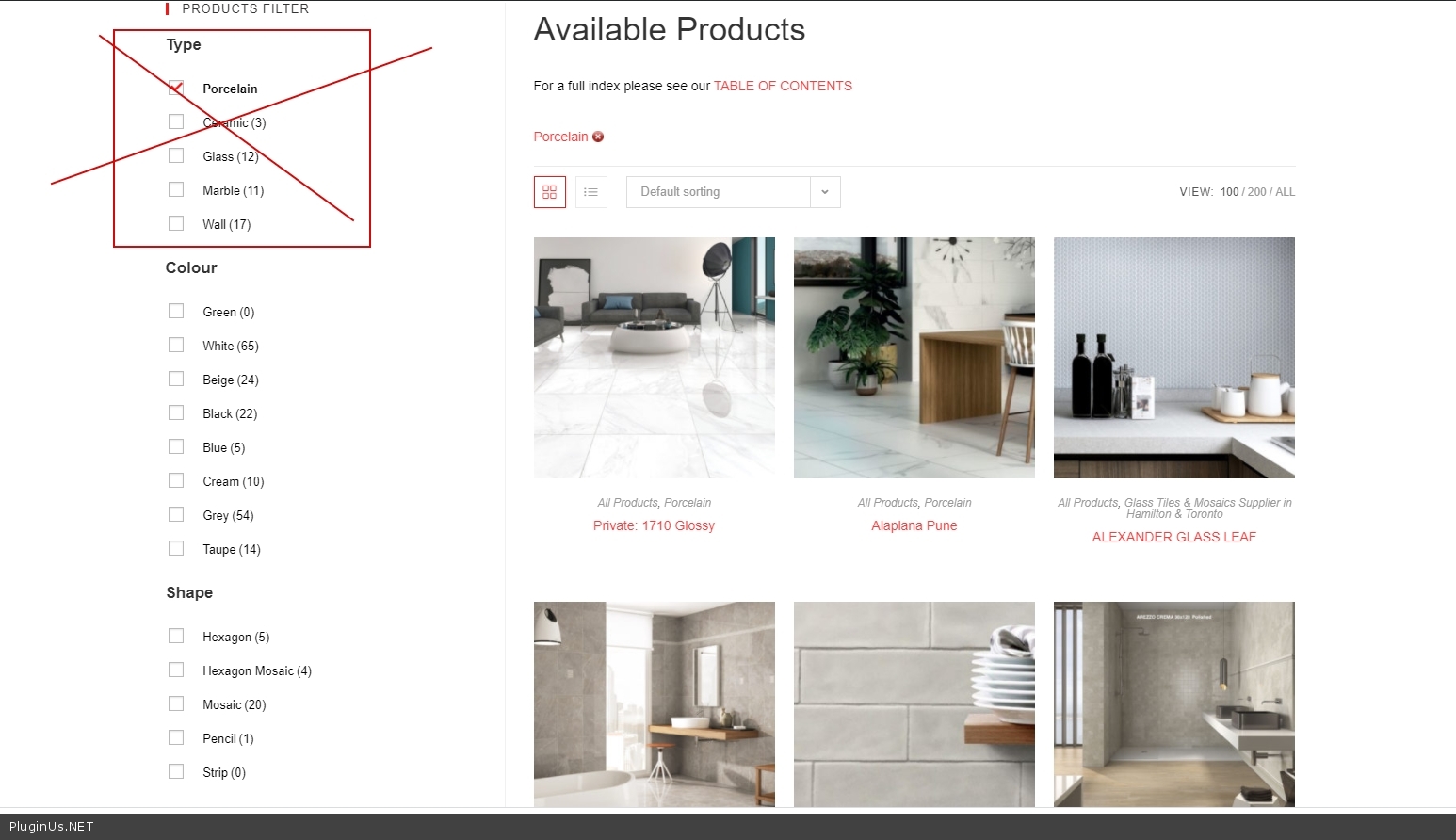
to adapt the shortcode to the current category - [woof tax_exclude='pa_type-filter' taxonomies="product_cat:6563" ] where 6563 is id of current category"Ceramic" ( https://c2n.me/49847Lb.png )
Quote from Alex on September 21, 2020, 15:05Is there shortcode in order to have something selected when the page loads?
Is there shortcode in order to have something selected when the page loads?
Quote from Pablo Borysenco on September 22, 2020, 11:25Hello
Do you mean pre-filtering?
Read this please - https://products-filter.com/manipulate-search-data-options/
Hello
Do you mean pre-filtering?
Read this please - https://products-filter.com/manipulate-search-data-options/