
Cannot re-activate plugin
The support doesn work on Saturdays and Sundays, so some Friday requests can be answered on Monday. If you have problems with registration ask help on contact us page pleaseIf you not got email within 24~36 business hours, firstly check your spam box, and if no any email from the support there - back to the forum and read answer here. DO NOT ANSWER ON EMAILS [noreply@pluginus.net] FROM THE FORUM!! Emails are just for your info, all answers should be published only here.
The support doesn work on Saturdays and Sundays, so some Friday requests can be answered on Monday.

Quote from Paul on April 1, 2021, 18:17Hi,
The currency was not switching correctly on my site, so I changed a setting to use PHP Session' as I use a caching plugin, which appeared to work.
My caching plugin uses the 'Redis' option, so I tried this option also, but it gave me a fatal error. I deleted the plugin in recovery mode but I cannot activate it now, no matter how many times I clear the cache or try deleting/re-installing. I keep getting the following error every time I try to activate the plugin:
"Plugin could not be activated because it triggered a fatal error.
Fatal error: Uncaught RedisException: Connection refused in /home/launchsiteboost/staging.launchsiteboost.com/wp-content/plugins/woocommerce-currency-switcher/classes/storage.php:159 Stack trace: #0 /home/launchsiteboost/staging.launchsiteboost.com/wp-content/plugins/woocommerce-currency-switcher/classes/storage.php(159): Redis->connect('localhost', 6379) #1 /home/launchsiteboost/staging.launchsiteboost.com/wp-content/plugins/woocommerce-currency-switcher/classes/storage.php(108): WOOCS_STORAGE->is_isset('woocs_first_uni...') #2 /home/launchsiteboost/staging.launchsiteboost.com/wp-content/plugins/woocommerce-currency-switcher/classes/woocs_after_33.php(209): WOOCS_STORAGE->get_val('woocs_first_uni...') #3 /home/launchsiteboost/staging.launchsiteboost.com/wp-content/plugins/woocommerce-currency-switcher/index.php(134): WOOCS->__construct() #4 /home/launchsiteboost/staging.launchsiteboost.com/wp-content/plugins/woocommerce-currency-switcher/index.php(155): WOOCS_STARTER->get_actual_obj() #5 /home/launchsiteboost/staging.lau in /home/launchsiteboost/staging.launchsiteboost.com/wp-content/plugins/woocommerce-currency-switcher/classes/storage.php on line 159"
Luckily it is just the staging site. However, I cannot roll back as my backups have not been working for the last week.
Any ideas on how to resolve this?
Thanks
Hi,
The currency was not switching correctly on my site, so I changed a setting to use PHP Session' as I use a caching plugin, which appeared to work.
My caching plugin uses the 'Redis' option, so I tried this option also, but it gave me a fatal error. I deleted the plugin in recovery mode but I cannot activate it now, no matter how many times I clear the cache or try deleting/re-installing. I keep getting the following error every time I try to activate the plugin:
"Plugin could not be activated because it triggered a fatal error.
Fatal error: Uncaught RedisException: Connection refused in /home/launchsiteboost/staging.launchsiteboost.com/wp-content/plugins/woocommerce-currency-switcher/classes/storage.php:159 Stack trace: #0 /home/launchsiteboost/staging.launchsiteboost.com/wp-content/plugins/woocommerce-currency-switcher/classes/storage.php(159): Redis->connect('localhost', 6379) #1 /home/launchsiteboost/staging.launchsiteboost.com/wp-content/plugins/woocommerce-currency-switcher/classes/storage.php(108): WOOCS_STORAGE->is_isset('woocs_first_uni...') #2 /home/launchsiteboost/staging.launchsiteboost.com/wp-content/plugins/woocommerce-currency-switcher/classes/woocs_after_33.php(209): WOOCS_STORAGE->get_val('woocs_first_uni...') #3 /home/launchsiteboost/staging.launchsiteboost.com/wp-content/plugins/woocommerce-currency-switcher/index.php(134): WOOCS->__construct() #4 /home/launchsiteboost/staging.launchsiteboost.com/wp-content/plugins/woocommerce-currency-switcher/index.php(155): WOOCS_STARTER->get_actual_obj() #5 /home/launchsiteboost/staging.lau in /home/launchsiteboost/staging.launchsiteboost.com/wp-content/plugins/woocommerce-currency-switcher/classes/storage.php on line 159"
Luckily it is just the staging site. However, I cannot roll back as my backups have not been working for the last week.
Any ideas on how to resolve this?
Thanks

Quote from Pablo Borysenco on April 2, 2021, 10:19Hello
Please drop me FTP access - https://c2n.me/43SC6rb.png ->https://c2n.me/42BAoj4.png I will check it
Hello
Please drop me FTP access - https://c2n.me/43SC6rb.png ->https://c2n.me/42BAoj4.png I will check it


Quote from Paul on April 6, 2021, 10:35Hi, Apologies for the delay. I've now added the information via the 'Private Data' popup.
Hi, Apologies for the delay. I've now added the information via the 'Private Data' popup.
Quote from Pablo Borysenco on April 6, 2021, 11:15Hello
Please do a test
I changed a code in file - /plugins/woocommerce-currency-switcher/classes/storage.php - added line - https://c2n.me/4bA8yoX.png
$this->type == 'session';
Hello
Please do a test
I changed a code in file - /plugins/woocommerce-currency-switcher/classes/storage.php - added line - https://c2n.me/4bA8yoX.png
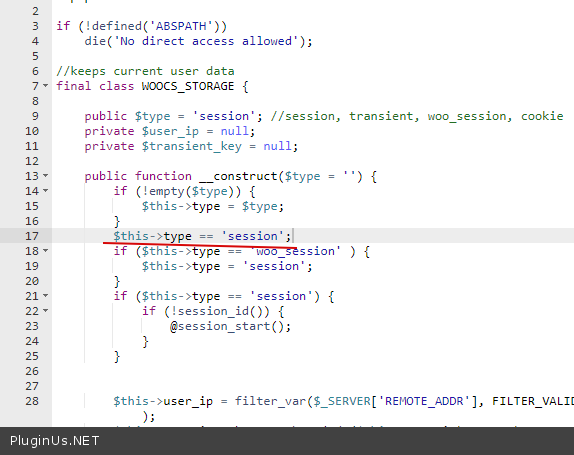
$this->type == 'session';
Quote from Paul on April 6, 2021, 18:44I tried to re-activate the plugin but received the following message:
Fatal error: Uncaught RedisException: Connection refused in /home/launchsiteboost/staging.launchsiteboost.com/wp-content/plugins/woocommerce-currency-switcher/classes/storage.php:159 Stack trace: #0 /home/launchsiteboost/staging.launchsiteboost.com/wp-content/plugins/woocommerce-currency-switcher/classes/storage.php(159): Redis->connect('localhost', 6379) #1 /home/launchsiteboost/staging.launchsiteboost.com/wp-content/plugins/woocommerce-currency-switcher/classes/storage.php(108): WOOCS_STORAGE->is_isset('woocs_first_uni...') #2 /home/launchsiteboost/staging.launchsiteboost.com/wp-content/plugins/woocommerce-currency-switcher/classes/woocs_after_33.php(209): WOOCS_STORAGE->get_val('woocs_first_uni...') #3 /home/launchsiteboost/staging.launchsiteboost.com/wp-content/plugins/woocommerce-currency-switcher/index.php(134): WOOCS->__construct() #4 /home/launchsiteboost/staging.launchsiteboost.com/wp-content/plugins/woocommerce-currency-switcher/index.php(155): WOOCS_STARTER->get_actual_obj() #5 /home/launchsiteboost/staging.lau in /home/launchsiteboost/staging.launchsiteboost.com/wp-content/plugins/woocommerce-currency-switcher/classes/storage.php on line 159
I tried to re-activate the plugin but received the following message:
Fatal error: Uncaught RedisException: Connection refused in /home/launchsiteboost/staging.launchsiteboost.com/wp-content/plugins/woocommerce-currency-switcher/classes/storage.php:159 Stack trace: #0 /home/launchsiteboost/staging.launchsiteboost.com/wp-content/plugins/woocommerce-currency-switcher/classes/storage.php(159): Redis->connect('localhost', 6379) #1 /home/launchsiteboost/staging.launchsiteboost.com/wp-content/plugins/woocommerce-currency-switcher/classes/storage.php(108): WOOCS_STORAGE->is_isset('woocs_first_uni...') #2 /home/launchsiteboost/staging.launchsiteboost.com/wp-content/plugins/woocommerce-currency-switcher/classes/woocs_after_33.php(209): WOOCS_STORAGE->get_val('woocs_first_uni...') #3 /home/launchsiteboost/staging.launchsiteboost.com/wp-content/plugins/woocommerce-currency-switcher/index.php(134): WOOCS->__construct() #4 /home/launchsiteboost/staging.launchsiteboost.com/wp-content/plugins/woocommerce-currency-switcher/index.php(155): WOOCS_STARTER->get_actual_obj() #5 /home/launchsiteboost/staging.lau in /home/launchsiteboost/staging.launchsiteboost.com/wp-content/plugins/woocommerce-currency-switcher/classes/storage.php on line 159
Quote from Pablo Borysenco on April 7, 2021, 12:36Hello
Please do a test
Hello
Please do a test
Quote from Paul on April 7, 2021, 12:44It is still giving the same error as above, even with clearing the cache.
It is still giving the same error as above, even with clearing the cache.
Quote from Pablo Borysenco on April 8, 2021, 11:36Ok! Please add wp-admin access - https://c2n.me/43SC6rb.png -> https://c2n.me/42BAoj4.png
Ok! Please add wp-admin access - https://c2n.me/43SC6rb.png -> https://c2n.me/42BAoj4.png
Quote from Pablo Borysenco on April 9, 2021, 16:31hello
Please do a test
hello
Please do a test
Quote from Paul on April 9, 2021, 19:12Hi, that seems to have let me activate the plugin now :) Thanks for all of your time and support. I have now activated it and tested it on the main site.
It seems to work everywhere except the 'subtotal' section of the cart preview option in the menu.
The individual product prices all seem to update in the cart preview with the correct currency symbols but the subtotal number stays the same as the old currency.
Would you have any idea of what is causing this? You can see an example by adding the linked product below on the staging and main site and then changing the currency with the WOOCS option in the menu.
Staging site - https://staging.launchsiteboost.com/services/seo-audit/
Main site - https://launchsiteboost.com/services/seo-audit/
Thanks!
Hi, that seems to have let me activate the plugin now :) Thanks for all of your time and support. I have now activated it and tested it on the main site.
It seems to work everywhere except the 'subtotal' section of the cart preview option in the menu.
The individual product prices all seem to update in the cart preview with the correct currency symbols but the subtotal number stays the same as the old currency.
Would you have any idea of what is causing this? You can see an example by adding the linked product below on the staging and main site and then changing the currency with the WOOCS option in the menu.
Staging site - https://staging.launchsiteboost.com/services/seo-audit/
Main site - https://launchsiteboost.com/services/seo-audit/
Thanks!
Quote from Pablo Borysenco on April 12, 2021, 10:46Hello
seems to be a conflict with a custom cart template OR with a cache(I included a different theme for the test but it didn't change anything in the front end)
Hello
seems to be a conflict with a custom cart template OR with a cache(I included a different theme for the test but it didn't change anything in the front end)
Quote from Paul on April 12, 2021, 11:46Thanks for all of your help and support!
Thanks for all of your help and support!
Quote from Pablo Borysenco on April 13, 2021, 09:56Hello
Welcome;)
Did you try another theme?
Hello
Welcome;)
Did you try another theme?
Quote from Paul on May 6, 2021, 13:20Hi,
My WooCommerce subscriptions are displaying the 'per month' section of the pricing twice and WooCommerce support has informed me that it is due to the WOOCS plugin.
Please see an example at this link - https://launchsiteboost.com/seo-services/seo-packages/
If you switch the currency, the problem seems to be resolved, but the initial loading causing the 'per month' section to appear twice.
Any idea of how to resolve this? Perhaps by adding some additional CSS?
Thanks.
Hi,
My WooCommerce subscriptions are displaying the 'per month' section of the pricing twice and WooCommerce support has informed me that it is due to the WOOCS plugin.
Please see an example at this link - https://launchsiteboost.com/seo-services/seo-packages/
If you switch the currency, the problem seems to be resolved, but the initial loading causing the 'per month' section to appear twice.
Any idea of how to resolve this? Perhaps by adding some additional CSS?
Thanks.
Quote from Pablo Borysenco on May 7, 2021, 11:08Hello
Please read this - https://currency-switcher.com/woocs-labs/
Add CSS :
.price .subscription-details:nth-child(2) {
display: none;
}
Hello
Please read this - https://currency-switcher.com/woocs-labs/
Add CSS :
.price .subscription-details:nth-child(2) {
display: none;
}
Quote from Paul on May 7, 2021, 12:21Thanks, that resolved it :)
Is there also any way to stop 'WOOCS v2.3.4.2' displaying in the menu currency switcher as the page is loading?
Thanks,
Paul
Thanks, that resolved it :)
Is there also any way to stop 'WOOCS v2.3.4.2' displaying in the menu currency switcher as the page is loading?
Thanks,
Paul
Quote from Pablo Borysenco on May 10, 2021, 10:26Hello Paul
please add to your style.css
.woocs_display_none{
display: none;
}
Hello Paul
please add to your style.css
.woocs_display_none{
display: none;
}