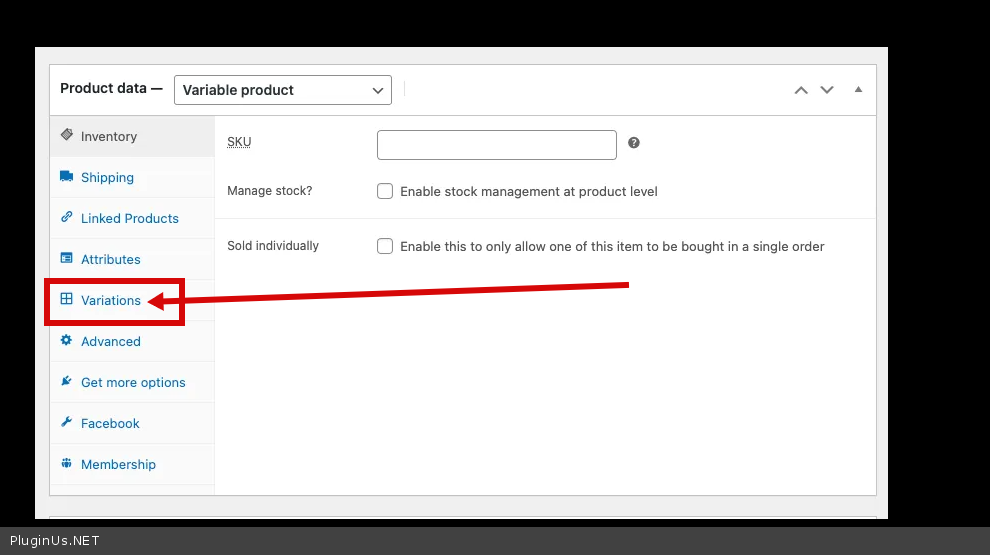
cannot access "general" tab when editing "product data"
The support doesn work on Saturdays and Sundays, so some Friday requests can be answered on Monday. If you have problems with registration ask help on contact us page pleaseIf you not got email within 24~36 business hours, firstly check your spam box, and if no any email from the support there - back to the forum and read answer here. DO NOT ANSWER ON EMAILS [noreply@pluginus.net] FROM THE FORUM!! Emails are just for your info, all answers should be published only here.
The support doesn work on Saturdays and Sundays, so some Friday requests can be answered on Monday.

Quote from rach on April 22, 2021, 22:59I cannot access the "general" tab when editing "product data" for a variable product. It's fine for a simple product.
I have verified in my advanced settings that I still have selected "yes" for "is multiple allowed" and that I still have selected "Individual fixed prices rules for each product".
I have recently installed Paid Memberships Pro, so I do have an extra tab for Memberships when I'm editing "product data".
I'm also wondering how can I set discount prices for members if I have set prices in two different currencies? Paid Memberships Pro says that I need to set the prices in WooCommerce because I am using WooCommerce for these memberships (I was already able to set my prices in different currencies for these).
if you intend to fully use WooCommerce for membership checkout, please note the following:
- All of the level pricing details would be set up via the product in WooCommerce.
- If you are using WooCommerce as the “product” for membership, none of the settings in Paid Memberships Pro’s Memberships > Settings > Levels in the admin are used.
https://www.paidmembershipspro.com/add-ons/pmpro-woocommerce/#membership-product
I cannot access the"general" tab when editing"product data" for a variable product. It's fine for a simple product.
I have verified in my advanced settings that I still have selected"yes" for"is multiple allowed" and that I still have selected"Individual fixed prices rules for each product".
I have recently installed Paid Memberships Pro, so I do have an extra tab for Memberships when I'm editing"product data".
I'm also wondering how can I set discount prices for members if I have set prices in two different currencies? Paid Memberships Pro says that I need to set the prices in WooCommerce because I am using WooCommerce for these memberships (I was already able to set my prices in different currencies for these).
if you intend to fully use WooCommerce for membership checkout, please note the following:
- All of the level pricing details would be set up via the product in WooCommerce.
- If you are using WooCommerce as the “product” for membership, none of the settings in Paid Memberships Pro’s Memberships > Settings > Levels in the admin are used.
https://www.paidmembershipspro.com/add-ons/pmpro-woocommerce/#membership-product

Quote from Pablo Borysenco on April 23, 2021, 12:05Hello
I'm not sure I understood you
I cannot access the "general" tab when editing "product data" for a variable product. It's fine for a simple product. - Not sure if this has anything to do with my plugin
I'm also wondering how can I set discount prices for members if I have set prices in two different currencies? - Fixed only work with standard products. If you have set a discount for fixed prices, set also for the standard price
Hello
I'm not sure I understood you
I cannot access the"general" tab when editing"product data" for a variable product. It's fine for a simple product. - Not sure if this has anything to do with my plugin
I'm also wondering how can I set discount prices for members if I have set prices in two different currencies? - Fixed only work with standard products. If you have set a discount for fixed prices, set also for the standard price
Quote from rach on April 23, 2021, 12:34The reason I use this plugin is because I sell items through a print-on-demand drop-shipping service (I don't hold any inventory myself). That service charges in USD, but I am in Canada. I wanted something where I could set prices in my WooCommerce shop for USD and CAD. It has been some time since I first set up my shop, but I could have sworn I was able to set USD and CAD prices for those variable products I have in my store. Was that once a feature?
When I go to edit the product data, the general tab is where I was able to edit prices. I can still do that for simple products (like the services I sell). See the screen shots linked below to see how I have my setup (I have multiple allowed and individual fixed price rules for each product selected). Should I also select "individual prices based on user role" to help me with membership pricing?
I also have screen shots of what I can do with variable vs simple products. You can see that the first tab for editing a simple product is general, followed by inventory. However, with a variable product, the first tab is inventory, with no tab for general, where I can set the fixed prices in my currencies of choice.
You'll also see that I am able to set product prices for members in USD only. Will I also be able to set product prices for members in CAD as well?
I hope this explains my situation better. Please let me know if you need more details. Thank you!!!
Screen shots here: https://photos.app.goo.gl/X8Yt2pLguLbhhVGUA
The reason I use this plugin is because I sell items through a print-on-demand drop-shipping service (I don't hold any inventory myself). That service charges in USD, but I am in Canada. I wanted something where I could set prices in my WooCommerce shop for USD and CAD. It has been some time since I first set up my shop, but I could have sworn I was able to set USD and CAD prices for those variable products I have in my store. Was that once a feature?
When I go to edit the product data, the general tab is where I was able to edit prices. I can still do that for simple products (like the services I sell). See the screen shots linked below to see how I have my setup (I have multiple allowed and individual fixed price rules for each product selected). Should I also select"individual prices based on user role" to help me with membership pricing?
I also have screen shots of what I can do with variable vs simple products. You can see that the first tab for editing a simple product is general, followed by inventory. However, with a variable product, the first tab is inventory, with no tab for general, where I can set the fixed prices in my currencies of choice.
You'll also see that I am able to set product prices for members in USD only. Will I also be able to set product prices for members in CAD as well?
I hope this explains my situation better. Please let me know if you need more details. Thank you!!!
Screen shots here: https://photos.app.goo.gl/X8Yt2pLguLbhhVGUA
Quote from Pablo Borysenco on April 26, 2021, 10:21Hello
Unfortunately I do not see any screenshots.
Will I also be able to set product prices for members in CAD as well? - For base currency only
what plugin version number are you using?
Hello
Unfortunately I do not see any screenshots.
Will I also be able to set product prices for members in CAD as well? - For base currency only
what plugin version number are you using?
Quote from rach on April 26, 2021, 12:03Hello, I am using
WOOCS - WooCommerce Currency Switcher v.2.3.4
Actualized for WooCommerce v.5.2.x
I have uploaded the photos to a page I no longer use. https://cadance5678.com/basic-virtual-class-replays/
Thank you!
Hello, I am using
WOOCS - WooCommerce Currency Switcher v.2.3.4
Actualized for WooCommerce v.5.2.x
I have uploaded the photos to a page I no longer use. https://cadance5678.com/basic-virtual-class-replays/
Thank you!
Quote from Pablo Borysenco on April 27, 2021, 10:17Hello
Paste your license key here - https://c2n.me/43SC6rb.png -> https://c2n.me/42HBIt7.png
To check fixed prices - https://c2n.me/4bQlk2X.png
Hello
Paste your license key here - https://c2n.me/43SC6rb.png -> https://c2n.me/42HBIt7.png


To check fixed prices - https://c2n.me/4bQlk2X.png