
Cache setting not working
The support doesn work on Saturdays and Sundays, so some Friday requests can be answered on Monday. If you have problems with registration ask help on contact us page pleaseIf you not got email within 24~36 business hours, firstly check your spam box, and if no any email from the support there - back to the forum and read answer here. DO NOT ANSWER ON EMAILS [noreply@pluginus.net] FROM THE FORUM!! Emails are just for your info, all answers should be published only here.
The support doesn work on Saturdays and Sundays, so some Friday requests can be answered on Monday.

Quote from digitallion on May 28, 2025, 03:52Hi,
If you check this site: https://woocommerce-1450226-5441742.cloudwaysapps.com/online-training/, you will see that if you go to the online training page and change the currency, it updates the price on the page when you have the get variable in the url. When you navigate to other pages, it maintains the selected currency using memcached (transient worked too); however, the price is not updating, so if you go to the online training page again (or the homepage which also contains the product and price in the Our Online Courses section), you will see the same price from before you switched the currency. This is with the redraw setting turned on, so I am not sure why it is not redrawing the price.
Hi,
If you check this site: https://woocommerce-1450226-5441742.cloudwaysapps.com/online-training/, you will see that if you go to the online training page and change the currency, it updates the price on the page when you have the get variable in the url. When you navigate to other pages, it maintains the selected currency using memcached (transient worked too); however, the price is not updating, so if you go to the online training page again (or the homepage which also contains the product and price in the Our Online Courses section), you will see the same price from before you switched the currency. This is with the redraw setting turned on, so I am not sure why it is not redrawing the price.

Quote from Pablo Borysenco on May 28, 2025, 09:55Hello
Please check this option - https://share.pluginus.net/image/i20250528105311.png
In your case, redrawing prices will not work because you are using a custom price template. Please use the woocommerce functionality (we developed our plugin for this) and everything will work fine
Hello
Please check this option - https://share.pluginus.net/image/i20250528105311.png

In your case, redrawing prices will not work because you are using a custom price template. Please use the woocommerce functionality (we developed our plugin for this) and everything will work fine
Quote from digitallion on June 9, 2025, 19:43Hey Pablo,
Please refer to the screenshot where it is showing that we have used woocommerce product price as short code. What more needs to be done please advise.
Thanks always for your help!
Hey Pablo,
Please refer to the screenshot where it is showing that we have used woocommerce product price as short code. What more needs to be done please advise.
Thanks always for your help!
Quote from Pablo Borysenco on June 10, 2025, 09:51Hello
Please try this - https://currency-switcher.com/shortcode/woocs_price
Hello
Please try this - https://currency-switcher.com/shortcode/woocs_price
Quote from digitallion on June 20, 2025, 07:54Thanks, that works great. But any idea why if you change the currency right away upon loading the page e.g. here https://tinyurl.com/55z8pn39, it doesn't do anything. You have to wait for about 15 seconds and then change it and then it works. Then when you do switch the currency to USD and load the homepage, it takes about 15 seconds before it switches the currency symbol in the dropdown from CAD to USD.
Also, for some reason when I turn on varnish cache, it seems to stop working entirely.
Thanks, that works great. But any idea why if you change the currency right away upon loading the page e.g. here https://tinyurl.com/55z8pn39, it doesn't do anything. You have to wait for about 15 seconds and then change it and then it works. Then when you do switch the currency to USD and load the homepage, it takes about 15 seconds before it switches the currency symbol in the dropdown from CAD to USD.
Also, for some reason when I turn on varnish cache, it seems to stop working entirely.
Quote from Pablo Borysenco on June 20, 2025, 12:13Hello
Please try to disable this option - https://share.pluginus.net/image/i20250620113708.png - to test
Hello
Please try to disable this option - https://share.pluginus.net/image/i20250620113708.png - to test

Quote from digitallion on June 20, 2025, 19:42Hey. That works great! However, when I enable Varnish, it stops working entirely. When I switch the currency, I see the url changes, but both the currency dropdown and the prices don't change from the original. Is there a way around that?
Hey. That works great! However, when I enable Varnish, it stops working entirely. When I switch the currency, I see the url changes, but both the currency dropdown and the prices don't change from the original. Is there a way around that?
Quote from Pablo Borysenco on June 23, 2025, 09:51Hello
Please check this option - https://share.pluginus.net/image/i20250623104635.png
ok! in the previous message I asked to do a test, unfortunately this is not a solution to the problem in itself. This issue may be related to JS optimization settings. Try disabling JS optimization and returning this option - https://share.pluginus.net/image/i20250620113708.png - and do a test

Hello
Please check this option - https://share.pluginus.net/image/i20250623104635.png

ok! in the previous message I asked to do a test, unfortunately this is not a solution to the problem in itself. This issue may be related to JS optimization settings. Try disabling JS optimization and returning this option - https://share.pluginus.net/image/i20250620113708.png - and do a test
Quote from digitallion on June 23, 2025, 17:31We are already using Fox Session for currency storage.
The issue occurs whether JS is deferred/minified/delayed or not.
We are already using Fox Session for currency storage.
The issue occurs whether JS is deferred/minified/delayed or not.
Quote from Pablo Borysenco on June 24, 2025, 10:07Hello
Ok! Please drop me wp-admin access - https://share.pluginus.net/image/i20230222134241.png ->https://share.pluginus.net/image/i20230222134615.png
Can I disable JS optimization?
Hello
Ok! Please drop me wp-admin access - https://share.pluginus.net/image/i20230222134241.png ->https://share.pluginus.net/image/i20230222134615.png


Can I disable JS optimization?
Quote from digitallion on June 24, 2025, 21:18Ok, I've added a temporary login link. You can disable JS optimization (WP Rocket) but please re-enable when finished. I would actually prefer Delay than Defer but seemed to have problems with that and the currency, despite excluding your scripts.
Ok, I've added a temporary login link. You can disable JS optimization (WP Rocket) but please re-enable when finished. I would actually prefer Delay than Defer but seemed to have problems with that and the currency, despite excluding your scripts.
Quote from Pablo Borysenco on June 25, 2025, 12:06Hello
Can you add ftp access? - https://share.pluginus.net/image/i20230222134241.png ->https://share.pluginus.net/image/i20230222134615.png
Hello
Can you add ftp access? - https://share.pluginus.net/image/i20230222134241.png ->https://share.pluginus.net/image/i20230222134615.png
Quote from digitallion on June 25, 2025, 23:16I've done so. Thanks for your help.
I've done so. Thanks for your help.
Quote from Pablo Borysenco on June 26, 2025, 14:08Hello
Please do a test
Hello
Please do a test
Quote from digitallion on July 2, 2025, 23:38Unfortunately it is still not working. When I go to https://tinyurl.com/5fek3zkd and change to USD and then go to the homepage and scroll down to the online training section, it is back to CAD (though the dropdown does still say USD)
Unfortunately it is still not working. When I go to https://tinyurl.com/5fek3zkd and change to USD and then go to the homepage and scroll down to the online training section, it is back to CAD (though the dropdown does still say USD)
Quote from Pablo Borysenco on July 3, 2025, 11:13Hello
My test - https://share.pluginus.net/video/v20250703121259.mp4
Hello
My test - https://share.pluginus.net/video/v20250703121259.mp4
Quote from digitallion on August 5, 2026, 05:09Hey Pablo! I hope you have been well.
We just updated your plugin and for some reason the USD currency is not being displayed on the cart page but is on the product pages and checkout. Any idea why? Here is an example product: https://berlinembroidery.com/product/shadow-work-butterfly-3/?swcfpc=1.
Hey Pablo! I hope you have been well.
We just updated your plugin and for some reason the USD currency is not being displayed on the cart page but is on the product pages and checkout. Any idea why? Here is an example product: https://berlinembroidery.com/product/shadow-work-butterfly-3/?swcfpc=1.

Quote from Alex Dev on August 6, 2026, 11:11Hello
Just added product into site cart using USD currency:
Please tell me what storge you using on the site, and if cache option enabled "I am using cache plugin on my site"
Hello
Just added product into site cart using USD currency:
Please tell me what storge you using on the site, and if cache option enabled"I am using cache plugin on my site"
Quote from digitallion on August 7, 2026, 04:35Hey Alex,
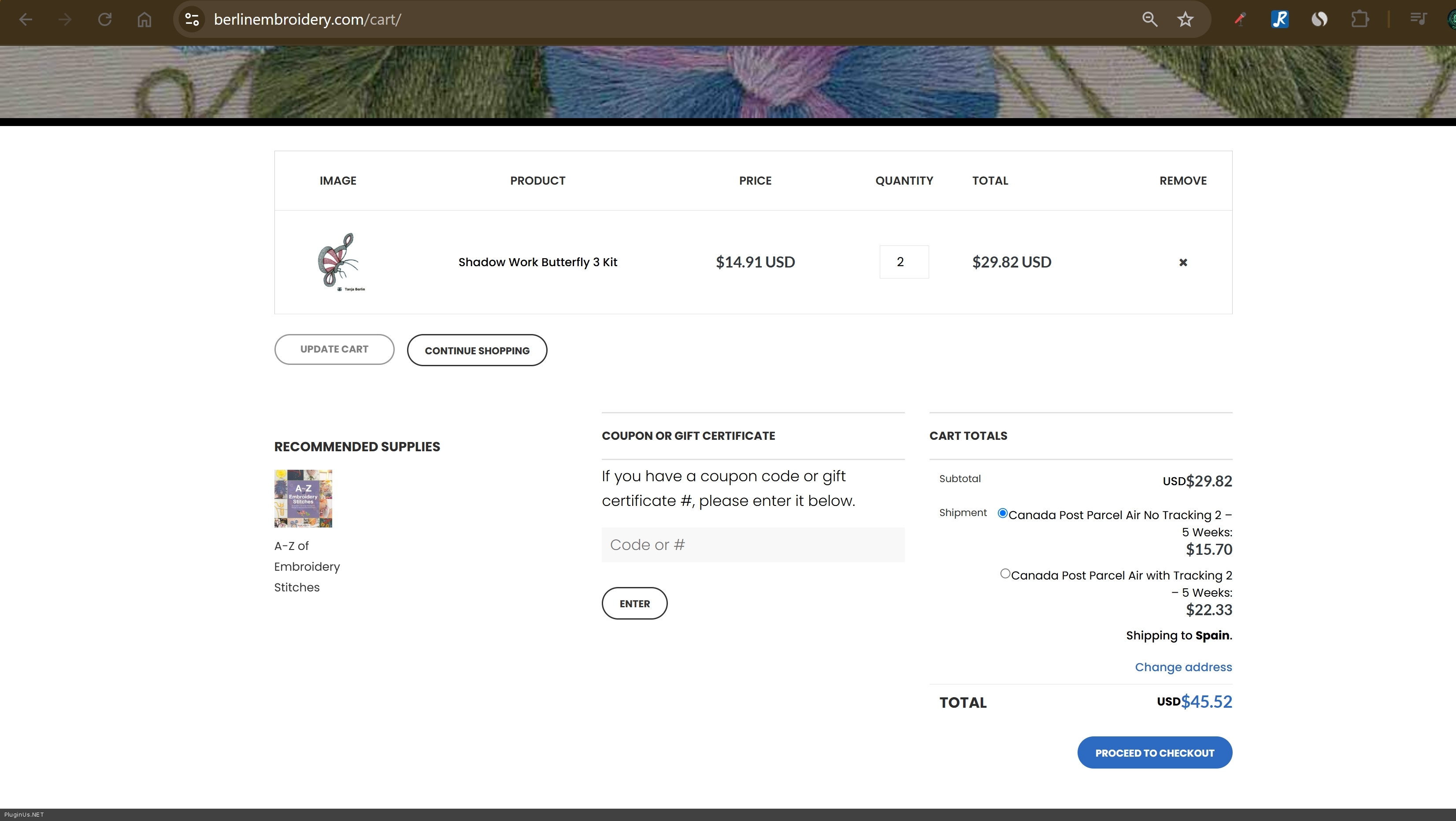
The store’s default currency is CAD. Could your successful test be because USD is your default currency? Can you reproduce it with CAD as the default, then switch to USD on the cart?
Cart screenshot: https://imgur.com/a/SNv1zXy
Upon further investigation, I found that the issue affects both the cart and checkout, but differently:
- Cart: after selecting USD, the dropdown displays USD but the cart prices remain CAD.
- Checkout: the prices are correctly displayed in USD, but the dropdown displays CAD.
- Product and category pages display USD correctly.
On checkout, the page’s configuration reports:
woocs_current_currency: CADwoocs_default_currency: CAD- Dropdown’s server-rendered value: CAD
woocs_shop_is_cached: 1woocs_browser_key_mode: 1woocs_special_ajax_mode: 1Despite that CAD state, the checkout prices are redrawn in USD. It therefore appears that the browser-key currency is USD while the server-rendered currency remains CAD.
I can provide administrator and FTP access if needed, if there is a secure way to do so.
Hey Alex,
The store’s default currency is CAD. Could your successful test be because USD is your default currency? Can you reproduce it with CAD as the default, then switch to USD on the cart?
Cart screenshot: https://imgur.com/a/SNv1zXy
Upon further investigation, I found that the issue affects both the cart and checkout, but differently:
- Cart: after selecting USD, the dropdown displays USD but the cart prices remain CAD.
- Checkout: the prices are correctly displayed in USD, but the dropdown displays CAD.
- Product and category pages display USD correctly.
On checkout, the page’s configuration reports:
woocs_current_currency: CADwoocs_default_currency: CAD- Dropdown’s server-rendered value: CAD
woocs_shop_is_cached: 1woocs_browser_key_mode: 1woocs_special_ajax_mode: 1
Despite that CAD state, the checkout prices are redrawn in USD. It therefore appears that the browser-key currency is USD while the server-rendered currency remains CAD.
I can provide administrator and FTP access if needed, if there is a secure way to do so.
Quote from Alex Dev on August 7, 2026, 12:43Hello
Thank youfor your explanations!
For now, please switch the "No GET data in link" option off. With it disabled the currency travels in the address, and the server knows which one to render. I checked it on your site and it does work: https://berlinembroidery.com/cart/?currency=cad renders correctly. That is your workaround until the proper fix ships.
To get to the bottom of it rather than leave you on a workaround, we need access. Since the site is live, please do not give us the live one. Make a staging clone and add to the private section of this ticket:
- a WordPress administrator account on the staging site
- FTP or SFTP credentials
We need to switch between storage modes and cache options and swap plugin builds, which is not something to do on a shop that is taking orders.
One note on timing so you know what to expect. Our support team is on vacation from August 8 to September 3, so replies in that period will be irregular.
https://share.pluginus.net/image/i20230222134241.png
https://share.pluginus.net/image/i20230222134615.png
Hello
Thank youfor your explanations!
For now, please switch the"No GET data in link" option off. With it disabled the currency travels in the address, and the server knows which one to render. I checked it on your site and it does work: https://berlinembroidery.com/cart/?currency=cad renders correctly. That is your workaround until the proper fix ships.
To get to the bottom of it rather than leave you on a workaround, we need access. Since the site is live, please do not give us the live one. Make a staging clone and add to the private section of this ticket:
- a WordPress administrator account on the staging site
- FTP or SFTP credentials
We need to switch between storage modes and cache options and swap plugin builds, which is not something to do on a shop that is taking orders.
One note on timing so you know what to expect. Our support team is on vacation from August 8 to September 3, so replies in that period will be irregular.
https://share.pluginus.net/image/i20230222134241.png
https://share.pluginus.net/image/i20230222134615.png