matthewmeaklim(@matthewmeaklim)
11 Posts
Customers
Quote from matthewmeaklim on February 15, 2022, 10:34
Hello,
I've seen this question asked quite a lot, and am just wondering if there's been any movement on a solution for it?
I've seen a post about registering two sidebars, then hiding/showing via CSS, and also one with a JS solution of changing the "autosubmit" value based on screen width - is there a better solution though as of today?
Thanks,
Matthew
Hello,
I've seen this question asked quite a lot, and am just wondering if there's been any movement on a solution for it?
I've seen a post about registering two sidebars, then hiding/showing via CSS, and also one with a JS solution of changing the"autosubmit" value based on screen width - is there a better solution though as of today?
Thanks,
Matthew

Pablo Borysenco(@pavlo_borysenco)
34,196 Posts
Quote from Pablo Borysenco on February 15, 2022, 13:23
Hello Matthew
please create 2 widgets (filters)
To show/hide widgets - https://wordpress.org/plugins/widget-options/
Hello Matthew
please create 2 widgets (filters)
To show/hide widgets - https://wordpress.org/plugins/widget-options/
matthewmeaklim(@matthewmeaklim)
11 PostsTopic Author
Customers
Quote from matthewmeaklim on February 15, 2022, 15:20
Don't suppose you know the breakpoints the plugin uses for mobile and desktop?
Don't suppose you know the breakpoints the plugin uses for mobile and desktop?
matthewmeaklim(@matthewmeaklim)
11 PostsTopic Author
Customers
Quote from matthewmeaklim on February 15, 2022, 16:18
Ah, tried it there but doesn't seem to do anything. I just end up with two filters that don't work independently.
Ah, tried it there but doesn't seem to do anything. I just end up with two filters that don't work independently.
Pablo Borysenco(@pavlo_borysenco)
34,196 Posts
Quote from Pablo Borysenco on February 16, 2022, 12:21
Hello
Drop me exact link to the issue
I just end up with two filters - it means you didn't set it up correctly - https://wordpress.org/plugins/widget-options/
Hello
Drop me exact link to the issue
I just end up with two filters - it means you didn't set it up correctly - https://wordpress.org/plugins/widget-options/
matthewmeaklim(@matthewmeaklim)
11 PostsTopic Author
Customers
Quote from matthewmeaklim on February 16, 2022, 17:23
Actually, the client likes having the "Filter" button so I think we're all good. Just one more question for you; what are the breakpoints? I've styles in place for the mobile modal up to 1023px, then I've styles from 1024px up for the filters without the modal. I'd like to avoid someone on a device of say 800px seeing no modal and un-styled filters or something like that. Thanks as always.
Actually, the client likes having the"Filter" button so I think we're all good. Just one more question for you; what are the breakpoints? I've styles in place for the mobile modal up to 1023px, then I've styles from 1024px up for the filters without the modal. I'd like to avoid someone on a device of say 800px seeing no modal and un-styled filters or something like that. Thanks as always.
Pablo Borysenco(@pavlo_borysenco)
34,196 Posts
Quote from Pablo Borysenco on February 17, 2022, 11:53
Hello
Unfortunately, I didn't understand your question. What are modal filters?
Hello
Unfortunately, I didn't understand your question. What are modal filters?
matthewmeaklim(@matthewmeaklim)
11 PostsTopic Author
Customers
Quote from matthewmeaklim on February 17, 2022, 12:59
Apologies. I am referring to: "Mobile Mode: hide the widget on a mobile device and a button appears to show the filter.". What I want to know is, what is the breakpoint? At what screen size does mobile mode end?
Apologies. I am referring to:"Mobile Mode: hide the widget on a mobile device and a button appears to show the filter.". What I want to know is, what is the breakpoint? At what screen size does mobile mode end?
Pablo Borysenco(@pavlo_borysenco)
34,196 Posts
Quote from Pablo Borysenco on February 17, 2022, 13:21
To determine the current device, we use the function wp_is_mobile()
To determine the current device, we use the function wp_is_mobile()
matthewmeaklim(@matthewmeaklim)
11 PostsTopic Author
Customers
Quote from matthewmeaklim on February 17, 2022, 18:07
Ah, cool - that should be perfect then.
Just one more question and I REALLY will let you be... lol.
Possible to always display the "Reset" button?
https://scrollymcscroll.matthewmeaklim.com/shop/ (no filters applied) vs https://scrollymcscroll.matthewmeaklim.com/shop/?swoof=1&product_tag=brand-one (filter applied) - looks much neater when the "Reset" button is present.
Thanks as always for all your help.
Ah, cool - that should be perfect then.
Just one more question and I REALLY will let you be... lol.
Possible to always display the"Reset" button?
https://scrollymcscroll.matthewmeaklim.com/shop/ (no filters applied) vs https://scrollymcscroll.matthewmeaklim.com/shop/?swoof=1&product_tag=brand-one (filter applied) - looks much neater when the"Reset" button is present.
Thanks as always for all your help.
Pablo Borysenco(@pavlo_borysenco)
34,196 Posts
Quote from Pablo Borysenco on February 18, 2022, 12:25
Hello
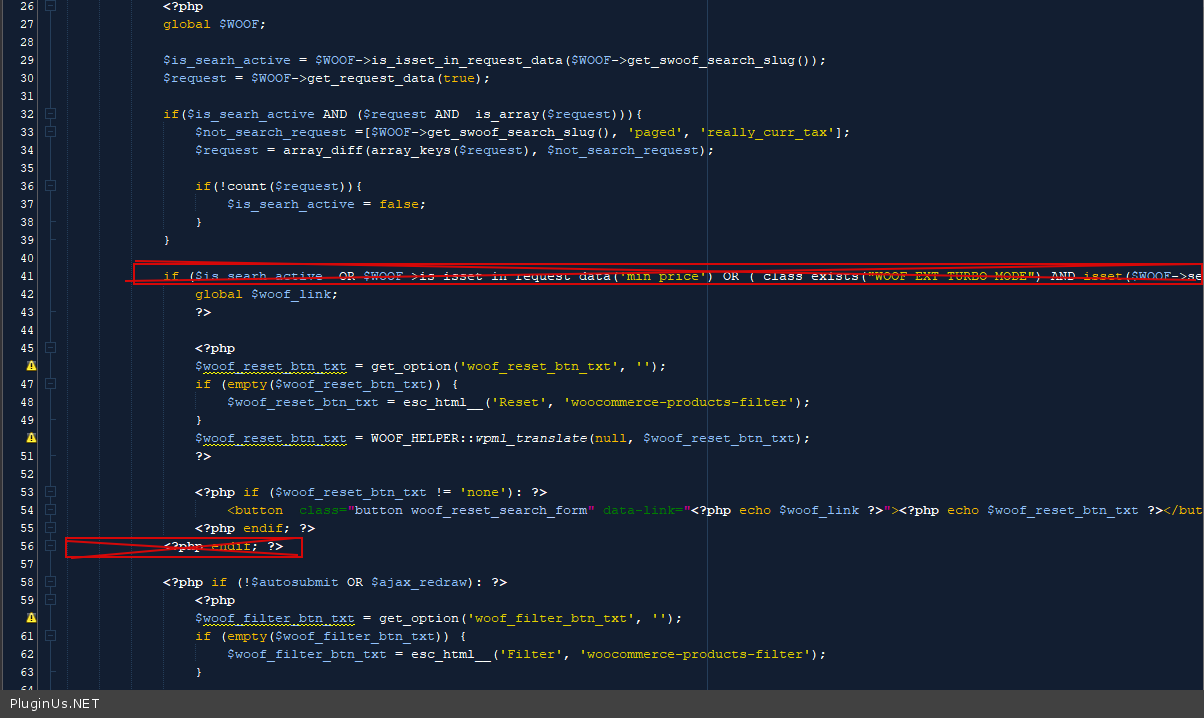
In this case, you need code customization. In file - wp-content\plugins\woocommerce-products-filter\views\woof.php - delete this code - https://c2n.me/4eYTtP0.png
Hello
In this case, you need code customization. In file - wp-content\plugins\woocommerce-products-filter\views\woof.php - delete this code - https://c2n.me/4eYTtP0.png