

Attributes missing
The support doesn work on Saturdays and Sundays, so some Friday requests can be answered on Monday. If you have problems with registration ask help on contact us page pleaseIf you not got email within 24~36 business hours, firstly check your spam box, and if no any email from the support there - back to the forum and read answer here. DO NOT ANSWER ON EMAILS [noreply@pluginus.net] FROM THE FORUM!! Emails are just for your info, all answers should be published only here.
The support doesn work on Saturdays and Sundays, so some Friday requests can be answered on Monday.

Quote from Bjorn on March 31, 2021, 16:52Hello,
I have a couple of hundreds attributes in the woocommerce webshop. Now and then a attribute is missing in the bulk editor. Anyone a solution so that it is always synchronised?
Hello,
I have a couple of hundreds attributes in the woocommerce webshop. Now and then a attribute is missing in the bulk editor. Anyone a solution so that it is always synchronised?

Quote from Pablo Borysenco on April 1, 2021, 11:11Hello
Paste your license key here - https://c2n.me/43SC6rb.png -> https://c2n.me/42HBIt7.png and wp-admin access - https://c2n.me/42BAoj4.png
Describe in more detail what I have to do to get the error
Hello
Paste your license key here - https://c2n.me/43SC6rb.png -> https://c2n.me/42HBIt7.png and wp-admin access - https://c2n.me/42BAoj4.png



Describe in more detail what I have to do to get the error
Quote from Bjorn on April 8, 2021, 13:32Hello,
That is the difficuilt part of it haha. It only appears now and then. For example: Bu attributes you can see under technology: Biax. But in the BEAR bulk editor it does not appear. Also if I want to delete a attribute term in the Bear Bulk editor. It seems it does not to delete is. After I saved it and refresh the page the item will still stand there. Example: Fanatic Grip XS does not have to have a attribute size type 7. When I delete that, save it and refresh the page the attribute is coming back.
Hello,
That is the difficuilt part of it haha. It only appears now and then. For example: Bu attributes you can see under technology: Biax. But in the BEAR bulk editor it does not appear. Also if I want to delete a attribute term in the Bear Bulk editor. It seems it does not to delete is. After I saved it and refresh the page the item will still stand there. Example: Fanatic Grip XS does not have to have a attribute size type 7. When I delete that, save it and refresh the page the attribute is coming back.
Quote from Pablo Borysenco on April 9, 2021, 11:35Hello
Please update plugin to latest version - https://bulk-editor.com/howto/how-to-make-auto-update-for-wordpress-plugins-and-themes-bought-on-envato/
Cleare all cache and do a test
Hello
Please update plugin to latest version - https://bulk-editor.com/howto/how-to-make-auto-update-for-wordpress-plugins-and-themes-bought-on-envato/
Cleare all cache and do a test
Quote from Bjorn on April 13, 2021, 16:04Hello,
It still doesn't work. For example: By attributes on products > attributes. You see the attribute Model. In that attribute you have the term freewave which is not seeing on bulk editor when you type that down.
Hope you can fix this. Thanks in advance
Hello,
It still doesn't work. For example: By attributes on products > attributes. You see the attribute Model. In that attribute you have the term freewave which is not seeing on bulk editor when you type that down.
Hope you can fix this. Thanks in advance
Quote from Pablo Borysenco on April 14, 2021, 09:49Hello
Ok! Can you drop me FTP access - https://c2n.me/43SC6rb.png ->https://c2n.me/42BAoj4.png I will check it
Hello
Ok! Can you drop me FTP access - https://c2n.me/43SC6rb.png ->https://c2n.me/42BAoj4.png I will check it
Quote from Bjorn on April 19, 2021, 10:45Hello, did you already have a solution? Thanks in advance
Hello, did you already have a solution? Thanks in advance
Quote from Pablo Borysenco on April 20, 2021, 16:32Hello
Please check your ftp access - https://c2n.me/4bLoOwA.png - I only see these folders
Hello
Please check your ftp access - https://c2n.me/4bLoOwA.png - I only see these folders

Quote from Bjorn on April 21, 2021, 17:00Can you reconnect again? You should get in the root by now and from there you can enter public_html
Can you reconnect again? You should get in the root by now and from there you can enter public_html
Quote from Pablo Borysenco on April 22, 2021, 17:05Hello
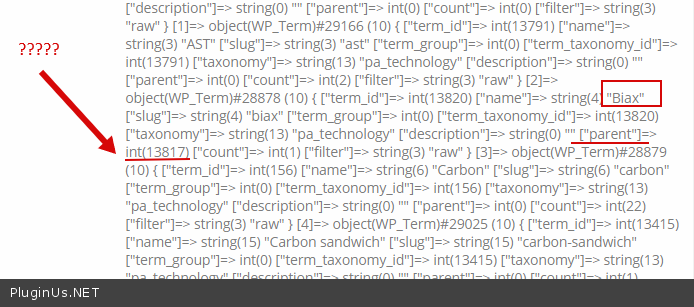
These attributes were created incorrectly - https://c2n.me/4bNklMN.png - attributes cannot have child or parent elements
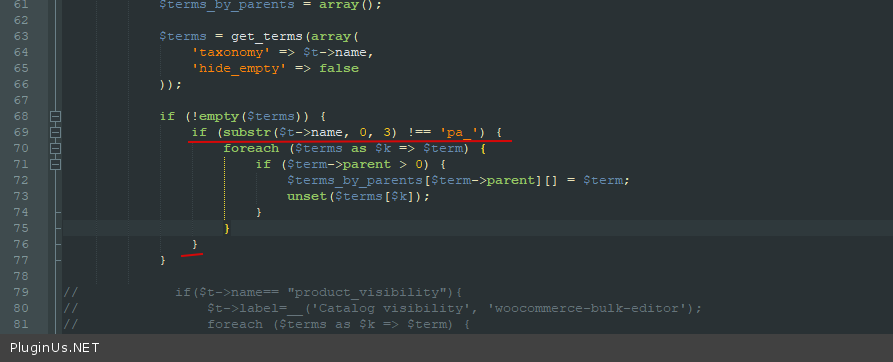
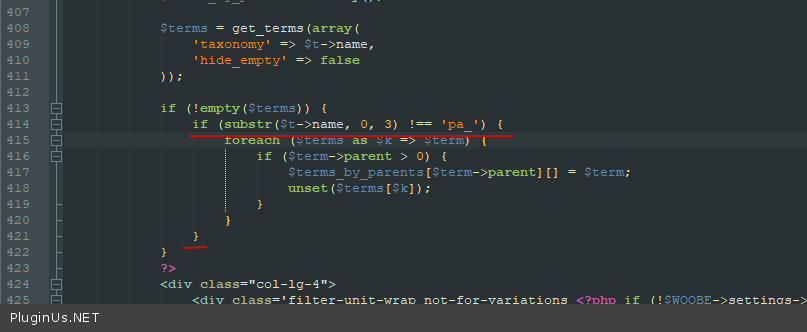
I add code in file - \wp-content\plugins\woocommerce-bulk-editor\ext\filters\views\panel.php - https://c2n.me/4bNliy5.png and in - \wp-content\plugins\woocommerce-bulk-editor\ext\bulk\views\panel.php - https://c2n.me/4bNllMW.png
But this is a temporary solution, you should fix the attributes
Hello
These attributes were created incorrectly - https://c2n.me/4bNklMN.png - attributes cannot have child or parent elements
I add code in file - \wp-content\plugins\woocommerce-bulk-editor\ext\filters\views\panel.php - https://c2n.me/4bNliy5.png and in - \wp-content\plugins\woocommerce-bulk-editor\ext\bulk\views\panel.php - https://c2n.me/4bNllMW.png
But this is a temporary solution, you should fix the attributes