
Attribute visibility column / select all variations at once?
The support doesn work on Saturdays and Sundays, so some Friday requests can be answered on Monday. If you have problems with registration ask help on contact us page pleaseIf you not got email within 24~36 business hours, firstly check your spam box, and if no any email from the support there - back to the forum and read answer here. DO NOT ANSWER ON EMAILS [noreply@pluginus.net] FROM THE FORUM!! Emails are just for your info, all answers should be published only here.
The support doesn work on Saturdays and Sundays, so some Friday requests can be answered on Monday.

Quote from Helena on January 18, 2021, 21:07Hello,
Congratulations for this great plugin! I have 2 questions:
- I'm dealing with variable products but I don't want attributes to show in Informations tab on product page. When I delete attributes in "attribute visibility" column and hit "Save", it doesn't work. The attributes still show up in Informations tab on product page and when I refresh page in backend, the attributes reappear in "attribute visibility" column. The only way I can prevent attributes from showing on product page is to go to Products -> Attributes, and then, uncheck the "visible on product page" option. So I guess it's an issue from the plugin and not the theme or whatsoever.
- When creating attributes, is there a way to select all variations at once? Because for an attribute I have at least 8 different variations and it's not very convenient to select them one by one.
(I'm using Wordpress 5.6 + Woocommerce 4.9.0 + PHP 7.4.13 + BEAR 1.0.7.)
Thanks in advance,
Best regards
Hello,
Congratulations for this great plugin! I have 2 questions:
- I'm dealing with variable products but I don't want attributes to show in Informations tab on product page. When I delete attributes in"attribute visibility" column and hit"Save", it doesn't work. The attributes still show up in Informations tab on product page and when I refresh page in backend, the attributes reappear in"attribute visibility" column. The only way I can prevent attributes from showing on product page is to go to Products -> Attributes, and then, uncheck the"visible on product page" option. So I guess it's an issue from the plugin and not the theme or whatsoever.
- When creating attributes, is there a way to select all variations at once? Because for an attribute I have at least 8 different variations and it's not very convenient to select them one by one.
(I'm using Wordpress 5.6 + Woocommerce 4.9.0 + PHP 7.4.13 + BEAR 1.0.7.)
Thanks in advance,
Best regards

Quote from Pablo Borysenco on January 19, 2021, 11:28Hello
Please watch a video - https://bulk-editor.com/video-tutorials#video_2506
Hello
Please watch a video - https://bulk-editor.com/video-tutorials#video_2506
Quote from Helena on January 19, 2021, 19:21Hello,
Thank you. The video helps for solving Question 1. But I haven't found any answer for Question 2. Let's say I have the attribute "Colors" which has 10 variations. Now, if I want to select all the variations, I need to click on each of them (that is to say click 10 times ). I thought there would be a way to do that more conveniently.
Hello,
Thank you. The video helps for solving Question 1. But I haven't found any answer for Question 2. Let's say I have the attribute"Colors" which has 10 variations. Now, if I want to select all the variations, I need to click on each of them (that is to say click 10 times ). I thought there would be a way to do that more conveniently.
Quote from Pablo Borysenco on January 20, 2021, 11:02Hello
Please describe it in more detail. You can create screenshots
Hello
Please describe it in more detail. You can create screenshots
Quote from Helena on January 20, 2021, 16:55Hello,
Sorry for my ignorance but when I click on Insert/Edit image button, I need to enter the source of the image. Does it mean I have to put my screenshots on a server beforehand? I don't know to do that.
Hello,
Sorry for my ignorance but when I click on Insert/Edit image button, I need to enter the source of the image. Does it mean I have to put my screenshots on a server beforehand? I don't know to do that.
Quote from Pablo Borysenco on January 21, 2021, 10:37Hello
you can use services to transfer images by link.
Or create a custom page on your site(paste image on this page) and drop me a link
Hello
you can use services to transfer images by link.
Or create a custom page on your site(paste image on this page) and drop me a link
Quote from Helena on January 21, 2021, 15:49Hello,
Thank you. Here is the screenshot:
https://ibb.co/PZ95tY4
Hello,
Thank you. Here is the screenshot:
Quote from Pablo Borysenco on January 22, 2021, 11:41Hello
Ok! I understood you
I passed your idea to the developers
Hello
Ok! I understood you
I passed your idea to the developers
Quote from Helena on January 22, 2021, 16:08Hello,
Thank you. Please let me know when you'll have an answer from them.
Have a good week-end,
Regards
Hello,
Thank you. Please let me know when you'll have an answer from them.
Have a good week-end,
Regards
Quote from Pablo Borysenco on January 25, 2021, 11:12Hello
The developers added this to the list "To do".
I think it will be available in the next version.
Hello
The developers added this to the list"To do".
I think it will be available in the next version.
Quote from Helena on January 25, 2021, 16:06Hello,
Thank you for your answer.
Now, I would like to return to Question 1 because I still think there's an issue with "attribute visibility" column.
I noticed that it's possible to delete attributes directly from the "attribute visibility" column but not all attributes. In other words, if I have 2 attributes, I can delete only one attribute, and if I have one attribute, I just can't delete it. To me, it looks like a "bug". Please have a look at the screenshots here:
Hello,
Thank you for your answer.
Now, I would like to return to Question 1 because I still think there's an issue with"attribute visibility" column.
I noticed that it's possible to delete attributes directly from the"attribute visibility" column but not all attributes. In other words, if I have 2 attributes, I can delete only one attribute, and if I have one attribute, I just can't delete it. To me, it looks like a"bug". Please have a look at the screenshots here:
Quote from Pablo Borysenco on January 26, 2021, 11:05Hello
Try in file - wp-content\plugins\woocommerce-bulk-editor\index.php add this code - https://c2n.me/4aBiDbD.png
if(!isset($_REQUEST['value']) || $_REQUEST['value'] == null){
$_REQUEST['value'] = array();
}and do a test
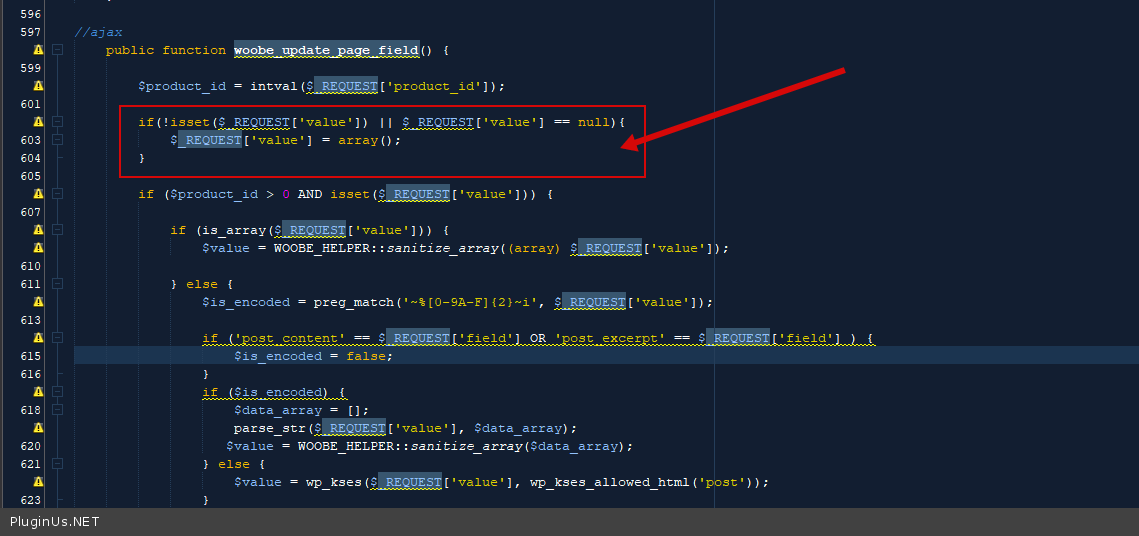
Hello
Try in file - wp-content\plugins\woocommerce-bulk-editor\index.php add this code - https://c2n.me/4aBiDbD.png
if(!isset($_REQUEST['value']) || $_REQUEST['value'] == null){
$_REQUEST['value'] = array();
}
and do a test
Quote from Helena on January 26, 2021, 17:04Hello,
Thank you for your reply but I have a warning when I click on the link. It says "Website blocked due to trojan". Is it safe?
Hello,
Thank you for your reply but I have a warning when I click on the link. It says"Website blocked due to trojan". Is it safe?
Quote from Pablo Borysenco on January 27, 2021, 10:54Hello
Yes! This is one of the popular screenshot services. We have been using this service for five years
Hello
Yes! This is one of the popular screenshot services. We have been using this service for five years
Quote from Helena on January 27, 2021, 16:52Hello,
It works fine. Thank you so much!
Do I need to add this code snippet for the next updates of the plugin?
Hello,
It works fine. Thank you so much!
Do I need to add this code snippet for the next updates of the plugin?
Quote from Pablo Borysenco on January 28, 2021, 10:12Hello
This fix will be included in the next version.
Hello
This fix will be included in the next version.
Quote from Helena on January 28, 2021, 16:55Hello,
Thank you very much.
Have a nice day,
Best regards.
Hello,
Thank you very much.
Have a nice day,
Best regards.
Quote from Pablo Borysenco on January 29, 2021, 11:54Hello
Welcome;)
Hello
Welcome;)