
Always redirect to Shop page ?
The support doesn work on Saturdays and Sundays, so some Friday requests can be answered on Monday. If you have problems with registration ask help on contact us page pleaseIf you not got email within 24~36 business hours, firstly check your spam box, and if no any email from the support there - back to the forum and read answer here. DO NOT ANSWER ON EMAILS [noreply@pluginus.net] FROM THE FORUM!! Emails are just for your info, all answers should be published only here.
The support doesn work on Saturdays and Sundays, so some Friday requests can be answered on Monday.

Quote from patH on April 29, 2026, 11:19Hi there.
I am rebuilding my website and I have a problem with my existing filter use.
First I used it on Shop page, but I move it on Category of product Page (Divi model).
The problem is <when I use the filter it always redirects to Shop page, even if the generated url seems good!
https://boutique.ramscores.com/categorie-produit/trios/ redirected to https://boutique.ramscores.com/categorie-produit/trios/swoof/genre-jazz/categorie-produit-trios-pour-clarinettes/ (which show Shoppage ?!).
However if I try Instrumentation filter,it does nothing at all...Thanks for any help.
Hi there.
I am rebuilding my website and I have a problem with my existing filter use.
First I used it on Shop page, but I move it on Category of product Page (Divi model).
The problem is <when I use the filter it always redirects to Shop page, even if the generated url seems good!
https://boutique.ramscores.com/categorie-produit/trios/ redirected to https://boutique.ramscores.com/categorie-produit/trios/swoof/genre-jazz/categorie-produit-trios-pour-clarinettes/ (which show Shoppage ?!).
However if I try Instrumentation filter,it does nothing at all...
Thanks for any help.

Quote from Alex Dev on April 29, 2026, 11:55Hello
Thank you for the details. The issue is most likely caused by filtering quieries and Divi not set its template
Please try the following two steps in order:
First, go to HUSKY settings, open the Advanced tab, and enable the option "Disable swoof influence". Save and test the filter.
If the filter still does not work correctly after that, also disable SEO links mode and test again with regular (non-permalink) filter URLs.
If neither of these helps, please provide temporary admin access to your site or a staging copy in the private area of this ticket so we can investigate directly. Please make a full backup before sharing access.
https://share.pluginus.net/image/i20230222134241.png
https://share.pluginus.net/image/i20230222134615.png
Hello
Thank you for the details. The issue is most likely caused by filtering quieries and Divi not set its template
Please try the following two steps in order:
First, go to HUSKY settings, open the Advanced tab, and enable the option"Disable swoof influence". Save and test the filter.
If the filter still does not work correctly after that, also disable SEO links mode and test again with regular (non-permalink) filter URLs.
If neither of these helps, please provide temporary admin access to your site or a staging copy in the private area of this ticket so we can investigate directly. Please make a full backup before sharing access.
https://share.pluginus.net/image/i20230222134241.png
https://share.pluginus.net/image/i20230222134615.png


Quote from patH on April 29, 2026, 13:25Hi and thank you @alexdev for your help.
I tried to disallow swoof influence, but it didn't change anything.
I tried to Disable SEO links but I am not sure to have found the right option (Advanced / SEO URL request / Enable/disable ?).
Anyway it didn't change anything.
Hi and thank you @alexdev for your help.
I tried to disallow swoof influence, but it didn't change anything.
I tried to Disable SEO links but I am not sure to have found the right option (Advanced / SEO URL request / Enable/disable ?).
Anyway it didn't change anything.
Quote from Alex Dev on April 30, 2026, 20:23Hello
Can you please tell me what difference should I look for?
I see both pages looks the same, what is the difference? Can you please make video where the issue will be specifically stated ...
Hello
Can you please tell me what difference should I look for?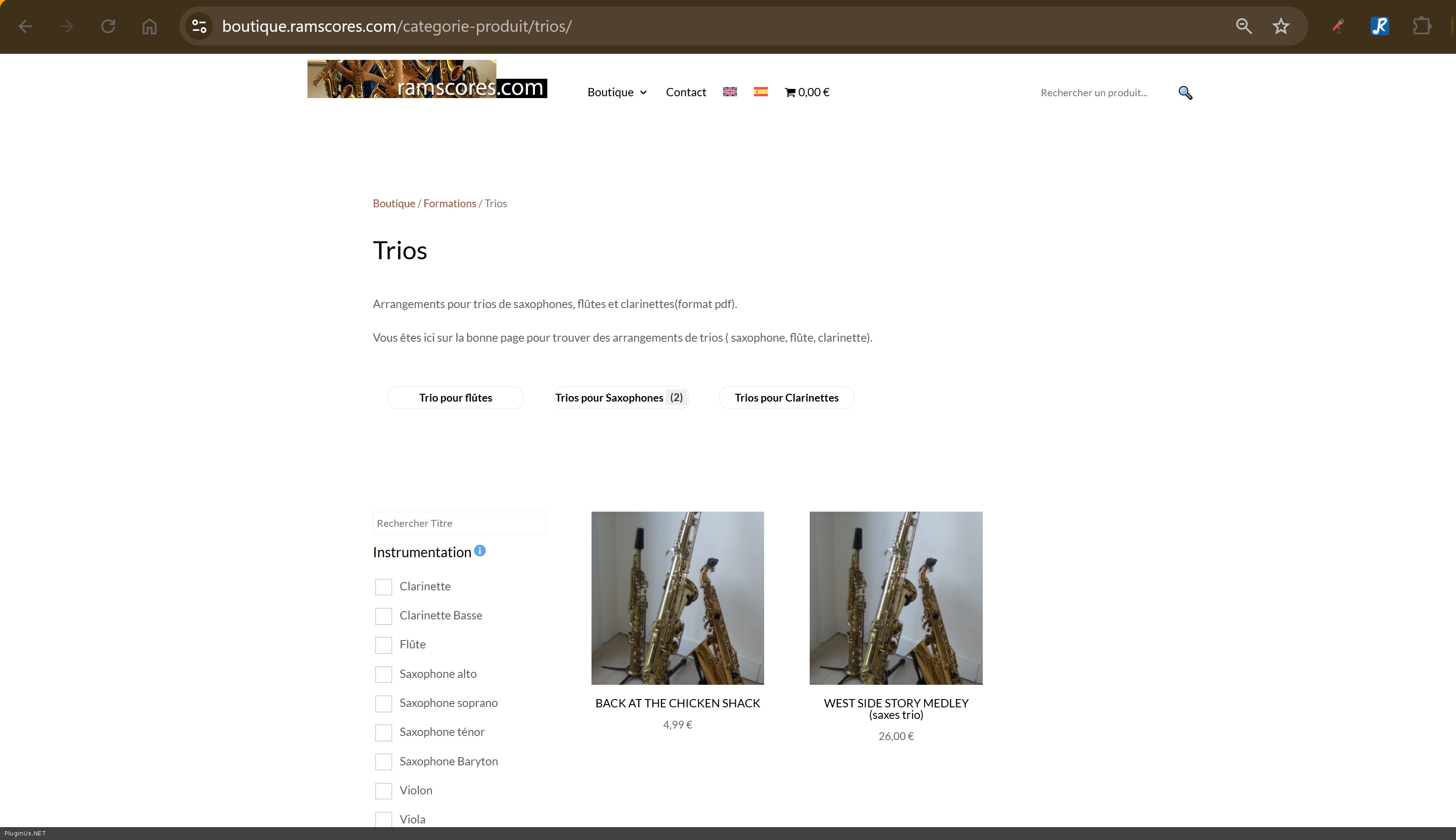
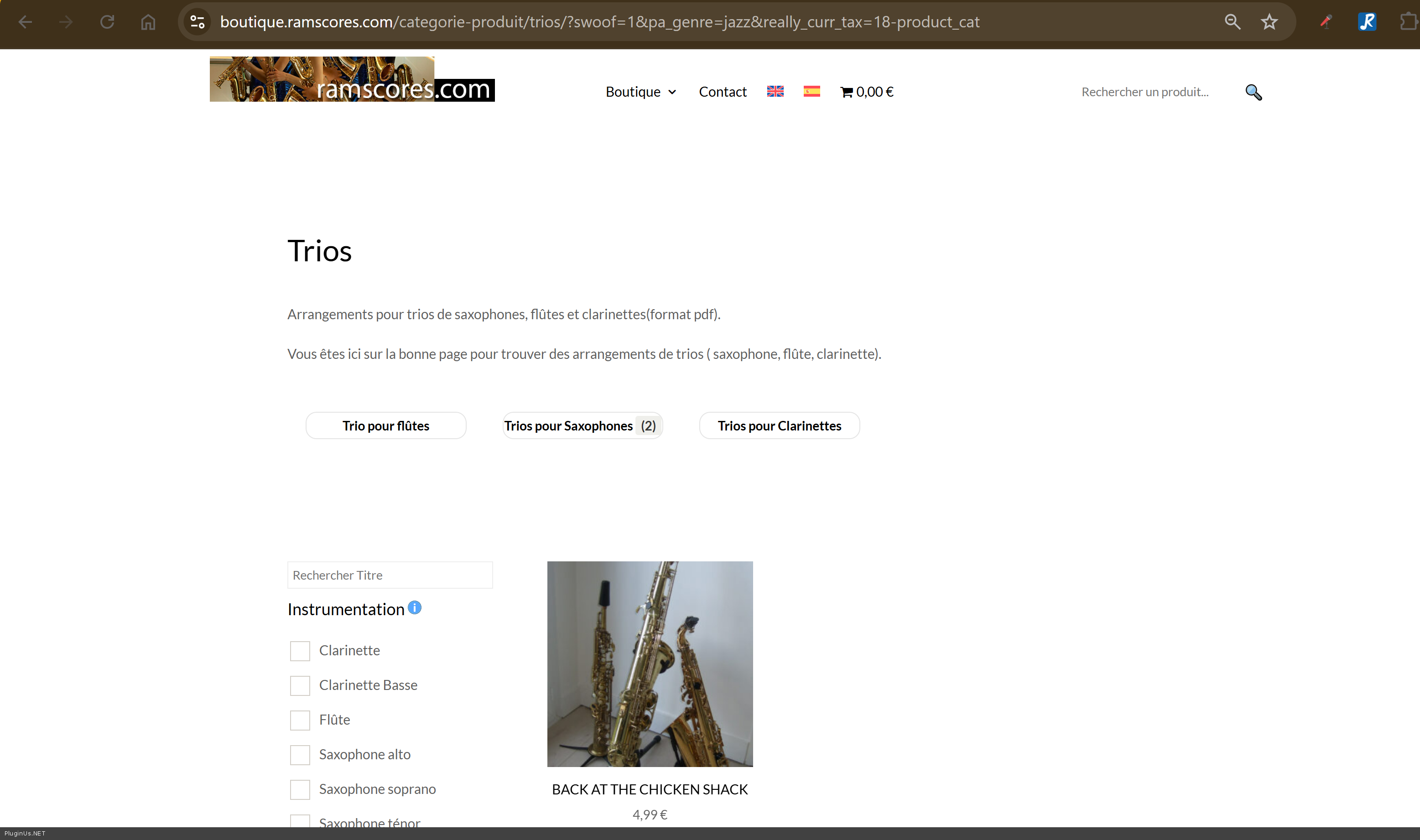
I see both pages looks the same, what is the difference? Can you please make video where the issue will be specifically stated ...
Quote from patH on May 2, 2026, 18:50Thank you Alex and sorry for the change I did.
Actually what did not work now is the last filter parameter called "niveau".
This filter change should show only one product, https://boutique.ramscores.com/categorie-produit/trios/?swoof=1&slider_niveau=3^8&really_curr_tax=18-product_cat
And this one should show 2 products as result https://boutique.ramscores.com/categorie-produit/trios/?swoof=1&slider_niveau=2^7&really_curr_tax=18-product_cat
I can not understand any logic in it.
Thanks.
Thank you Alex and sorry for the change I did.
Actually what did not work now is the last filter parameter called"niveau".
This filter change should show only one product, https://boutique.ramscores.com/categorie-produit/trios/?swoof=1&slider_niveau=3^8&really_curr_tax=18-product_cat
And this one should show 2 products as result https://boutique.ramscores.com/categorie-produit/trios/?swoof=1&slider_niveau=2^7&really_curr_tax=18-product_cat
I can not understand any logic in it.
Thanks.
Quote from Alex Dev on May 4, 2026, 12:05Hello
I investigated the issue: https://boutique.ramscores.com/husky/tester/swoof/niveau_meta-1-to-4/ - its works here, but looks like on that pages its cached, or old filters code, just replace it on shortcode [woof]
Tester page is created by shortcodes:
[woof]
[woof_products]I looked into widgest page https://boutique.ramscores.com/husky/wp-admin/widgets.php and I not found the filter, where and how you created the filter? (text, screens, video)
Welcome!
Hello
I investigated the issue: https://boutique.ramscores.com/husky/tester/swoof/niveau_meta-1-to-4/ - its works here, but looks like on that pages its cached, or old filters code, just replace it on shortcode [woof]
Tester page is created by shortcodes:
[woof]
[woof_products]
I looked into widgest page https://boutique.ramscores.com/husky/wp-admin/widgets.php and I not found the filter, where and how you created the filter? (text, screens, video)
Welcome!
Quote from patH on May 4, 2026, 14:43Hi and thank you Alex for your help.
I think you didn't get the right website, you used a stagged copy (/husky/).
I didn't created the filter with widget, but with Divi Theme Builder.
Just created a model for products' category archive.
I used that code : [woof is_ajax='0' dynamic_recount='1']
Thanks again.
Hi and thank you Alex for your help.
I think you didn't get the right website, you used a stagged copy (/husky/).
I didn't created the filter with widget, but with Divi Theme Builder.
Just created a model for products' category archive.
I used that code : [woof is_ajax='0' dynamic_recount='1']
Thanks again.
Quote from Alex Dev on May 5, 2026, 10:10Hello
Just looked prodduction site, there still issue with the meta which has the same name as attribute:
I created meta key 'degre' and placed it on HUSKY filter, you can control its data here https://boutique.ramscores.com/wp-admin/edit.php?post_type=product&page=woobe
Next: you right, links https://boutique.ramscores.com/categorie-produit/trios/?swoof=1&slider_degre=3^8&really_curr_tax=18-product_cat AND doesn work https://boutique.ramscores.com/categorie-produit/trios/?swoof=1&slider_degre=2^7&really_curr_tax=18-product_cat - but that is right and let me explain:
- I created tester page and its shows 2 products https://boutique.ramscores.com/tester/?swoof=1&slider_degre=2^7 - right
- BUt why its not shows that 2 products here https://boutique.ramscores.com/categorie-produit/trios/?swoof=1&slider_degre=2^7&really_curr_tax=18-product_cat because they are not belongs to category 'trios'
- so deal is in data, use please https://boutique.ramscores.com/wp-admin/edit.php?post_type=product&page=woobe to see it all on the same time to understad the picture
Welcome!
Hello
Just looked prodduction site, there still issue with the meta which has the same name as attribute:
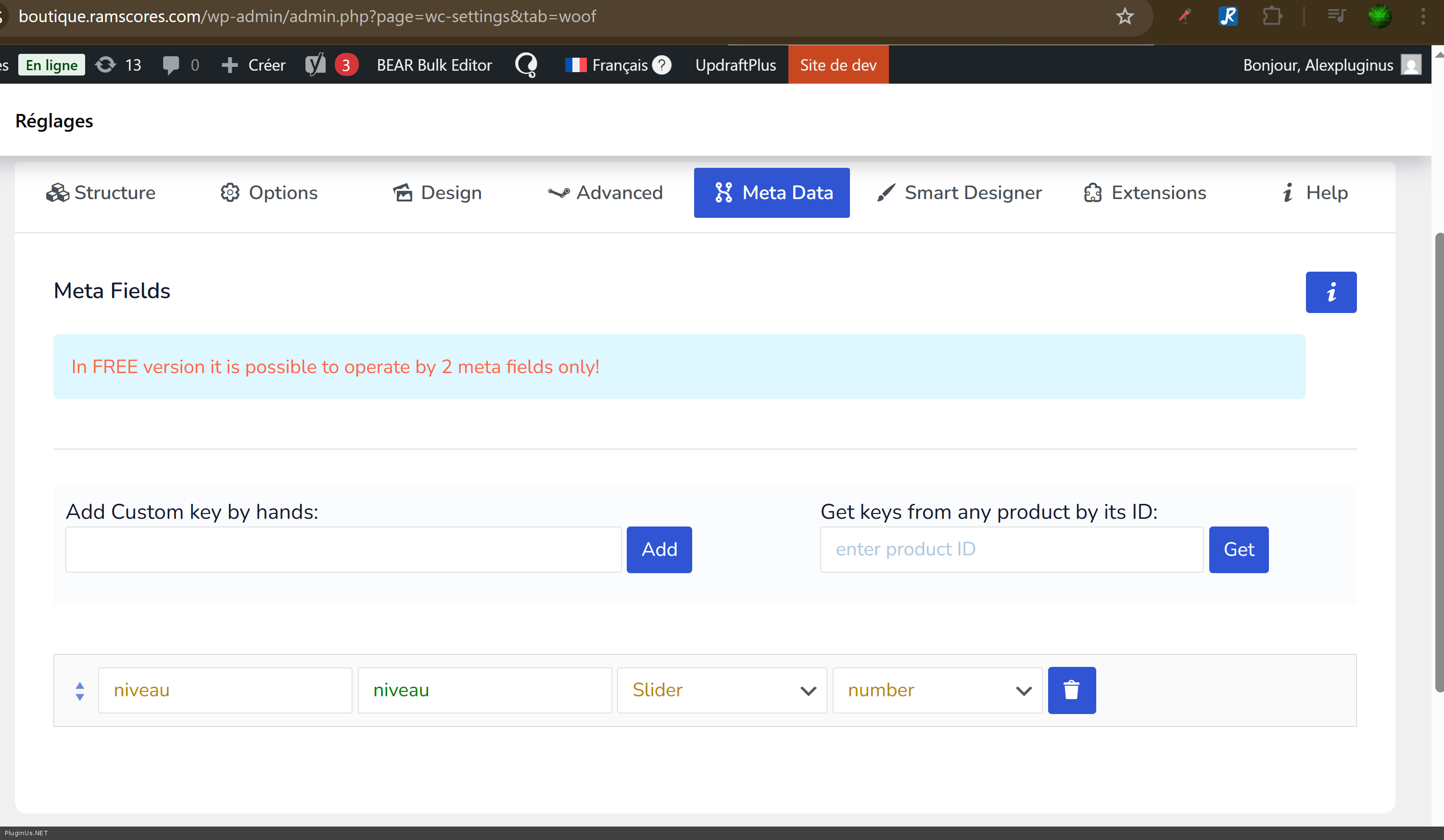
I created meta key 'degre' and placed it on HUSKY filter, you can control its data here https://boutique.ramscores.com/wp-admin/edit.php?post_type=product&page=woobe
Next: you right, links https://boutique.ramscores.com/categorie-produit/trios/?swoof=1&slider_degre=3^8&really_curr_tax=18-product_cat AND doesn work https://boutique.ramscores.com/categorie-produit/trios/?swoof=1&slider_degre=2^7&really_curr_tax=18-product_cat - but that is right and let me explain:
- I created tester page and its shows 2 products https://boutique.ramscores.com/tester/?swoof=1&slider_degre=2^7 - right
- BUt why its not shows that 2 products here https://boutique.ramscores.com/categorie-produit/trios/?swoof=1&slider_degre=2^7&really_curr_tax=18-product_cat because they are not belongs to category 'trios'
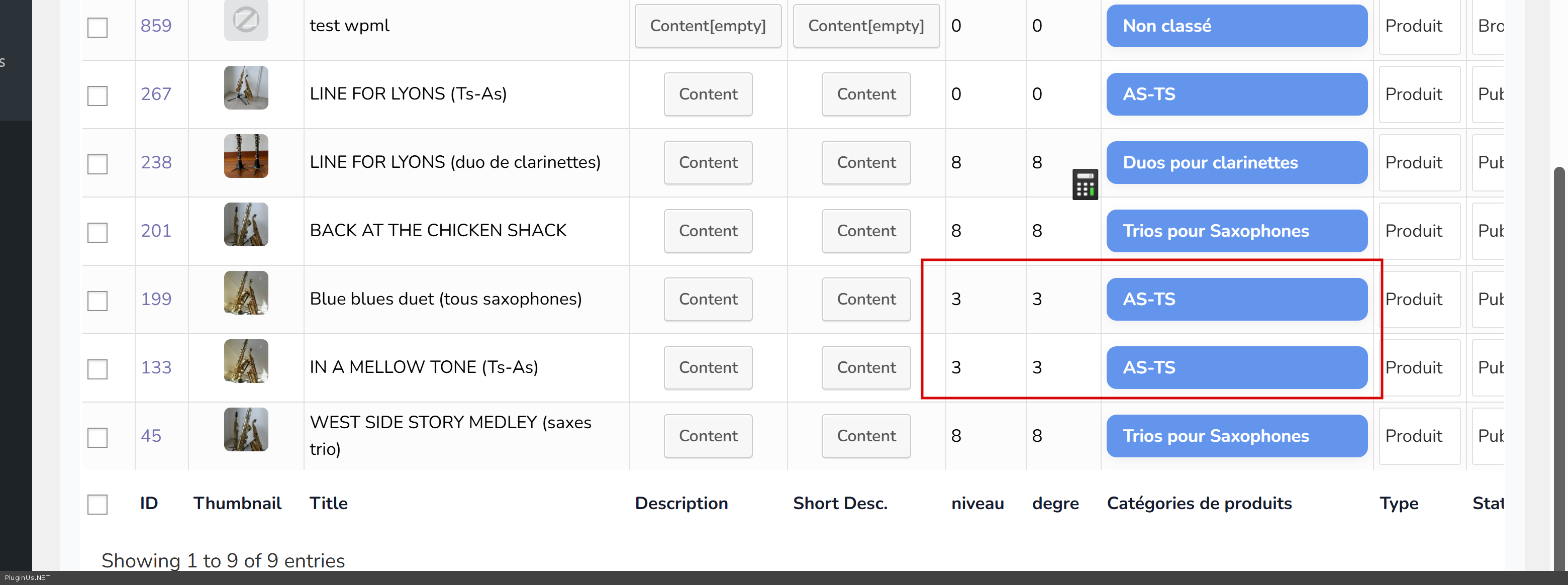
- so deal is in data, use please https://boutique.ramscores.com/wp-admin/edit.php?post_type=product&page=woobe to see it all on the same time to understad the picture
Welcome!
Quote from patH on May 5, 2026, 12:01Hi and thanks a lot Alex for your help!
I think I understood.
First I still have that problem of naming attribute, because I want range slider on a specific existing global Attribute, so I need Premium version.
I wanted to be sure everything works fine before premium.Then, for the range slider to works fine I need to associate each product with all parent categories right, not only the last one in the hierarchy ?
Because the url of the results for range slider include the ID of a specific Category.
A bit annoying because in the end I will have a lot of categories and child categories and a lot of products.Thanks anyway !
Hi and thanks a lot Alex for your help!
I think I understood.
First I still have that problem of naming attribute, because I want range slider on a specific existing global Attribute, so I need Premium version.
I wanted to be sure everything works fine before premium.
Then, for the range slider to works fine I need to associate each product with all parent categories right, not only the last one in the hierarchy ?
Because the url of the results for range slider include the ID of a specific Category.
A bit annoying because in the end I will have a lot of categories and child categories and a lot of products.
Thanks anyway !
Quote from Alex Dev on May 6, 2026, 18:07Hello
Regarding the range slider and Premium version: the slider is already working on the custom meta field we set up for you (degre). That is the free version working correctly. Premium is only required if you specifically want the slider on an existing global WooCommerce attribute. For your current setup with custom meta, you can also use BEAR Bulk Editor to manage and update the meta values across all your products at once if needed. (By the way in full HUSKY version full version of BEAR is gong there as gift)
Regarding the category hierarchy question, you understood it correctly. We have a dedicated guide that explains exactly this problem and provides ready-to-use scripts to fix it automatically: https://products-filter.com/how-to-fix-category-hierarchy-filtering-in-woocommerce-shop
The guide includes two parts: a permanent hook that auto-assigns all parent categories every time a product is saved, and a one-time script to normalize all your existing products. After running it you will not need to worry about this manually.
Welcome!
Hello
Regarding the range slider and Premium version: the slider is already working on the custom meta field we set up for you (degre). That is the free version working correctly. Premium is only required if you specifically want the slider on an existing global WooCommerce attribute. For your current setup with custom meta, you can also use BEAR Bulk Editor to manage and update the meta values across all your products at once if needed. (By the way in full HUSKY version full version of BEAR is gong there as gift)
Regarding the category hierarchy question, you understood it correctly. We have a dedicated guide that explains exactly this problem and provides ready-to-use scripts to fix it automatically: https://products-filter.com/how-to-fix-category-hierarchy-filtering-in-woocommerce-shop
The guide includes two parts: a permanent hook that auto-assigns all parent categories every time a product is saved, and a one-time script to normalize all your existing products. After running it you will not need to worry about this manually.
Welcome!
Quote from patH on May 7, 2026, 10:29Once again thanks a lot @alexdev for your precious help.
Thank a lot for the categoru hierarchy association solution and the fixes!About the range slider matter, what I want is use an existing WooCommerce Attribute, so it seems Premium is the solution.
But I can not understand, when you created the meta field "degre", where can I find it on admin panel ? On a product, I can not see it ? and how to modify it ?Okay I got it !
ACF was activated on my website, but I didn't use it, so custome meta field were hidden on product admin page !
Once again thanks a lot @alexdev for your precious help.
Thank a lot for the categoru hierarchy association solution and the fixes!
About the range slider matter, what I want is use an existing WooCommerce Attribute, so it seems Premium is the solution.
But I can not understand, when you created the meta field"degre", where can I find it on admin panel ? On a product, I can not see it ? and how to modify it ?
Okay I got it !
ACF was activated on my website, but I didn't use it, so custome meta field were hidden on product admin page !
Quote from Alex Dev on May 7, 2026, 21:38Hello
You can also manage your data trought: https://boutique.ramscores.com/wp-admin/edit.php?post_type=product&page=woobe - its more compact and allows to show all the data using data rows (just click on cells and change)
Welcome!
Hello
You can also manage your data trought: https://boutique.ramscores.com/wp-admin/edit.php?post_type=product&page=woobe - its more compact and allows to show all the data using data rows (just click on cells and change)
Welcome!