

Add to cart max quantity
The support doesn work on Saturdays and Sundays, so some Friday requests can be answered on Monday. If you have problems with registration ask help on contact us page pleaseIf you not got email within 24~36 business hours, firstly check your spam box, and if no any email from the support there - back to the forum and read answer here. DO NOT ANSWER ON EMAILS [noreply@pluginus.net] FROM THE FORUM!! Emails are just for your info, all answers should be published only here.
The support doesn work on Saturdays and Sundays, so some Friday requests can be answered on Monday.

Quote from przemek.tuqu@gmail.com on August 25, 2021, 14:13Hi!
I would like to let my clients to add to cart more than max 5 products (eg. 10x single variant). I didn't find any information about that in documentation, codex and in settings.
You can check that you can not add more than 5 pieces here: https://produkcja.lavel.pl/dostepne-produkty/
For example this product: Panties Aleksja / Negro - majtki kąpielowe z wysokim stanem, variant: rozmiar 44
Hi!
I would like to let my clients to add to cart more than max 5 products (eg. 10x single variant). I didn't find any information about that in documentation, codex and in settings.
You can check that you can not add more than 5 pieces here: https://produkcja.lavel.pl/dostepne-produkty/
For example this product: Panties Aleksja / Negro - majtki kąpielowe z wysokim stanem, variant: rozmiar 44

Quote from Pablo Borysenco on August 26, 2021, 09:24Hello
Try in file - wp-content\plugins\woot-products-tables\profiles\woocommerce\js\woocommerce-cart.js - change code - https://share.pluginus.net/image/i20210826102358.png
Hello
Try in file - wp-content\plugins\woot-products-tables\profiles\woocommerce\js\woocommerce-cart.js - change code - https://share.pluginus.net/image/i20210826102358.png
Quote from przemek.tuqu@gmail.com on August 26, 2021, 13:50Works as a charm!
Here is what I've changed:
let input = document.createElement('input');input.className = 'woot-add-to-cart-input';input.value = 1;input.setAttribute('min', 1);input.setAttribute('step', 1);input.setAttribute('max', 20);// quantity);input.setAttribute('size', 4);input.setAttribute('type', 'number');input.setAttribute('inputmode', 'numeric');Isn't it a good idea to move this quantity into settings page and dynamically load it from database?
Works as a charm!
Here is what I've changed:
let input = document.createElement('input');input.className = 'woot-add-to-cart-input';input.value = 1;input.setAttribute('min', 1);input.setAttribute('step', 1);input.setAttribute('max', 20);// quantity);input.setAttribute('size', 4);input.setAttribute('type', 'number');input.setAttribute('inputmode', 'numeric');
Quote from Pablo Borysenco on August 27, 2021, 11:31Hello
I will pass it to the developers
Hello
I will pass it to the developers
Quote from przemek.tuqu@gmail.com on August 27, 2021, 15:55Great, thanks for your great support!!
Great, thanks for your great support!!
Quote from Pablo Borysenco on August 30, 2021, 09:38Hello
Welcome;)
Hello
Welcome;)
Quote from przemek.tuqu@gmail.com on September 1, 2021, 17:19I have a post-help question :D
I just realized that when I change code inside your plugin, the change will be overwritten by plugin's updates.
How to achieve same effect but in my files? Maybe a script that can set the attribute on the input -> input.setAttribute('max', 20);. But those inputs are generated dynamically, so I can't bind events to them "on page load". Do you fire some events when the variations table is popping up?
I have a post-help question :D
I just realized that when I change code inside your plugin, the change will be overwritten by plugin's updates.
How to achieve same effect but in my files? Maybe a script that can set the attribute on the input -> input.setAttribute('max', 20);. But those inputs are generated dynamically, so I can't bind events to them"on page load". Do you fire some events when the variations table is popping up?
Quote from przemek.tuqu@gmail.com on September 1, 2021, 18:59I did some research in your files, and I have found event "woot-do-after-draw'. I'm using it to add listener for clicks made on popup's background area to close the popup.
Should I just set this "max" attribute to each variant?
My background clicks script:
document.addEventListener('woot-do-after-draw', function(e){var tableID = e.detail.otable.container.attributes.id.nodeValue;console.log(tableID);if(tableID){var theTable = jQuery('#' + tableID);var backgroundModal = theTable.closest('.woot-dynamic-popup-wrapper').find('.woot-modal-backdrop');backgroundModal.one('click', function(e){var table = theTable.closest('.woot-dynamic-popup-wrapper').find('.woot-modal .woot-modal-inner .woot-modal-inner-footer .woot-btn')[0];if(table){theTable.closest('.woot-dynamic-popup-wrapper').find('.woot-modal .woot-modal-inner .woot-modal-inner-footer .woot-btn')[0].click();}});}});
I did some research in your files, and I have found event"woot-do-after-draw'. I'm using it to add listener for clicks made on popup's background area to close the popup.
Should I just set this"max" attribute to each variant?
My background clicks script:
document.addEventListener('woot-do-after-draw', function(e){var tableID = e.detail.otable.container.attributes.id.nodeValue;console.log(tableID);if(tableID){var theTable = jQuery('#' + tableID);var backgroundModal = theTable.closest('.woot-dynamic-popup-wrapper').find('.woot-modal-backdrop');backgroundModal.one('click', function(e){var table = theTable.closest('.woot-dynamic-popup-wrapper').find('.woot-modal .woot-modal-inner .woot-modal-inner-footer .woot-btn')[0];if(table){theTable.closest('.woot-dynamic-popup-wrapper').find('.woot-modal .woot-modal-inner .woot-modal-inner-footer .woot-btn')[0].click();}});}});
Quote from Pablo Borysenco on September 2, 2021, 09:33Hello
Use event : table23-after-build-rows - ( https://c2n.me/4dcnnY0.png )
This value must be set for each product.
Hello
Use event : table23-after-build-rows - ( https://c2n.me/4dcnnY0.png )
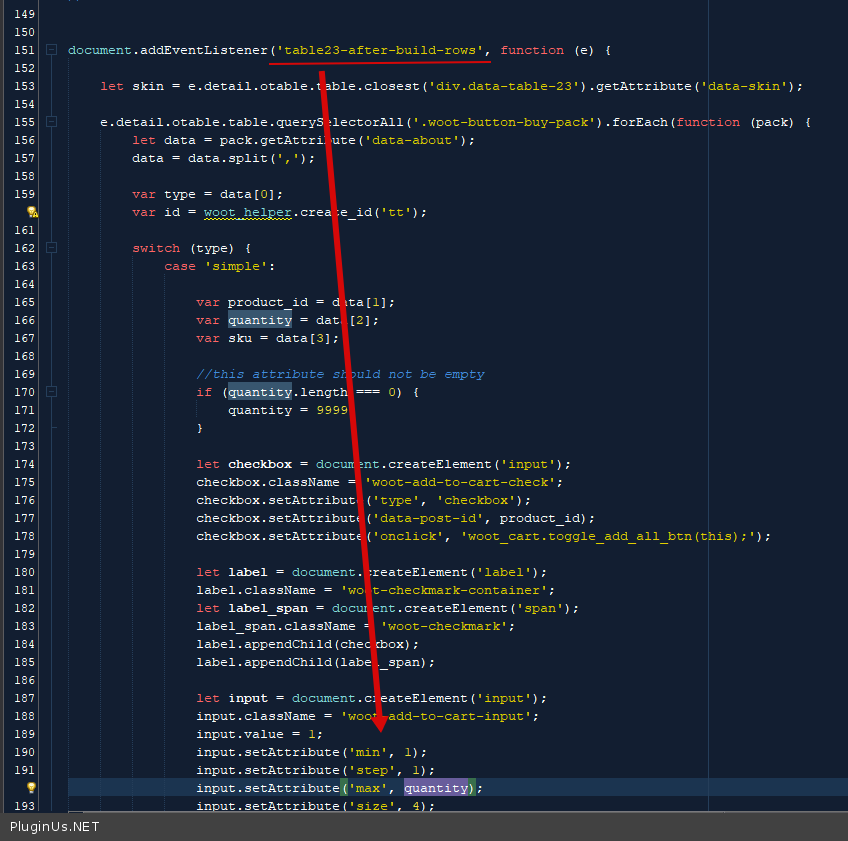
This value must be set for each product.