Pablo Borysenco(@pavlo_borysenco)
34,196 Posts
Quote from Pablo Borysenco on December 16, 2024, 11:52
Ok! If this field is not empty in the database, then the export will work correctly - https://share.pluginus.net/image/i20241216115126.png
Ok! If this field is not empty in the database, then the export will work correctly - https://share.pluginus.net/image/i20241216115126.png
Pablo Borysenco(@pavlo_borysenco)
34,196 Posts
Quote from Pablo Borysenco on December 16, 2024, 12:56
Ok! As I wrote to you earlier - these are empty fields in the database - https://share.pluginus.net/image/i20241216125152.png
https://c2n.me/4lZIon9.png - You use this custom code to display this data in the BEAR table. You get this data using a third-party plugin. But in fact, nothing is stored in the database for this key. Your custom code simply substitutes data from another source.
Ok! As I wrote to you earlier - these are empty fields in the database - https://share.pluginus.net/image/i20241216125152.png
https://c2n.me/4lZIon9.png - You use this custom code to display this data in the BEAR table. You get this data using a third-party plugin. But in fact, nothing is stored in the database for this key. Your custom code simply substitutes data from another source.
Pablo Borysenco(@pavlo_borysenco)
34,196 Posts
Quote from Pablo Borysenco on December 20, 2024, 10:33
Hello
Unfortunately our plugin does not have such a hook.
Hello
Unfortunately our plugin does not have such a hook.
Pablo Borysenco(@pavlo_borysenco)
34,196 Posts
Quote from Pablo Borysenco on December 20, 2024, 13:05
Hello
You should hire a developer to customize the code.
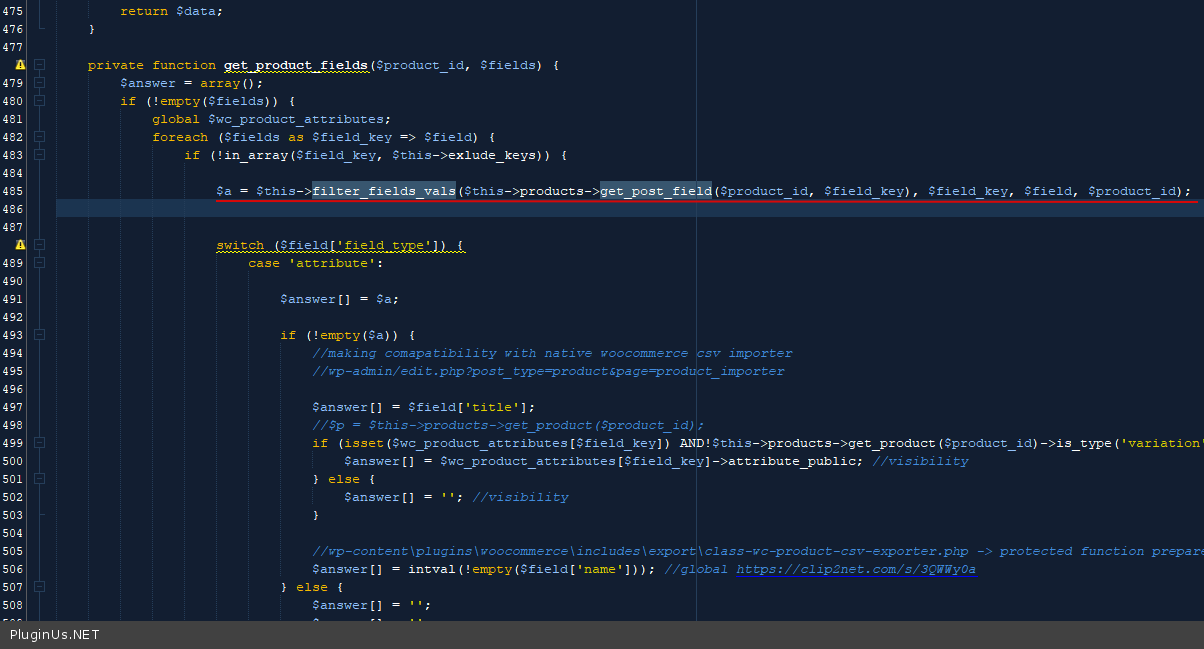
Our plugin processes data in this place - woo-bulk-editor\ext\export\export.php - code - https://c2n.me/4m1skmp.png
Hello
You should hire a developer to customize the code.
Our plugin processes data in this place - woo-bulk-editor\ext\export\export.php - code - https://c2n.me/4m1skmp.png
Pablo Borysenco(@pavlo_borysenco)
34,196 Posts
Quote from Pablo Borysenco on January 30, 2025, 10:32
Hello
Ok! I passed this on to the developers.
Hello
Ok! I passed this on to the developers.
Pablo Borysenco(@pavlo_borysenco)
34,196 Posts
Quote from Pablo Borysenco on April 30, 2025, 09:04
Welcome;)
Welcome;)