

A few questions
The support doesn work on Saturdays and Sundays, so some Friday requests can be answered on Monday. If you have problems with registration ask help on contact us page pleaseIf you not got email within 24~36 business hours, firstly check your spam box, and if no any email from the support there - back to the forum and read answer here. DO NOT ANSWER ON EMAILS [noreply@pluginus.net] FROM THE FORUM!! Emails are just for your info, all answers should be published only here.
The support doesn work on Saturdays and Sundays, so some Friday requests can be answered on Monday.

Quote from farrah on September 20, 2020, 07:51Hi, we just purchased your plugin (Love it so far!). Just a few questions that we have:
https://cmi.maleksodigital.com.au/shop/?swoof=1&paged=1&product_cat=aro,audio
- How do I make the FILTER button appear at the top as well as at the bottom? I'd like it to appear below the PRODUCT FILTERS title.
- In responsive mode, the filters show below the products. I'd prefer that the filters show above the product list.
- In responsive mode, is it possible to collapse the filters section and only if a person clicks on the PRODUCT FILTERS title, expand that section and display it?
I think that's all for now
Hi, we just purchased your plugin (Love it so far!). Just a few questions that we have:
https://cmi.maleksodigital.com.au/shop/?swoof=1&paged=1&product_cat=aro,audio
- How do I make the FILTER button appear at the top as well as at the bottom? I'd like it to appear below the PRODUCT FILTERS title.
- In responsive mode, the filters show below the products. I'd prefer that the filters show above the product list.
- In responsive mode, is it possible to collapse the filters section and only if a person clicks on the PRODUCT FILTERS title, expand that section and display it?
I think that's all for now

Quote from Pablo Borysenco on September 21, 2020, 12:21Hello
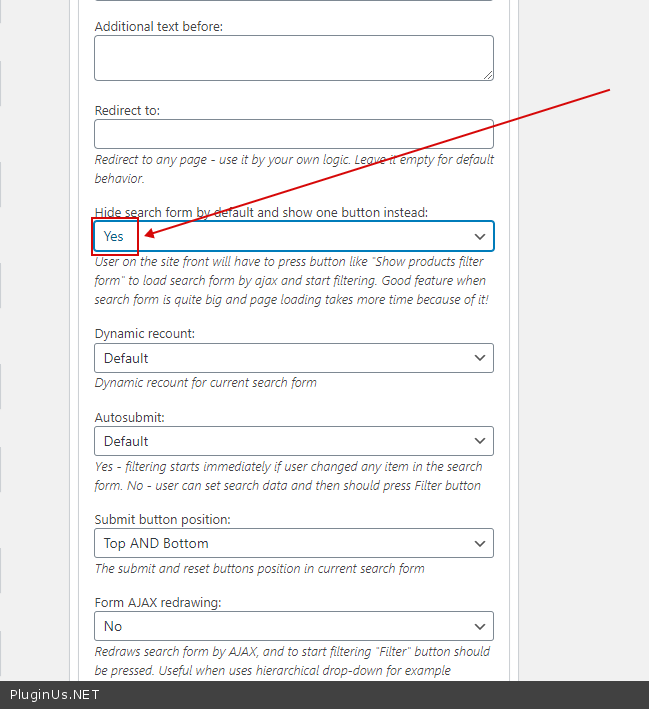
1) Check option please - https://c2n.me/499zuqp.png
2) Unfortunately my plugin doesn't affect the sidebar layout. It only depends on the current theme. Try to use this option - https://c2n.me/499zOE2.png
3) Check option - https://c2n.me/499zKtJ.png
Hello
1) Check option please - https://c2n.me/499zuqp.png

2) Unfortunately my plugin doesn't affect the sidebar layout. It only depends on the current theme. Try to use this option - https://c2n.me/499zOE2.png
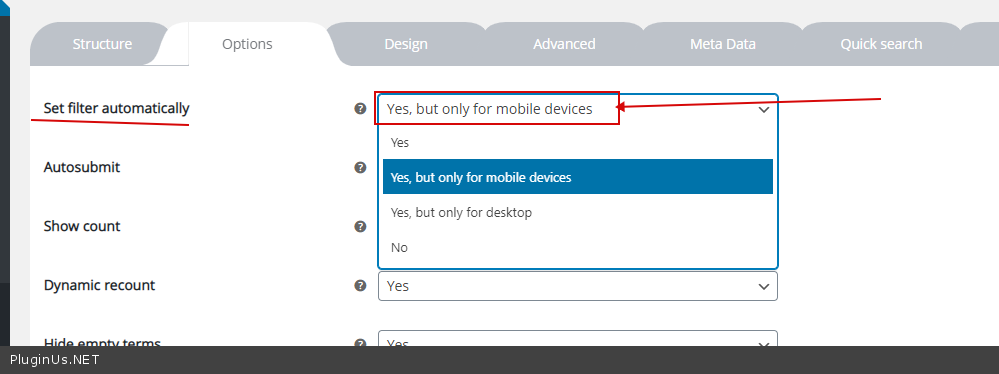
3) Check option - https://c2n.me/499zKtJ.png
Quote from farrah on September 21, 2020, 15:44I don't see #1 in my options for the filter.
I'll check into the side bar layout/design.
I don't see #1 in my options for the filter.
I'll check into the side bar layout/design.
Quote from Pablo Borysenco on September 22, 2020, 11:39Hello
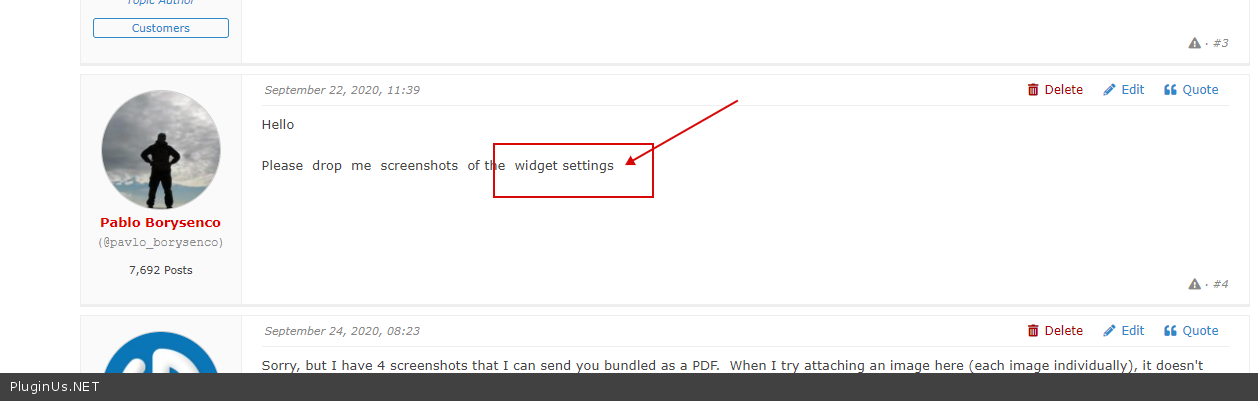
Please drop me screenshots of the widget settings
Hello
Please drop me screenshots of the widget settings
Quote from farrah on September 24, 2020, 08:23Sorry, but I have 4 screenshots that I can send you bundled as a PDF. When I try attaching an image here (each image individually), it doesn't look like it's attaching. Please advise.
Sorry, but I have 4 screenshots that I can send you bundled as a PDF. When I try attaching an image here (each image individually), it doesn't look like it's attaching. Please advise.
Quote from Pablo Borysenco on September 24, 2020, 11:56Hello
better use services to transfer images by link/ Example: clip2net
Or add image to you site and drop me a link
Hello
better use services to transfer images by link/ Example: clip2net
Or add image to you site and drop me a link
Quote from farrah on September 24, 2020, 12:53https://drive.google.com/file/d/1VQeC-kFekp2jvF67d2EicINa-gsb1qE2/view?usp=sharing
https://drive.google.com/file/d/1VQeC-kFekp2jvF67d2EicINa-gsb1qE2/view?usp=sharing
Quote from Pablo Borysenco on September 25, 2020, 11:27Hello
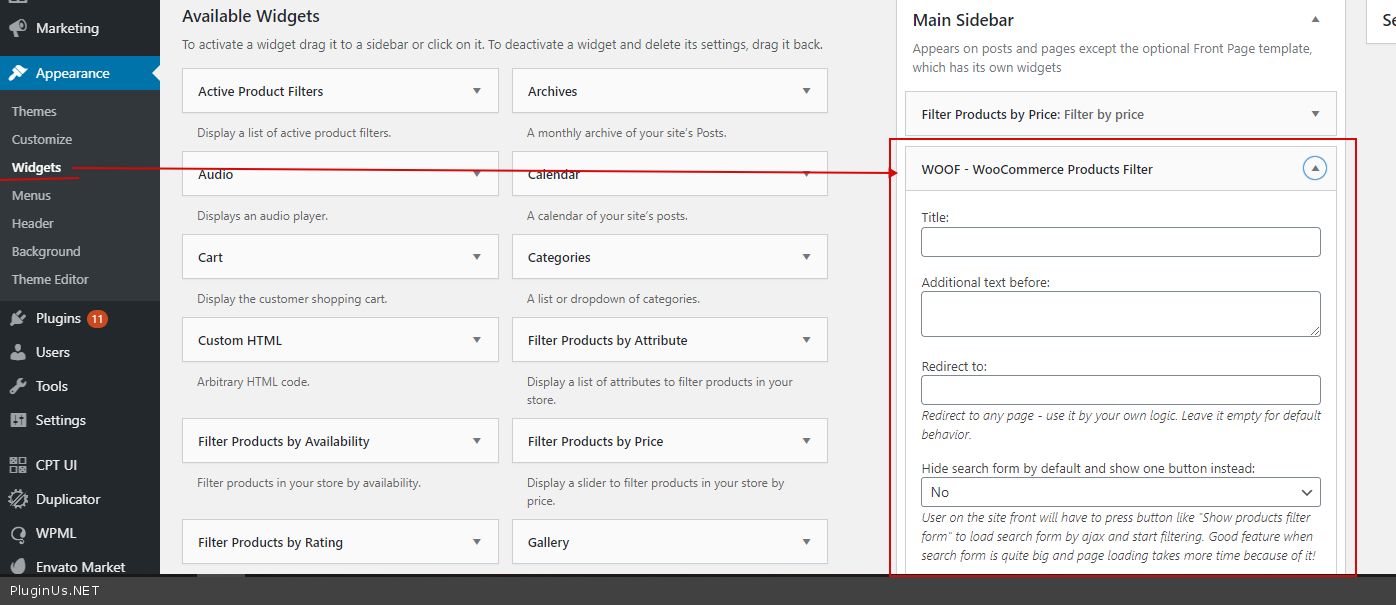
I requested( https://c2n.me/49d4zZF.png ) a screenshot of the widget setting - https://c2n.me/49d4Dgn.png
Hello
I requested( https://c2n.me/49d4zZF.png ) a screenshot of the widget setting - https://c2n.me/49d4Dgn.png
Quote from farrah on September 25, 2020, 11:55Oh gosh! I'm so sorry. Here you go
Settings: https://drive.google.com/file/d/1puqQHm9YUBd15TIi7xUUsCNYMjmbGf0f/view?usp=sharing
Oh gosh! I'm so sorry. Here you go
Settings: https://drive.google.com/file/d/1puqQHm9YUBd15TIi7xUUsCNYMjmbGf0f/view?usp=sharing
Quote from Pablo Borysenco on September 25, 2020, 12:28it looks like you found this setting
it looks like you found this setting
Quote from farrah on September 25, 2020, 16:01Yes, but if you check my shop page, the buttons don't appear. When I didn't have that setting set, I had the clear button at the bottom. Now even that doesn't show up.
Yes, but if you check my shop page, the buttons don't appear. When I didn't have that setting set, I had the clear button at the bottom. Now even that doesn't show up.
Quote from Pablo Borysenco on September 28, 2020, 11:31Hello
I checked it - https://c2n.me/49eBPP2.mp4 - I see buttons
Hello
I checked it - https://c2n.me/49eBPP2.mp4 - I see buttons
Quote from farrah on September 28, 2020, 14:36It is very strange because I cannot see the buttons on my side.
Can you tell me what browser and OS you're using? I've tried on Fedora and Windows, on Firefox, Microsoft Edge, Vivaldi (a Chromium browser), Chrome and so far nothing.
It is very strange because I cannot see the buttons on my side.
Can you tell me what browser and OS you're using? I've tried on Fedora and Windows, on Firefox, Microsoft Edge, Vivaldi (a Chromium browser), Chrome and so far nothing.
Quote from Pablo Borysenco on September 29, 2020, 11:17Hello
Try to select any filter. And create video with error and drop me.
Can you tell me what browser and OS you're using? - Windows, on Firefox and Chrome.
Hello
Try to select any filter. And create video with error and drop me.
Can you tell me what browser and OS you're using? - Windows, on Firefox and Chrome.
Quote from farrah on September 29, 2020, 12:02I got it sorted out. Thanks for all your help!
I got it sorted out. Thanks for all your help!
Quote from Pablo Borysenco on September 30, 2020, 10:45Hello
Welcome;)
Hello
Welcome;)