
wrong purchase
The support doesn work on Saturdays and Sundays, so some Friday requests can be answered on Monday. If you have problems with registration ask help on contact us page pleaseIf you not got email within 24~36 business hours, firstly check your spam box, and if no any email from the support there - back to the forum and read answer here. DO NOT ANSWER ON EMAILS [noreply@pluginus.net] FROM THE FORUM!! Emails are just for your info, all answers should be published only here.
The support doesn work on Saturdays and Sundays, so some Friday requests can be answered on Monday.

Quote from Marco on November 16, 2021, 13:34Hello.
I need your help. I just made a mistake.
I bought your plugin again but it wasn't the intention, it was my employee who made the purchase, however, the website I'm doing at the moment already has a filtering system attached to the template.
Can we cancel the purchase?
Hello.
I need your help. I just made a mistake.
I bought your plugin again but it wasn't the intention, it was my employee who made the purchase, however, the website I'm doing at the moment already has a filtering system attached to the template.
Can we cancel the purchase?

Quote from Pablo Borysenco on November 17, 2021, 12:53Hello
Yes. Please request a refund on envato. In the description of the reason, insert a link to this topic
Hello
Yes. Please request a refund on envato. In the description of the reason, insert a link to this topic
Quote from Marco on November 19, 2021, 14:23Hello
I ended up using the plugin because the template creators didn't make the tools you have.
However, another problem arose:
Whenever I select the option "Reset filters" I go back to the books page but the filters do not appear.
On my site, filters only appear with this link "https://bivam.pt/biblioteca/?product_layout=list&product_per_page=6" and not with this "https://bivam.pt/biblioteca/"
Can you solve the problem?
Hello
I ended up using the plugin because the template creators didn't make the tools you have.
However, another problem arose:
Whenever I select the option"Reset filters" I go back to the books page but the filters do not appear.
On my site, filters only appear with this link"https://bivam.pt/biblioteca/?product_layout=list&product_per_page=6" and not with this"https://bivam.pt/biblioteca/"
Can you solve the problem?
Quote from Pablo Borysenco on November 22, 2021, 12:27Hello
I can't check it - https://c2n.me/4e4KC2Y.jpg
Please add access - https://share.pluginus.net/image/i20210618130558.png ->https://share.pluginus.net/image/i20210618130637.png
Hello
I can't check it - https://c2n.me/4e4KC2Y.jpg

Please add access - https://share.pluginus.net/image/i20210618130558.png ->https://share.pluginus.net/image/i20210618130637.png


Quote from Marco on November 22, 2021, 12:39You have to login to wordpress. I had already made the access data available.
You have to login to wordpress. I had already made the access data available.
Quote from Pablo Borysenco on November 22, 2021, 14:37try to use this option - https://products-filter.com/extencion/seo-url-request
try to use this option - https://products-filter.com/extencion/seo-url-request
Quote from Marco on November 22, 2021, 15:34I couldn't make it work.
When selecting a category, all filters disappear (shouldn't)Please try it yourself.
I couldn't make it work.
When selecting a category, all filters disappear (shouldn't)
Please try it yourself.
Quote from Pablo Borysenco on November 23, 2021, 19:40Hello
Try in file -\wp-content\plugins\woocommerce-products-filter\js\front.js - change this code - https://share.pluginus.net/image/i20211123203936.png
if(typeof woof_current_values.product_layout !== 'undefined'){
let layout = {'product_layout':woof_current_values.product_layout};woof_current_values = layout;
}else{
woof_current_values = {};
}Clear all cache and do a test
Hello
Try in file -\wp-content\plugins\woocommerce-products-filter\js\front.js - change this code - https://share.pluginus.net/image/i20211123203936.png

if(typeof woof_current_values.product_layout !== 'undefined'){
let layout = {'product_layout':woof_current_values.product_layout};
woof_current_values = layout;
}else{
woof_current_values = {};
}
Clear all cache and do a test
Quote from Marco on November 23, 2021, 20:07It is not working.
Note: I have already removed the "SEO URL request"
It is not working.
Note: I have already removed the"SEO URL request"
Quote from Pablo Borysenco on November 24, 2021, 12:42Hello
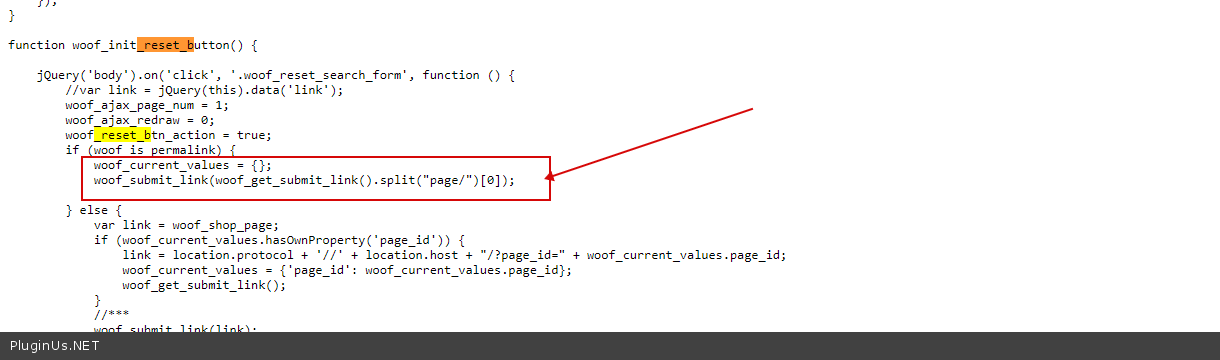
I checked your file - https://c2n.me/4e6vkk8.png - it looks like you didn't change the code as I asked
Hello
I checked your file - https://c2n.me/4e6vkk8.png - it looks like you didn't change the code as I asked
Quote from Marco on November 24, 2021, 12:53Hello.
Sorry, I was changing the code on the wrong site (my server has more than one site)But it still doesn't work.
Hello.
Sorry, I was changing the code on the wrong site (my server has more than one site)
But it still doesn't work.
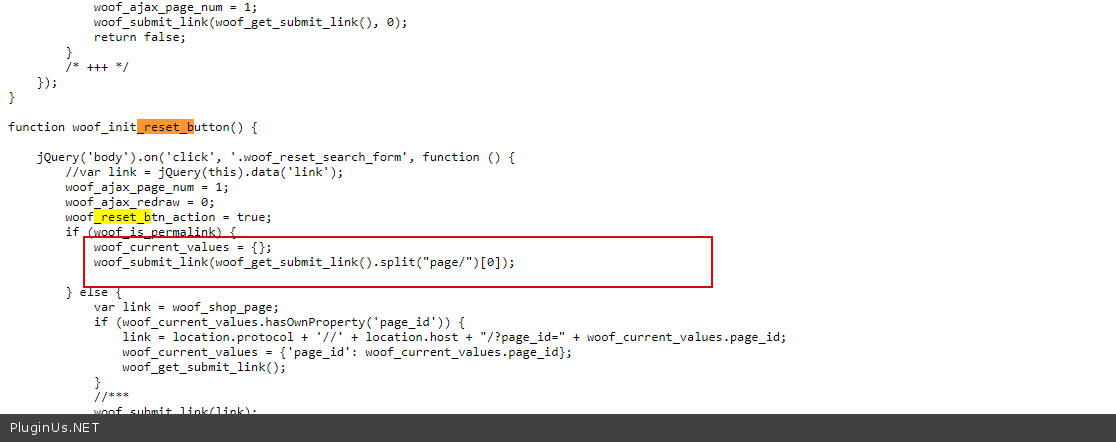
Quote from Pablo Borysenco on November 24, 2021, 16:22You still haven't made any changes to the file. - https://c2n.me/4e6KOKO.png
You still haven't made any changes to the file. - https://c2n.me/4e6KOKO.png
Quote from Marco on November 24, 2021, 16:50I had removed the change because it wasn't working.
But I already know what the problem is:
I was testing the "limpar tudo" button at the top. Your change only works for the "RESTABELECER" button.Is it possible to send the change also to the "clear all" button that is found at the top of the site?
I had removed the change because it wasn't working.
But I already know what the problem is:
I was testing the"limpar tudo" button at the top. Your change only works for the"RESTABELECER" button.
Is it possible to send the change also to the"clear all" button that is found at the top of the site?
Quote from Pablo Borysenco on November 25, 2021, 17:30Hello
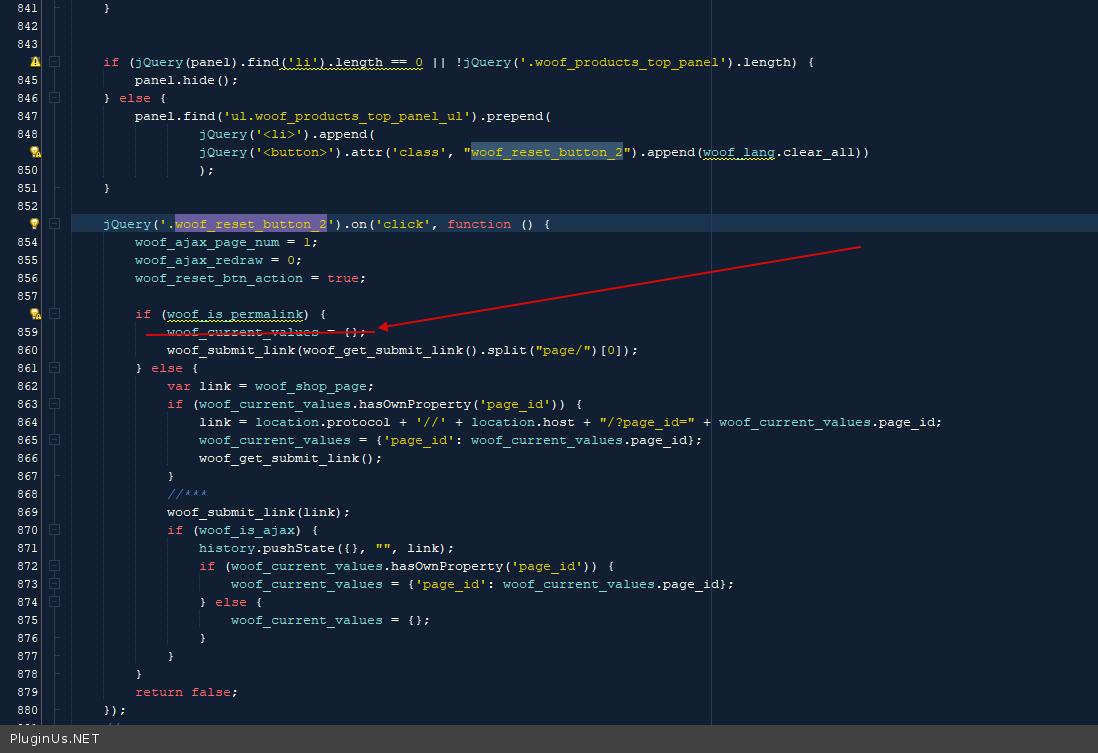
Please add the same code here - https://c2n.me/4e7FKQY.png
Hello
Please add the same code here - https://c2n.me/4e7FKQY.png
Quote from Marco on November 25, 2021, 18:59Fantastic.
It's working perfectly.Thanks for the amazing help.
Fantastic.
It's working perfectly.
Thanks for the amazing help.
Quote from Pablo Borysenco on November 26, 2021, 12:54Hello
Welcome;)
Hello
Welcome;)