PluginUs.Net - Business Tools for WooCommerce and WordPress

[realize your idea - make your dreams come true]

Support Forum

You need to log-in to create request (topic) to the support

working with slideout filters

The support doesn work on Saturdays and Sundays, so some Friday requests can be answered on Monday. If you have problems with registration ask help on contact us page please
If you not got email within 24~36 business hours, firstly check your spam box, and if no any email from the support there - back to the forum and read answer here. DO NOT ANSWER ON EMAILS [noreply@pluginus.net] FROM THE FORUM!! Emails are just for your info, all answers should be published only here.
The support doesn work on Saturdays and Sundays, so some Friday requests can be answered on Monday.

Hi,

I just acquired the WOOF plugin from codecanion, it works great.

The only thing, I can't make the slideout work. I set it up accordingly, but I don't understand what I should do more to integrate it in my theme (I'm using Gioia theme right now). The current filter has been installed easily adding the widget on the side woocommerce column. Is there a video explaining how to use it (not on a separate page, but using the theme editor)?


Thanks

Hello

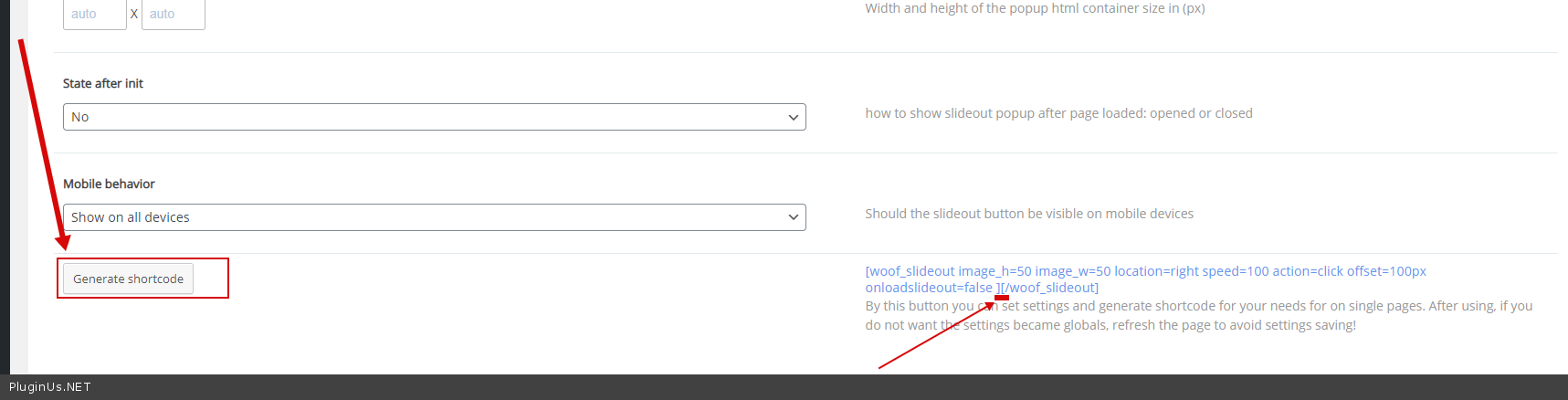
Please  generate  an  shortcode - https://c2n.me/49R4LIi.png - And insert into this shortcode [woof] AND  you can paste  it  in a text editor

An  example :

[woof_slideout image_h=50 image_w=50 location=right speed=100 action=click offset=100px onloadslideout=false ][woof][/woof_slideout]

Read  this - https://products-filter.com/shortcode/woof/