

"woof_turbo_do_recreate_file" cron job is missing
The support doesn work on Saturdays and Sundays, so some Friday requests can be answered on Monday. If you have problems with registration ask help on contact us page pleaseIf you not got email within 24~36 business hours, firstly check your spam box, and if no any email from the support there - back to the forum and read answer here. DO NOT ANSWER ON EMAILS [noreply@pluginus.net] FROM THE FORUM!! Emails are just for your info, all answers should be published only here.
The support doesn work on Saturdays and Sundays, so some Friday requests can be answered on Monday.

Quote from Fsanya on February 11, 2026, 16:07Hello,
I have a similar problem like explained here: https://pluginus.net/support/topic/daily-cron-job-for-turbo-mode-not-working/
Turbo mode is enabled, set to daily cron, but "woof_turbo_do_recreate_file" cron job is not added. I tried manually adding it, but it could not find the corresponding callback (do_recreate_file($id, $ids, $is_end))
The file generates ok if clicked manually. By setting update to automatic, the file generates partially.
I am using version 3.3.8
Hello,
I have a similar problem like explained here: https://pluginus.net/support/topic/daily-cron-job-for-turbo-mode-not-working/
Turbo mode is enabled, set to daily cron, but"woof_turbo_do_recreate_file" cron job is not added. I tried manually adding it, but it could not find the corresponding callback (do_recreate_file($id, $ids, $is_end))
The file generates ok if clicked manually. By setting update to automatic, the file generates partially.
I am using version 3.3.8

Quote from Alex Dovlatov on February 12, 2026, 13:56Hello Sandor
I've identified the issue. The problem occurs because:
1. File clearing before write: The turbo file is truncated (cleared) before new data is written. If PHP execution time limit is exceeded during the write operation, the file remains empty. But this is ok, problem is another thing
2. WordPress Cron limitations: WP Cron isn't reliable for long-running tasks and may not execute if no one visits the site.
Recommended solution - Use server-side cron:
Step 1: Disable WordPress cron in `wp-config.php`:
define('DISABLE_WP_CRON', true);
Step 2: Add to server crontab (runs daily at 3 AM):
0 3 * * * php /path/to/your/site/wp-cron.php >/dev/null 2>&1
Or using wget:
0 3 * * * wget -q -O - https://yoursite.com/wp-cron.php?doing_wp_cron >/dev/null 2>&1
Step 3: Increase PHP execution time in turbo mode callback
Alternative - Increase PHP limits:
Add to wp-config.php:@ini_set('max_execution_time', 300); // 5 minutes
@ini_set('memory_limit', '512M');
This ensures cron has enough time to complete the turbo file generation. Please try server-side cron first - it's the most reliable solution for production sites.
Hello Sandor
I've identified the issue. The problem occurs because:
1. File clearing before write: The turbo file is truncated (cleared) before new data is written. If PHP execution time limit is exceeded during the write operation, the file remains empty. But this is ok, problem is another thing
2. WordPress Cron limitations: WP Cron isn't reliable for long-running tasks and may not execute if no one visits the site.
Recommended solution - Use server-side cron:
Step 1: Disable WordPress cron in `wp-config.php`:
define('DISABLE_WP_CRON', true);
Step 2: Add to server crontab (runs daily at 3 AM):
0 3 * * * php /path/to/your/site/wp-cron.php >/dev/null 2>&1
Or using wget:
0 3 * * * wget -q -O - https://yoursite.com/wp-cron.php?doing_wp_cron >/dev/null 2>&1
Step 3: Increase PHP execution time in turbo mode callback
Alternative - Increase PHP limits:
Add to wp-config.php:
@ini_set('max_execution_time', 300); // 5 minutes
@ini_set('memory_limit', '512M');
This ensures cron has enough time to complete the turbo file generation. Please try server-side cron first - it's the most reliable solution for production sites.
Quote from Fsanya on February 16, 2026, 11:35Hello Alex,
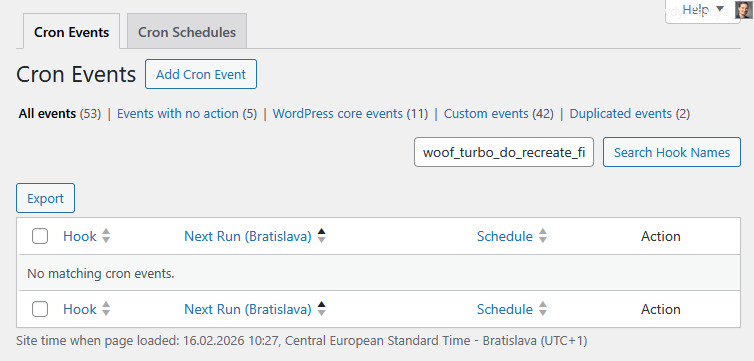
I'm afraid you misunderstood the problem. Right now wp-cron works ok. The issue is that the cron job "woof_turbo_do_recreate_file" is not created at all. It does not show in crontrol's Cron events list. (see embedded image)
Thanks
Hello Alex,
I'm afraid you misunderstood the problem. Right now wp-cron works ok. The issue is that the cron job"woof_turbo_do_recreate_file" is not created at all. It does not show in crontrol's Cron events list. (see embedded image)
Thanks
Quote from Alex Dovlatov on February 16, 2026, 13:03Hello Sandor
The "woof_turbo_do_recreate_file" event will NOT appear in WP Crontrol because WOOF Turbo Mode uses a custom cron system, not WordPress native cron.
To verify your turbo cron is working:
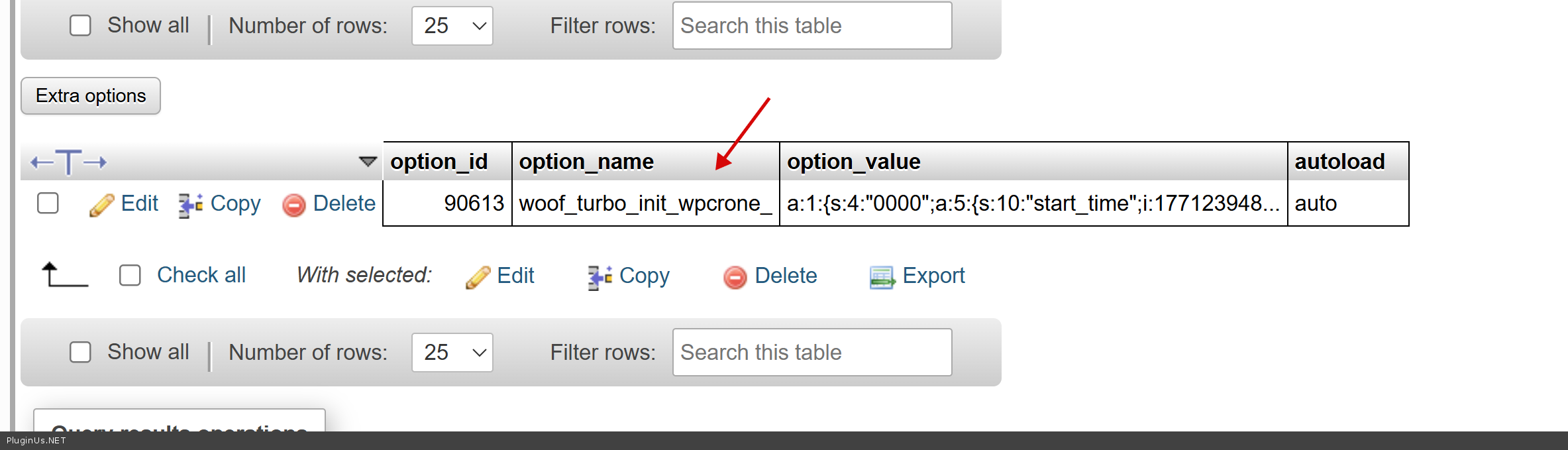
1. Check database option `woof_turbo_init_wpcrone_` in wp_options table
- Should contain an array with schedule data
- If empty or doesn't exist → cron is not initialized2. Most likely causes:
- Turbo Mode not enabled in WOOF settings
- Update period set to "without update" (value = 'no')Solution:
Go to WOOF → Advanced → Turbo Mode:
- Make sure "Enable" is checked ✓
- Set "Update period" to "daily" or "weekly" (NOT "without update")
- Click "Save Settings"Then check the database again - `woof_turbo_init_wpcrone_` should now contain your cron schedule.
The custom cron triggers on every `init` hook and checks if it's time to run. It doesn't use wp_schedule_event, so WP Crontrol can't see it - this is normal behavior.
- This isn't a bug, just a custom cron implementation.
- WP Crontrol won't show it.
- The problem is most likely in the settings (not enabled or period='no').Let me know what you find in the database!
Hello Sandor
The"woof_turbo_do_recreate_file" event will NOT appear in WP Crontrol because WOOF Turbo Mode uses a custom cron system, not WordPress native cron.
To verify your turbo cron is working:
1. Check database option `woof_turbo_init_wpcrone_` in wp_options table
- Should contain an array with schedule data
- If empty or doesn't exist → cron is not initialized
2. Most likely causes:
- Turbo Mode not enabled in WOOF settings
- Update period set to"without update" (value = 'no')
Solution:
Go to WOOF → Advanced → Turbo Mode:
- Make sure"Enable" is checked ✓
- Set"Update period" to"daily" or"weekly" (NOT"without update")
- Click"Save Settings"
Then check the database again - `woof_turbo_init_wpcrone_` should now contain your cron schedule.
The custom cron triggers on every `init` hook and checks if it's time to run. It doesn't use wp_schedule_event, so WP Crontrol can't see it - this is normal behavior.
- This isn't a bug, just a custom cron implementation.
- WP Crontrol won't show it.
- The problem is most likely in the settings (not enabled or period='no').
Let me know what you find in the database!
Quote from Fsanya on February 18, 2026, 16:47Hello Alex,
Thank you for the information, I checked and the "woof_turbo_init_wpcrone_" option exists and contains all data you mentioned.
I disabled wp-cron and set up server cron to run every minute.
I checked right after the ["next"] timestamp, the option value is populated with product IDs. Now a "temp" file is created, and its size is gradually increasing. After cc. 15 minutes, at ~600 kBytes it becomes the live file (data_0000_xxx.json) which is smaller than it should be, cc. 1.4 Mb. (The correct size is created by manual updating)
The server memory limit is 512 Mb and time limit is 3 minutes. Is it possible that it is still not enough?
Earlier you mentioned to "Increase PHP execution time in turbo mode callback". I would also try this, but I'm not sure, how to. Could you please explain?
Hello Alex,
Thank you for the information, I checked and the"woof_turbo_init_wpcrone_" option exists and contains all data you mentioned.
I disabled wp-cron and set up server cron to run every minute.
I checked right after the ["next"] timestamp, the option value is populated with product IDs. Now a"temp" file is created, and its size is gradually increasing. After cc. 15 minutes, at ~600 kBytes it becomes the live file (data_0000_xxx.json) which is smaller than it should be, cc. 1.4 Mb. (The correct size is created by manual updating)
The server memory limit is 512 Mb and time limit is 3 minutes. Is it possible that it is still not enough?
Earlier you mentioned to"Increase PHP execution time in turbo mode callback". I would also try this, but I'm not sure, how to. Could you please explain?
Quote from Alex Dovlatov on February 19, 2026, 13:19Hello Sandor
Thank you for the detailed investigation — this really helps narrow down the problem. There are a few things to address:
1. Parallel cron processes (most likely cause)
Your external cron is set to run every minute, but the file generation takes ~15 minutes. This means a new cron process starts every minute and interferes with the still-running previous one — both accessing the same product ID queue in
woof_turbo_init_wpcrone_. This causes the queue to be reset mid-generation, resulting in an incomplete file that gets promoted as "finished". Please change your cron schedule to run once per day (e.g. at 3 AM) to eliminate this conflict.2. Execution time mismatch
Your time limit is set to 3 minutes, but the file generation takes ~15 minutes. That's the core issue. You need to increase
max_execution_timeto at least 1200 seconds (20 minutes) to be safe.3. PHP CLI vs web context
When you regenerate manually via browser it works because that runs in the web context (Apache/FPM) where your wp-config.php limits apply. But when cron runs
php wp-cron.phpfrom the command line, it uses the PHP CLI configuration which has its own separatephp.ini— yourini_setin wp-config.php may not be enough there.How to increase PHP execution time:
Option A — in
wp-config.php(may not affect CLI):@ini_set('max_execution_time', 1200); @ini_set('memory_limit', '512M');Option B — find your PHP CLI config and edit it directly:
php --iniThis will show the path to the CLI
php.ini. Open it and set:max_execution_time = 1200 memory_limit = 512MOption C — override directly in your crontab command:
0 3 * * * php -d max_execution_time=1200 -d memory_limit=512M /path/to/wp-cron.php >/dev/null 2>&1This is the most reliable option for CLI cron.
Recommended steps in order:
- Change cron to once per day
- Use Option C above to guarantee proper PHP limits for CLI
- Regenerate manually once to get a correct full file
- Wait for the next scheduled cron run and verify the file size matches the manual result
Let me know how it goes!
Hello Sandor
Thank you for the detailed investigation — this really helps narrow down the problem. There are a few things to address:
1. Parallel cron processes (most likely cause)
Your external cron is set to run every minute, but the file generation takes ~15 minutes. This means a new cron process starts every minute and interferes with the still-running previous one — both accessing the same product ID queue in woof_turbo_init_wpcrone_. This causes the queue to be reset mid-generation, resulting in an incomplete file that gets promoted as"finished". Please change your cron schedule to run once per day (e.g. at 3 AM) to eliminate this conflict.
2. Execution time mismatch
Your time limit is set to 3 minutes, but the file generation takes ~15 minutes. That's the core issue. You need to increase max_execution_time to at least 1200 seconds (20 minutes) to be safe.
3. PHP CLI vs web context
When you regenerate manually via browser it works because that runs in the web context (Apache/FPM) where your wp-config.php limits apply. But when cron runs php wp-cron.php from the command line, it uses the PHP CLI configuration which has its own separate php.ini — your ini_set in wp-config.php may not be enough there.
How to increase PHP execution time:
Option A — in wp-config.php (may not affect CLI):
@ini_set('max_execution_time', 1200);
@ini_set('memory_limit', '512M');
Option B — find your PHP CLI config and edit it directly:
php --ini
This will show the path to the CLI php.ini. Open it and set:
max_execution_time = 1200
memory_limit = 512M
Option C — override directly in your crontab command:
0 3 * * * php -d max_execution_time=1200 -d memory_limit=512M /path/to/wp-cron.php >/dev/null 2>&1
This is the most reliable option for CLI cron.
Recommended steps in order:
- Change cron to once per day
- Use Option C above to guarantee proper PHP limits for CLI
- Regenerate manually once to get a correct full file
- Wait for the next scheduled cron run and verify the file size matches the manual result
Let me know how it goes!
Quote from Fsanya on March 1, 2026, 22:11Hello Alex,
Thank you for the instructions. I set up server cron with the recommended parameters (php -d max_execution_time=1200 -d memory_limit=512M) but running it only once per day would be absurd, since actionscheduler requires to run every minute, and mainly all woocommerce background functions depend on it.
Moreover after setting up this server cron and testing it with multiple timings (eg. hourly), the file generation could not finish as well - as if I didn't change anything.
Unfortunately in this state, this background file generation cannot be used. I change back to normal ajax filtering until you change the background file generation to a more reliable version (eg. using actionscheduler).
Thanks,
Sándor
Hello Alex,
Thank you for the instructions. I set up server cron with the recommended parameters (php -d max_execution_time=1200 -d memory_limit=512M) but running it only once per day would be absurd, since actionscheduler requires to run every minute, and mainly all woocommerce background functions depend on it.
Moreover after setting up this server cron and testing it with multiple timings (eg. hourly), the file generation could not finish as well - as if I didn't change anything.
Unfortunately in this state, this background file generation cannot be used. I change back to normal ajax filtering until you change the background file generation to a more reliable version (eg. using actionscheduler).
Thanks,
Sándor
Quote from Alex Dovlatov on March 3, 2026, 15:32Hello Sandor
Ok, I created task to make test how it is, to check functionality, and if/when I will get results I will back to this ticket
Thank you for your cooperation ...
Hello Sandor
Ok, I created task to make test how it is, to check functionality, and if/when I will get results I will back to this ticket
Thank you for your cooperation ...