Pablo Borysenco(@pavlo_borysenco)
34,196 Posts
Quote from Pablo Borysenco on March 29, 2022, 11:28
Hello
In this case, you need to customize the plugin code
Hello
In this case, you need to customize the plugin code
Pablo Borysenco(@pavlo_borysenco)
34,196 Posts
Quote from Pablo Borysenco on April 4, 2022, 11:33
Hello
You should change your database queries in file( https://share.pluginus.net/image/i20220404093323.png ) - wp-content\plugins\woocommerce-products-filter\classes\counter.php
Hello
You should change your database queries in file( https://share.pluginus.net/image/i20220404093323.png ) - wp-content\plugins\woocommerce-products-filter\classes\counter.php
Pablo Borysenco(@pavlo_borysenco)
34,196 Posts
Quote from Pablo Borysenco on April 5, 2022, 11:52
Hello
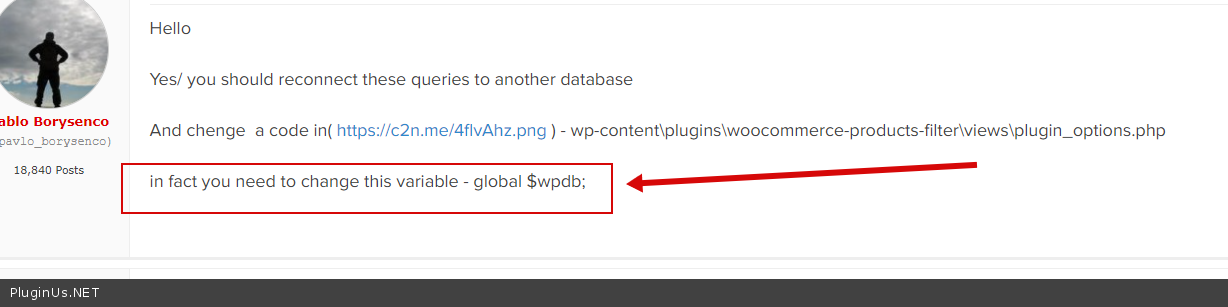
Yes/ you should reconnect these queries to another database
And chenge a code in( https://c2n.me/4flvAhz.png ) - wp-content\plugins\woocommerce-products-filter\views\plugin_options.php
in fact you need to change this variable - global $wpdb;
Hello
Yes/ you should reconnect these queries to another database
And chenge a code in( https://c2n.me/4flvAhz.png ) - wp-content\plugins\woocommerce-products-filter\views\plugin_options.php
in fact you need to change this variable - global $wpdb;
Pablo Borysenco(@pavlo_borysenco)
34,196 Posts
Quote from Pablo Borysenco on April 6, 2022, 11:24
Hello
it is not correct! You just changed the name of the table, which in fact does not make any sense
You should make a connection to another database - https://c2n.me/4fm97ho.png
Hello
it is not correct! You just changed the name of the table, which in fact does not make any sense
You should make a connection to another database - https://c2n.me/4fm97ho.png
Pablo Borysenco(@pavlo_borysenco)
34,196 Posts
Quote from Pablo Borysenco on April 7, 2022, 10:13
Hello
global $wpdb->select('database_name'); - so you break the whole site
You should hire a developer
Better use PDO class
Read this - https://stackoverflow.com/questions/23811628/wordpress-and-pdo-compatibility
Hello
global $wpdb->select('database_name'); - so you break the whole site
You should hire a developer
Better use PDO class
Read this - https://stackoverflow.com/questions/23811628/wordpress-and-pdo-compatibility
Pablo Borysenco(@pavlo_borysenco)
34,196 Posts
Quote from Pablo Borysenco on April 7, 2022, 12:15
Hello
Unfortunately I don't have time for custom tasks
Hello
Unfortunately I don't have time for custom tasks