

Woof with DIVI support
The support doesn work on Saturdays and Sundays, so some Friday requests can be answered on Monday. If you have problems with registration ask help on contact us page pleaseIf you not got email within 24~36 business hours, firstly check your spam box, and if no any email from the support there - back to the forum and read answer here. DO NOT ANSWER ON EMAILS [noreply@pluginus.net] FROM THE FORUM!! Emails are just for your info, all answers should be published only here.
The support doesn work on Saturdays and Sundays, so some Friday requests can be answered on Monday.

Quote from raghavan2004 on January 5, 2021, 15:33I like to integrate the filter plugin with Divi. But its not working as expected,
Url : shopping.olvdigitalsolutions.com
Steps to be replicated
1 .... Go to the shop page
2..... Click on the shoes from the product list from the side bar filter.
3.... Move the pricing slider at the top of the page
4.... The entire page is reloading and the product is displayed
5.... I also request you to check the pricing filter .... All the functionalities should occur in single page but the page is reloading and a new page is coming for shoes..
Regards,
Vijay
I like to integrate the filter plugin with Divi. But its not working as expected,
Url : shopping.olvdigitalsolutions.com
Steps to be replicated
1 .... Go to the shop page
2..... Click on the shoes from the product list from the side bar filter.
3.... Move the pricing slider at the top of the page
4.... The entire page is reloading and the product is displayed
5.... I also request you to check the pricing filter .... All the functionalities should occur in single page but the page is reloading and a new page is coming for shoes..
Regards,
Vijay

Quote from Pablo Borysenco on January 5, 2021, 16:27Hello Vijay
About sidebar - https://c2n.me/4asuevZ
Delete sidebar - https://c2n.me/4asuqYY As you can see this is DIVI setting
Click on the shoes from the product list from the side bar filter. - this is not a filter this is a link to a category page. If you want to add a filter use the WOOF widget
The entire page is reloading and the product is displayed - Correct! If you need filtering without reloading, use Ajax mode - https://c2n.me/4asuA69.png
Please watch a video - https://products-filter.com/video-tutorials/#video_beGT6p_look
Hello Vijay
About sidebar - https://c2n.me/4asuevZ
Delete sidebar - https://c2n.me/4asuqYY As you can see this is DIVI setting
Click on the shoes from the product list from the side bar filter. - this is not a filter this is a link to a category page. If you want to add a filter use the WOOF widget
The entire page is reloading and the product is displayed - Correct! If you need filtering without reloading, use Ajax mode - https://c2n.me/4asuA69.png
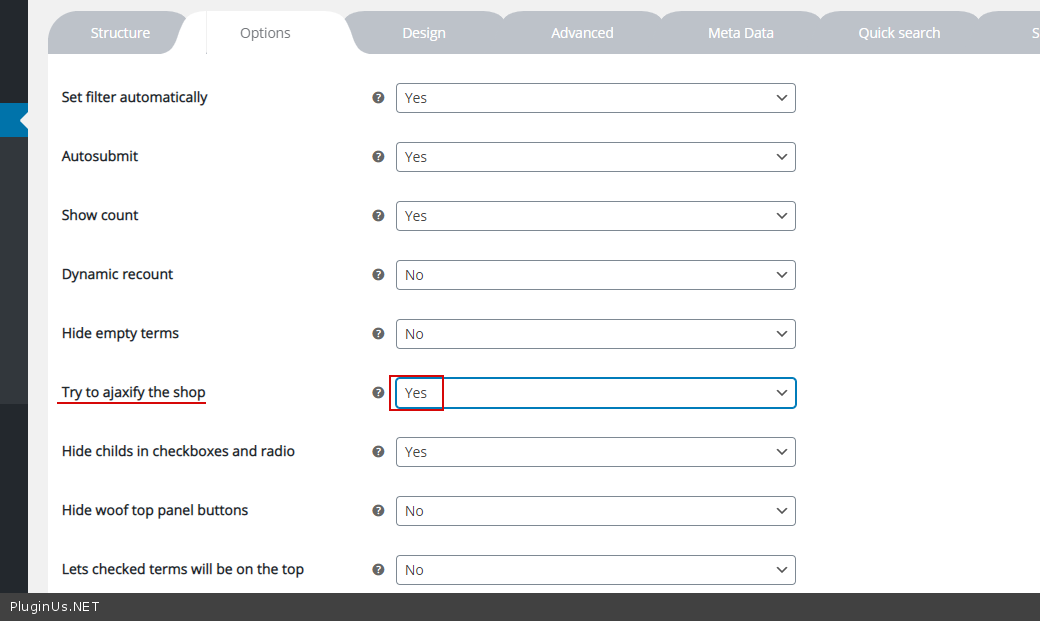
Please watch a video - https://products-filter.com/video-tutorials/#video_beGT6p_look
Quote from raghavan2004 on January 5, 2021, 17:03Hi Thanks for the support and the video. As per the video I configured but it is not working correctly. My sidebar is not showing in the shop page instead it is showing in the products page.
I request you to configure, I am confusing a lot.... Unable to proceed ..
Regards,
Vijay
Hi Thanks for the support and the video. As per the video I configured but it is not working correctly. My sidebar is not showing in the shop page instead it is showing in the products page.
I request you to configure, I am confusing a lot.... Unable to proceed ..
Regards,
Vijay
Quote from Pablo Borysenco on January 6, 2021, 12:20Hello Vijay
As I wrote above! These are DIVI theme settings that have nothing to do with my plugin. Perhaps you should contact DIVI support and then their employees will probably do their job
https://c2n.me/4asUcOp.jpg - It looks like you have already solved this problem
Hello Vijay
As I wrote above! These are DIVI theme settings that have nothing to do with my plugin. Perhaps you should contact DIVI support and then their employees will probably do their job
https://c2n.me/4asUcOp.jpg - It looks like you have already solved this problem
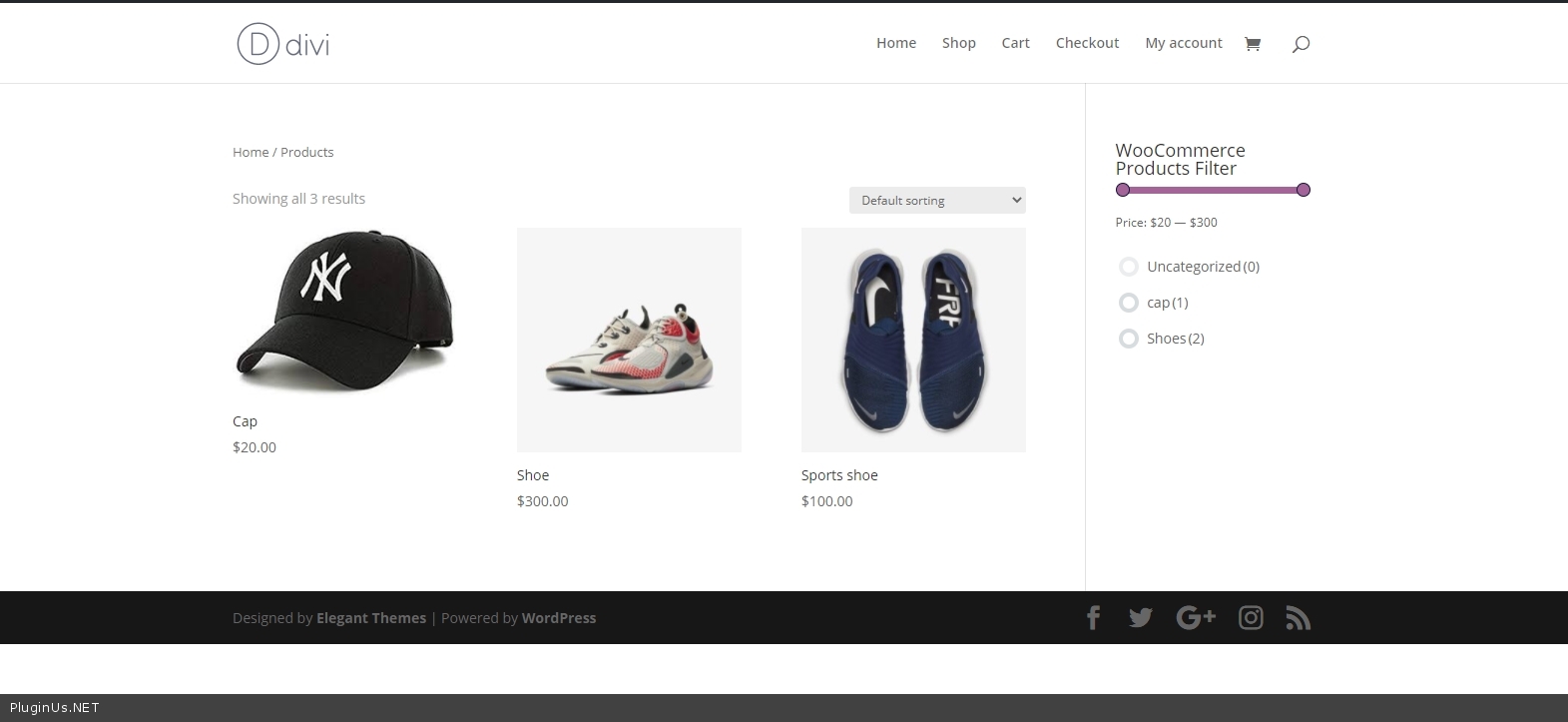
Quote from raghavan2004 on January 6, 2021, 12:23I added few css, to remove those blocks, I am not sure is that the procedure to be done... I request you to check once and update.
Regards,
Vijay
I added few css, to remove those blocks, I am not sure is that the procedure to be done... I request you to check once and update.
Regards,
Vijay
Quote from Pablo Borysenco on January 7, 2021, 11:49Hello Vijay
Sorry, it looks like I didn't understand you
can you describe the problem in more detail. You can add screenshots
Hello Vijay
Sorry, it looks like I didn't understand you
can you describe the problem in more detail. You can add screenshots
Quote from raghavan2004 on January 7, 2021, 12:19To hide the Filter in the page, I have used a css to hide. please see in the Divi > Theme options > to hide wofu
I used the css below to hide the filter in the page
.woof_sid_auto_shortcode.woof {
display: none !important;
}refer below link for the screenshot
https://prnt.sc/wi5v8p
the below code I used for showing the side bar in the shop page alone, In order to remove from other pages I added the code. I dont know what to do. So added the css, Please guide me if this process is correct or wrong.
/*** Hide Sidebar ***/
.page #sidebar {
display:none;
}
/*** Take out the divider line between content and sidebar ***/
.page #main-content .container:before {
background: none;
}
/*** Expand the content area to fullwidth ***/
@media (min-width: 981px){
.page #left-area {
width: 100%;
padding: 23px 0px 0px !important;
float: none !important;
}
}All the css are in Divi > theme options > Css
To hide the Filter in the page, I have used a css to hide. please see in the Divi > Theme options > to hide wofu
I used the css below to hide the filter in the page
.woof_sid_auto_shortcode.woof {
display: none !important;
}
refer below link for the screenshot
the below code I used for showing the side bar in the shop page alone, In order to remove from other pages I added the code. I dont know what to do. So added the css, Please guide me if this process is correct or wrong.
/*** Hide Sidebar ***/
.page #sidebar {
display:none;
}
/*** Take out the divider line between content and sidebar ***/
.page #main-content .container:before {
background: none;
}
/*** Expand the content area to fullwidth ***/
@media (min-width: 981px){
.page #left-area {
width: 100%;
padding: 23px 0px 0px !important;
float: none !important;
}
}
All the css are in Divi > theme options > Css
Quote from Pablo Borysenco on January 7, 2021, 13:14To hide it - https://prnt.sc/wi5v8p - please use this option - https://c2n.me/4atrIUV.png
Please watch a video - https://products-filter.com/video-tutorials/#video_beGT6p_look
About sidebar:
In order to remove from other pages I added the code. I dont know what to do - I recommend contacting DIVI support/ I think it is possible to change the shop template in the theme settings. This is the more correct way
To hide it - https://prnt.sc/wi5v8p - please use this option - https://c2n.me/4atrIUV.png
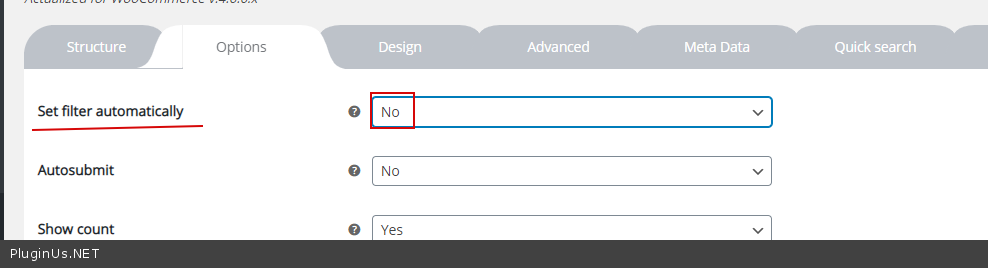
Please watch a video - https://products-filter.com/video-tutorials/#video_beGT6p_look
About sidebar:
In order to remove from other pages I added the code. I dont know what to do - I recommend contacting DIVI support/ I think it is possible to change the shop template in the theme settings. This is the more correct way
Quote from raghavan2004 on January 7, 2021, 13:27Thanks a lot, I will try and update you..
Thanks hoe the help.
Regards,
Vijay
Thanks a lot, I will try and update you..
Thanks hoe the help.
Regards,
Vijay
Quote from Pablo Borysenco on January 8, 2021, 11:41Hello Vijay
oK! Welcome;)
Hello Vijay
oK! Welcome;)