Pablo Borysenco(@pavlo_borysenco)
34,196 Posts
Quote from Pablo Borysenco on September 27, 2021, 13:41
Hello
What plugin version number are you using?
Drop me exact link to the issue
Hello
What plugin version number are you using?
Drop me exact link to the issue
Pablo Borysenco(@pavlo_borysenco)
34,196 Posts
Quote from Pablo Borysenco on September 28, 2021, 11:50
Hello
Paste your license key here - https://share.pluginus.net/image/i20210618130558.png -> https://share.pluginus.net/image/i20210618130614.png
Hello
Paste your license key here - https://share.pluginus.net/image/i20210618130558.png -> https://share.pluginus.net/image/i20210618130614.png
Pablo Borysenco(@pavlo_borysenco)
34,196 Posts
Quote from Pablo Borysenco on September 30, 2021, 16:28
Hello
Try in file - \wp-content\plugins\woocommerce-products-filter\ext\turbo_mode\js\turbo_mode.js - change this line - https://share.pluginus.net/image/i20210930172749.png
query = " (meta_data->('" + settings["meta_key"] + "') BETWEEN " + data_arr[0] + " AND " + data_arr[1] + ") ";
Hello
Try in file - \wp-content\plugins\woocommerce-products-filter\ext\turbo_mode\js\turbo_mode.js - change this line - https://share.pluginus.net/image/i20210930172749.png
query =" (meta_data->('" + settings["meta_key"] +"') BETWEEN" + data_arr[0] +" AND" + data_arr[1] +")";
Pablo Borysenco(@pavlo_borysenco)
34,196 Posts
Quote from Pablo Borysenco on October 4, 2021, 18:31
Hello
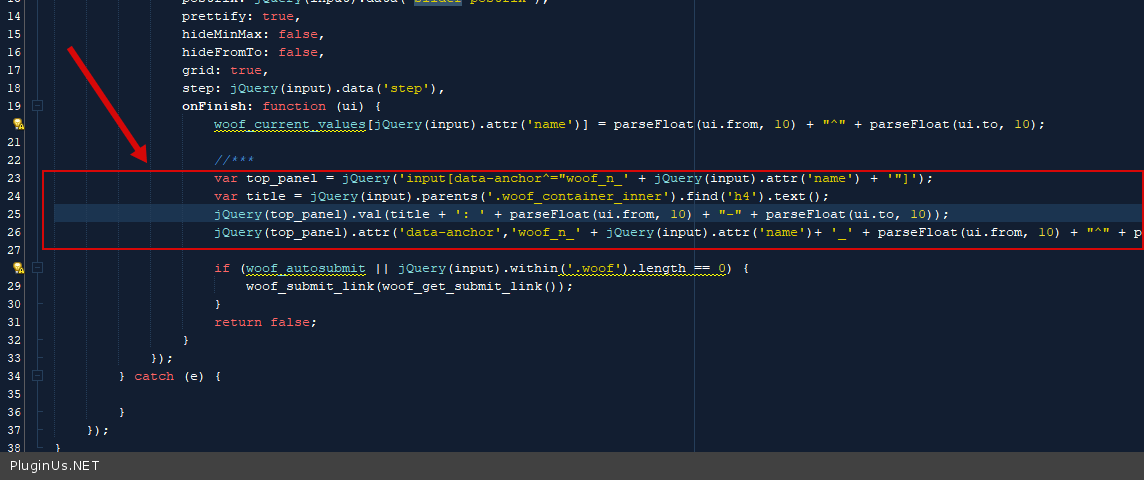
Please try in file - wp-content\plugins\woocommerce-products-filter\ext\meta_filter\html_types\slider\js\slider.js - add code - https://c2n.me/4dxZtfi.png
var top_panel = jQuery('input[data-anchor^="woof_n_' + jQuery(input).attr('name') + '"]');
var title = jQuery(input).parents('.woof_container_inner').find('h4').text();
jQuery(top_panel).val(title + ': ' + parseFloat(ui.from, 10) + "-" + parseFloat(ui.to, 10));
jQuery(top_panel).attr('data-anchor','woof_n_' + jQuery(input).attr('name')+ '_' + parseFloat(ui.from, 10) + "^" + parseFloat(ui.to, 10));
clear all cache and do a test
Hello
Please try in file - wp-content\plugins\woocommerce-products-filter\ext\meta_filter\html_types\slider\js\slider.js - add code - https://c2n.me/4dxZtfi.png
var top_panel = jQuery('input[data-anchor^="woof_n_' + jQuery(input).attr('name') + '"]');
var title = jQuery(input).parents('.woof_container_inner').find('h4').text();
jQuery(top_panel).val(title + ': ' + parseFloat(ui.from, 10) +"-" + parseFloat(ui.to, 10));
jQuery(top_panel).attr('data-anchor','woof_n_' + jQuery(input).attr('name')+ '_' + parseFloat(ui.from, 10) +"^" + parseFloat(ui.to, 10));
clear all cache and do a test
Pablo Borysenco(@pavlo_borysenco)
34,196 Posts
Quote from Pablo Borysenco on October 5, 2021, 11:45
Hello
This changes will be in future update? - Yes!
Welcome;)
Hello
This changes will be in future update? - Yes!
Welcome;)