

Woof shows products with variations out of stock
The support doesn work on Saturdays and Sundays, so some Friday requests can be answered on Monday. If you have problems with registration ask help on contact us page pleaseIf you not got email within 24~36 business hours, firstly check your spam box, and if no any email from the support there - back to the forum and read answer here. DO NOT ANSWER ON EMAILS [noreply@pluginus.net] FROM THE FORUM!! Emails are just for your info, all answers should be published only here.
The support doesn work on Saturdays and Sundays, so some Friday requests can be answered on Monday.

Quote from idjego on October 18, 2021, 15:02I have a website that I am working on that at the time of filtering by sizes shows sizes that do not have stock.
The code not work for my web
add_filter('woof_get_request_data', 'my_woof_get_request_data');
function my_woof_get_request_data($data){
$data['stock']='instock';
return $data;
}
My web:
https://desbloqueate.pruebasmolonas.es/categoria-producto/ropa-0/hombre-85/camiseta-86/
Problem:
https://ibb.co/gyWR21N
I have a website that I am working on that at the time of filtering by sizes shows sizes that do not have stock.
The code not work for my web
add_filter('woof_get_request_data', 'my_woof_get_request_data');
function my_woof_get_request_data($data){
$data['stock']='instock';
return $data;
}
My web:
https://desbloqueate.pruebasmolonas.es/categoria-producto/ropa-0/hombre-85/camiseta-86/
Problem:

Quote from Pablo Borysenco on October 19, 2021, 10:48Hello
Please update the plugin to latest version - https://products-filter.com/how-to-make-auto-update-for-wordpress-plugins-and-themes-bought-on-envato
Drop me wp-admin access - https://share.pluginus.net/image/i20210618130558.png ->https://share.pluginus.net/image/i20210618130637.png
Renew your support
Hello
Please update the plugin to latest version - https://products-filter.com/how-to-make-auto-update-for-wordpress-plugins-and-themes-bought-on-envato
Drop me wp-admin access - https://share.pluginus.net/image/i20210618130558.png ->https://share.pluginus.net/image/i20210618130637.png


Renew your support
Quote from idjego on October 24, 2021, 17:29Private data added!
Private data added!
Quote from Pablo Borysenco on October 25, 2021, 13:19Hello
Please check your link/ It looks like the link to the test site is incorrect
Hello
Please check your link/ It looks like the link to the test site is incorrect
Quote from idjego on October 25, 2021, 13:37update link! Sorry!
update link! Sorry!
Quote from Pablo Borysenco on October 26, 2021, 11:34Hello
I checked it out. Everything works correctly
An Example this product - https://desbloqueate.pruebasmolonas.es/producto/camiseta-m-c-cro-727-the-surfcar/ - this product has these attributes - https://c2n.me/4dMgMyQ.png - for variants you use two attributes - M, 2XL (all in stock)
Therefore, any search for these attributes will include this product. Search by XL - the parent product has this attribute and also In stock - filtering result is correct
But if you make this variation out of stock - https://c2n.me/4dMhvQ9
Hello
I checked it out. Everything works correctly
An Example this product - https://desbloqueate.pruebasmolonas.es/producto/camiseta-m-c-cro-727-the-surfcar/ - this product has these attributes - https://c2n.me/4dMgMyQ.png - for variants you use two attributes - M, 2XL (all in stock)
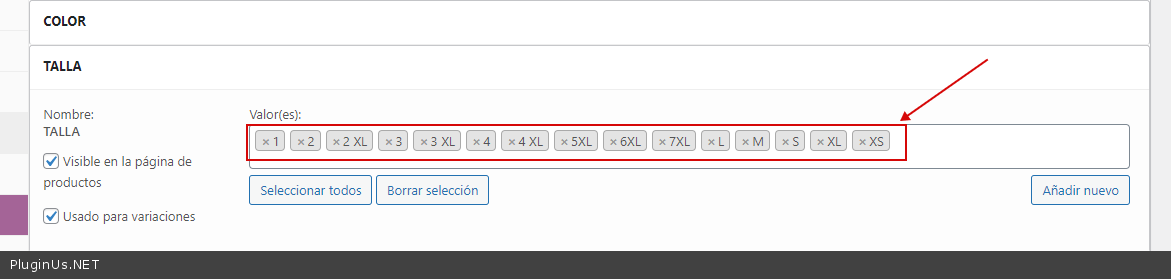
Therefore, any search for these attributes will include this product. Search by XL - the parent product has this attribute and also In stock - filtering result is correct
But if you make this variation out of stock - https://c2n.me/4dMhvQ9
Quote from idjego on October 26, 2021, 13:53Hi, thank you for you answer.
The problem is that it shows attributes to filter that there are no sizes. For example, the plugin shows size 1 and size 2 and there are no products that have those sizeshttps://ibb.co/zmz7G75
what I want is not to show that number 1 since there are no sizes. The plugin shows all sizes even if there is no stock
Hi, thank you for you answer.
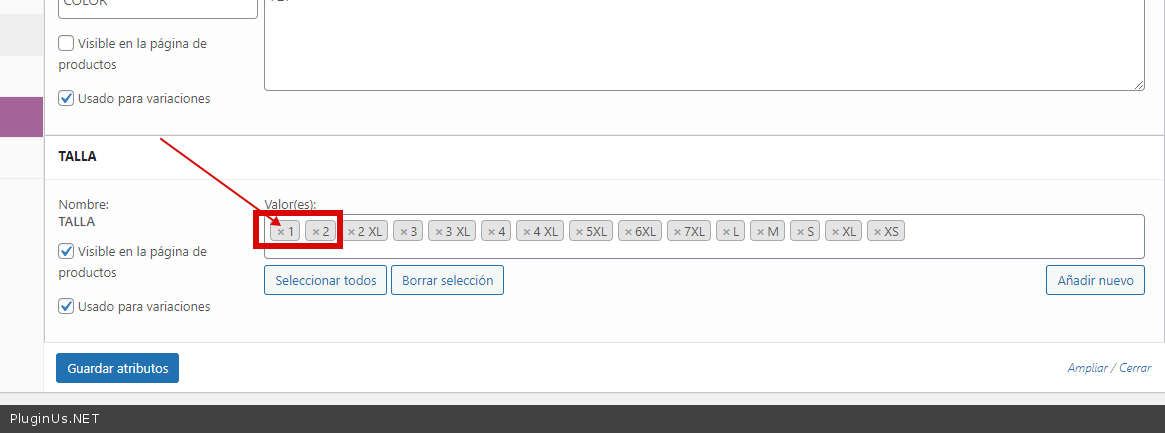
The problem is that it shows attributes to filter that there are no sizes. For example, the plugin shows size 1 and size 2 and there are no products that have those sizes
what I want is not to show that number 1 since there are no sizes. The plugin shows all sizes even if there is no stock
Quote from Pablo Borysenco on October 27, 2021, 11:35Hello
Please read my previous message
you have products with this size and in stock - https://c2n.me/4dN7ZrZ.png -
Hello
Please read my previous message
you have products with this size and in stock - https://c2n.me/4dN7ZrZ.png -
Quote from idjego on October 27, 2021, 15:44Hello again,
in the following screenshot I show a podructo.
These products have the values added, but they do not have stock.
That's why I want the plugin to show only those that have stock, the green oneshttps://ibb.co/rs64CjV
Hello again,
in the following screenshot I show a podructo.
These products have the values added, but they do not have stock.
That's why I want the plugin to show only those that have stock, the green ones
Quote from Pablo Borysenco on October 28, 2021, 11:08Hello
The parent product has in stock - it is the fact
The parent product has these attributes( https://share.pluginus.net/image/i20211028120159.png ) - this is also the fact
Your shop template only shows parent products
Search Query - Get all products where Size = 1 OR 2 and Stock status = In stock - this product is 100% suitable for this search query
I have already described to you how to set it up correctly - https://share.pluginus.net/image/i20211028120719.png
Hello
The parent product has in stock - it is the fact
The parent product has these attributes( https://share.pluginus.net/image/i20211028120159.png ) - this is also the fact

Your shop template only shows parent products
Search Query - Get all products where Size = 1 OR 2 and Stock status = In stock - this product is 100% suitable for this search query
I have already described to you how to set it up correctly - https://share.pluginus.net/image/i20211028120719.png

Quote from idjego on October 28, 2021, 15:27Hello again. I have seen the video of her but it is not the result I want.
The problem is that it shows size 1 or size 2 filters and there is no product that currently has that size.
If I click on check 1 or check 2, it shows wrong results, since there are no products that have stock with size 1 or size 2In this filter it should not show the number 1 or the number 2, since there is no stock of products with that size
Hello again. I have seen the video of her but it is not the result I want.
The problem is that it shows size 1 or size 2 filters and there is no product that currently has that size.
If I click on check 1 or check 2, it shows wrong results, since there are no products that have stock with size 1 or size 2
In this filter it should not show the number 1 or the number 2, since there is no stock of products with that size
Quote from Pablo Borysenco on October 29, 2021, 11:47Hello
I honestly don't know how to explain this to you
You have products with these sizes, you have added these attributes to the product and the result is correct
https://c2n.me/4dOLD6L.png - what is this? These are the sizes you added to these products. All products on this page have these sizes. And all these products have in stock status.
You don't have any product that has size 1 or 2 and is outof stock status
Don't add attributes to a product that you don't use for variations. Because if there is no such variation, then it cannot have the status
Hello
I honestly don't know how to explain this to you
You have products with these sizes, you have added these attributes to the product and the result is correct
https://c2n.me/4dOLD6L.png - what is this? These are the sizes you added to these products. All products on this page have these sizes. And all these products have in stock status.
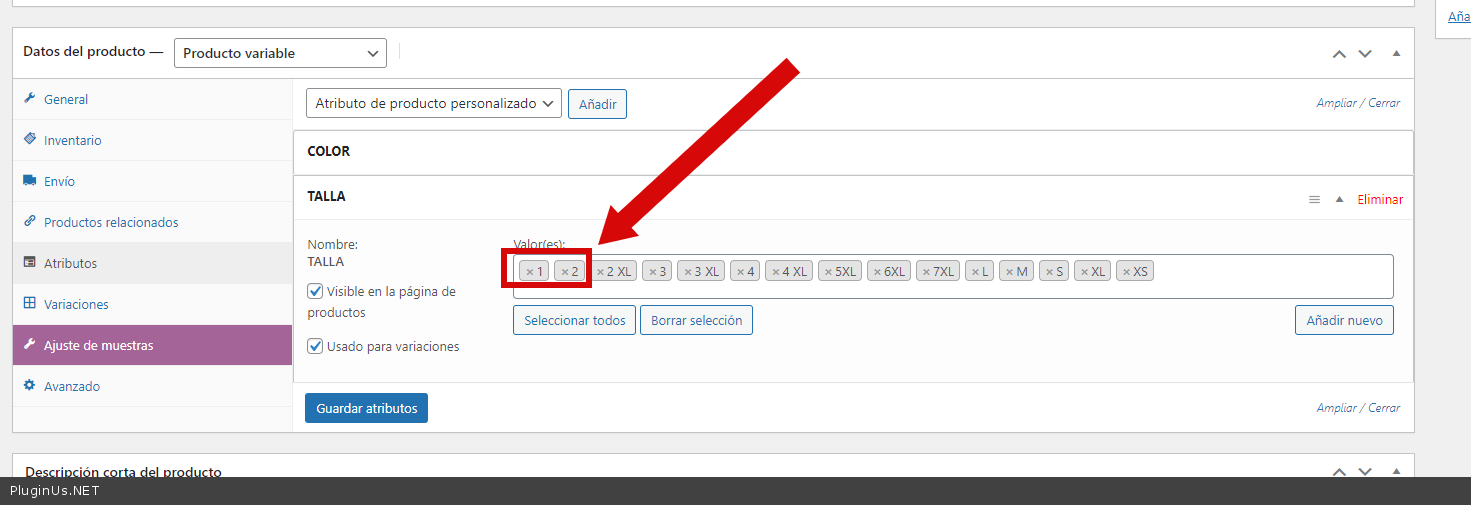
You don't have any product that has size 1 or 2 and is outof stock status
Don't add attributes to a product that you don't use for variations. Because if there is no such variation, then it cannot have the status
Quote from idjego on November 14, 2021, 19:16Hello again.
The problem I have is that the web is connected through ApiRest to a desktop application in which when inserting a product it automatically adds all the attributes even if they do not have stock. That is why I am looking for a way to show only the products that really have stock and not as it happens now, which shows all the products that have attributes even though they do not have stock.
Hello again.
The problem I have is that the web is connected through ApiRest to a desktop application in which when inserting a product it automatically adds all the attributes even if they do not have stock. That is why I am looking for a way to show only the products that really have stock and not as it happens now, which shows all the products that have attributes even though they do not have stock.
Quote from Pablo Borysenco on November 15, 2021, 13:24Hello
This is how Wordpress / woocommerce database works
And in fact, this is the correct behavior. If there are no such variations then there is no stock status
In your case, this can only work if your store displays variable products as separate products and not part of the parent product. And it doesn't depend on my plugin
Hello
This is how Wordpress / woocommerce database works
And in fact, this is the correct behavior. If there are no such variations then there is no stock status
In your case, this can only work if your store displays variable products as separate products and not part of the parent product. And it doesn't depend on my plugin