
Woof product filtering questions
The support doesn work on Saturdays and Sundays, so some Friday requests can be answered on Monday. If you have problems with registration ask help on contact us page pleaseIf you not got email within 24~36 business hours, firstly check your spam box, and if no any email from the support there - back to the forum and read answer here. DO NOT ANSWER ON EMAILS [noreply@pluginus.net] FROM THE FORUM!! Emails are just for your info, all answers should be published only here.
The support doesn work on Saturdays and Sundays, so some Friday requests can be answered on Monday.

Quote from st3bas on September 15, 2020, 11:14Hi Pablo,
I have purchased and I am using woof for my site and I have a few questions/problems I'm having with the plugin that I hope you could shed some light on.
- When I use the Product Category Filter with Dynamic recount and hide empty terms on then once I select a category the filtering works but the category dropdown only shows the children of that category not even the selected category. I would like it to keep all the categories in the list so that the user can switch between them even though the other filters only apply to the category selected.
- Is there a way to switch out the + and the - on the closed filters (I feel like it should be the other way around, the + should be displayed when the menu is closed and - when its expanded)
Thanks for your help.
Hopefully this made sense.
Hi Pablo,
I have purchased and I am using woof for my site and I have a few questions/problems I'm having with the plugin that I hope you could shed some light on.
- When I use the Product Category Filter with Dynamic recount and hide empty terms on then once I select a category the filtering works but the category dropdown only shows the children of that category not even the selected category. I would like it to keep all the categories in the list so that the user can switch between them even though the other filters only apply to the category selected.
- Is there a way to switch out the + and the - on the closed filters (I feel like it should be the other way around, the + should be displayed when the menu is closed and - when its expanded)
Thanks for your help.
Hopefully this made sense.

Quote from Pablo Borysenco on September 15, 2020, 13:19Hello
1 On the category page, the filter shows only child categories. This is a very logical behavior. On the category page, you can show ONLY products that belong to the category OR child category. It makes sense to show only child categories( of the current category ), because clicking on any other category will always give zero products )
2 You can change it here - Design tab -> https://c2n.me/495wzAt.png To disable it - https://c2n.me/495wE5u.png
Hello
1 On the category page, the filter shows only child categories. This is a very logical behavior. On the category page, you can show ONLY products that belong to the category OR child category. It makes sense to show only child categories( of the current category ), because clicking on any other category will always give zero products )
2 You can change it here - Design tab -> https://c2n.me/495wzAt.png To disable it - https://c2n.me/495wE5u.png
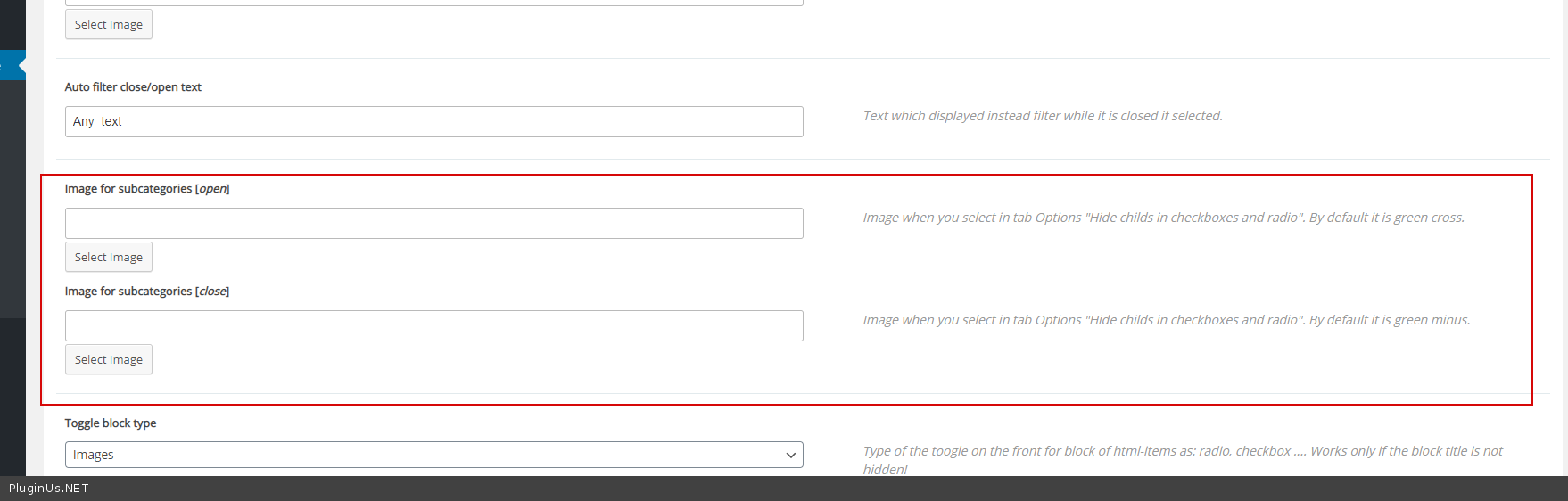
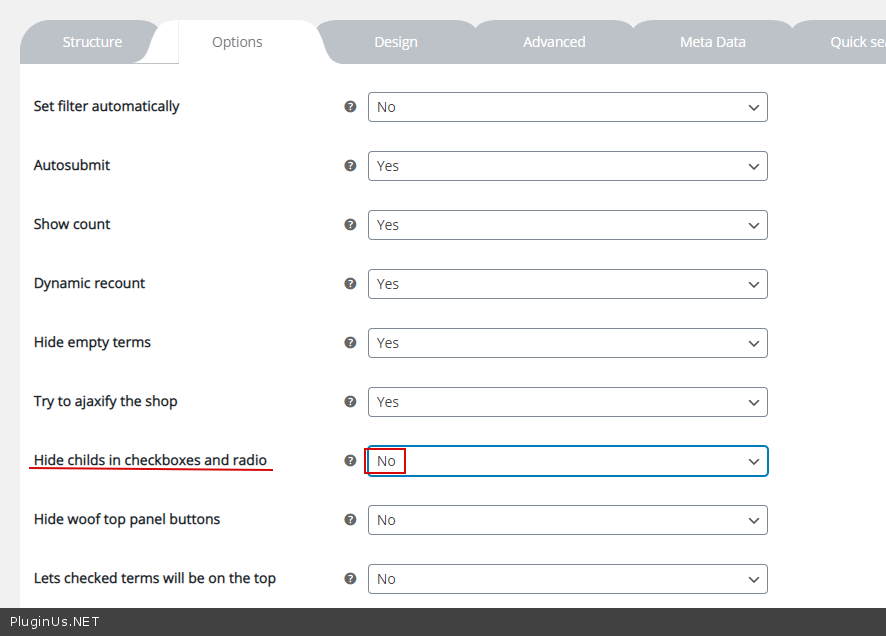
Quote from st3bas on September 15, 2020, 15:13Hi again,
Ok so while I understand it only showing the children but it definitely does not seem to be working as it is supposed to be.
Take for example this scenario:I've changed the product categories filter to a checkbox and it lists all of the categories correctly.
When I select one of the check boxes for example "Displays" all of the checkboxes disappear including displays meaning that I can't untick it nor can I tick any of the other potential categories that I would want to search on:
Hi again,
Ok so while I understand it only showing the children but it definitely does not seem to be working as it is supposed to be.
Take for example this scenario:
I've changed the product categories filter to a checkbox and it lists all of the categories correctly.

When I select one of the check boxes for example"Displays" all of the checkboxes disappear including displays meaning that I can't untick it nor can I tick any of the other potential categories that I would want to search on:

Quote from st3bas on September 15, 2020, 21:38Hi Pablo,
If you have some insight into this it would be great but I've actually just written an extension to woof to achieve what I wanted to do and it works wonders!
Thanks for the help.
P.S. It might be a nice feature if you could set some of the global options on a per filter basis e.g. "Dynamic recount, Hide empty"
Other than that, I love the plugin - it was very easy to extend as well. Good job!
Hi Pablo,
If you have some insight into this it would be great but I've actually just written an extension to woof to achieve what I wanted to do and it works wonders!
Thanks for the help.
P.S. It might be a nice feature if you could set some of the global options on a per filter basis e.g."Dynamic recount, Hide empty"
Other than that, I love the plugin - it was very easy to extend as well. Good job!
Quote from Pablo Borysenco on September 16, 2020, 13:22Hello
When I select one of the check boxes for example "Displays" all of the checkboxes disappear including displays meaning - This is an incorrect setting or a conflict with a third-party plugin
Please drop me exact link to the issue
Check an option ->Advanced->Options - https://c2n.me/496mBPb.png
Hello
When I select one of the check boxes for example"Displays" all of the checkboxes disappear including displays meaning - This is an incorrect setting or a conflict with a third-party plugin
Please drop me exact link to the issue
Check an option ->Advanced->Options - https://c2n.me/496mBPb.png
